
Trending Lyricist I
April 28, 2020
Answered

Undefined devices in matrix

hi all, i have a mix of wired and wireless units around the house inside and out. The colours on the matrix change often with sometimes red showing but the system works without dropouts. 

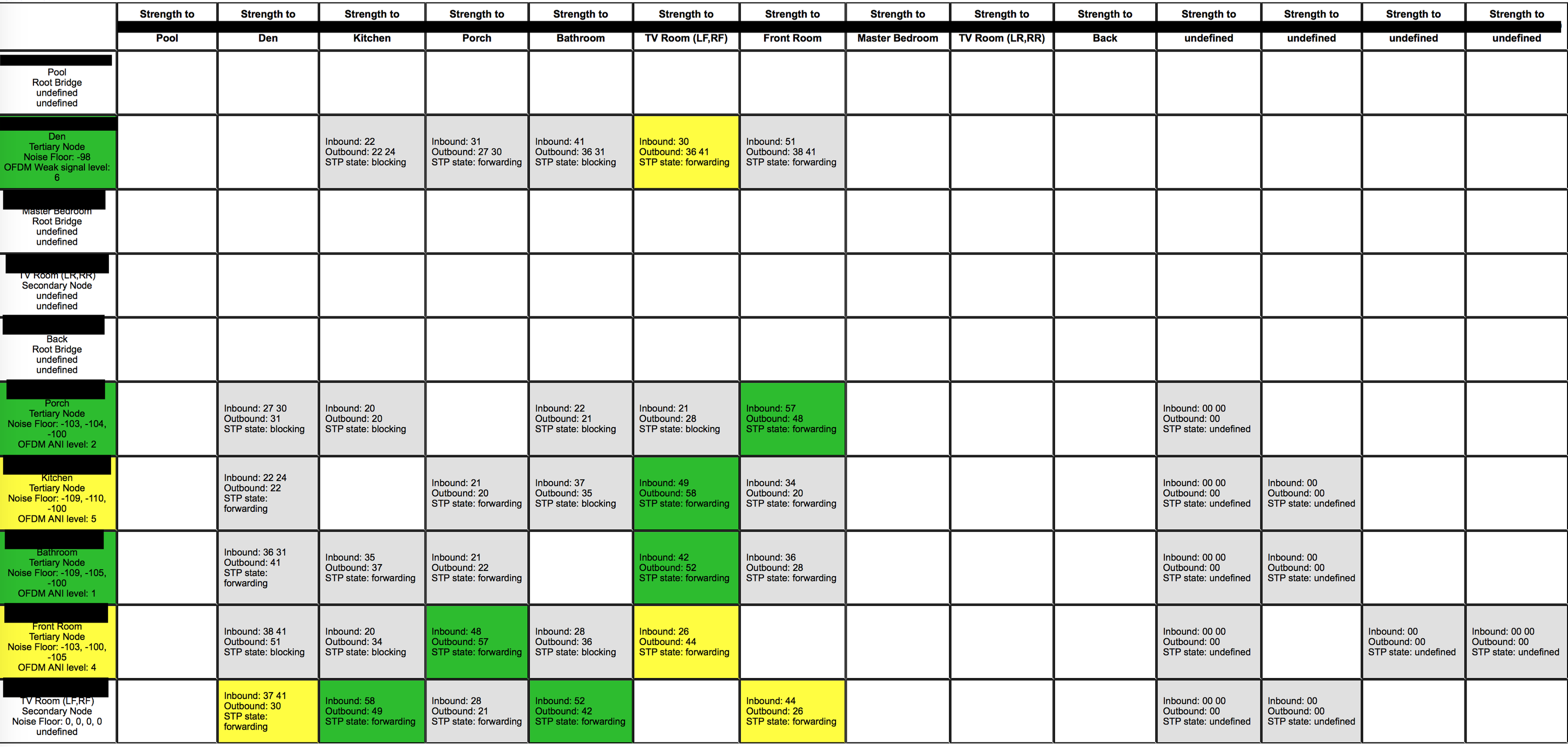
As you can see on the screenshot there are several undefined devices. i have several root bridges, not all devices have the noise floor info and OFDM info also.

I have my managed switch with STP on, but this setting makes no difference to the squares showing that the STP is forwarding, this is the same state with the STP turned on or off on my switch. I've also made sure all devices have their IP listed in the DHCP table of my router so they get the same IP every time.

looking for some help

thank you
 

    This topic has been closed for further comments. You can use the search bar to find a similar topic, or create a new one by clicking Create Topic at the top of the page.
    ratty
    rattyAnswer
    April 28, 2020

    According to a user manual for that switch, it looks like you’d need to go to L2 FEATURES > Spanning Tree > Port Config and enable STP on each of the ports which connect to Sonos devices.

    16 replies

    ratty
    April 28, 2020

    That now looks sensible. Don’t touch any further switch settings, at least for STP.

    Returning to the title of this thread

    • the “undefined” in the left column are where the radio is disabled or, in the case of TV Room, it’s one of the latest wireless cards which doesn’t return ambient noise data in a form compatible with the matrix
    • the “undefined” in your top row are devices where the radio has been disabled. They leave a ghost column under the wireless MAC address, which differs from the main MAC by 1 in the last digit
    sen8orAuthor
    Trending Lyricist I
    April 28, 2020

    Okay, thank you ratty I’ll learn to live with the extra devices showing up on the matrix.

    Would you suggest moving more devices back to wifi and not on ethernet? Some of the devices will fall off soon when the new app comes in from Sonos so i want to keep the signal strong. 

    The porch is way out the front of the house and on wifi, the pool is way out the back but on Ethernet so ill see what drops in strength when the old amp and the Den (an old connect) drop off.

    again, ratty, thanks for your time

    Smilja
    April 28, 2020

    @sen8or, why did you disable the radio on 4 wired devices? And what do you mean here by WiFi – Sonos Wireless or have you entered the credentials of your home WiFi, thus operating Sonos in mixed mode? If the latter, remove the WiFi details. 

    On iOS or Android: From the Settings tab, tap System > Network > Networks. Select the WiFi network you'd like to remove, and tap Remove.

    »And the world is like an apple whirling silently in space, Like the circles that you find in the windmills of your mind.« (›Windmills Of Your Mind‹ [1967]. Music by Michel Legrand ; English lyrics written by Alan & Marilyn Bergman)
    ratty
    April 28, 2020

    Would you suggest moving more devices back to wifi and not on ethernet?

    Do whatever makes sense, and performs reliably. Generally the more wired devices the better. Of course leaving the radios enabled also offers the wireless devices more points to connect to.

    The Connect:Amp driving the surrounds is an exception, since it has to have a wired connection back to the main HT player.

    sen8orAuthor
    Trending Lyricist I
    April 28, 2020

    Sorry when i say wifi i mean Sonosnet. So when you have a device with Ethernet plugged in i thought you needed to disable the wifi in the app for each speaker so it would use the Ethernet. Are you saying i should enable all wifi on each speaker using the app but leave the Ethernet plugged in?

    i don’t have my home wifi details entered into the Sonos app/speakers.

    ratty
    April 28, 2020

    You don't need to, indeed shouldn't usually, disable the radio when using SonosNet.

    The labelling in the app -- "Disable WiFi" -- is unhelpful and continues to confuse people. It should more accurately be labelled "Disable SonosNet".
