
Answered

record play/receiver setup with picture

  • January 10, 2026
  • 16 replies
  • 154 views

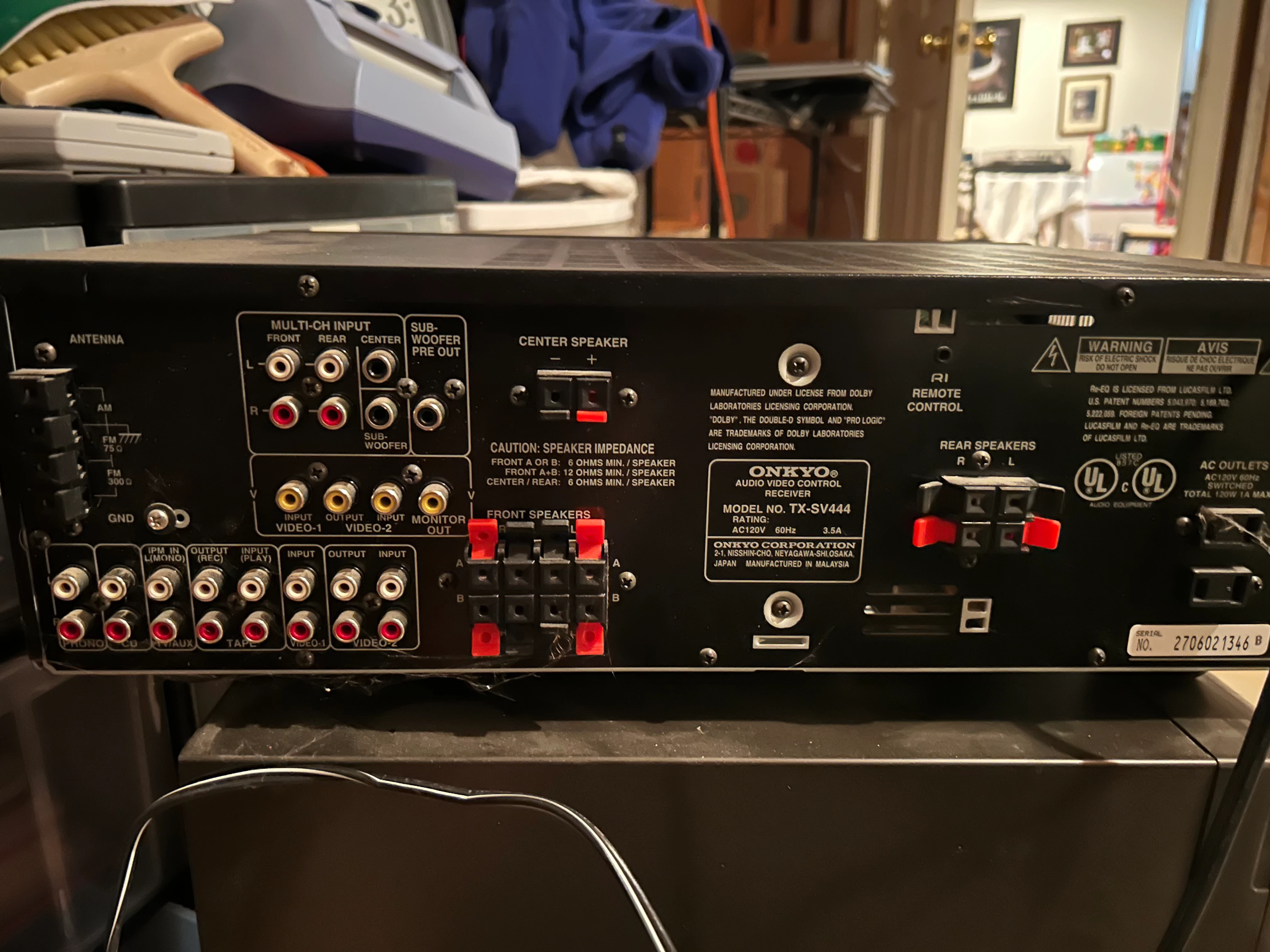
Have seen numerous comments on setting up a record player but need to add a receiver to the mix for signal boost. I have Kenwood KD-3070 turntable with RCA jacks and a Onkyo TX-SV444 receiver with many input/output ports. See pictures. I am guessing I connect the turntable to receiver (RCA) then receiver to ? to connect to my SONOS 100 speakers. Looking for guidance please with clear non-audiophile description. what connects to what description. I would assume that the connection from the new SONOS device would connect to SONOS speakers via WiFi? Thank You very much for input.

 

Best answer by Stanley_4

Seems silly to go through the hassle and expense of the receiver and Port when an inexpensive phono preamp would allow you to use the Era-100 analog input adapter.

$90 to $2500:  https://www.crutchfield.com/g_50500/Phono-Preamps.html?tp=48772&o=p

The $90 preamp and the $50 Era adapter are going to sound as good and be far less expensive. Spending more on the phono preamp can only be justified if you will be able to hear the difference.

16 replies

AjTrek1
  • January 10, 2026

If you are speaking of Sonos Era 100’s you can connect a turntable to them directly using the Sonos proprietary line in adapter. The turntable must have a built-in pre-amp or you can use a 3rd party outboard pre-amp.

The other option is to use your Onkyo and connect the turntable table to its phono input. You would then need to purchase a Sonos Port and connect it to the Onkyo tape-out to send Turntable audio to your Era 100’s.

Learn more about using a Turntable with Sonos at the links:

https://support.sonos.com/en-us/article/listen-to-your-turntable-on-sonos

https://en.community.sonos.com/groups/using-sonos-with-a-turntable-229138


  • Author
  • Contributor I
  • January 10, 2026

turntable does not have pre-amp which is why I would like to use receiver. So sounds like SONOS Port would be used to connect to receiver. Does SONOS Port connect to Era 100 speakers via WiFi or Bluetooth? Thanks


AjTrek1
  • January 10, 2026

The Sonos Port would send audio to the Era 100’s via your WiFi not Bluetooth. Click the links mentioned in my previous post. We’re here to assist with your questions.


AjTrek1
  • January 10, 2026

The Port has input and output connections. You can use its output connection to your Onkyo tape input to stream audio to speakers connected to it (Onkyo). Also via WiFi.


Stanley_4
  • Grand Maestro
  • Answer
  • January 10, 2026

Seems silly to go through the hassle and expense of the receiver and Port when an inexpensive phono preamp would allow you to use the Era-100 analog input adapter.

$90 to $2500:  https://www.crutchfield.com/g_50500/Phono-Preamps.html?tp=48772&o=p

The $90 preamp and the $50 Era adapter are going to sound as good and be far less expensive. Spending more on the phono preamp can only be justified if you will be able to hear the difference.


buzz
  • January 11, 2026

If you have the space and want to continue using the receiver, you can attach the turntable to the Phono input of the receiver and the SONOS USB input adapter to the receiver’s Video 2 analog audio output. Note that there will be a time delay between speakers connected to the receiver and output from the SONOS system.


  • Author
  • Contributor I
  • January 11, 2026

Seems silly to go through the hassle and expense of the receiver and Port when an inexpensive phono preamp would allow you to use the Era-100 analog input adapter.

$90 to $2500:  https://www.crutchfield.com/g_50500/Phono-Preamps.html?tp=48772&o=p

The $90 preamp and the $50 Era adapter are going to sound as good and be far less expensive. Spending more on the phono preamp can only be justified if you will be able to hear the difference.

Thanks for the suggestion. I looked at your Crutchfield link but did not see any pre-amps that connect to the Era 100 via WiFi which is important to me based on desired setup. Is there a model that you recommend that can connect easily via WiFi? I have 4 different “zones” setup with SONOS Era 100 and Roam 2 speakers and want to be able to choose which zone that the music from turntable plays on. Thanks


AjTrek1
  • January 11, 2026

The pre-amp sits between your turntable and Era 100 via  RCA cables from turntable to RCA input on pre-amp then RCA out from pre-amp to proprietary Sonos line in adapter to Era 100 using a RCA to 3.5mm stereo cable. There is no such thing as a wireless pre-amp. All wireless communication is handled by the Era 100. You can group other Sonos rooms/zones to Era 100 when playing turntable audio.

Click the links in my first post for more information.


AjTrek1
  • January 11, 2026

Looking at the Crutchfield link I’d recommend the Pro_Ject Phono Box DC as it has a dedicated switch for MM and MC phono cartridges


Stanley_4
  • Grand Maestro
  • January 11, 2026

Thanks for the suggestion. I looked at your Crutchfield link but did not see any pre-amps that connect to the Era 100 via WiFi which is important to me based on desired setup. Is there a model that you recommend that can connect easily via WiFi? I have 4 different “zones” setup with SONOS Era 100 and Roam 2 speakers and want to be able to choose which zone that the music from turntable plays on. Thanks

There is no option ro connect your current turntable to tne Era via WiFi but you could get a Sonos enabled turntable, I think the Victrola Stream line does that. It connects to the Sonos system, not a particular speaker.

You could go from your current turntable to a phono-preamp (essential for both level boosting and application of the RIAA equalization) to a Bluetooth transmitter and on to the Era. Your sound quality would likely suffer from the Bluetooth link.

By far the best option is turntable, short cable, preamp, longer cable, Sonos adapter, Era. You might be able to use a 3 Meter / 12 foot cable beteeen preamp amd the adapter, the better the quality (not the higher the price) the longer you can go. Not a good option to use a long turntable to preamp cable.

Once the turntable is connected to any Sonos you can select it as a source on any Sonos. It doesn't even have to play on the one it is connected to.


  • Author
  • Contributor I
  • January 11, 2026

Thanks for the suggestion. I looked at your Crutchfield link but did not see any pre-amps that connect to the Era 100 via WiFi which is important to me based on desired setup. Is there a model that you recommend that can connect easily via WiFi? I have 4 different “zones” setup with SONOS Era 100 and Roam 2 speakers and want to be able to choose which zone that the music from turntable plays on. Thanks

There is no option ro connect your current turntable to tne Era via WiFi but you could get a Sonos enabled turntable, I think the Victrola Stream line does that. It connects to the Sonos system, not a particular speaker.

You could go from your current turntable to a phono-preamp (essential for both level boosting and application of the RIAA equalization) to a Bluetooth transmitter and on to the Era. Your sound quality would likely suffer from the Bluetooth link.

By far the best option is turntable, short cable, preamp, longer cable, Sonos adapter, Era. You might be able to use a 3 Meter / 12 foot cable beteeen preamp amd the adapter, the better the quality (not the higher the price) the longer you can go. Not a good option to use a long turntable to preamp cable.

Once the turntable is connected to any Sonos you can select it as a source on any Sonos. It doesn't even have to play on the one it is connected to.

Thanks again as I am learning with each response. WiFi is mandatory as turntable will be in different room from speakers. I know it is not the cheapest option but will likely go to SONOS Port. Also don’t want to get a new turntable as the one I have (granted 40yrs old) is a very good turntable. Thanks to all


AjTrek1
  • January 11, 2026

Really not understanding your use case for a turntable. Here’s why I say that...

  • Your statement...”WiFi is mandatory as turntable will be in different room from speakers

So you’re going to have a turntable and a Port connected to your Onkyo. The Era 100’s will be set as the “auto-play room” for the Port. Unless the room is akin to an open concept (like a kitchen and great room) how will you know when the needle hits the record if you can’t hear the Era 100’s?


106rallye
Forum|alt.badge.img+18
  • January 12, 2026

I still wouldn’t use the receiver but go for a preamp, Era 100 plus adaptor (instead of the Port that has no speaker). It is the least expensive option, the Era 100 will handle the WiFi connection, you could hear if the record is playing OK (if you so wish) and you’d lose the receiver that will take up lots of space and will use much more energy than the preamp.


  • Author
  • Contributor I
  • January 15, 2026

Really not understanding your use case for a turntable. Here’s why I say that...

  • Your statement...”WiFi is mandatory as turntable will be in different room from speakers

So you’re going to have a turntable and a Port connected to your Onkyo. The Era 100’s will be set as the “auto-play room” for the Port. Unless the room is akin to an open concept (like a kitchen and great room) how will you know when the needle hits the record if you can’t hear the Era 100’s?

the turntable will be in ground floor office which is next to “open concept” family room and kitchen. Would easily hear Era 100 speakers from where turntable is located. I am also thinking of adding my CD player to the receiver down the road as I have hundreds of CDs. Thanks again


Stanley_4
  • Grand Maestro
  • January 15, 2026

Instead of a CD player and shuffling disks why not rip them to a lossless format and use the Sonos music library to play them.


buzz
  • January 15, 2026

Back when virtually every computer had a CD drive, I would bring several computers and piles of CD's to a room and have a “mass rip". As trays popped out, I'd reload. I used one computer to correct Metadata fetched from online databases. Depending on Metadata quality, I could process about 30 CD's per hour. Now, with less drives and CD's to be ripped, I just stack CD's beside my desk and multi-task. There is not much impact on my normal work flow. 

Personally, I prefer not to handle CD's as I play, but others want to handle the jewel cases. At one point jewel cases had some nice dialog and maybe some extra pictures.  Modern jewel cases tend to be very drab. Now there are rich dialogs online.


