Answered

Play 5 Audio Quality with Turntable

  • December 8, 2025
  • 7 replies
  • 86 views

I have a Play 5 that is connected to AT-LP60X turntable. For several years this has worked flawlessly. We noticed earlier this year that the records had a warble sound. Almost sounded like the music was under water. It was in the spring time and we got busy with summer activities. Now that it is cold and we want to listen to our music we are noticing it again. We changed out the needle and tested the speed of the turntable. All was good. Finally we hooked up some headphones to the turntable and the sound was flawless. 


I tried some online recommendations and it really seems like an issue with the audio compression setting being removed from the Sonos application. If I reset the speaker, or change the EQ settings. The sound goes back to normal and the distortion is gone, but it will come back usually around 10-15 minutes later. 


Supposedly this was an issue with the app update that was fixed. It appears to still be an issue for me. It is VERY frustrating to have invested so much into a speaker solution, to not have it work. 


Other maybe relevant information. My network set up is a Deco XE75 mesh system. I have 3 sonos products. An Arc Soundbar, a Sonos Move (gen1) and the Sonas Play 5 (gen2).


Any help would be appreciated. Thanks!

Best answer by jgatie

A turntable sounding like it is underwater is often due to the wrong setting on the RIAA decoding, either a Line level setting into a phono jack or a Phono setting into Line jacks.  On the back of the turntable, there is a switch labeled “Phono Line”.  If it isn’t switched to Line, then do so.  Even if it is switched to Line, switch it to Phono and then back to Line just in case it got knocked to some middle space.  

7 replies

Stanley_4
  • Lead Maestro
  • December 8, 2025

Get the problem to happen, submit a diagnostic and call support, they need to see it is still an issue.


jgatie
  • Answer
  • December 8, 2025

A turntable sounding like it is underwater is often due to the wrong setting on the RIAA decoding, either a Line level setting into a phono jack or a Phono setting into Line jacks.  On the back of the turntable, there is a switch labeled “Phono Line”.  If it isn’t switched to Line, then do so.  Even if it is switched to Line, switch it to Phono and then back to Line just in case it got knocked to some middle space.  


buzz
  • December 9, 2025

Do you have this issue while playing music from an online service?


AjTrek1
  • December 9, 2025

Just to eliminate one possible issue you mentioned it’s not your network because you are using line-in which is direct from TT to the Play 5. If not the Play 5 itself then the line-level as was previously mentioned may need adjusting. 


buzz
  • December 9, 2025

To me this seems like an issue with the tonearm bearing. This can change the effective tracking force. Sometimes the bearing might work OK. The exact issue can depend on how the arm is moved before sitting down on the record and on room temperature. Cartridge performance also varies with temperature.


AjTrek1
  • December 9, 2025

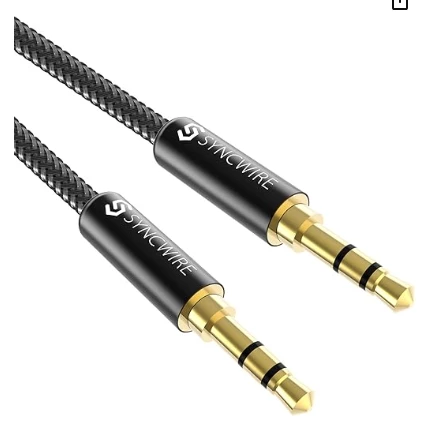
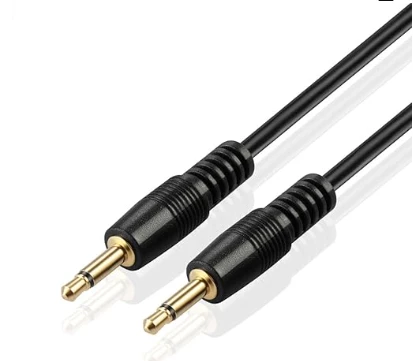
According to my research the AT LP60X uses a 3.5 mm output.  You must use a cable as the one shown in the first picture for stereo input to the Play 5. The cable shown in the second picture is not stereo. Notice that the stereo cable has two black rings whereas the mono cable has only one. Hopefully, it’s a cable issue which is easily resolved.


Stereo 3.5 to 3.5 Cable


Mono 3.5 to 3.5 cable


AjTrek1
  • December 10, 2025

Hmmm….no response from the OP? However, it happens…probably all too often. Oh well 🤷