Enthusiast I
April 4, 2026
Answered

Sonos One SL not responding, not broadcasting any audio

.: Hello, I have a Sonos Arc soundbar and 2 Sonos One SL speakers in my living room. They can receive sound from my OLED flatscreen tv. I’ve had the One SL speakers for >1 year, and have never had a problem with them until now. Simply put, they will not broadcast any sound. 

I’ve tried all the “solutions” found on various Sonos Help Pages, and nothing has worked, I have rebooted my router, I have unplugged and plugged in each SL speakers, and I have deleted the speakers from my Sonos App and then reintroduced them, complete with having to walk around my living room, moving my arm up and down, as the speakers played the repeating pulsing sound until the growing circular line on the app was complete. The SL speakers were working and wereloud during the setup with that repeating pulsing sound, but haven’t made any noise since. 

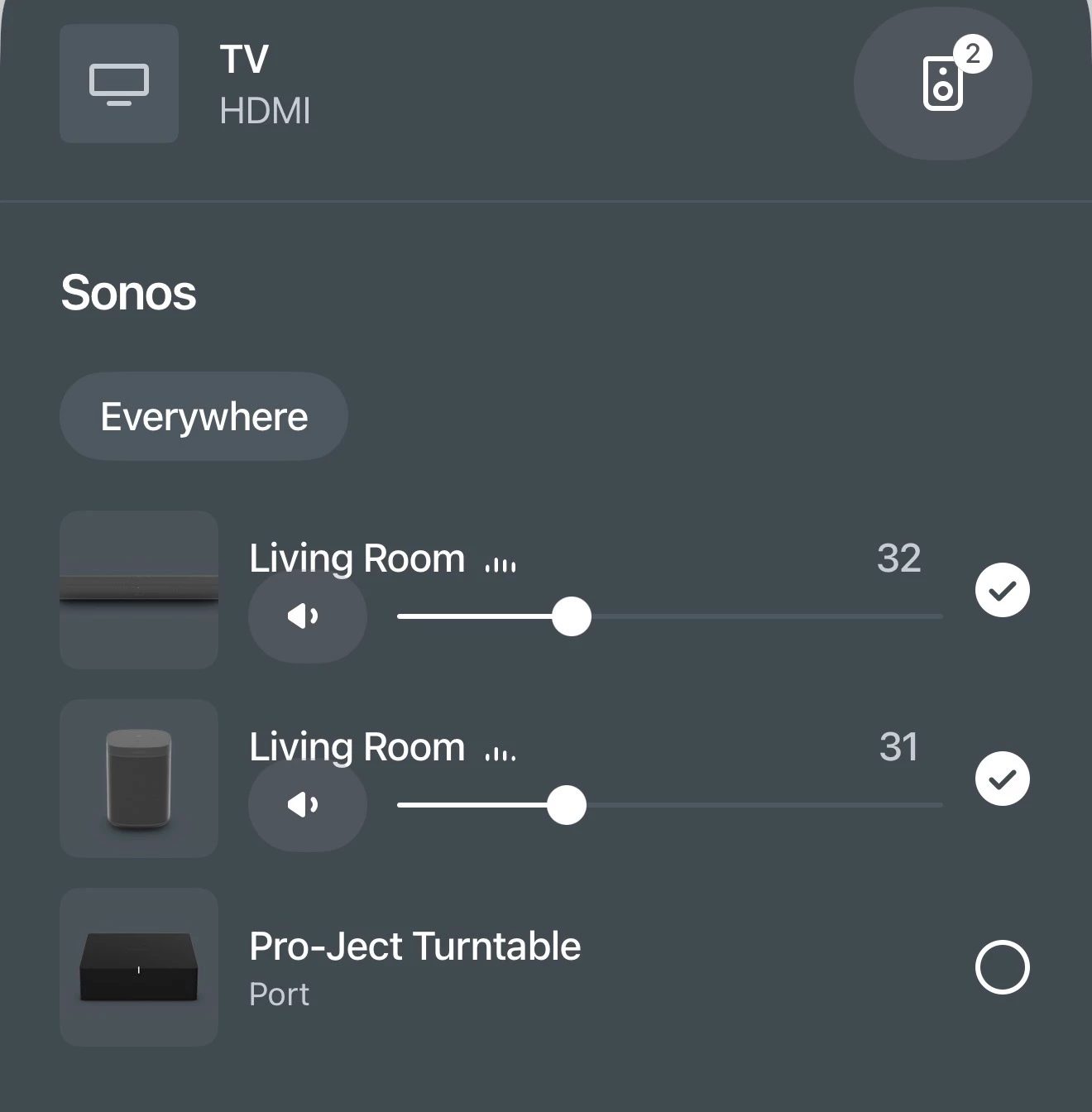
On the app page that shows my “rooms,” there are three llisted: Living Room (TV), Living Room (Line In - Audio Component,) and Pro-Ject Turntable (No Content. See attached images.

Notice that the sound bars for Living Room (Line In - Audio Componenet) are fluctuating in tandem with the sound bars on Living Room (TV), suggesting that the SL’s should be working, but no sound is emitted from the SLs. If I press MUTE on either of my remote controls for my TV, the LED’s on the SL’s go green. If I disable MUTE, they go white.

I sm at a loss and very frustrated. Any thoughts, ideas, suggestions, etc., will be absolutely welcome with infinite gratitude and respect.



This topic has been closed for further comments. You can use the search bar to find a similar topic, or create a new one by clicking Create Topic at the top of the page.
MoPac
MoPacAnswer
Headliner III
April 5, 2026

​@Podbay:

 First don’t have two Rooms with the same name.

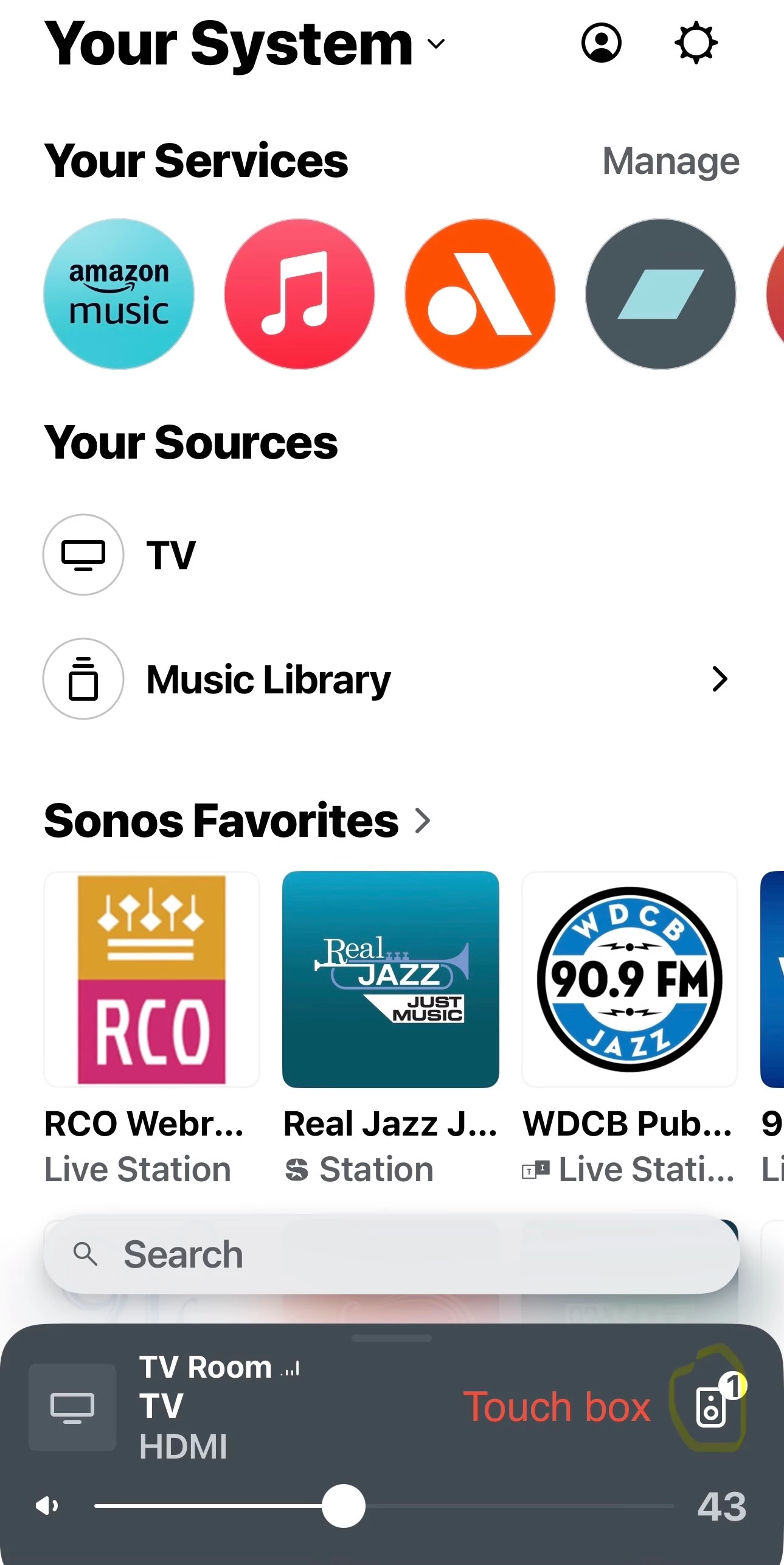
Touch the small speaker icon in the first screenshot to see the Group screen.

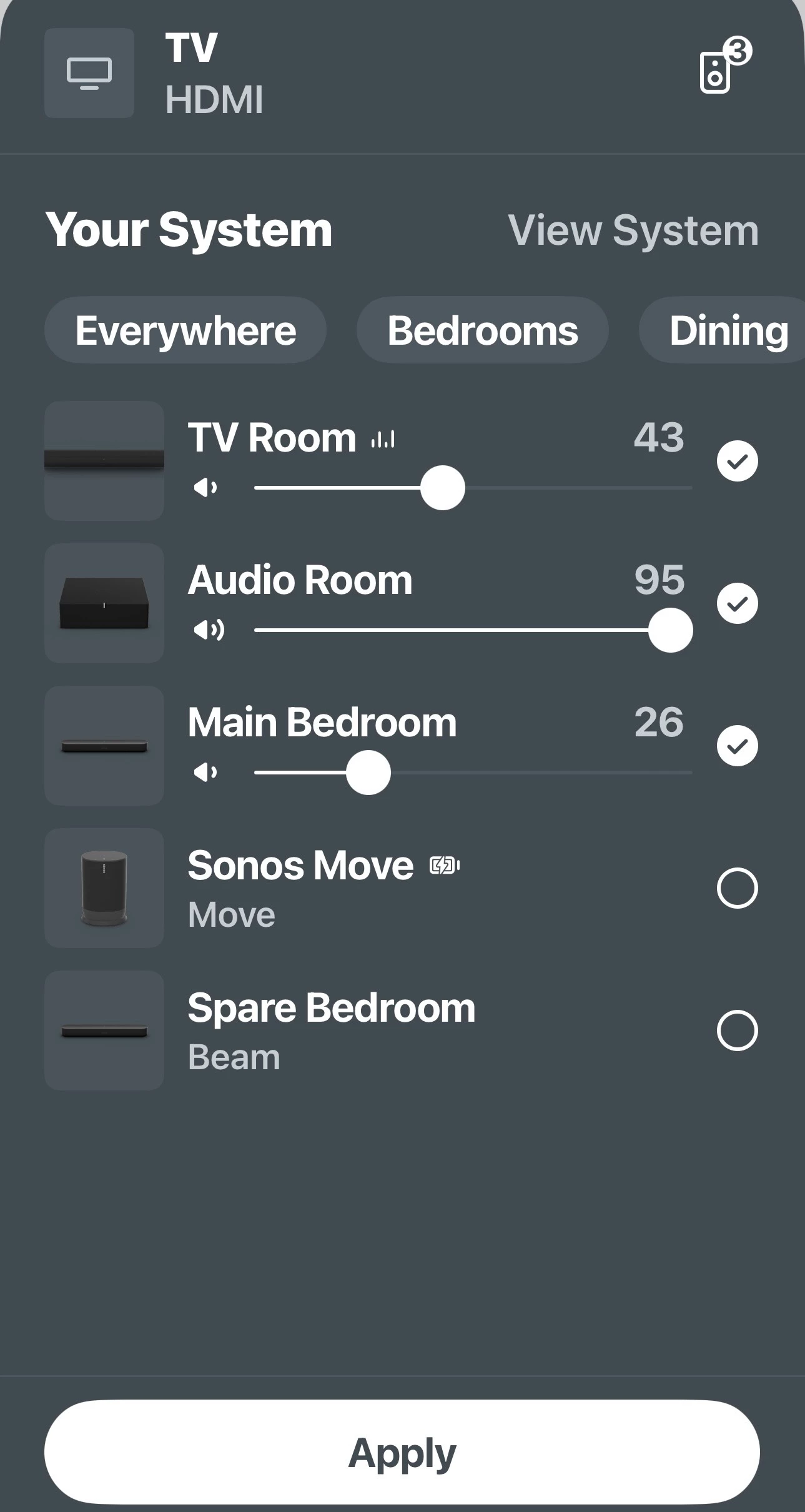
You asked about how to remove a Room(s) from a Group.  The second screenshot shows how.  Tap on the two Rooms Under TV Room then tap Apply.  Those rooms are then removed from the group.  In that screen you can add & remove rooms.

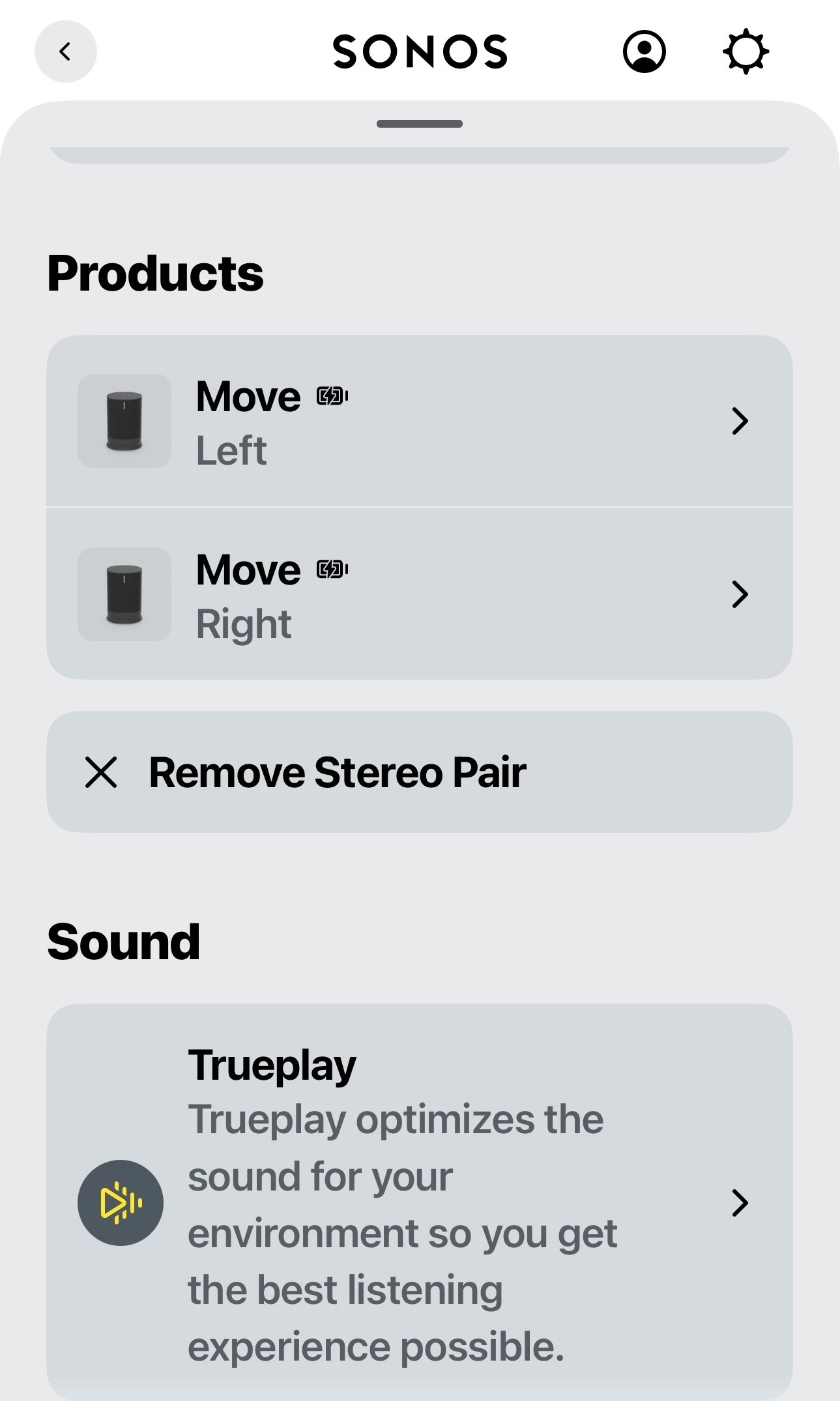
if you want to separate a stereo pair go to Settings (gear) - Choose stereo room - scroll down till you see Remove Stereo Pair.  This would have to be done before the two speakers that were in stereo can be added as surround speakers.  See third screenshot.


21 replies

MoPac
MoPacAnswer
Headliner III
April 5, 2026

​@Podbay:

 First don’t have two Rooms with the same name.

Touch the small speaker icon in the first screenshot to see the Group screen.

You asked about how to remove a Room(s) from a Group.  The second screenshot shows how.  Tap on the two Rooms Under TV Room then tap Apply.  Those rooms are then removed from the group.  In that screen you can add & remove rooms.

if you want to separate a stereo pair go to Settings (gear) - Choose stereo room - scroll down till you see Remove Stereo Pair.  This would have to be done before the two speakers that were in stereo can be added as surround speakers.  See third screenshot.


PodbayAuthor
Enthusiast I
April 5, 2026

Thank you, @AjTrek4 and @Stanley_4 for your help. What I tried to do in the last hour is reset the SL speakers, I did this four times. Each time, each speaker would connect to my wifi signal, but when I finished connecting both of them both would then lose the wifi signal shortly thereafter. The Arc stays connected but the SLs drop out.

I can’t get to the TV HDMI screen above. I have renamed “Living Room” to “Arc”, as per @Stanleu_4’s suggestion.

I am unable to remove the SLs as a stereo pair and set them up as surround, because when I reset the SLs, they drop the wifi signal within 60 seconds.

The dilemma continues.

Some screen shots:


PodbayAuthor
Enthusiast I
April 5, 2026

​@Podbay:

 First don’t have two Rooms with the same name.

Touch the small speaker icon in the first screenshot to see the Group screen.

You asked about how to remove a Room(s) from a Group.  The second screenshot shows how.  Tap on the two Rooms Under TV Room then tap Apply.  Those rooms are then removed from the group.  In that screen you can add & remove rooms.

if you want to separate a stereo pair go to Settings (gear) - Choose stereo room - scroll down till you see Remove Stereo Pair.  This would have to be done before the two speakers that were in stereo can be added as surround speakers.  See third screenshot.


Thank you, MoPac. I will investigate further following your instructions.

Stanley_4
Grand Maestro
April 5, 2026

Why are you resetting speakers that is counterproductive and will not solve your issues, just make more work and aggravation.

Lose the wifi signal? I hope you are not looking at your router to see connected devices, it is unlikely to correctly display Sonosnet 5 gHz device to device (not device to the router's wifi to device) connections used by sub and surrounds. You can spend endless hours chasing your own tail if you try to make Sonos function differently than it does. Stick to the simple steps above and don't get distracted by the misleading router status information.

AjTrek1
April 5, 2026

​@Podbay 

You’re almost there!

The disconnect you see for the One SL’s as surrounds in the picture below is not your home Wi-Fi. What you are seeing is the One SL’s not communicating with the Arc via the hidden 5Ghz channel within the Sonos speakers.


Try this…

First tap the Room “Arc” in your picture above and make sure everything looks like what you see here. Then follow steps below:

  1. Unplug the One SL’s 
  2. Unplug the Arc
  3. Plug in the Arc and let it come back (You will see the solid white LED if you have it turned on in settings. If not wait at least 5 minutes)
  4. Plug in the One SL’s and let them connect to the Arc (Be patient as it may take awhile)
  5. After 10 minutes close the Sonos app and re-open it to see if everything is OK

Let us know the results.

Together Everyone Achieves More = T.E.A.M.
PodbayAuthor
Enthusiast I
April 5, 2026

Why are you resetting speakers that is counterproductive and will not solve your issues, just make more work and aggravation.

Lose the wifi signal? I hope you are not looking at your router to see connected devices, it is unlikely to correctly display Sonosnet 5 gHz device to device (not device to the router's wifi to device) connections used by sub and surrounds. You can spend endless hours chasing your own tail if you try to make Sonos function differently than it does. Stick to the simple steps above and don't get distracted by the misleading router status information.

​@Stanley_4 I was restting the speakers because with my limited knowledge and understanding of how this all works, I thought if I reintroduced the SLs to my account they might function normally. Clearly this wasn’t the case. I will try again w/o resetting the speakers.

AjTrek1
April 5, 2026

​@Podbay 

You’re getting a lot of good advice from ​@Stanley_4 . I’m going to drop off so as not to interject more information than is required. Good luck to get everything sorted out. 

Together Everyone Achieves More = T.E.A.M.
Stanley_4
Grand Maestro
April 5, 2026

There is so much bad advice out there about the factory reset, and even more from some AI answers it is a common problem. The Sonos position:

https://support.sonos.com/en-us/article/reset-your-sonos-product

There are a few specific situations where the support pages recommemd it.


I do wish the app was easier to explain and there were less picky steps to go through. Sonos is aware of the app issues and is working to make things better.

PodbayAuthor
Enthusiast I
April 5, 2026

.: Friends: I am pleased to report that thanks to direction and guidance from kind-hearted community members Stanley_4 and AjTrek1, my Sonos One SL speakers are now working in tandem with my Sonos Arc SL soundbar, and are providing most excellent surround-sound again. Thank you so much for your help, folks!

Senior Virtuoso
April 5, 2026

Well done, ​@Stanley_4, for providing such clear instruction, and to ​@Podbay for (finally) following the advice. Glad it’s all sorted.