
Contributor I
October 6, 2025

Sonos has SHUTDOWN ALL NETWORK again and again ...

Any chance to repair it by SONOS ?

Before you start to blame my network (like I’ve seen this mostly on this forum) check this :
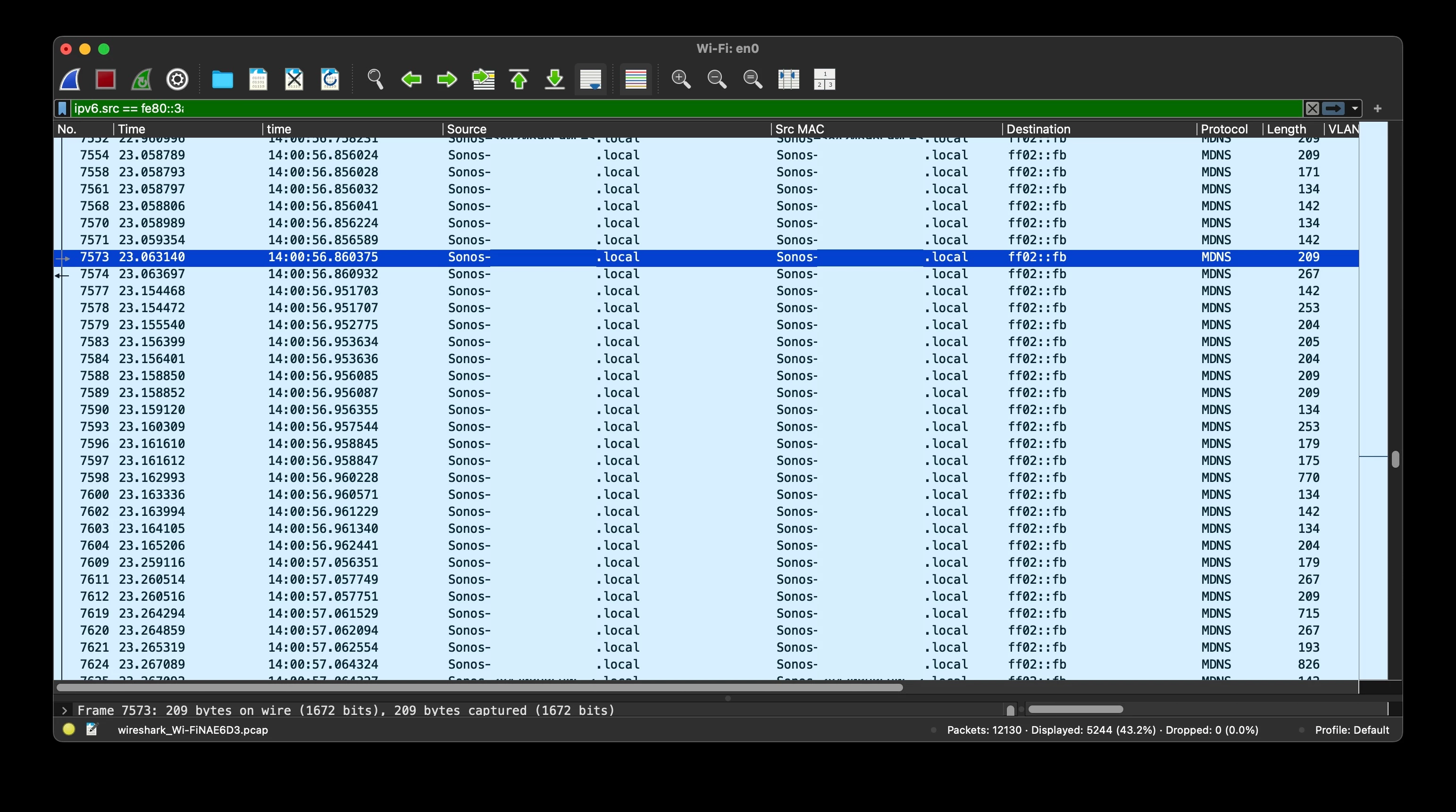
 

 any chance to write a firmware in normal way  or should I get rid of sonos and buy something which works …? 

This topic has been closed for further comments. You can use the search bar to find a similar topic, or create a new one by clicking Create Topic at the top of the page.

14 replies

Airgetlam
October 6, 2025

It’s odd, Sonos hasn’t shut down my network at all. Have you called Sonos Support to discuss it?

Bruce
jgatie
October 6, 2025

Looks like a Spanning Tree Protocol (STP) flood.  This can arise from having more than one Sonos unit connected by both Ethernet and WiFi and your network (Yes, I said YOUR network) not being properly set up for STP.  You can either unplug the device(s) from Ethernet, or properly configure STP on your network devices (router/switches/hubs/etc.).

eRAVAuthor
Contributor I
October 6, 2025

​@jgatie 

so TELL ME ABOUT MY NETWORK please ... 
ALL devices are connected AND PERFECTLY CONFIGURED to use ONLY WIRED Ethernet … not WiFi

and yes STP is working here 
you see … the thing is that if you configure one network card (wired - here) the WiFi card should be disabled by firmware / setup apps whatever you call it  
it’s Sonos part to write app in proper way: I want WiFi mode -wired Ethernet is disabled, I want wire - WiFi disappears …

it so easy don’t you THINK ? 


buzz
Grand Maestro
October 6, 2025

I know of one network controller that does not enable STP on all ports. The obvious button only enables STP or RSTP on connected switches not the embedded switch ports.

buzz
Grand Maestro
October 7, 2025
Local Superstar
October 7, 2025

There is much information and discussion on this forum that discusses the issue(s) you are facing on your network:

LINK TO SONOS NETWORK DISCUSSIONS

I want WiFi mode -wired Ethernet is disabled, I want wire - 

it so easy don’t you THINK ? 
 

I agree, that would be easy for Sonos to implement, but it would break millions of existing working Sonos Systems that rely on the SonosNet feature.

jgatie
October 7, 2025

​@jgatie 

so TELL ME ABOUT MY NETWORK please ... 
ALL devices are connected AND PERFECTLY CONFIGURED to use ONLY WIRED Ethernet … not WiFi

and yes STP is working here 
you see … the thing is that if you configure one network card (wired - here) the WiFi card should be disabled by firmware / setup apps whatever you call it  
it’s Sonos part to write app in proper way: I want WiFi mode -wired Ethernet is disabled, I want wire - WiFi disappears …

it so easy don’t you THINK ? 


You are being argumentative and abusive to a person you are seeking help from.  So no, I won’t help you.  Peel it back some and have some humility and maybe the folks here can point you in the right direction. 

But I will tell you this . . . configuring “one network card” as wired doesn’t do squat to the WiFi connection unless you physically turn WiFi off for this device.  WiFi is not automatically disabled (for good reasons).  This is a big clue. 

eRAVAuthor
Contributor I
October 7, 2025

There is much information and discussion on this forum that discusses the issue(s) you are facing on your network:

LINK TO SONOS NETWORK DISCUSSIONS

I want WiFi mode -wired Ethernet is disabled, I want wire - 

it so easy don’t you THINK ? 
 

I agree, that would be easy for Sonos to implement, but it would break millions of existing working Sonos Systems that rely on the SonosNet feature.

Disagree…
The current settings are easy to read and “import” to the new one -and c’mon … 
I’m not programmer but it is really easy without breaking anything ... 
 

jgatie
October 7, 2025

Disagree…
The current settings are easy to read and “import” to the new one -and c’mon … 
I’m not programmer but it is really easy without breaking anything ... 
 

 I am a programmer (actually, a software engineer) and 99% of the time, anyone saying the bolded has no clue what they are talking about.  

And ​@craigski is correct.  Making the Sonos connection toggle between Ethernet and WiFi automatically would break millions of system that still rely on Sonosnet.  Never mind the millions of systems that rely on WiFI to be on for the private connections between Home Theater components.  

eRAVAuthor
Contributor I
October 7, 2025

​@jgatie 

so TELL ME ABOUT MY NETWORK please ... 
ALL devices are connected AND PERFECTLY CONFIGURED to use ONLY WIRED Ethernet … not WiFi

and yes STP is working here 
you see … the thing is that if you configure one network card (wired - here) the WiFi card should be disabled by firmware / setup apps whatever you call it  
it’s Sonos part to write app in proper way: I want WiFi mode -wired Ethernet is disabled, I want wire - WiFi disappears …

it so easy don’t you THINK ? 


You are being argumentative and abusive to a person you are seeking help from.  So no, I won’t help you.  Peel it back some and have some humility and maybe the folks here can point you in the right direction. 

But I will tell you this . . . configuring “one network card” as wired doesn’t do squat to the WiFi connection unless you physically turn WiFi off for this device.  WiFi is not automatically disabled (for good reasons).  This is a big clue. 

“abusive” … why …? because your point of view is the only one possible ?
please check what a word means before usage

I saw your previous replies on this forum (2020, 2021 etc regarding similar issues) -and they are really abusive -do you want to see them ? How “nice-guy” and “helpful“ you are  ?


You always blame network and customers - ALWAYS …

ALWAYS the customer is guilty …


maybe it’s time to RE-THINK your approach 

the STP died a long  time ago, now we are using RSTP, MSTP, PVSTP+ etc - the effect of the badly implemented app architecture still persists…

the cheapest “switch” devices even don’t understand what to do when broadcast storm occurred generating by Sonos devices.

i.e. Juniper switches can “feel” overwhelming traffic and automatically shutdown port when traffic goes higher than 80% - but … it is not common knowledge for ordinary customer.

so if you really want to help others  and/or  you have any connection with Sonos - consider creation of  proper instruction and / or  implement changes the app instead of lecture others with superiority


BTW
WiFi is more delicate than you think and not so good as the only one medium

have you ever heard about the spectrum analyzer ? (no - no simple wifi scanner) 
you’ll see how messy the air around you can be … all these iphones with turned on hotspots with 80MHz width of channel, IoT devices, almost everything now “must have” embedded wireless card from speakers to fridge or washing machine
 

As simply as that… the “big clue”