
Contributor I
April 25, 2024
Answered

Please help me understand how sonos fails so i can mitigate

Hi All,

I’ve been fighting with my sonos speakers for about 5years now. I never seem to lose hope and each year I think I figure it out, then a few weeks go by and im back to square one.


This year I really thought I had it figured out by creating a dedicated network just for my speakers and then advertising a 2.4Ghz only wireless network for that network which again only my speakers connect to. That way there is no more sonosnet. There is no other interference on the network. 


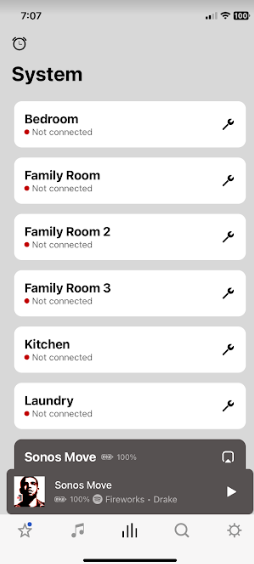
Everything worked great for 16days and then i wake up to:
 

Here is what the speakers look like on my network when this happens(notice the “wifi” column - theyre all dropped off from a router standpoint...but in the app theyre in a state where they are connected to the wifi, but they arent responding? how?..):
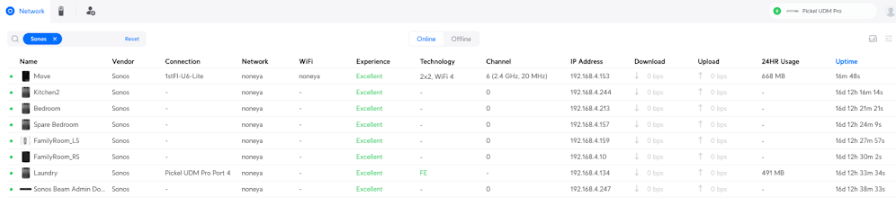

So I reboot my entire network. All devices go offline. This is very disruptive, but its gotta work right?:

 

​
Nope theyre jacked up still...everything else on my other networks are connected right back up. Sonos app just shows the same screen with the gear icon and “Lets Fix it” at the top (which never works).


The final fix (its been over an hour now), is i have to walk around the house and unplug each speaker, wait 5mins, plug them back in...its insane. Theyre hard to get to so this isnt a sustainable solution.


TLDR:
What is happening with my speakers? How do they all just drop off a very stable unifi network, where they(speakers) have their own dedicated network and 2.4Ghz SSID? And how can i fix this next time it happens WITHOUT resetting each speaker’s power?

 

This topic has been closed for further comments. You can use the search bar to find a similar topic, or create a new one by clicking Create Topic at the top of the page.
controlav
controlavAnswer
Lead Maestro
April 25, 2024

I can’t see your pictures very well on my phone but it looks like you have a UniFi gateway and switch?

There are some STP related settings you must set in UniFi.  If you’ve already done this ignore, but if not check this out:

https://github.com/IngmarStein/unifi-sonos-doc?tab=readme-ov-file

Or follow Uni’s advice for Sonos

https://help.ui.com/hc/en-us/articles/18930473041047-Best-Practices-for-Sonos-Devices

but for the love of all things, don’t expect it to work out of the box on a Uni system.

Author of the leading independent Sonos apps for Android, MacOS, iOS, Windows and Xbox.

25 replies

Contributor I
June 6, 2024

i think its the software (sonos app) searching my SSID named “noneya” and NOT finding sonos...which is bizarre. Not a bad idea, i didnt check the phone insights that time. This particular issue has stopped happening lately.


Currently my annoyance is the speakers just going in and out constantly. I have a theory its the spotify integration. If i play “sonos radio” it seems to stream more consistently to the speakers…

Apparently the next time the problem happens i can submit a system diagnostic to sonos, so ill try that and report back
 

Contributor I
June 11, 2024

Still experiencing terrible speakers cutting in/out but the worst seems to be over for now, the app has not been saying “Lets fix it” nor have speakers dropped out of the app:

Thus far these parameters are the most stable for unifi/sonos i’ve seen on my network:


  1. a dedicated network for sonos
  2. a dedicated ssid for sonos
  3. a dedicated single AP (unfortunately...hope to move away from this)
  4. Settings Under Unifi > Networks :
  1. Settings Under Unifi > wifi(for sonos ssid):

     
controlav
Lead Maestro
June 12, 2024

Here’s mine but its my main network, I see zero point in keeping Sonos on its own network plus then my phone has to be on that network too, so what’s the point?

Note: I have 5GHz enabled as well for the newer devices, and Band steering too because why not.

Author of the leading independent Sonos apps for Android, MacOS, iOS, Windows and Xbox.
controlav
Lead Maestro
June 12, 2024

Plus mDNS which is now critical for the new app:


Author of the leading independent Sonos apps for Android, MacOS, iOS, Windows and Xbox.
Contributor I
June 12, 2024

thanks @controlav ! I’ll try your settings next time i see a failure.


Looks like i have mDNS


I also disabled “meshing” on every AP in my house, since theyre all wired.