
Contributor I
April 25, 2024
Answered

Please help me understand how sonos fails so i can mitigate

Hi All,

I’ve been fighting with my sonos speakers for about 5years now. I never seem to lose hope and each year I think I figure it out, then a few weeks go by and im back to square one.


This year I really thought I had it figured out by creating a dedicated network just for my speakers and then advertising a 2.4Ghz only wireless network for that network which again only my speakers connect to. That way there is no more sonosnet. There is no other interference on the network. 


Everything worked great for 16days and then i wake up to:
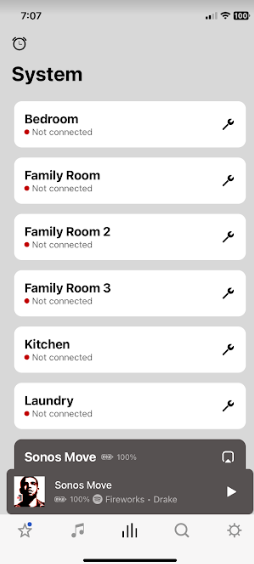
 

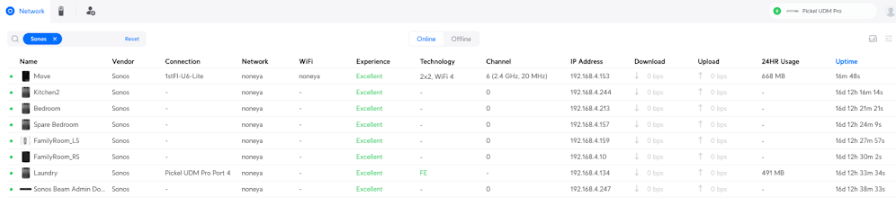
Here is what the speakers look like on my network when this happens(notice the “wifi” column - theyre all dropped off from a router standpoint...but in the app theyre in a state where they are connected to the wifi, but they arent responding? how?..):

So I reboot my entire network. All devices go offline. This is very disruptive, but its gotta work right?:

 

​
Nope theyre jacked up still...everything else on my other networks are connected right back up. Sonos app just shows the same screen with the gear icon and “Lets Fix it” at the top (which never works).


The final fix (its been over an hour now), is i have to walk around the house and unplug each speaker, wait 5mins, plug them back in...its insane. Theyre hard to get to so this isnt a sustainable solution.


TLDR:
What is happening with my speakers? How do they all just drop off a very stable unifi network, where they(speakers) have their own dedicated network and 2.4Ghz SSID? And how can i fix this next time it happens WITHOUT resetting each speaker’s power?

 

This topic has been closed for further comments. You can use the search bar to find a similar topic, or create a new one by clicking Create Topic at the top of the page.
controlav
controlavAnswer
Lead Maestro
April 25, 2024

I can’t see your pictures very well on my phone but it looks like you have a UniFi gateway and switch?

There are some STP related settings you must set in UniFi.  If you’ve already done this ignore, but if not check this out:

https://github.com/IngmarStein/unifi-sonos-doc?tab=readme-ov-file

Or follow Uni’s advice for Sonos

https://help.ui.com/hc/en-us/articles/18930473041047-Best-Practices-for-Sonos-Devices

but for the love of all things, don’t expect it to work out of the box on a Uni system.

Author of the leading independent Sonos apps for Android, MacOS, iOS, Windows and Xbox.

25 replies

Contributor I
May 20, 2024

So far its been at least running, half of my speakers go in and out while playing. My theory is that unifi likes to adjust its wireless channel based on any congestion nearby. So i see some on channel 11 while others are on 6...perhaps the reason why i hear this inconsistent playing?


controlav
Lead Maestro
May 20, 2024

So far its been at least running, half of my speakers go in and out while playing. My theory is that unifi likes to adjust its wireless channel based on any congestion nearby. So i see some on channel 11 while others are on 6...perhaps the reason why i hear this inconsistent playing?


Look at the network logs for one of the problem devices and see what it says. Its possible they are switching to 5GHz and you aren’t configured to handle that change.

Author of the leading independent Sonos apps for Android, MacOS, iOS, Windows and Xbox.
Contributor I
May 21, 2024

thanks i hard coded the SSID to only use 2.4Ghz so ill be shocked if i see it flip to 5Ghz at all

controlav
Lead Maestro
May 21, 2024

thanks i hard coded the SSID to only use 2.4Ghz so ill be shocked if i see it flip to 5Ghz at all

Well the logs should reveal the truth.

Author of the leading independent Sonos apps for Android, MacOS, iOS, Windows and Xbox.
Contributor I
May 27, 2024

i setup remote logging to my synology server, the logs are very verbose, no idea how im going to parse this...looking into “graylog” possibly.


5/27

Annnnd we’re back to speakers just disappearing. There should be 7, there’s only 3 now...(im even on the new app they released):

edit: there’s only 2 left actually...”bedroom” is showing but i cant interact with it^ you can see it in the screenshot, theres no volume number next to it

controlav
Lead Maestro
May 27, 2024

Well the new app adds its own special problems, I would stick with the Desktop app for now and see if the speakers stay around in that.

Author of the leading independent Sonos apps for Android, MacOS, iOS, Windows and Xbox.
Contributor I
May 28, 2024

thanks i’ll try that, its getting to the point that this sonos lab is really barebones. I’m even afraid to join the SSID with a 2nd phone so as to not “disrupt anything”...actually per your suggestion, i’ll eliminate the dedicated iphone from the mix and only use a desktop app as a single controller

Contributor I
May 30, 2024

today i forced my (sonos-only) network across only one wireless access-point. This seems to be helping, we’ll see how long it lasts.


working scenario at this moment:

  • all speakers wireless
  • 2.4Ghz only network
  • ONLY sonos speakers on this SSID, no other network devices
  • 1 single wireless access-point
  • “multicast enhancement” is off (unifi setting)
  • still using the phone app(i cant seem force myself to use the pc)


Also fun fact from all this monotonous attention i’ve paid to these speakers, when you go to factory reset a speaker and pair it on iphone, if you have a phone call running on your phone the stupid app wont let you pair the speaker, buuuuut a mysterious new function appears like “pair without microphone” and you can simply enter a PIN found on the bottom of your speaker. Did this twice now, the speakers pair way faster.

Contributor I
May 31, 2024

nope failed that day, had to “pause” and then “resume” the SSID then reboot the wireless ap’s to fix the below


controlav
Lead Maestro
June 1, 2024

The error above indicates the phone has disconnected from wifi, which doesn’t sound like a Sonos problem to me.

I have my new Uni system up and running now, so I know enough to be slightly dangerous:

Go to Client Devices on the Uni page for your router. Select your phone. Select Insights. Scroll down to Connection Logs. What does it say?

Author of the leading independent Sonos apps for Android, MacOS, iOS, Windows and Xbox.