Contributor I
November 30, 2022
Answered

Error Code 6 when trying to update Sonos One

My Sonos One speaker fails when updating. Its a 2019 Gen 2 model. 
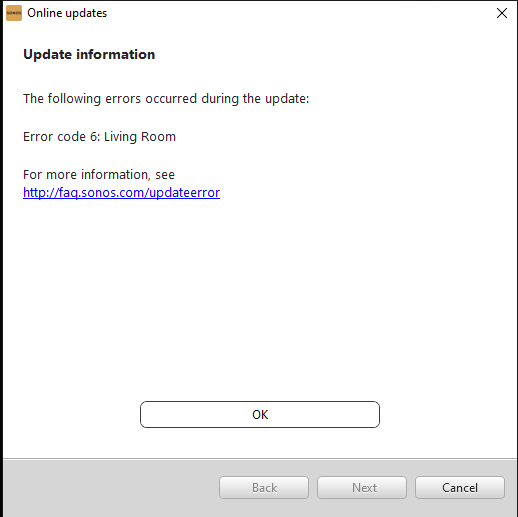
the unit has a wired connection to home router, and definitely has internet access since Alexa voice assistant is working ok. It stopped playing spotify song requests recently. So I opened the Sonos S2 App and it wont let me do anything except apply the latest update. The update gets to final stage and then fails with an Error code 6 

 I followed all the troubleshooting hints from Sonos support article regarding error updating :
1. Set static IP 
2. Rebooted my router and fiber modem (I have a TP-Link Home Mesh router system )
3. I have powered the unit off/on  multiple times.
(https://en.community.sonos.com/speakers-229128/code-error-6-6877525) 

I have tried several times to do the update, but it fails every time. 
Have successfully done updates before, I never had an issue. 


Any suggestions how this can be resolved ? 

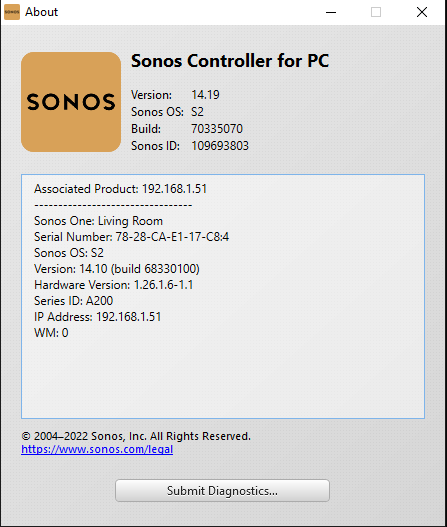
See attached images.  


This topic has been closed for further comments. You can use the search bar to find a similar topic, or create a new one by clicking Create Topic at the top of the page.
mbergerAnswer
Contributor I
December 3, 2022

Finally figured it out! 😄

I removed the wired connection, reset the Sonos One device and ran through the setup again on the app. This time it asked me to press the button on the back of the speaker which never asked me to do with the wired connection. Following that the setup completed and the upgrade downloaded and applied successfully. 

Summary: to resolve error code 6 when updating a Sonos One device from a wired connection, remove the wired connection, reset the Sonos and use the app to find  your sonos as a wireless device. Then run the update. 


I also figured out how to fix Spotify which had stopped playing via Alexa. Need to first go into to Spotify mobile app and set it as default player for Alexa. Spotify then opens the Alexa mobile app which then  shows the spotify 'skill' as linked and you then set spotify as default music service.   Heres the thread for this fix : https://community.spotify.com/t5/Accounts/Alexa-connect-issue-due-to-geographical-restrictions/td-p/5129377/page/2


13 replies

mbergerAuthor
Contributor I
December 1, 2022

Hi Bruce,

DNS issue was something I never considered, but just in case I did try set routers primary dns server to 8.8.8.8.  The update failed again, but at least we checked that off the list so we know its not dns l. 

I spoke to Sonos support again via their chat (3rd time that day) and they say are unable to help me and asked me to call the support hotline and quote my support ticket #, they will arrange remote access to see for themselves. I guess they do this because many home users will miss something obvious which supprt will pick up when accessing remotely. I'm pretty confident they wont find anything that's been missed on my side and then go back to drawing board and finally escalate to a senipr support person to take a deep dive into the diagnostics report. 

My suspicion is that somehow my account or my device has been flagged as a beta tester and they are trying to push a a beta version to my device. online tech support people said  error code 6 is only related to Beta testers.

Will ask them to check again that I am not a beta tester (i have never signed up as far as I can recall).


Airgetlam
December 1, 2022

I’ll keep watching this thread to see what I missed. It really isn’t supposed to be this hard. 

Good luck!

Bruce
mbergerAuthorAnswer
Contributor I
December 3, 2022

Finally figured it out! 😄

I removed the wired connection, reset the Sonos One device and ran through the setup again on the app. This time it asked me to press the button on the back of the speaker which never asked me to do with the wired connection. Following that the setup completed and the upgrade downloaded and applied successfully. 

Summary: to resolve error code 6 when updating a Sonos One device from a wired connection, remove the wired connection, reset the Sonos and use the app to find  your sonos as a wireless device. Then run the update. 


I also figured out how to fix Spotify which had stopped playing via Alexa. Need to first go into to Spotify mobile app and set it as default player for Alexa. Spotify then opens the Alexa mobile app which then  shows the spotify 'skill' as linked and you then set spotify as default music service.   Heres the thread for this fix : https://community.spotify.com/t5/Accounts/Alexa-connect-issue-due-to-geographical-restrictions/td-p/5129377/page/2