
Contributor I
April 5, 2025

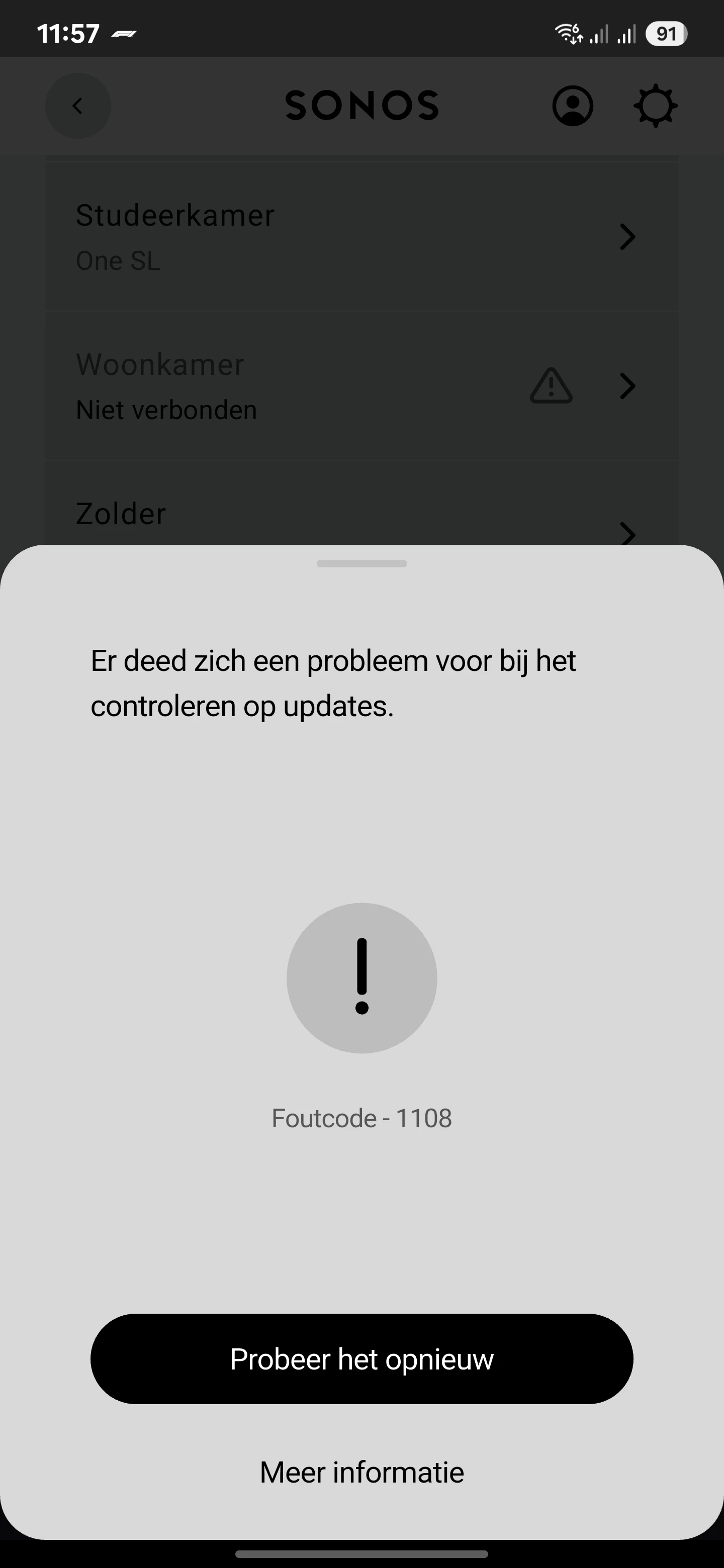
Error code 1108


 After receiving the last update, the ERA100 Sonos ARC Ultra, sonos 5 gen and sub gen 3 were not visible in the app, after factory setting recovery. the installation is broken with error code 1108. someone has an idea of how to fix this. 
 

This topic has been closed for further comments. You can use the search bar to find a similar topic, or create a new one by clicking Create Topic at the top of the page.

15 replies

Airgetlam
April 5, 2025

I’ve not seen that error code before. I’d be tempted to temporarily wire each speaker to your router with an Ethernet cable, and try the update again. Given that it’s several speakers, you might have to wire a single unit at a time, and work your way through, although the Sub is likely bonded to your Arc, and should be updated when the Arc gets updated.

However, since I have no idea what 1108 really means, it could equally be a ‘cannot communicate with the update server’ issue, which would suggest some sort of port blocking, most frequently associated with VPNs, work profiles, virus protection apps, and the like. You didn’t mention if any speakers were updated, if so, this is a moot paragraph. 

If neither of those suggestions work, you might want to call Sonos Support directly to discuss it.

When you speak directly to the phone folks, they have tools at their disposal that will allow them to give you advice specific to your network and Sonos system.

Bruce
ipje1968Author
Contributor I
April 5, 2025

Only two SL one worked after the app update. It all worked well but after the update it's a disaster. I have no VPN or virus app. Monday I will contact support. 

Airgetlam
April 5, 2025

Would love to know what 1108 really means!

Bruce
ipje1968Author
Contributor I
April 5, 2025

Would love to know what 1108 really means!

The translation says "there is a problem with checking for updates". After a few times trying, the message says "you can use the product after it's updated ". But yeah...that's the problem, it won't update.

Airgetlam
April 5, 2025

It’s odd that it updated the two One SLs , and failed on the rest, but that’s why I’m hoping Support can shed more light. 

Bruce
Lyricist I
April 6, 2025

Were you able to resolve your problem? Because I'm having the same error code today. I noticed that my sub wasn't connected anymore and did a factory reset and tried to do an update and now it's not updating.

ipje1968Author
Contributor I
April 6, 2025

Were you able to resolve your problem? Because I'm having the same error code today. I noticed that my sub wasn't connected anymore and did a factory reset and tried to do an update and now it's not updating.

I found the solution last night, if you use a WiFi extender. I turned it off and everything became visible again. Then I turned on the extender again, so far without any problems. I wanted to wait a while because I wanted to try it out for a few hours. But now you are also experiencing this problem. I hope this is the solution for you too. 

If it does not become visible immediately after you have turned off the WiFi extender. Then you must first add the product back to your Sonos system. Or try it with restarting the app.

Lyricist I
April 6, 2025

I figured it out. I am currently using a eero mesh and I had my sound bar connected via ethernet and my other speakers connected via the eero wifi. Once I disconnect the ethernet and factory reset the sound bar so I could connect via the eero wifi it allowed me to find and set up the rest of my Sonos speakers. I did have to do a factory reset of all the speakers in order to set everything up properly. But it's all working now and I can see and control my Sonos system again. So long story short. If you use a mesh make sure it's eather all connected via ethernet or all connected via wifi. Do not connect mixed ie wifi and ethernet.

Lyricist I
April 7, 2025

I can confirm that my disconnected ERA300’s updated again after I temporarily removed the Mesh networking (on FritzBox from AVM). I could then re-add these speakers to a room.

Lyricist I
May 19, 2025

Hi,

I had similar issues with a PLAY1.

Followed all the suggestions - hard-wired, factory reset etc. Eventually rebooted router and this sorted this issue. 

...incase that helps anyone else with similar issues