Contributor I
Nov 25, 2026 1:31 PM UTC
Question

Back to that probably boring subject of Reserved IP addresses

I have the same problem as reported elsewhere - the 2 Sonos devices I have (Beam Gen 1 & Sub Gen 2) periodically losing connectivity.

Have finally (after several years!) got around to trying to sort it out.

Having run a network scan some time ago and made a record of the assigned IP for each device, I see now that they have changed, and it's had the predictable effect, not only for these 2 devices but for others.

Am busy fixing IP addresses manually where I can, for infrastructure which is effectively fixed (i.e. not occasional-presence mobiles, other visitors, etc).

Can see on here that setting DHCP Reservations is a suggested resolution to the problem for some, even if others seem to disagree!

It's obviously the best practice for most networks, for servers, printers, switches, routers, etc. Why not for Sonos devices too? It obviously prevents/minimises problems, even if making any changes to the network (such as adding a new router, as thus possibly a new Default Gateway) results in a bit of extra manual work to each device's config if/when that time comes.

I note that the only way to "fix" IP addresses for Sonos devices is to build DHCP reservations. I suppose that someone somewhere must have thought this was a good idea...

Question re building the reservations though.

Although the port scan reveals the 2 Sonos devices with separate IP addresses, it also shows them as having the same MAC address, which presumably will lead to DHCP reservation creation problems (?). Or at least implementation problems.

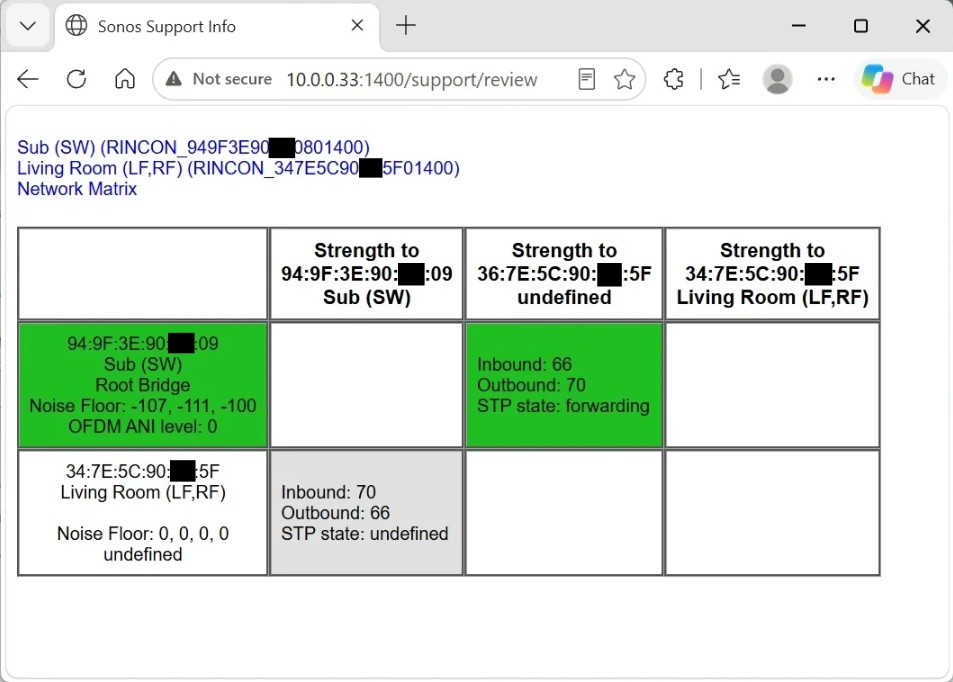
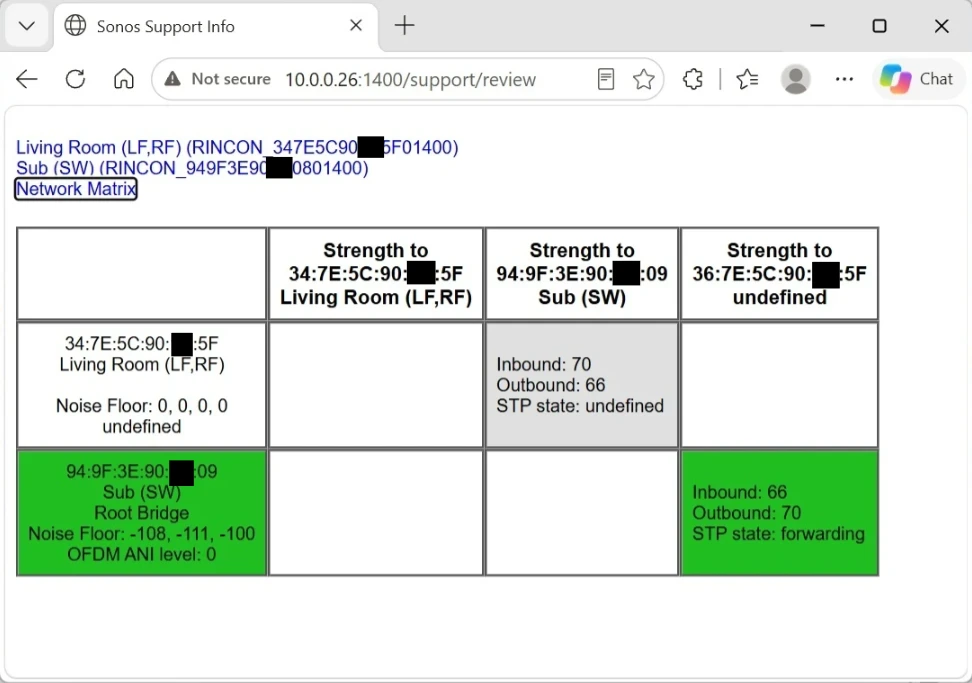
Have looked for further info about each device using the http://<YOUR_SONOS_IP>:1400/support/review link, although the web browser (Edge) reports that support for XSLT will be removed very soon, and Brave doesn't support it at all.

Unfortunately, the results for each device's Network Matrix don't shed as much light on the differences as I'd hoped. Or at least those differences simply raise another question.

Although the report for each device has 4 columns and 2 rows of data (plus the header row), and the upper row in one report is the lower row in the other, the information in each of the cells is the same. 

The 3 columns have 3 different MAC addresses. The column with the MAC address reported by the Port Scanner has empty cells. The other two columns - the columns whose cells contain data in one of those cells, each have different MAC addresses. Presumably (?) these are the "hidden" MAC addresses for each of the 2 devices?

Is each one the MAC address to build into the DHCP reservation for each device?

The problem here would seem to be that the DHCP Server on the router does not "see" these MAC addresses. At least not judging by the entries in the ARP Table on the router, where the MAC address for each IP address is the same as the one seen by the Port Scanner.

Or do I just use the same MAC address for each reservation, and leave the Sonos to sort it out? Will it accept 2 reservations/IP addresses on the same MAC address? Perhaps the results so far suggest that it does...

Screenshots attached. 

Would anyone with experience of dealing with this please shed some light on this apparent dilemma?

Best regards

"Frank"
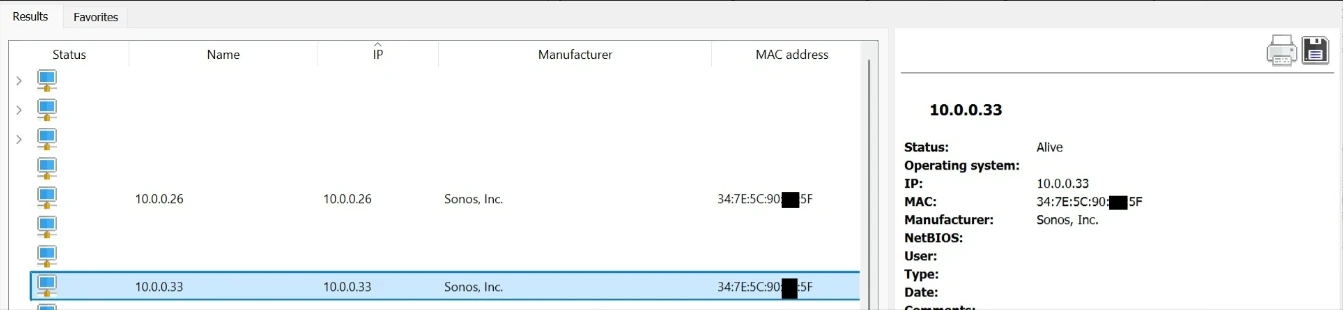
 

Moderator edit: partially obscured personally identifiable information (MAC addresses)

50 replies

Airgetlam
Nov 25, 2026 5:58 PM UTC

Perhaps the better way is to consider the system is designed to be used by the uninitiated, and not the ‘expert who makes changes’. Don’t try to make things more complex merely because you can. If the system is working, leave it be. 

Translate
Bruce
FrankZ1Author
Contributor I
Nov 25, 2026 8:36 PM UTC

I did have what I thought was a reason for trying to be clever! But they do say that the road to hell is paved with good intentions.

Translate
FrankZ1Author
Contributor I
Nov 25, 2026 7:03 PM UTC

Bruce

Sound advice. The only reason for even thinking about this is that sometimes it just doesn’t work, or sometimes stops working and then mysteriously sorts itself out again after a while. The frustration of this, whilst also not having any knowledge abut how it all works, has led to wanting to try and improve it. Whether it will or not is another matter.

Thank you very much to all for all the help, information and advice today (and quickly too). Have learned a lot about the workings of it this afternoon.

Very happy to read more if there is more (I don’t want this to seem as if I’m trying to draw this to a close. Am definitely not.) Just wanted to acknowledge the excellent help so far.

Translate
Smilja
Nov 25, 2026 7:11 PM UTC

Bruce

Sound advice. The only reason for even thinking about this is that sometimes it just doesn’t work, or sometimes stops working and then mysteriously sorts itself out again after a while.


Are there any network-connected devices close to the Beam? If yes, please move them further away; ideally, keep a distance of at least 1,5 m (5 ft) from the Beam.

Translate
»And the world is like an apple whirling silently in space, Like the circles that you find in the windmills of your mind.« (›Windmills Of Your Mind‹ [1967]. Music by Michel Legrand ; English lyrics written by Alan & Marilyn Bergman)
FrankZ1Author
Contributor I
Nov 25, 2026 7:20 PM UTC

Are there any network-connected devices close to the Beam? If yes, please move them further away; ideally, keep a distance of at least 1 m (3 ft) from the Beam.


The beam is mounted under the flat-screen TV, and also strapped to the back of the TV is a small 5-port switch and an Apple TV box. All devices are connected via network cable rather than wi-fi, although the Beam has been disconnected from its cable. But could be re-connected. Not sure why I disconnected it now, apart from the fact that doing so seemed to fix a problem a few years back.

Slightly difficult to move those devices, although not impossible.


Translate
jgatie
Nov 25, 2026 8:07 PM UTC

Best advice is to not have any bonded units (surrounds or Subs) wired to Ethernet.  No matter how intuitive you may think “Wired is faster than Wireless” sounds, the proprietary direct 5 GHz bond goes through less hops than even a wired connection, and as long as the Home Theater units are all in the same room, wireless will always be superior to wiring a surround or sub into the Network.  

Translate
FrankZ1Author
Contributor I
Nov 25, 2026 8:21 PM UTC

Best advice is to not have any bonded units (surrounds or Subs) wired to Ethernet.  No matter how intuitive you may think “Wired is faster than Wireless” sounds, the proprietary direct 5 GHz bond goes through less hops than even a wired connection, and as long as the Home Theater units are all in the same room, wireless will always be superior to wiring a surround or sub into the Network.  


OK, that’s an interesting take on it. Thanks.

More food for thought, just when I was thinking I had a plan!


Translate
Smilja
Nov 25, 2026 8:48 PM UTC

Sub and surrounds are merely dependent data receivers slaved to the soundbar, that’s why they aren't suitable as a root bridge.

Translate
»And the world is like an apple whirling silently in space, Like the circles that you find in the windmills of your mind.« (›Windmills Of Your Mind‹ [1967]. Music by Michel Legrand ; English lyrics written by Alan & Marilyn Bergman)
FrankZ1Author
Contributor I
Nov 25, 2026 8:56 PM UTC

“Sub and surrounds are merely dependent data receivers slaved to the soundbar, that’s why they aren't suitable as a root bridge.”

Hadn’t appreciated this. But had wondered why earlier today, when it was suggested that the Sub shouldn’t be a Root Bridge.

I probably didn’t take as much notice of or interest in the (very simple, 2-device) Sonos system as I should have done when it was first installed (almost 8 years ago now), so didn’t do any reading about it. It was just installed by the bloke who supplied the TV (now long gone). For the most part it just worked - until it didn’t. It was just the icing on the cake of a new house build, so there were rather more pressing things on which to focus!

It’s been an informative day.

Translate
Smilja
Nov 25, 2026 9:08 PM UTC

The fact that the Beam is causing so much trouble confuses me too. It might be better to talk to Sonos Support before you dive into the troubleshooting trenches. They can determine whether there’s a hardware defect with the Beam or the Sub.

Help and Support | Sonos

Translate
»And the world is like an apple whirling silently in space, Like the circles that you find in the windmills of your mind.« (›Windmills Of Your Mind‹ [1967]. Music by Michel Legrand ; English lyrics written by Alan & Marilyn Bergman)
Puppeteer
Collaborator II
Nov 25, 2026 10:12 PM UTC

​@FrankZ1  ...then seeing moving IP addresses in the ARP cache, the…

As I mentioned above, watch out for bonded speakers and ARP - it can (and does) cause issues with master/bonded speakers if you have DAI/static ARP entries enabled for them...

Translate
Long term user/contributor from 2014, @User117655 - now 'Anonymous', who for some reason underwent a forced user reset...
FrankZ1Author
Contributor I
Nov 26, 2026 9:12 PM UTC

Having read right through this thread again, made notes and pondered, this is what the plan now looks like:-

Physical installation-specific (first):-

  • Remove the existing 5-port unmanaged, non-IGMP-snooping switch and replace with a 5-port managed switch (have to do this because am finally implementing VLANs on the network. Long story.)
  • Ensure STP is configured (it will be anyway)
  • When rebuilding the whole network using VLANs, take care to check through that "Sonos + UniFi: Best Practices & Recommended Settings" page. Have now read it properly. Plenty of detail there for particular UniFi network settings etc. Can also see many comments beneath that from several of you here. You've obviously been around the block....
  • Move the new switch from behind the TV to the cupboard beneath the TV, to distance it from the Beam
  • Buy longer cable to move the Apple TV box to the cupboard beneath the TV, ditto
  • The only other device with wi-fi capability (even though it's connected by network cable) which is much more difficult to separate from the Beam is the TV itself. The Beam is mounted on a bracket directly beneath the screen, which is on an articulating frame.


Sonos specific (second):-

  • Not make DHCP Reservations to fix the IPs (my original question)
  • Disable SonosNet
  • NOT reconnect the Beam to its network lead, but leave both devices on wi-fi
  • Power down both devices
  • Start the Beam and wait for it to sort itself out and become Root Bridge again
  • Run the http://<YOUR_SONOS_IP>:1400/support/review and check the Network Matrix to check Root Bridge status
  • Start the Sub and wait for it to sort itself out
  • Check the app and their pairing


(i.e. keep it almost standard and simple/uncomplicated, apart from the SonosNet disabling)

Keep fingers crossed that it stays stable.

If it doesn't, build DHCP reservations, using the MAC addresses on each device rather than what's reported in the network scan.

I hope this is a reasonable summary of the excellent advice provided here, and a suitable plan.

A hell of a lot of verbiage by me and patient assistance from you all, only to end up with a pretty standard setup! So much for me trying to be clever.

Have learnt a hell of a lot more about how Sonos works though, so worth it (to me anyway) for that alone.

Thanks all for excellent, patient and rapid advice, combined with absolutely zero "talking down to the newbie" attitude, and "WTF are you doing?" which is sometimes all too present on support forums.

Translate