Contributor I
Nov 25, 2026 1:31 PM UTC
Question

Back to that probably boring subject of Reserved IP addresses

I have the same problem as reported elsewhere - the 2 Sonos devices I have (Beam Gen 1 & Sub Gen 2) periodically losing connectivity.

Have finally (after several years!) got around to trying to sort it out.

Having run a network scan some time ago and made a record of the assigned IP for each device, I see now that they have changed, and it's had the predictable effect, not only for these 2 devices but for others.

Am busy fixing IP addresses manually where I can, for infrastructure which is effectively fixed (i.e. not occasional-presence mobiles, other visitors, etc).

Can see on here that setting DHCP Reservations is a suggested resolution to the problem for some, even if others seem to disagree!

It's obviously the best practice for most networks, for servers, printers, switches, routers, etc. Why not for Sonos devices too? It obviously prevents/minimises problems, even if making any changes to the network (such as adding a new router, as thus possibly a new Default Gateway) results in a bit of extra manual work to each device's config if/when that time comes.

I note that the only way to "fix" IP addresses for Sonos devices is to build DHCP reservations. I suppose that someone somewhere must have thought this was a good idea...

Question re building the reservations though.

Although the port scan reveals the 2 Sonos devices with separate IP addresses, it also shows them as having the same MAC address, which presumably will lead to DHCP reservation creation problems (?). Or at least implementation problems.

Have looked for further info about each device using the http://<YOUR_SONOS_IP>:1400/support/review link, although the web browser (Edge) reports that support for XSLT will be removed very soon, and Brave doesn't support it at all.

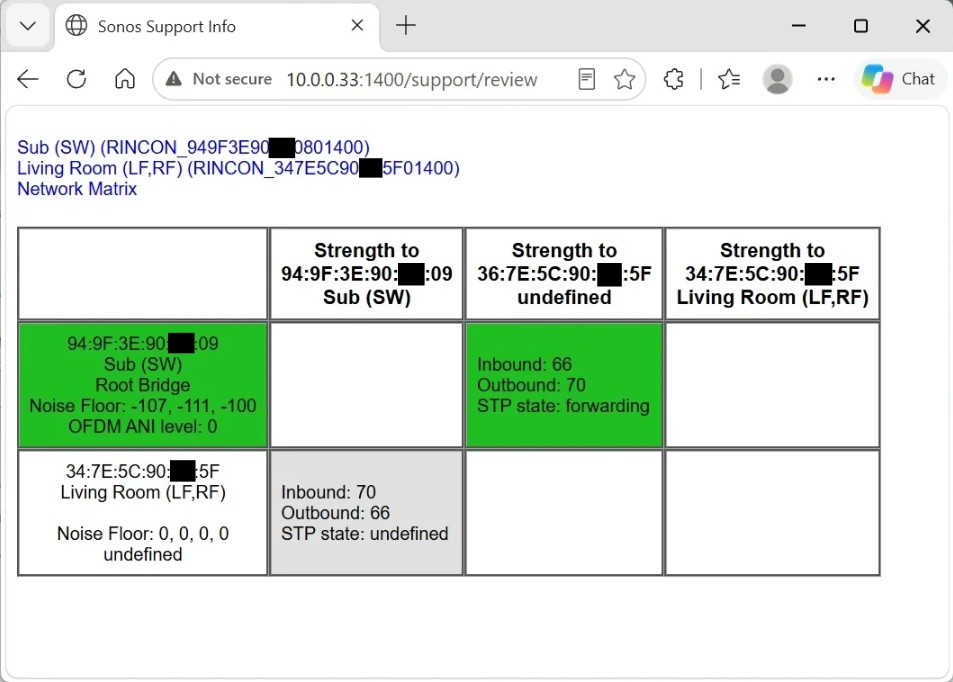
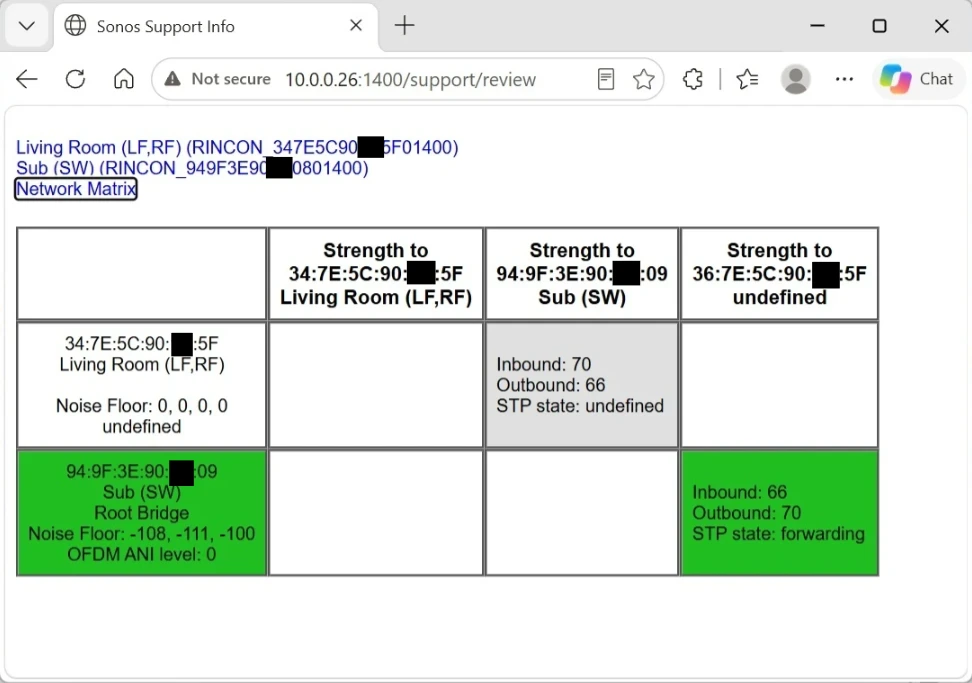
Unfortunately, the results for each device's Network Matrix don't shed as much light on the differences as I'd hoped. Or at least those differences simply raise another question.

Although the report for each device has 4 columns and 2 rows of data (plus the header row), and the upper row in one report is the lower row in the other, the information in each of the cells is the same. 

The 3 columns have 3 different MAC addresses. The column with the MAC address reported by the Port Scanner has empty cells. The other two columns - the columns whose cells contain data in one of those cells, each have different MAC addresses. Presumably (?) these are the "hidden" MAC addresses for each of the 2 devices?

Is each one the MAC address to build into the DHCP reservation for each device?

The problem here would seem to be that the DHCP Server on the router does not "see" these MAC addresses. At least not judging by the entries in the ARP Table on the router, where the MAC address for each IP address is the same as the one seen by the Port Scanner.

Or do I just use the same MAC address for each reservation, and leave the Sonos to sort it out? Will it accept 2 reservations/IP addresses on the same MAC address? Perhaps the results so far suggest that it does...

Screenshots attached. 

Would anyone with experience of dealing with this please shed some light on this apparent dilemma?

Best regards

"Frank"
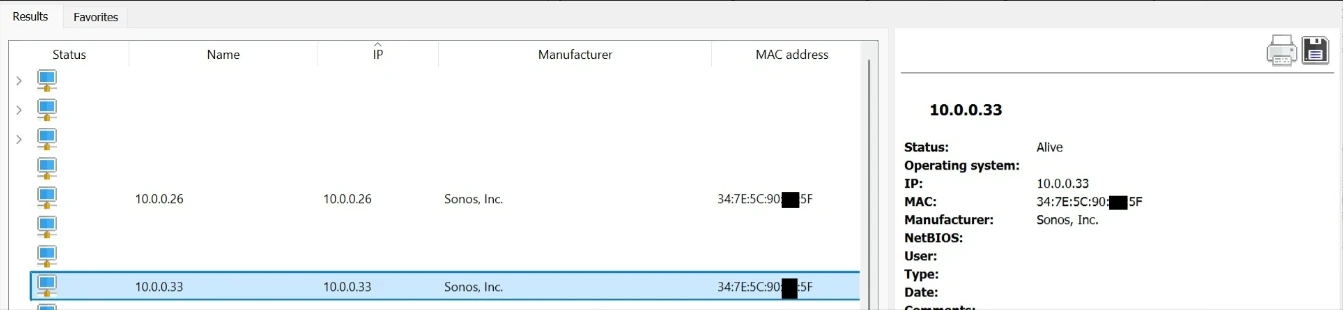
 

Moderator edit: partially obscured personally identifiable information (MAC addresses)

45 replies

FrankZ1Author
Contributor I
Nov 25, 2026 2:21 PM UTC

Thank you, moderator. Wasn’t sure whether to obscure any bits of info, or if so, which bits exactly, or even, given that it’s only MAC addresses, whether it mattered much. Looks as though it does.

Translate
Smilja
Nov 25, 2026 2:32 PM UTC

I have the same problem as reported elsewhere - the 2 Sonos devices I have (Beam Gen 1 & Sub Gen 2) periodically losing connectivity.


Yes, because you wired the Sub to the router, thus making it the SonosNet Root Bridge.

You have three options:

  1. Cable the Beam instead of the Sub
  2. Cable the Beam instead of the Sub and disable SonosNet
  3. Run Beam and Sub via Wi-Fi
Translate
»And the world is like an apple whirling silently in space, Like the circles that you find in the windmills of your mind.« (›Windmills Of Your Mind‹ [1967]. Music by Michel Legrand ; English lyrics written by Alan & Marilyn Bergman)
FrankZ1Author
Contributor I
Nov 25, 2026 3:05 PM UTC

Interesting - thank you very much for your rapid reply.

"Yes, because you wired the Sub to the router, thus making it the SonosNet Root Bridge."

Not entirely sure how this has happened because the Sub is in a location where there isn't a network port nearby, and always has been, so it's connected to the system via wi-fi. It's not physically wired, and never has been, as far as I know.

In fact, so too is the Beam now (connected via wi-fi), although at one time it was attached via a network cable. That cable is still there, just behind the Beam (along with a small 5-port switch which also connects the TV on which the Beam is mounted, and an Apple TV box), but doing this reminds me that at some stage I unplugged the Beam from its network cable and connected it via wi-fi instead. I seem to remember doing this to solve a problem at the time, but can't now remember why this was, or why that was a solution.

Is it a problem having a Sub as the "primary" device (if that's the correct term)?

"Connect the Beam instead of the Sub"

I didn't set up the Sonos system in the first place (it was done by the supplier), so not sure how to do this. Have never set up a Sonos system from scratch. Will have to do some reading.

"and disable SonosNet"

Checking in the app, SonosNet would appear to be enabled. The only setting available (apart from a list of channels) is a "Disable Sonos" button.

If SonosNet is disabled, will the Beam and the Sub be able to talk to one another, and output the same sound signal? How will the Sub know that it needs to play the signal from the Beam and TV, rather than something else? Will they still appear as a paired system in the app? (I realise that this is probably a stupid question, but have to ask it anyway).

WiFi is already enabled on both the Beam and the Sub, and they would both appear to have their own IP addresses already, given the port scan results.

Translate
Stanley_4
Grand Maestro
Nov 25, 2026 4:24 PM UTC

I have an Arc wired and a Sub and surrounds unwired, with Sonosnet disabled. 

Keep in mind Sonosnet is nothing but a (obsolete and not quite standard) wifi signal from years back. New Sonos don't even offer it as an option.

Unless you have a fairly unique situation you are better off disabling Sonosnet and using Wi-Fi for your connections. Wiring primary devices (not Sub or surrounds) isn't likely necessary but doesn't hurt anything then. If you really want tears and frustration, wire your older Sonos and leave Sonosnet enabled, that takes you down the STP routing path with all the unnecessary pain.

Do not confuse disable Sonosnet with disable Wi-Fi, that option is almost always a bad option as it disables the internal radio. Think trimming a fingernail by chopping off tne finger.

Translate
FrankZ1Author
Contributor I
Nov 25, 2026 3:25 PM UTC

Just reading up on how to change the Root Bridge, and AI suggests using “http://<current-IP>:1400/advconfig.htm”

However, that simply generates “Error 403, Forbidden” messages.

None of the suggested possible fixes for this (e.g. removal of the “.htm” suffix) help.

Hmm.

Translate
Smilja
Nov 25, 2026 3:57 PM UTC

Please don’t complicate things. If you wire the Beam to the router, (disconnect the cable from the Sub), restart the Beam afterwards first, followed by the Sub. You can then verify in the Matrix that the Beam has become the Root Bridge.


If SonosNet is disabled, will the Beam and the Sub be able to talk to one another, and output the same sound signal?


To be honest, I’m not sure about that, as I have always run my system via SonosNet. In this case, the Sonos app should either display an error message, or the option to disable SonosNet should be greyed out.

I would skip this option and choose between either SonosNet or Wi-Fi (i. e. without an Ethernet cable). If you only own a Beam and a Sub, it essentially doesn’t matter which mode you choose.

Translate
»And the world is like an apple whirling silently in space, Like the circles that you find in the windmills of your mind.« (›Windmills Of Your Mind‹ [1967]. Music by Michel Legrand ; English lyrics written by Alan & Marilyn Bergman)
Puppeteer
Collaborator II
Nov 25, 2026 4:11 PM UTC

Firstly I think we are assuming you are on Sonos s2 and not s1…

With all your speakers connected through WiFi (Beam and Sub) when the Sub is not bonded to the Beam (so unused) it will have a presence on your network with a unique Mac and Unique IP. Once it is bonded to the Beam only the Beam will be connected to your WiFi. The Sub will be on a private network run and managed by the Beam.

On your router you can reserve IP addresses for both - this can be done manually by reading the Mac address from the label on the speakers and assigning either the currently assigned, or any other unassigned, IP to the Mac but both Mac and IP must be unique.

Once this is done on power off all speakers, reboot the router, power on the speakers (Beam followed by Sub) - all steps with a suitable time between them.

What you must not do on your router is enable ARP spoofing traps for the IP/Mac assignments on the router. When the Sub is bonded and comes to update it will do so through the Beam’s IP address. An ARP Spoofing trap will block this thus preventing the Sub being able to apply a firmware update as it enforces the Mac/IP relationship.

This probably explains why, at some point, your Beam and Sub were showing the same IP - Mac addresses are designed to be totally unique, IP addresses should always be unique on any given network but multiple Mac addresses can communicate through a single IP. You should not and should not be able to assign a Mac to multiple IP’s or an IP to multiple Mac’s on your router.

You should be able to turn off SonosNet within the app from Settings → Network → <enable/disable> SonosNet, disable it. 

Translate
Long term user/contributor from 2014, @User117655 - now 'Anonymous', who for some reason underwent a forced user reset...
Smilja
Nov 25, 2026 4:24 PM UTC

This probably explains why, at some point, your Beam and Sub were showing the same IP - Mac addresses are designed to be totally unique, IP addresses should always be unique on any given network but multiple Mac addresses can communicate through a single IP. You should not and should not be able to assign a Mac to multiple IP’s or an IP to multiple Mac’s on your router.


That’s more about how a Sonos soundbar works; it acts as a DHCP proxy for the bonded Sub or/and surround speakers.

Translate
»And the world is like an apple whirling silently in space, Like the circles that you find in the windmills of your mind.« (›Windmills Of Your Mind‹ [1967]. Music by Michel Legrand ; English lyrics written by Alan & Marilyn Bergman)
Puppeteer
Collaborator II
Nov 25, 2026 4:56 PM UTC

Yes indeed, but that is exactly how it manifests when the Sub is communicating (or being communicated to) during firmware updates. So the 'duplicate' Mac/IP situation was either that or the Sub entry was old and related to a pre-bonded Sub…

Just trying to keep it as non-tec as possible 🤓


Translate
Long term user/contributor from 2014, @User117655 - now 'Anonymous', who for some reason underwent a forced user reset...
FrankZ1Author
Contributor I
Nov 25, 2026 4:19 PM UTC

"Please don’t complicate things."

A long-standing personality flaw :-)

"disconnect the cable from the Sub"

It doesn't have one. But I could re-connect the Beam to its cable.

I do only own these 2 Sonos devices.

As far as I can see, the problem with SonosNet is that it assigns a single MAC address to both devices, and I'm not sure how well DHCP Reservations are going to play with that. Maybe it will handle it just fine. Not sure. Perhaps I should just try it.

Whereas with SonosNet disabled, as I understand it, each device will be seen on the network with its own individual MAC address - useful for DHCP Reservations, perhaps. 

And providing IP Reservations for "fixing" device IP addresses was what this whole question was about!

But in that case, the inter-Sonos-device question still lingers!
 

Translate
Smilja
Nov 25, 2026 4:38 PM UTC

As far as I can see, the problem with SonosNet is that it assigns a single MAC address to both devices, and I'm not sure how well DHCP Reservations are going to play with that. Maybe it will handle it just fine. Not sure. Perhaps I should just try it.


Has nothing to do with SonosNet. The Beam acts as a DHCP proxy for the bonded Sub.


It doesn't have one. But I could re-connect the Beam to its cable.


Are you sure?


This is roughly what the Sonos Matrix looks like in Wi-Fi mode. It's completely useless because it outputs incorrect values, as Spanning Tree Protocol (STP) isn't active over Wi-Fi. It shows three phantom 'root bridges' along with bogus STP paths.

Moderator edit: partially obscured personally identifiable information (MAC addresses)

Translate
»And the world is like an apple whirling silently in space, Like the circles that you find in the windmills of your mind.« (›Windmills Of Your Mind‹ [1967]. Music by Michel Legrand ; English lyrics written by Alan & Marilyn Bergman)
FrankZ1Author
Contributor I
Nov 25, 2026 6:47 PM UTC

Smilja

"Are you sure" (re re-connecting the network cable)

Well, I could!  The cable is still sitting there and is still connected to the 5-port switch, which runs upstream. Whether I should or not is another matter, I suppose. Am always in favour of wired connections if I can, and can't now remember exactly why I disconnected it. But if I do, it sounds as though I still should not "Disable WiFi" on it, even if I'm disabling SonosNet, which does sound like a good idea.  I hope I've got this right.

Having just typed that, I've just read your last message about the lack of need for this. Hmm.

All ways up, these very welcome responses are coming faster than I can respond properly to them!
 

Translate
Stanley_4
Grand Maestro
Nov 25, 2026 4:37 PM UTC

See my answer (well buried by the awful forum threads) above for inter-device connection.

Bottom line, mix Sonosnet, Wi-Fi and wired if you want complex  network issues, disable Sonosnet if you want music.

Translate
FrankZ1Author
Contributor I
Nov 25, 2026 6:47 PM UTC

Good grief, more answers and more help than I was expecting, and a lot faster too. Thank you all.

Stanley

You're right, the forum layout did mean that I missed your other reply as it was further up. Am new here...

Interesting to hear about your experience with no SonosNet, and about its heritage. Looks as though this might be the best solution if I want to ensure unique MAC addresses appearing in a network scan and apply Reservations to the devices' IP addresses. 

Although I note another reply which discusses getting the MAC addresses off the device labels (and which do appear in the app as serial numbers) and using those in the reservations. One of these, the Beam's, is the MAC address that appears in the Port Scan at the moment, and the Sub's address is the one which also appears in the app, but not in the port scan.

Which may (or may not) suggest that at one time the Beam was the Root Bridge (?).
 

Translate
Stanley_4
Grand Maestro
Nov 25, 2026 7:25 PM UTC

Being new you don't miss the old forum style that actuwlly worked for answering questions rather thwn being a snipe hunt for hidden answers. We try to work with what we have...

I reserved IP addresses here, necessary as I have one of the problem DHCP servers (ISC) folks with older versions of other DHCP servers saw similar issues. The latest dnsmasq server appears to have fixed the IP issue for most folks. 

In my case I assign a reserved addresses to every Sonos MAC along with a name that makes sense to me. Really handy in the past when you wanted to look at a specific device, mostly obsolete as the internal stuff is now mostly available in the app. Taking a picture of every data-plate isn't a bad idea, you could use them to confirm what your DHCP server thinks.

Root bridge, that sounds like the STP mess when you mix Ethernet and Sonosnet, and add in a managed switch, somehing folks here were kind enough to warn me off so my experience is watching train-wrecks not riding in one.

I don't pay much attention to port scans, th3y have their place but not in setting up and using Sonos. 

Translate
Local Superstar
Nov 25, 2026 4:52 PM UTC

No need to reserve IPs. Disabling SonosNet in the App will not disable the the HT 5GHz Sonos Network, this will continue to bridge the Sub to the soundbar MAC address, ie the Soundbar IP address and Sub IP address will show the MAC address of the soundbar, as shown in your first screenshot.

As said above, don’t make it more complicated than it needs to be.

Translate
Smilja
Nov 25, 2026 5:07 PM UTC

Of course! What applies to surrounds also applies to the Sub. Thank you. 😊

Translate
»And the world is like an apple whirling silently in space, Like the circles that you find in the windmills of your mind.« (›Windmills Of Your Mind‹ [1967]. Music by Michel Legrand ; English lyrics written by Alan & Marilyn Bergman)
Airgetlam
Nov 25, 2026 5:24 PM UTC

I’ve found the ‘need’ for setting reserved IP addresses certainly depends on the router, not the Sonos. Some routers don’t seem to need it at all, some it helps. It won’t cause any harm to set them up, although it is a possibly a waste if time. Unless you’re experiencing issues, there’s no need to do it. 

Translate
Bruce
FrankZ1Author
Contributor I
Nov 25, 2026 6:54 PM UTC

Bruce

The urge to fix IPs for physically static devices is strong here. Maybe it just appeals to the OCD librarian-manqué tendency here.

Although it's not just that. The whole network is easier to manage if you know where everything is.

Combine that with the Sonos sometimes seeming to disconnect, and then seeing moving IP addresses in the ARP cache, the urge to fix is strong. Whether it will help, time will tell I guess.

Translate
Airgetlam
Nov 25, 2026 7:54 PM UTC

Believe me, I understand. Am still a bit annoyed that my current T-Mobile supplied router doesn’t allow me to do so, but then I’ve had no difficulties, even with the frequent power outages I have here. It was two routers ago that it was necessary for me, as ​@Stanley_4 points out, many (most?) routers don’t need it anymore. 

But as has been suggested, don’t over complicate things you don’t need to. 

Translate
Bruce
FrankZ1Author
Contributor I
Nov 25, 2026 5:46 PM UTC

"Firstly I think we are assuming you are on Sonos s2 and not s1…"

Yes.

"With all your speakers connected through WiFi (Beam and Sub) when the Sub is not bonded to the Beam (so unused) it will have a presence on your network with a unique Mac and Unique IP."

Makes sense.

"Once it is bonded to the Beam only the Beam will be connected to your WiFi. The Sub will be on a private network run and managed by the Beam."

The Sub is bonded to the Beam already, and they appear as a pair in the Sonos app. But each device is still connected to the network via wi-fi (the app has that "Enable WiFi" ticked for each device, although it's greyed out). And I can ping each device by IP address and get a response. It's just that the port scanner shows them as the same MAC address.

"On your router you can reserve IP addresses for both"

Yes, this is what I was trying to do, but confused by the fact that the two different IP addresses apparently have the same MAC address, which, as you say, I'd previously thought was impossible. And wasn't sure whether the DHCP server would a) allow me to specify them in that way, or b) work properly even if it did.

"What you must not do on your router is enable ARP spoofing traps"

I hadn't thought of trying that. Have never ever had cause to use that, and have zero experience of it.

"You should be able to turn off SonosNet within the app from Settings → Network → <enable/disable> SonosNet, disable it."

Have seen, or been advised of, this option. Just wasn't sure what the inter-device communications aspect of this might be. If they were entirely separate on the network, would they communicate and output the same sound signal?

But as was suggested elsewhere, I was/am probably just making this more complicated than it needs to be! But 35 years or so of making a living doing IT has taught me to try and think through the possible implications of making changes before I make them! Even after all these years, IT's ability to make one feel like a stupid beginner on a daily basis is undiminished.


Many thanks for your helpful reply.

Translate
Smilja
Nov 25, 2026 6:05 PM UTC

"You should be able to turn off SonosNet within the app from Settings → Network → <enable/disable> SonosNet, disable it."

Have seen, or been advised of, this option. Just wasn't sure what the inter-device communications aspect of this might be. If they were entirely separate on the network, would they communicate and output the same sound signal?


It doesn't make any difference whether you disable SonosNet or not. How the Beam functions with the Sub (and rear speakers, if present) is identical in SonosNet and Wi-Fi mode.

Translate
»And the world is like an apple whirling silently in space, Like the circles that you find in the windmills of your mind.« (›Windmills Of Your Mind‹ [1967]. Music by Michel Legrand ; English lyrics written by Alan & Marilyn Bergman)