

jTemplar
Collaborator II
August 27, 2023
Answered

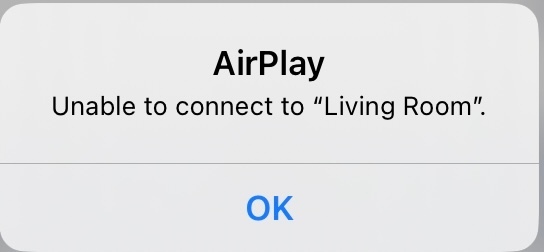
Airplay unable to connect to Play:5

Hi,


My Play:5 keeps getting the error message ‘Unable to connect to "Living Room”’.


I have:

  • Restarted all devices and tried to AirPlay again
  • Switched-off Bluetooth and tried with BT on
  • Turned off Cellular Data on iPhone but same on non-cellular iPad 
  • I am not connected to any Bluetooth devices 
  • I am connected to the same WiFi
  • Reset my network settings on my iDevices
  • Reset Network Settings
  • Disabled ‘Private Address’ in the iOS Network connection 
  • Disabled WiFi calling
  • I am on latest iOS, Sonos app and speaker firmware/software
  • Tried both hard wire (CAT 5) and Wi-Fi 
  • Rebooted the router and all Sonos speakers
  • Disabled VPN software on the sending device

I have even reset the Play:5 to factory settings and reinstalled on system which does work and I can use AirPlay for a day or two then back to ‘Unable to connect to "Living Room”’.

I can AirPlay to Apple HomePod no problem. I can use Spotify connect to Play:5 no problem. 

My submitted diagnostic confirmation number is 1692353740.

Any help gratefully received. 

This topic has been closed for further comments. You can use the search bar to find a similar topic, or create a new one by clicking Create Topic at the top of the page.
jTemplar
jTemplarAnswer
Collaborator II
September 15, 2023

Following advice from Sonos tech experts I have removed my Play:5 2nd Gen from my S1 home wide system and placed it in a room closer to the router on its own S2 system by itself and there have been no further issues with unable to connect to Airplay.

Therefore the issue appears to be resolved so thanks to all who replied here.

24 replies

jTemplar
jTemplarAuthor
Collaborator II
August 30, 2023

Thanks to all and just to keep you in the loop here’s what’s happening at the moment. 

Telephone support have got me to lock my Play:5 2nd Gen into its own little sandbox network using a mobile hotspot where it’s happily sitting all alone, save for a controller device, and despite an initial ‘Unable to connect to “Test’, whereupon I was asked to factory reset it is now content to AirPlay undisturbed by any other Sonos speaker or indeed anything at all.

I’ll keep you updated. The excitement is killing me. 🫣


jTemplar
jTemplarAuthor
Collaborator II
September 5, 2023

Status embed installed correctly

Corry P
Sonos Staff
September 13, 2023

Hi @jTemplar 

I was reviewing this thread to see if it had a resolution yet, but found your last post a little confusing.

Have you now been able to resolve this issue of being unable to connect AirPlay to your Play:5 (Gen2)?

"Common sense is the collection of prejudices acquired by age eighteen." - Albert Einstein
jTemplar
jTemplarAuthorAnswer
Collaborator II
September 15, 2023

Following advice from Sonos tech experts I have removed my Play:5 2nd Gen from my S1 home wide system and placed it in a room closer to the router on its own S2 system by itself and there have been no further issues with unable to connect to Airplay.

Therefore the issue appears to be resolved so thanks to all who replied here.