

jTemplar
Collaborator II
August 27, 2023
Answered

Airplay unable to connect to Play:5

Hi,


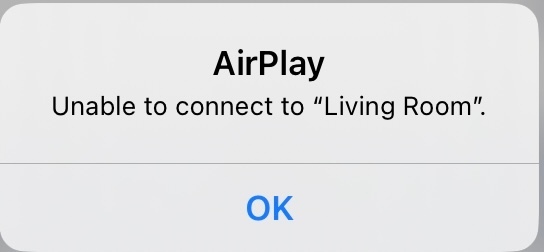
My Play:5 keeps getting the error message ‘Unable to connect to "Living Room”’.


I have:

  • Restarted all devices and tried to AirPlay again
  • Switched-off Bluetooth and tried with BT on
  • Turned off Cellular Data on iPhone but same on non-cellular iPad 
  • I am not connected to any Bluetooth devices 
  • I am connected to the same WiFi
  • Reset my network settings on my iDevices
  • Reset Network Settings
  • Disabled ‘Private Address’ in the iOS Network connection 
  • Disabled WiFi calling
  • I am on latest iOS, Sonos app and speaker firmware/software
  • Tried both hard wire (CAT 5) and Wi-Fi 
  • Rebooted the router and all Sonos speakers
  • Disabled VPN software on the sending device

I have even reset the Play:5 to factory settings and reinstalled on system which does work and I can use AirPlay for a day or two then back to ‘Unable to connect to "Living Room”’.

I can AirPlay to Apple HomePod no problem. I can use Spotify connect to Play:5 no problem. 

My submitted diagnostic confirmation number is 1692353740.

Any help gratefully received. 

This topic has been closed for further comments. You can use the search bar to find a similar topic, or create a new one by clicking Create Topic at the top of the page.
jTemplar
jTemplarAnswer
Collaborator II
September 15, 2023

Following advice from Sonos tech experts I have removed my Play:5 2nd Gen from my S1 home wide system and placed it in a room closer to the router on its own S2 system by itself and there have been no further issues with unable to connect to Airplay.

Therefore the issue appears to be resolved so thanks to all who replied here.

24 replies

Airgetlam
August 27, 2023

Which PLAY:5? Gen 1 or gen 2? If I recall correctly, the gen 1 was built long before Apple settled on a protocol for AirPlay 2, and consequently doesn’t have the necessary electronics in it. The Gen 2, on the other hand, I use on a regular basis as an AirPlay 2 target. It shows up in the AirPlay 2 list of speaker targets in my iOS devices. 

Neither the PLAY::5 gen 1 or the gen 2 are Bluetooth capable. 

Are you running these PLAY:5s under S1 or S2?

Since you’ve generated a diagnostic, which only Sonos folk can read, I’d recommend that you call Sonos Support directly to discuss it.

When you speak directly to the phone folks, they have tools at their disposal that will allow them to give you advice specific to your Sonos system and network.

Bruce
jTemplar
jTemplarAuthor
Collaborator II
August 27, 2023

Thanks for your reply, Bruce and sorry I forgot to say the Play:5 I’m talking about is the 2nd generation with AirPlay built-in. I do have a 1st gen Play:5 on the same system which I know does not have Airplay hence why I’m also using the S1 app. I have a 2nd Sonos system in a separate part of my home which uses more modern speakers and I control that using the S2 app and have no issues to date with Airplay on that setup. 
 

I’ll give the techies a call when I get a chance. 
 

Thanks again. 

Airgetlam
August 27, 2023

It’s always somewhat unfortunate when all that data is ‘hidden’ in a diagnostic, something the vast majority of this community can’t see. And Sonos support themselves don’t monitor this forum, only Sonos forum moderators. 
 

Please keep us posted as to what you find out!

Bruce
jTemplar
jTemplarAuthor
Collaborator II
August 28, 2023

Please keep us posted as to what you find out!

Hi again Bruce,

I contacted Sonos Support on chat as you recommended.

The agents I spoke to blamed wireless interference, other smart devices, location, and just about everything except Sonos.

I switched-off every other wireless, and smart device, relocated my Play:5 2nd Gen close to the router, wired via ethernet and still it kept throwing out the error message I mentioned above.

Over a period of two hours and chatting with two different agents the only ‘resolution’ they were able to offer was upgrade to S2 which I explained wouldn’t resolve my issue of wanting to use a 1st and 2nd Gen Play:5 on the same system.

Nevertheless, I went along with their request and upgrade the 2nd Gen to S2 and of course following the reset to factory settings and upgrade to S2 AirPlay worked, as I had already explained I knew it would, since I had previously factory reset.

Sonos (28/08/2023, 13:48:28): I’m happy we managed to fix the issue together! 
Sonos (28/08/2023, 13:48:31): Is there anything else that I can help you for now? 
Me (28/08/2023, 13:48:39): I’m not 
Sonos (28/08/2023, 13:49:12): Thank you for being part of our Sonos Community! 
 

Ten seconds later chat disconnected!
 

Totally dissatisfied with their response and attitude. 

Corry P
Sonos Staff
August 28, 2023

Hi @jTemplar 

Thank you for updating the thread.

I wanted to look into this interaction you had with our customer support team to see how things could have been improved, but have been unable to find your case - only one from 2019. I presume you used a different email address from the one you use here. Could you please send me your case number in a private message (click my name, then Send Message)? Thank you.

"Common sense is the collection of prejudices acquired by age eighteen." - Albert Einstein
jTemplar
jTemplarAuthor
Collaborator II
August 28, 2023

And then within the hour, while running on the recommended S2, I’m once again back to getting ‘Unable to connect to AirPlay’ error message.

So frustrating!

jTemplar
jTemplarAuthor
Collaborator II
August 28, 2023

Now that I’ve upgraded the Play:5 2nd Gen to my S2 system and, as mentioned above, it was able to connect via Airplay for about 90 minutes. 
 

I am able to connect via Airplay to my Sonos One, Ray and Symfonisk Bookshelf but still not the Play:5 2nd Gen.  


Curiouser and curiouser! 

jTemplar
jTemplarAuthor
Collaborator II
August 28, 2023

So, given that AirPlay works just fine on the Sonos speakers I listed in my previous post and based on my experience as illustrated above, it appears to me the problem is not so much additional network equipment, such as switches or access points, wireless extenders/boosters, network switches, power line adapters, iOS version, changes in network configuration, interruptions of data flow, disruption of the consistent and constant flow of data needed by Sonos, high wireless interferences levels, ethernet cable, changing from S1 to S2, distance between the speaker and the router or the need to factory reset or indeed any other smart or wireless devices such as: Wireless Smart Lights; Wi-Fi Printers ; Wireless Security Cameras; Baby Monitors; DECT Phones; or any other smart/wireless devices near the speakers all as suggested by Sonos Support but in fact . . . the Play:5 2nd Gen speaker itself!

Phew!

Ken_Griffiths
August 28, 2023

I quickly read through the thread here and may have missed it @jTemplar, but have you tried the speaker in different locations around the home too, just to see if that might make any difference. I can’t test the issue here with my own setup, as my speakers are Sonos Five and they have always worked fine around the home with Airplay. 

As you use iOS, you perhaps could also install the free ‘Discovery App’ and just see if the RAOP (remote audio output protocol) ID is listed ‘uniquely’ for your Play:5 and is correctly showing up on your local network. Its identifier should be listed as its MAC_Address@Sonos Room Name.

Example:B42C12DE34F6@Kitchen

Very occasionally the HomeKit registration as an ‘accessory’ can sometimes cause an issue - so perhaps (if relevant0 remove it from the HomeKit App first and then factory reset the speaker before testing things too.

Hope you can get it sorted. 👍

Ken_Griffiths
August 28, 2023

Here’s an example screenshot from the Discovery App where two entirely different Sonos Moves on a network each had a RAOP identifier, but were assigned the same MAC addresses, just as an example. A factory reset of both products was needed to resolve the matter.