Contributor I
May 11, 2021 12:04 AM UTC
Answered

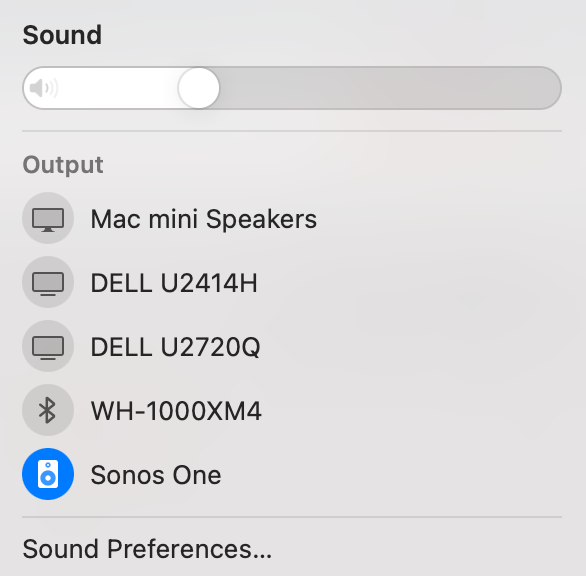
Sonos One not working on m1 Mac mini through Airplay

When connected to Sonos One using Airplay (via system sound setting), there is no sound at all. 

this works: Intel Macbook pro 

does not work: m1 Mac mini

This topic has been closed for further comments. You can use the search bar to find a similar topic, or create a new one by clicking Create Topic at the top of the page.
jstolAnswer
Lyricist I
Aug 6, 2021 3:40 PM UTC

Ok so after much testing I finally found my issue. Looks like my Mac mini ethernet port was causing the issue.

Even if I had enabled WIFI, and set the ordering it would not work. It would also not work if I set the ethernet service to inactive after it had been active and got a DHCP ip.

The only way I got it to work was to also go to advance on the ethernet service (once set to inactive) and then renew the DHCP setting so the adapter would loose the information it had. I would then be able to airplay to all my devices.

I then tested with a USB ethernet adapter, and disabled both WIFI and built in ethernet service and airplay worked fine! So something is very dodgy with my Mac M1 ethernet port.

Both my M1 and Intel based Mac minis have 10Gb ports. The intel Mac mini still works fine and can airplay. So I'm not sure if it is a 10Gb only port issue, or just some base software issue in general for M1 Mac mini built in ethernet ports.

Also on the M1 Mac mini the ethernet port (bar airplay) works fine, and I get 10Gb/s down from my servers etc.


The chances of apple actually resolving this I feel are very low.
17 replies

Airgetlam
Jun 28, 2021 6:19 AM UTC

Since it works without issue on an intel Mac, it’s a safe bet there’s some sort of difference for an M1 Mac, which would be on Apple’s side of things. 

Translate
Bruce
Lyricist I
Jul 1, 2021 4:18 PM UTC

My M1 Mac mini does not play airplay to Sonos speakers either.

That being said it neither Airplays to my fire.TV sticks or my sony TV with airplay 2 available. 

My iPhone and my intel Mac mini, and my iPads and my Mac book air & pro (all non M1 mac's) works fine.

This being said what does work is screen mirroring to my Sony TV:


Yet if I try and ONLY airplay sound (not screen mirror) to the TV it fails!


One thing I did notice was that if I had the Sonos app open and tried to airplay music to it, the Sonos app would briefly register the speaker playing the airplay music and then stop. In the console app I see tons of airplay errors:


given it happens on not just Sonos devices and it works fine on my non m1 Mac mini, you have to assume the underlying problem seems to be M1 mac's software.

Translate
Lyricist I
Jul 22, 2021 10:47 PM UTC

Sonos needs to contact Apple and get this working. Why should the users have too!! Should have bought Bose!

Translate
Contributor I
Jul 24, 2021 9:23 PM UTC

Since the Sonos works with the intel Mac, the issue is somewhere on Apple’s side of things, not Sonos’. 


How is this deemed the best answer? There is a weird cult of Sonos where everything is someone else’s problem. My Mac airplay works fine to other speakers, so that must make it Sonos fault? Really I just want a solution.

Translate
Contributor I
Jul 24, 2021 9:34 PM UTC

Here is a link to an answer that is actually useful:

I restarted the Mac and Roam (weird) and was able to get audio working.

Translate
Lyricist I
Jul 29, 2021 5:39 AM UTC

My sonos one could work well after restarting my M1 Mac mini (2020). Once my M1 Mac mini went into sleep mode and then woke-up, the connection between  Mac mini and Sonos one failed.


Translate
jstolAnswer
Lyricist I
Aug 6, 2021 3:40 PM UTC

Ok so after much testing I finally found my issue. Looks like my Mac mini ethernet port was causing the issue.

Even if I had enabled WIFI, and set the ordering it would not work. It would also not work if I set the ethernet service to inactive after it had been active and got a DHCP ip.

The only way I got it to work was to also go to advance on the ethernet service (once set to inactive) and then renew the DHCP setting so the adapter would loose the information it had. I would then be able to airplay to all my devices.

I then tested with a USB ethernet adapter, and disabled both WIFI and built in ethernet service and airplay worked fine! So something is very dodgy with my Mac M1 ethernet port.

Both my M1 and Intel based Mac minis have 10Gb ports. The intel Mac mini still works fine and can airplay. So I'm not sure if it is a 10Gb only port issue, or just some base software issue in general for M1 Mac mini built in ethernet ports.

Also on the M1 Mac mini the ethernet port (bar airplay) works fine, and I get 10Gb/s down from my servers etc.


The chances of apple actually resolving this I feel are very low.

Translate