

SonnyJ1987
Contributor I
April 25, 2024
Answered

Sonos iOS app groups

Hi,

Today I have added an Sonos Era 100 to my setup at home, I already had a Sonos One.

Now I’ve read and googled until I was crossed eyed but for the love of my I just don’t seem te be able to play everywhere.

I’ve found a manual stating I should go to the System and Then the box on the right where i can select “everywhere” or create a new group but I just don’t get that menu option.

Anyone experienced that before? Screenshot below :-) 
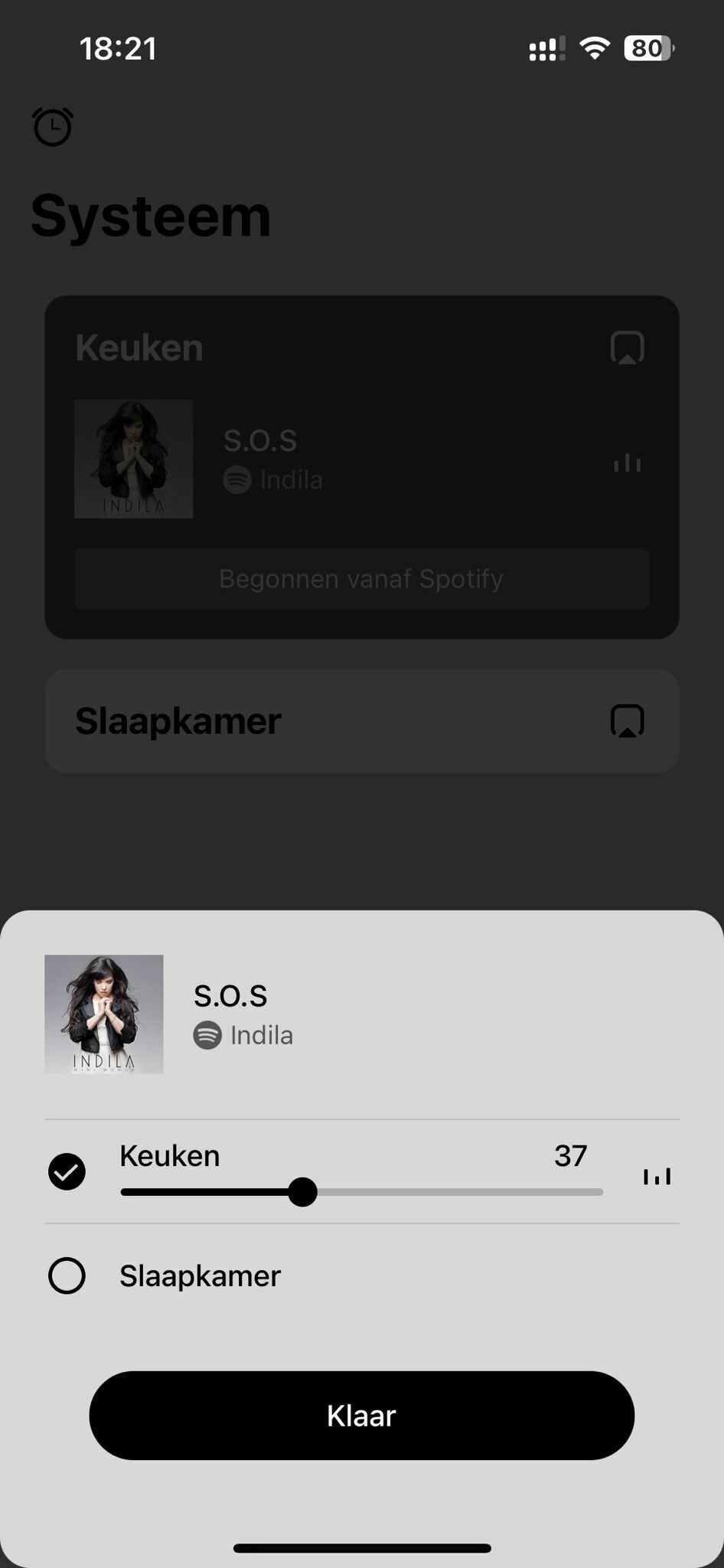
p.s. I just got the message there’s a new update coming may 7th, should I just wait that one out?


Thanks everyone!

Cheers!
Sonny

This topic has been closed for further comments. You can use the search bar to find a similar topic, or create a new one by clicking Create Topic at the top of the page.
nik9669aAnswer
Senior Virtuoso
April 25, 2024

When you only have two rooms, there’s no “everywhere”. Just select the other room - click the selection circle to the left of Slaapkamer. 

2 replies

nik9669aAnswer
Senior Virtuoso
April 25, 2024

When you only have two rooms, there’s no “everywhere”. Just select the other room - click the selection circle to the left of Slaapkamer. 

SonnyJ1987
Contributor I
April 26, 2024

Hi Nik,

Thanks, I wasn’t sure about this so I figured I was doing something wrong.
But now that you mention it, it makes perfectly sense..


Good excuse to the Mrs. to buy more Sonos 😃