
Contributor III
March 13, 2018
Answered

Improve Boost network

I have a Boost network (all components WP:0). A Bridge is hardwired, and there are 4 ZP80s.

One ZP80, named "Roving", is outside, in an outbuilding. Sometimes, it gets poor signal and plays music in a choppy or pulsing way.

Here is my network matrix.
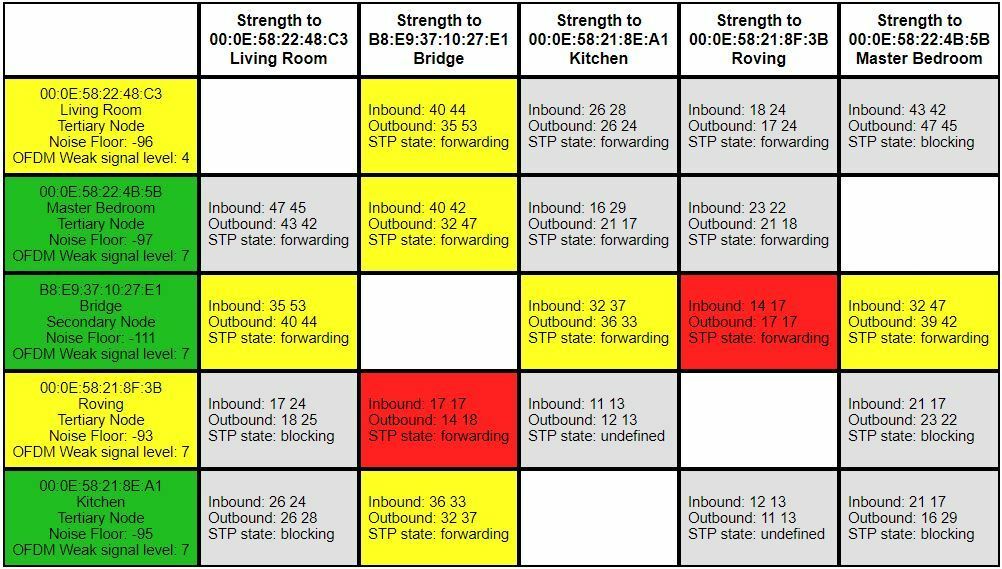


Is there anything I can do to get better signal to the Roving ZP80. If I buy another bridge and put it in an intermediate location, is this likely to make things better?

This topic has been closed for further comments. You can use the search bar to find a similar topic, or create a new one by clicking Create Topic at the top of the page.
ratty
rattyAnswer
March 14, 2018
Can I test this out by moving one of my ZP80s (e.g. Kitchen) to where I would put the added Bridge (or Boost)?
Yes, try it.

How should I see the matrix change if it does work? Is there any up-to-date doc on how to read the matrix? I've searched the web and only found stuff that seems to be old because it mentions terms that don't appear to be used in the matrix at this time.

Give it a few minutes to settle down. You should see Roving make an active connection to the ZP80 (and vice versa), rather than directly to the wired BRIDGE. Hopefully the matrix cells to/from the ZP80 will be yellow..

There's no official doc on the matrix. It's part of the internal diagnostics. The colours in the left column reflect ambient noise conditions. The colours in the body denote active (not blocked) wireless tunnels in the mesh.

13 replies

ratty
rattyAnswer
March 14, 2018
Can I test this out by moving one of my ZP80s (e.g. Kitchen) to where I would put the added Bridge (or Boost)?
Yes, try it.

How should I see the matrix change if it does work? Is there any up-to-date doc on how to read the matrix? I've searched the web and only found stuff that seems to be old because it mentions terms that don't appear to be used in the matrix at this time.

Give it a few minutes to settle down. You should see Roving make an active connection to the ZP80 (and vice versa), rather than directly to the wired BRIDGE. Hopefully the matrix cells to/from the ZP80 will be yellow..

There's no official doc on the matrix. It's part of the internal diagnostics. The colours in the left column reflect ambient noise conditions. The colours in the body denote active (not blocked) wireless tunnels in the mesh.
Contributor III
March 14, 2018
I moved Kitchen to the proposed location of a new Bridge, and after a good while now, in party mode, the matrix is this:


Am I wrong in interpreting it to mean that Roving is connected via Living Room, and Kitchen is connected via Master Bedroom? So Roving is not connecting via Kitchen, as hoped.
ratty
March 14, 2018
You're correct. Kitchen has a lousy connection to Bridge, which is why Roving is preferring Living Room.

For Roving to go via Kitchen would mean three wireless hops: Roving -> Kitchen -> Master Bedroom -> Bridge. This is more 'expensive' than two hops via Living Room. STP works to minimise the cumulative path cost back to the root (or wired secondary in this case: Bridge).