Chromatic Producer I
February 26, 2020
Answered

How to identify Sonos speaker's IP address?

I just linked Emby with Alexa.  Unfortunately Emby only knows the Sonos speakers by their IP addresses, not their names.  I can see the IP addresses assigned to Sonos devices in my router, but I’m unable to associate them with the room, e.g., sun room, living room, etc.

How can I see the IP address of the Sonos speakers and associate them with the room?

    This topic has been closed for further comments. You can use the search bar to find a similar topic, or create a new one by clicking Create Topic at the top of the page.
    Smilja
    SmiljaAnswer
    February 26, 2020

    Look in “about my system” under Setting>System. 


    Under Setting>System where?  Windows doesn't have that setting and neither does Sonos.


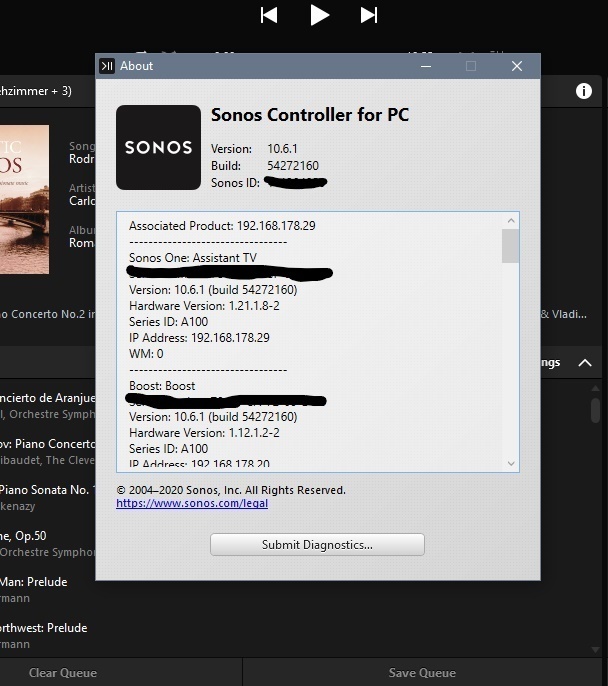
    In the PC Controller under “Help”.


    »And the world is like an apple whirling silently in space, Like the circles that you find in the windmills of your mind.« (›Windmills Of Your Mind‹ [1967]. Music by Michel Legrand ; English lyrics written by Alan & Marilyn Bergman)

    7 replies

    Airgetlam
    February 26, 2020

    Look in “about my system” under Setting>System in the Sonos mobile app. 

    Bruce
    Airgetlam
    February 26, 2020

    Note, unless you’ve reserved these in your router’s DHCP table, it’s possible, although unlikely, that these could change. 

    Bruce
    Chromatic Producer I
    February 26, 2020

    Look in “about my system” under Setting>System. 


    Under Setting>System where?  Windows doesn't have that setting and neither does Sonos.

    Airgetlam
    February 26, 2020

    Use your mobile device that you used to set up the system, not the windows controller. You probably could open up the DHCP table on your router and see the same information. 

    Bruce
    controlav
    Lead Maestro
    February 26, 2020

    Windows will also show the players under “This PC” in Explorer


    Author of the leading independent Sonos apps for Android, MacOS, iOS, Windows and Xbox.
    Smilja
    SmiljaAnswer
    February 26, 2020

    Look in “about my system” under Setting>System. 


    Under Setting>System where?  Windows doesn't have that setting and neither does Sonos.


    In the PC Controller under “Help”.


    »And the world is like an apple whirling silently in space, Like the circles that you find in the windmills of your mind.« (›Windmills Of Your Mind‹ [1967]. Music by Michel Legrand ; English lyrics written by Alan & Marilyn Bergman)
    Chromatic Producer I
    February 27, 2020

    Look in “about my system” under Setting>System. 


    Under Setting>System where?  Windows doesn't have that setting and neither does Sonos.


    In the PC Controller under “Help”.


    That's it!  Thank you!  Now if only Emby could recognize room names.  Off to that forum!