
2 systems on one app

  • January 1, 2026
  • 11 replies
  • 77 views

Forum|alt.badge.img+1

Evening all. 

My father in law has an existing set up in his house on a Vodafone WiFi. It has a playbar and a play 3. All working harmoniously. 


He now has a play 1 in his workshop and garage a ways down the property. The house WiFi does not stretch to these outbuildings.


He has run a cat cable from the router down to the garage underground into the workshop. And it is connected to a new WiFi extender type thing that emits its own WiFi signal. 


The aim, is to have a separate system from this house WiFi on this "new" WiFi signal. 

My belief is that if he resets the Sonos app, and then creates a new system, he can add his play 1 on this new WiFi network and operate it as a separate system. Ans then switch between the 2 systems once all set up . Is this a good line of thought ? 


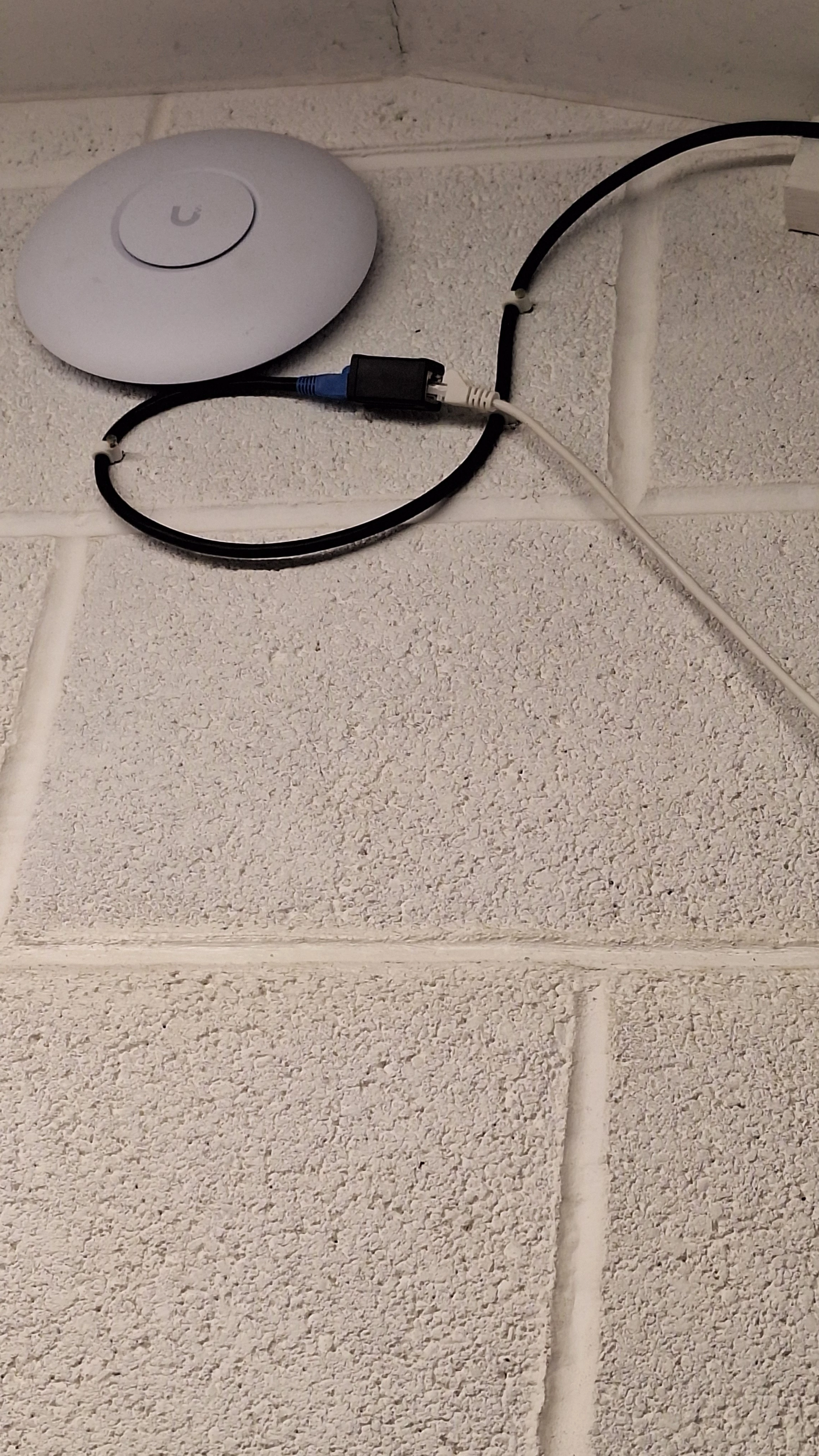
Attached picture of the device at the other end of his cat 5. 


In that photo he has another lead plugged into the play1. Is it better to hard patch or set up wirelessly.

Cheers all  
 

11 replies

buzz
  • January 1, 2026

For the moment don’t Factory Reset anything. We need more information on the intent of this workshop WiFi and SONOS system.


buzz
  • January 1, 2026

Is he also using UBIQUITI WiFi in the main house? Is there a security need for the workshop to be separate WiFi and/or SONOS? 

What sort of lightning protection is in use? Are there any other network devices in the workshop besides SONOS?

Is this PLAY:1 a used unit that had been installed elsewhere?


Stanley_4
  • Lead Maestro
  • January 1, 2026

I'd really lean to having all on the same wifi and LAN, just set the new AP up with the same SSID settings as the ones in the house and you can then roam between them without having to fiddle your controller connection or deal with two systems on a single controller.

You can even set the new AP in the house and make sure it is working before taking it to the garage.


Forum|alt.badge.img+1
  • Author
  • Avid Contributor I
  • January 1, 2026

Apologies we are new to this. What is an AP? And how does one configure such things. This is not a mesh network , purely an extender


buzz
  • January 1, 2026

The UBIQUITI is an AP (Access Point). That UBIQIUTI device is typically not used by new-bees. Was the main system originally setup by a pro or very experienced person? What model is that UBIQUITI? Is it currently operational?


Forum|alt.badge.img+1
  • Author
  • Avid Contributor I
  • January 1, 2026

Nope it was bought by my father in law under his own research without my knowledge. I did mention to him that using WiFi extenders is risky with Sonos . It's a lite 7 


Stanley_4
  • Lead Maestro
  • January 1, 2026

It is not an extender. It is a highly advanced and complicated (compared to ones designed for home use)  access point / AP and can be wired to your home network to provide a variety of services.

If the rest of your network is not Ubiquity you are in for a steep learning curve to get it operational. Start on the Ubiquity site and unless you have a Cloud Key device or that function on another Ubiquity device, download the Ubiquity App. That will give you a limited ability to install and set it up. If you have the Cloud Key you can use it to fully configure the AP and add it to your network. I believe it is also possible to do this over ssh in a text terminal, be prepared for tears and hair tearing if that goes for you as it did for me.

I love my Ubiquity gear for all the advanced capabilities, but I'd sure never give mom one!


buzz
  • January 1, 2026

Again, why do you want a separate system in the workshop? Is there a security concern? Most people would want the workshop to be part of the house system. This will result in the easiest setup and day to day operation. 


Forum|alt.badge.img+1
  • Author
  • Avid Contributor I
  • January 1, 2026

Thanks all. I think we thought it might be easier to set up a standalone rather than integrate. But happy for pointers. Will probably send  for a professional after reading this ! 


Stanley_4
  • Lead Maestro
  • January 1, 2026

I'd seriously consider getting a (to a non-networking specialist) user friendly home unit. There are several quality brands that offer a out-of-the-box mesh (access points not extenders) that will prove to be less frustrating long term.

If you are into networking getting a pure router (no integrated Wi-Fi) and using two or more of the Ubiquity APs would give you a great system. An Ubiquity router and switches if needed make for a very capable and well integrated system that can  expand to security cameras and a lot of other functions.


buzz
  • January 2, 2026

I assume that the PLAY:1 has been used elsewhere. If so, Factory Reset the unit before attempting to install it. Don’t Factory Reset the other SONOS units.

You could have the PLAY:1 operating within the hour if you wire it to the network, then add it to the system. Take care with this step, don’t accidentally create a new system or your workload will explode. Do this while it’s in the house. Once you have the PLAY:1 operational, you can take it to the workshop, wire it to your network connection, and temporarily ignore the UBIQUITY.

Surprise!!! If your workshop WiFi is too weak, you will not be able to use a wireless controller in the workshop to operate the PLAY:1 until you deal with the workshop WiFi, however, you could select music while the wireless controller is in the house and control a few functions such as Play/Pause/Volume using the PLAY:1 buttons. You could also wire a computer to the workshop network connection and use this to control SONOS. Note that a computer cannot be used to setup a system.

Further note: I haven’t tried this, but it may be possible to operate the system (including the wired PLAY:1 in the workshop) using the Web Controller over the cell network.