
Contributor I
November 5, 2018

HomeKit & Sonos One - unable to add

Hi all,

I just bought Sonos One and it works perfectly. Did add Apple Music service, works with Air Play, ... So far, so good.

Then I tried to add it to my Home via ...

  • Add Accessory
  • Don't Have a Code or Can't Scan?

... but my device didn't appear there even after couple of minutes.

I was searching this forum and I've found that I have to disable Group Non-AirPlay Speakers. The problem is that this option is there (control app), but it's greyed out (can't disable it). Trying to disable it in the Settings - AirPlay.
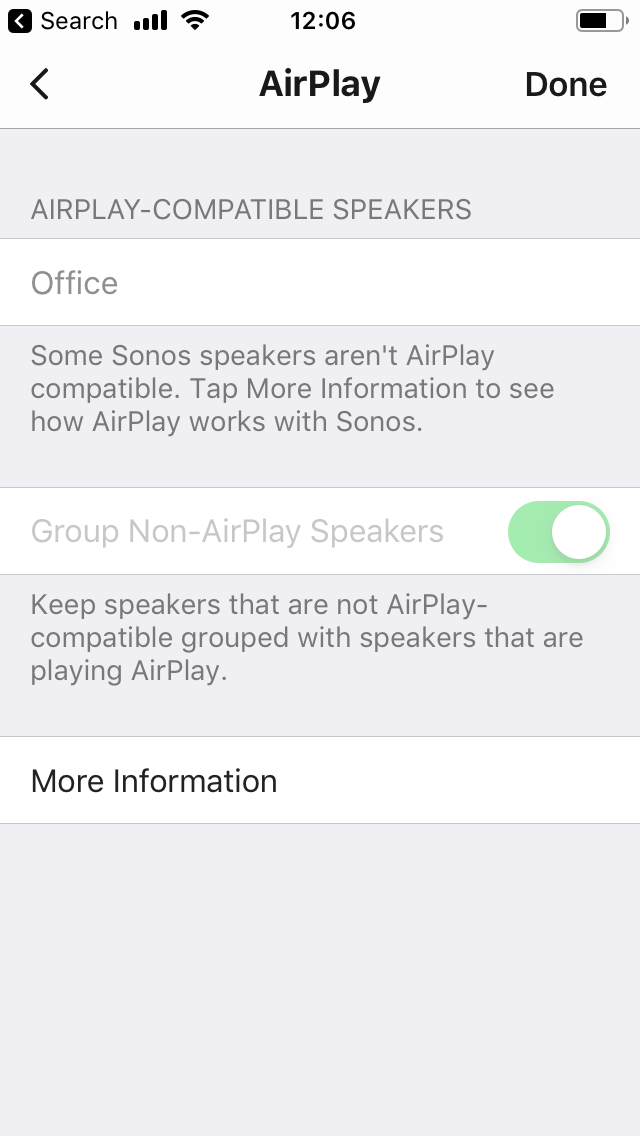


Sonos Control app version 9.2 (build 46357271), Sonos One speaker 9.2 (build 46357250), iOS 12.1.

How can I disable the Group Non-AirPlay Speakers to make it working with HomeKit?

Thanks,
Robert

P.S. I tried to disable Home in iOS, reboot Sonos One, etc. Nothing helps. This is the only thing that doesn't work for me. Rest works like a charm.
This topic has been closed for further comments. You can use the search bar to find a similar topic, or create a new one by clicking Create Topic at the top of the page.

20 replies

Liron
Avid Contributor I
November 8, 2018
Hi, just figured to throw in my two cents since I bought a One and had the exact same issue you're describing. I don't know if you've done this already, but all I needed to do was to reboot my phone. Home was able to detect the One after that.
Lyricist I
November 25, 2018
I had the same issue with Sonos AMP. I rebooted my iPad Air 2 and was able to detect the AMP and add it to Home via add accessory. I previously shut down WiFi on the AMP so it wasn't a WiFi issue.
Lyricist I
December 28, 2018
Wow, I have to say I am impressed Ken_Griffiths. I thought there was NO way the problem could be resolved by pulling out my old iPhone 6s to add the Beam to the home app. It couldn't be possible that we really had to use the original device that I created the Home with. Tell me it ain't so. But, sure enough, I tried everything else so I pull out the old phone and the Beam showed up immediately when I tried to add it as a new accessory. So, it is either that Ken is correct and it requires the original device, OR because the new phone is on the 5ghz band, and the old phone is on the 2.4. But, I don't feel like turning off the 5ghz to find out if that was the issue. Either way, at least I can add the Beam now. Thanks again Ken_Griffiths!
Contributor I
February 9, 2019
Hi, just figured to throw in my two cents since I bought a One and had the exact same issue you're describing. I don't know if you've done this already, but all I needed to do was to reboot my phone. Home was able to detect the One after that.

I just wanted to add in that a reboot of my iPhone XS and I was able to detect and add my Sonos one. Sometimes you miss the obvious, thanks for the tip Liron :8
Lyricist I
July 21, 2019
I have a similar question. I have a playbase which shows up in my HomeKit. But I also have 2 other sonos play 1’s in my house that won’t show up in the Home app. Does it need to be there or does it default under the playbase? Ultimately, I want to tell Siri to play music just in my kitchen or just on my deck. It works currently with my playbase. Everything is up to date, I’ve restarted my XS Max. Everything works perfect except for this.
Ken_Griffiths
July 21, 2019
I have a similar question. I have a playbase which shows up in my HomeKit. But I also have 2 other sonos play 1’s in my house that won’t show up in the Home app. Does it need to be there or does it default under the playbase? Ultimately, I want to tell Siri to play music just in my kitchen or just on my deck. It works currently with my playbase. Everything is up to date, I’ve restarted my XS Max. Everything works perfect except for this.
Only the Sonos devices that are AirPlay-2 capable will show up in Apple HomeKit as accessories. Currently those devices are:
  • Sonos PlayBase
  • Sonos Beam
  • Sonos One (gen1 or gen2) (when not used as rear HT surround)
  • Sonos 5 (gen2)
  • Sonos Amp (when not used as rear HT surround)
Lyricist I
July 21, 2019
Thanks for the tip on restarting the phone. That solved the problem with a new Sonos One that wasn’t showing in the Home app.
Lyricist I
August 2, 2019
After an hour and a half searching for clues in the community I found a solution that worked for me. First, to get the speaker to appear on the list of available devices in the homekit app, I started playing some music through AirPlay. Once I could press on that, an error message kept popping up saying it was unable to add the device to homekit. So I used one of the simplest tips that kept popping up in the community: turn your iPhone off and on again. I couldn’t believe that would be the solution but it worked.
Contributor I
October 20, 2019

It worked for me after rebooting my iPhone. This iPhone was NOT used for the initial setup of HomeKit.

Lyricist I
December 11, 2019

Rebooting my phone worked for me, thanks!