
Ryan S
Retired Sonos Staff
May 6, 2020

Meet Arc, Brilliant sound for your TV
Related content:Hardware
  • May 6, 2020
  • 550 replies
  • 51464 views
Meet Arc, Brilliant sound for your TV

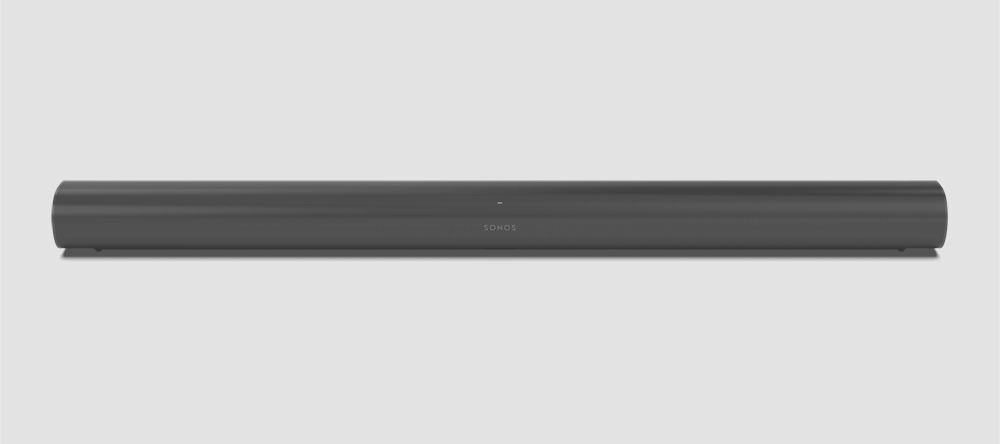
Available on June 10th, Sonos Arc is the premium smart soundbar for TV, movies, music, gaming, and more. Arc brings brilliant surround sound in 3D, along with immersive music, elegant design, and voice control built in. Experience shows, films, and games with the precise and immersive sound of Dolby Atmos, and enjoy incredible sound streaming music, podcasts, and audiobooks. 

bYRNZl3l6ouXNXqPq--kJwL9X4Hsv5-iWNYinpacIU-5-FY3CgN6-7PcbJzxeMMbhqV40WebxzfCCVxoPgDObYdrZGNH_A0jIsJW9i0KwiWmaDBvKcs7p5Yh-sOBZcHkximkoWu6

Extraordinary sound meets elegant design

Eleven high-performance drivers, including custom elliptical woofers and precisely angled side tweeters, produce vivid detail and impressive bass for home cinema and music streaming. Arc's upward-firing drivers create a multi-dimensional soundstage that moves around you, rendering every whisper and explosion with dramatic clarity, detail, and depth. 


With its elongated shape, soft profile, and seamless façade, Arc discreetly mounts to the wall or sits beneath the TV without pulling focus. When mounted, a magnetic sensor detects the orientation and smartly adjusts the EQ to temper bass resonance.


Arc’s sound was specially tuned with the help of Oscar-winning sound engineers to emphasize the human voice so you can always follow the story. The advanced processing creates five phased-array channels that masterfully deliver sound to your ears from all directions at the exact right moment. Use enhanced Trueplay tuning technology to optimize the sound for the unique acoustics of your room, even calibrating the height channels for precise localization. 


DQWhTCGCPaVFcDCO4zOsuR-17Tzj5o4vyWB8BxrHc4zOUbI7yrY_onZ6gcY9jIM62ejbLPlCWNndBrda3lKOZe5UUZvmbdr-z98sFkpGtoghniW9hJiRdIEV1CLNri7K-Cnwj4o0


You can also make a surround sound setup with a pair of our surround capable Sonos speakers, such as a pair of Sonos Ones, or amplify it all with a Sub for an extraordinary surround experience. 


Some more details on Sonos Arc:

  • Simple to set-up. Plug Arc into power and then connect it to your TV using the HDMI-ARC cord. Bring your phone up to Arc to automatically pair and securely transfer WiFi credentials using near-field communication (NFC).

  • HDMI eARC. Increased bandwidth supports high-quality audio and has lip-sync compensation built in.

  • Dolby Atmos. Play Atmos and Atmos-encoded audio to play from your collection and favorite services through your TV’s HDMI ARC or eARC connection.

  • Ambient light sensor. Arc detects how bright the room is and automatically adjusts the brightness of the LEDs to be visible but not distracting.

  • Automatic remote sync. Arc connects to your TV's HDMI eARC port with a single cable and automatically syncs with your remote.

  • Control your way. Control Sonos Arc with your voice, the Sonos app, your existing TV remote, your favorite music service’s app, or AirPlay 2. Capacitive touch controls for play, pause, skip tracks, adjust the volume, and group rooms just by tapping or swiping the top of the soundbar. LED indicates status, mute status and voice feedback.

  • Smart voice recognition. A four far-field microphone array used for advanced beamforming and multichannel echo cancellation makes sure you’re heard, even when the music is blasting, even when playing in immersive surround sound. For privacy, turn the microphone off with a tap. The LED light is hardwired and will always indicate if the microphones are enabled or if your voice assistant of choice isn't listening.

  • Optimized for your listening. From within the Sonos App, tap Speech Enhancement so you never miss a word, or Night Sound to amplify quiet noises and reduce loud ones so you can enjoy late night TV without waking the entire house.

  • Tune with Trueplay. Trueplay puts the speaker-tuning capability of the pros in the palm of your hands, adapting and optimising the sound of the speaker to the unique acoustics of the room. iOS device required.

  • Low profile and compact size. The dimensions are 3.4 x 45 x 4.5 inches (87 x 1141.7 x 115.7 mm) H x W x D and Arc weighs 13.78 lbs (6.25 kg).

Pre-order today on Sonos.com in stunning black with matte finish or white with matte finish for $799 US (€899 EUR, €799).

We’ve announced details for the Sonos Five and new Sonos Sub. You can also check out our blog for some great stories.

    This topic has been closed for further comments. You can use the search bar to find a similar topic, or create a new one by clicking Create Topic at the top of the page.

    550 replies

    Contributor I
    May 12, 2020

    don't know if this was already answered. apologies if had. can the arc device provide Atmos while using an apple 4k tv if running thru and ARC only HDMI in port or does it have to be eARC. heard something about the apple device only allowing high band with to give ATMOS. or does the standard ARC work around this somehow.. I hope..

    Ryan S
    Ryan SAuthor
    Retired Sonos Staff
    May 12, 2020

    Hi everyone, I will be replacing my Beam with the Arc in our family room.  I have the Beam power cord fished through the wall adjacent to the fire place and I am hoping the Arc uses the same power cord so I don’t have to run that through the wall again?  Thanks!

    Similar question, can I repurpose the power cord from my Playbar or do I need to run a new cable?


    Thanks!

    @dssss and @lovetractor, the Playbar uses a different power cable than the Beam and Arc, but the Beam power cable I believe is the same one. The connection looks to be the same but I’ll check with the team on the rating and will let you know if it’s different in some meaningful way.


    don't know if this was already answered. apologies if had. can the arc device provide Atmos while using an apple 4k tv if running thru and ARC only HDMI in port or does it have to be eARC. heard something about the apple device only allowing high band with to give ATMOS. or does the standard ARC work around this somehow.. I hope..

    There’s a lot of discussion on that topic in this thread and a few others. Short answer, is depending on the TV’s capabilities you’ll get a compressed version over Dolby Digital Plus which has Atmos support. Apple claims that they use Dolby MAT for Atmos, which requires eARC. But some TVs will convert that audio into Dolby Digital Plus, including Atmos.


    Mark good posts by pressing the like button, and select the best answer on questions you've asked to help others find solutions.
    Trending Lyricist I
    May 12, 2020

    I’m pretty much in the same situation as Guinans, except for an older Pioneer KURO TV and I was thinking about setting my Oppo player and my Apple TV the same way...

    To me, it’s a real shame the lacking of another input HDMI port and the choice to limit to an eArc the opportunity to take advantage of Dolby Atmos.

    Why Sonos, why??? 

    :cry:

    Well I hooked my Oppo to the TV ARC and selected HDMI/Arc input on the Oppo and it seems to be picking up audio from the TV (can alter the volume via the Oppo).

    Will test out the secondary AudioHDMI out when my Arc comes by connecting it to this and let you know if it works - looks promising! ie. Oppo will sit between the TV and Arc.

    It looks like I might be able to use the Oppo as a mini switcher and HDMI audio splitter but will test it out.

    Contributor I
    May 12, 2020

    Well the other question is coming up is will the Sonos Arc really receive the HDMI direct like those soundbars …. there seems to be inconsistent answers.   It would take someone plugging and HDMI direct into a Beam to see if really will or not.

    But assuming then it doesn’t work - a lot of switches already will extract HDMI ARC so just a matter of time before you can get a switch to do the eARC to the Sonos Arc (mouthful there).

    The example Switch had 4 inputs and 2 ouputs (of which one currently can be ARC …. just need updated version that will also do eARC)…. at about $50 a lot cheaper then replacing TV.

    A lot of hypotheticals right now - I’m sure a lot of creative solutions coming to get eARC ability for people on many things not just Sonos.   So a TV not having eARC shouldn’t be the biggest concern.


    I spent a lot of time looking a few months ago and could not find any HDMI switches that would *generate* ARC output (use-case is a projector that doesn’t support ARC). Many HDMI switches will *accept* ARC input from one off their output ports (since ARC goes backward compared to normal input/output designations) and send that audio as the audio channel of normal HDMI and/or send the ARC channel back to active inputs (say a receiver). But none of the normal ones I found would create ARC from a normal HDMI audio input which is what the Beam requires when you don’t have a TV that will generate the ARC signal. The Beam won’t play audio from a normal HDMI signal - as others have noted it acts as a source device that outputs video and consumes audio over ARC only from what I tested.

    I did find exactly one device that would generate an ARC signal either from a normal HDMI signal or from an optical input: https://www.sct.com.tw/ARC01.html The key is the embed functionality (as extract is common). There is no US distributor so I had to order direct from the manufacturer. The device works as advertised with my Beam. My original goal was to get HDMI-CEC working; I have not succeeded at that yet - but it may have to do with other issues in the HDMI switches I have connected. I haven’t diagnosed those yet to see if HDMI-CEC + ARC is viable for the beam with a non-ARC projector.

    The ARC01 doesn’t support eHDMI; but I assume a similar device with eARC support would be required to use the Sonos Arc with a non-ARC TV/projector. It also doesn’t look like this functionality is common or widely-sought after given the lack of support in normal HDMI switches. It is too bad Sonos is sticking with a pure-eARC/ARC strategy unless they are willing to also produce useful converters. Love the speakers but dancing around limitations like ARC, lack of DTS support, etc is unfortunate when comparing to other options at this price point.


    I can’t even describe how happy I am to have found this post as I too have been looking far and wide after a device able to embed the audio extracted back to ARC on HDMI input to be pushed back to the Sonos Arc’s HDMI output. Finally something useful!


    I’m just curious on how it works for you and how you’ve hooked it all up as I’m not completely satisfied with the information found in the data sheet. The sheet states that you can achieve ARC signal on the device’s HDMI input by connecting the optical/coaxial out of your tv on the device’s output side. And then of course connecting the Arc or Beam to the device’s HDMI input would push back the audio signal to the soundbar. But, to gain higher audio quality one would ideally like to split a high quality HDMI signal and feed one to the projector for video and the other to the ARC01. So, as you have tried the device, is it really able to extract audio from a full HDMI signal, connected on the output side, and embed it as ARC on the input side, enabling dd+ for example?


    If this is how you have it set up, can I also ask what kind of splitter you use for the source? Curious if it is sufficient to stack the ARC01 after a simple HDMI 1:2 splitter or if one should go for the HDfury AVR-key. Or something like that.


    Thank you for obviously being a google guru!

    I found a site selling the ARC01 - but given i haven’t received my Arc yet, i’ll probably give it a try only in June. 

    https://www.globalmediapro.com/dp/A2LQ51/Globalmediapro-SHE-ARC01-HDMI-ARC-Audio-Return-Channel-Digital-Audio-Converter/


    Trending Lyricist I
    May 12, 2020

    I’m pretty much in the same situation as Guinans, except for an older Pioneer KURO TV and I was thinking about setting my Oppo player and my Apple TV the same way...

    To me, it’s a real shame the lacking of another input HDMI port and the choice to limit to an eArc the opportunity to take advantage of Dolby Atmos.

    Why Sonos, why??? 

    :cry:

    Well I hooked my Oppo to the TV ARC and selected HDMI/Arc input on the Oppo and it seems to be picking up audio from the TV (can alter the volume via the Oppo).

    Will test out the secondary AudioHDMI out when my Arc comes by connecting it to this and let you know if it works - looks promising! ie. Oppo will sit between the TV and Arc.

    It looks like I might be able to use the Oppo as a mini switcher and HDMI audio splitter but will test it out.

    I think the Oppo second audio only hdmi is 1.4 which is not enough bandwidth to carry Dolby atmos. 

    Trending Lyricist I
    May 12, 2020

    I’m pretty much in the same situation as Guinans, except for an older Pioneer KURO TV and I was thinking about setting my Oppo player and my Apple TV the same way...

    To me, it’s a real shame the lacking of another input HDMI port and the choice to limit to an eArc the opportunity to take advantage of Dolby Atmos.

    Why Sonos, why??? 

    :cry:

    Well I hooked my Oppo to the TV ARC and selected HDMI/Arc input on the Oppo and it seems to be picking up audio from the TV (can alter the volume via the Oppo).

    Will test out the secondary AudioHDMI out when my Arc comes by connecting it to this and let you know if it works - looks promising! ie. Oppo will sit between the TV and Arc.

    It looks like I might be able to use the Oppo as a mini switcher and HDMI audio splitter but will test it out.

    I think the Oppo second audio only hdmi is 1.4 which is not enough bandwidth to carry Dolby atmos. 

    Lot’s of places say HDMI 1.4 works with Atmos (but maybe compressed DD+ only) so will let you know.

    Lyricist III
    May 12, 2020

    Well the other question is coming up is will the Sonos Arc really receive the HDMI direct like those soundbars …. there seems to be inconsistent answers.   It would take someone plugging and HDMI direct into a Beam to see if really will or not.

    But assuming then it doesn’t work - a lot of switches already will extract HDMI ARC so just a matter of time before you can get a switch to do the eARC to the Sonos Arc (mouthful there).

    The example Switch had 4 inputs and 2 ouputs (of which one currently can be ARC …. just need updated version that will also do eARC)…. at about $50 a lot cheaper then replacing TV.

    A lot of hypotheticals right now - I’m sure a lot of creative solutions coming to get eARC ability for people on many things not just Sonos.   So a TV not having eARC shouldn’t be the biggest concern.


    I spent a lot of time looking a few months ago and could not find any HDMI switches that would *generate* ARC output (use-case is a projector that doesn’t support ARC). Many HDMI switches will *accept* ARC input from one off their output ports (since ARC goes backward compared to normal input/output designations) and send that audio as the audio channel of normal HDMI and/or send the ARC channel back to active inputs (say a receiver). But none of the normal ones I found would create ARC from a normal HDMI audio input which is what the Beam requires when you don’t have a TV that will generate the ARC signal. The Beam won’t play audio from a normal HDMI signal - as others have noted it acts as a source device that outputs video and consumes audio over ARC only from what I tested.

    I did find exactly one device that would generate an ARC signal either from a normal HDMI signal or from an optical input: https://www.sct.com.tw/ARC01.html The key is the embed functionality (as extract is common). There is no US distributor so I had to order direct from the manufacturer. The device works as advertised with my Beam. My original goal was to get HDMI-CEC working; I have not succeeded at that yet - but it may have to do with other issues in the HDMI switches I have connected. I haven’t diagnosed those yet to see if HDMI-CEC + ARC is viable for the beam with a non-ARC projector.

    The ARC01 doesn’t support eHDMI; but I assume a similar device with eARC support would be required to use the Sonos Arc with a non-ARC TV/projector. It also doesn’t look like this functionality is common or widely-sought after given the lack of support in normal HDMI switches. It is too bad Sonos is sticking with a pure-eARC/ARC strategy unless they are willing to also produce useful converters. Love the speakers but dancing around limitations like ARC, lack of DTS support, etc is unfortunate when comparing to other options at this price point.


    I can’t even describe how happy I am to have found this post as I too have been looking far and wide after a device able to embed the audio extracted back to ARC on HDMI input to be pushed back to the Sonos Arc’s HDMI output. Finally something useful!


    I’m just curious on how it works for you and how you’ve hooked it all up as I’m not completely satisfied with the information found in the data sheet. The sheet states that you can achieve ARC signal on the device’s HDMI input by connecting the optical/coaxial out of your tv on the device’s output side. And then of course connecting the Arc or Beam to the device’s HDMI input would push back the audio signal to the soundbar. But, to gain higher audio quality one would ideally like to split a high quality HDMI signal and feed one to the projector for video and the other to the ARC01. So, as you have tried the device, is it really able to extract audio from a full HDMI signal, connected on the output side, and embed it as ARC on the input side, enabling dd+ for example?


    If this is how you have it set up, can I also ask what kind of splitter you use for the source? Curious if it is sufficient to stack the ARC01 after a simple HDMI 1:2 splitter or if one should go for the HDfury AVR-key. Or something like that.


    Thank you for obviously being a google guru!

    I found a site selling the ARC01 - but given i haven’t received my Arc yet, i’ll probably give it a try only in June. 

    https://www.globalmediapro.com/dp/A2LQ51/Globalmediapro-SHE-ARC01-HDMI-ARC-Audio-Return-Channel-Digital-Audio-Converter/


    Interesting; can be ordered directly now. That’s high international shipping to US though. Manufacturer sold it to me for $42 + $40 shipping a few months back. Had to e-mail them then send back a purchase request form via e-mail. The device definitely won’t do eARC; just ARC. I wrote to them and mentioned likely interest in such a device.

    Lyricist III
    May 12, 2020

    …


    I can’t even describe how happy I am to have found this post as I too have been looking far and wide after a device able to embed the audio extracted back to ARC on HDMI input to be pushed back to the Sonos Arc’s HDMI output. Finally something useful!


    I’m just curious on how it works for you and how you’ve hooked it all up as I’m not completely satisfied with the information found in the data sheet. The sheet states that you can achieve ARC signal on the device’s HDMI input by connecting the optical/coaxial out of your tv on the device’s output side. And then of course connecting the Arc or Beam to the device’s HDMI input would push back the audio signal to the soundbar. But, to gain higher audio quality one would ideally like to split a high quality HDMI signal and feed one to the projector for video and the other to the ARC01. So, as you have tried the device, is it really able to extract audio from a full HDMI signal, connected on the output side, and embed it as ARC on the input side, enabling dd+ for example?


    If this is how you have it set up, can I also ask what kind of splitter you use for the source? Curious if it is sufficient to stack the ARC01 after a simple HDMI 1:2 splitter or if one should go for the HDfury AVR-key. Or something like that.


    Thank you for obviously being a google guru!

    Trying to remember exact details since I don’t have access to the equipment right now...

    • AppleTV + Blu-Ray player + Beam → HDMI 4x1 switch inputs (I think one specific input receives ARC back but I don’t recall for sure on my switch)
    • HDMI switch output → ARC01 HDMI input
    • HDMI switch optical extract (output) → ARC01 optical input
    • ARC01 HDMI output → Projector HDMI input

    The result is that HDMI audio from the active input to the switch is extracted as optical audio; sent to the ARC01 where it is injected as ARC returned back to the HDMI switch which is passed to the Beam over HDMI while the video signal goes on to the non-ARC projector.

    Prior to this setup I was feeding the optical audio extracted from the HDMI switch to the Beam optical audio to HDMI converter. My purpose in adding the ARC01 was to feed true HDMI to the Beam to try and get CEC volume control working. That part is WIP - not sure if the devices are failing to negotiate as the ARC01 should pass the CEC stuff along - I still need to debug that.

    I had also contacted HDFury about their features and gotten their confirmation that they don’t support any ARC injection (much less eARC) currently.

    No fancy HDMI switch required here - just one that will extract HDMI audio and send it to optical - but limited utility for Sonos Arc (beyond HDMI CEC) if optical->HDMI works anyway and we don’t have eARC support yet.

    Lyricist III
    May 12, 2020

    …


    I can’t even describe how happy I am to have found this post as I too have been looking far and wide after a device able to embed the audio extracted back to ARC on HDMI input to be pushed back to the Sonos Arc’s HDMI output. Finally something useful!


    I’m just curious on how it works for you and how you’ve hooked it all up as I’m not completely satisfied with the information found in the data sheet. The sheet states that you can achieve ARC signal on the device’s HDMI input by connecting the optical/coaxial out of your tv on the device’s output side. And then of course connecting the Arc or Beam to the device’s HDMI input would push back the audio signal to the soundbar. But, to gain higher audio quality one would ideally like to split a high quality HDMI signal and feed one to the projector for video and the other to the ARC01. So, as you have tried the device, is it really able to extract audio from a full HDMI signal, connected on the output side, and embed it as ARC on the input side, enabling dd+ for example?


    If this is how you have it set up, can I also ask what kind of splitter you use for the source? Curious if it is sufficient to stack the ARC01 after a simple HDMI 1:2 splitter or if one should go for the HDfury AVR-key. Or something like that.


    Thank you for obviously being a google guru!

    Trying to remember exact details since I don’t have access to the equipment right now...

    • AppleTV + Blu-Ray player + Beam → HDMI 4x1 switch inputs (I think one specific input receives ARC back but I don’t recall for sure on my switch)
    • HDMI switch output → ARC01 HDMI input
    • HDMI switch optical extract (output) → ARC01 optical input
    • ARC01 HDMI output → Projector HDMI input

    The result is that HDMI audio from the active input to the switch is extracted as optical audio; sent to the ARC01 where it is injected as ARC returned back to the HDMI switch which is passed to the Beam over HDMI while the video signal goes on to the non-ARC projector.

    Prior to this setup I was feeding the optical audio extracted from the HDMI switch to the Beam optical audio to HDMI converter. My purpose in adding the ARC01 was to feed true HDMI to the Beam to try and get CEC volume control working. That part is WIP - not sure if the devices are failing to negotiate as the ARC01 should pass the CEC stuff along - I still need to debug that.

    I had also contacted HDFury about their features and gotten their confirmation that they don’t support any ARC injection (much less eARC) currently.

    No fancy HDMI switch required here - just one that will extract HDMI audio and send it to optical - but limited utility for Sonos Arc (beyond HDMI CEC) if optical->HDMI works anyway and we don’t have eARC support yet.


    Thank you for clearing this out for me! I understand now what you meant to do with CEC and that theres actually no gain in audio signal quality with this encoder. I should probably just stick with the included optical/HDMI adapter as there’s still going to be a bottleneck of optical in the user case above.

    I’m going to watch the internet like a hawk for someone inventing an eARC-adapter giving devices such as the Arc both input and output HDMI though. Maybe one day it’ll happen!

    Sjoop1985
    May 12, 2020

    Wow, I thought @JeffDs had found THE solution. But looking at the datasheet (had not checked that before) and the explanation above, this will not do what I am looking for with my non-ARC projector or for people with older TVs.

    As @egrunden said, there really is no benefit over an optical connection in this case, since Sonos already provides an optical to HDMI converter. 

    So that means back to square one: there are currently no known devices that can take the full HDMI audio signal and return ARC, except of course for (e)ARC capable TVs...


    Life is what happens to you while you're busy making other plans (John Lennon) --- Living room: Arc, Sub, 2x One - Kitchen: One - Bedroom: Play 3 - Office: Beam - Bathroom: Play 1