
Ryan S
Retired Sonos Staff
May 6, 2020

Meet Arc, Brilliant sound for your TV
Related content:Hardware
  • May 6, 2020
  • 550 replies
  • 51464 views
Meet Arc, Brilliant sound for your TV

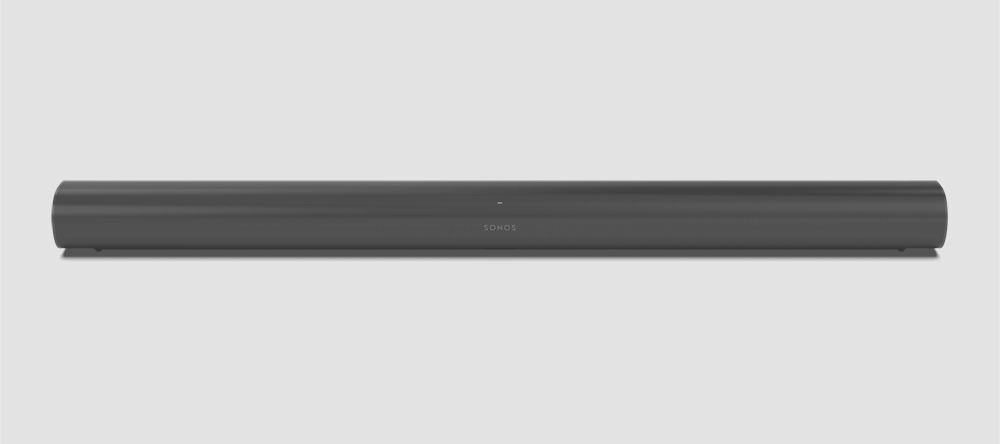
Available on June 10th, Sonos Arc is the premium smart soundbar for TV, movies, music, gaming, and more. Arc brings brilliant surround sound in 3D, along with immersive music, elegant design, and voice control built in. Experience shows, films, and games with the precise and immersive sound of Dolby Atmos, and enjoy incredible sound streaming music, podcasts, and audiobooks. 

bYRNZl3l6ouXNXqPq--kJwL9X4Hsv5-iWNYinpacIU-5-FY3CgN6-7PcbJzxeMMbhqV40WebxzfCCVxoPgDObYdrZGNH_A0jIsJW9i0KwiWmaDBvKcs7p5Yh-sOBZcHkximkoWu6

Extraordinary sound meets elegant design

Eleven high-performance drivers, including custom elliptical woofers and precisely angled side tweeters, produce vivid detail and impressive bass for home cinema and music streaming. Arc's upward-firing drivers create a multi-dimensional soundstage that moves around you, rendering every whisper and explosion with dramatic clarity, detail, and depth. 


With its elongated shape, soft profile, and seamless façade, Arc discreetly mounts to the wall or sits beneath the TV without pulling focus. When mounted, a magnetic sensor detects the orientation and smartly adjusts the EQ to temper bass resonance.


Arc’s sound was specially tuned with the help of Oscar-winning sound engineers to emphasize the human voice so you can always follow the story. The advanced processing creates five phased-array channels that masterfully deliver sound to your ears from all directions at the exact right moment. Use enhanced Trueplay tuning technology to optimize the sound for the unique acoustics of your room, even calibrating the height channels for precise localization. 


DQWhTCGCPaVFcDCO4zOsuR-17Tzj5o4vyWB8BxrHc4zOUbI7yrY_onZ6gcY9jIM62ejbLPlCWNndBrda3lKOZe5UUZvmbdr-z98sFkpGtoghniW9hJiRdIEV1CLNri7K-Cnwj4o0


You can also make a surround sound setup with a pair of our surround capable Sonos speakers, such as a pair of Sonos Ones, or amplify it all with a Sub for an extraordinary surround experience. 


Some more details on Sonos Arc:

  • Simple to set-up. Plug Arc into power and then connect it to your TV using the HDMI-ARC cord. Bring your phone up to Arc to automatically pair and securely transfer WiFi credentials using near-field communication (NFC).

  • HDMI eARC. Increased bandwidth supports high-quality audio and has lip-sync compensation built in.

  • Dolby Atmos. Play Atmos and Atmos-encoded audio to play from your collection and favorite services through your TV’s HDMI ARC or eARC connection.

  • Ambient light sensor. Arc detects how bright the room is and automatically adjusts the brightness of the LEDs to be visible but not distracting.

  • Automatic remote sync. Arc connects to your TV's HDMI eARC port with a single cable and automatically syncs with your remote.

  • Control your way. Control Sonos Arc with your voice, the Sonos app, your existing TV remote, your favorite music service’s app, or AirPlay 2. Capacitive touch controls for play, pause, skip tracks, adjust the volume, and group rooms just by tapping or swiping the top of the soundbar. LED indicates status, mute status and voice feedback.

  • Smart voice recognition. A four far-field microphone array used for advanced beamforming and multichannel echo cancellation makes sure you’re heard, even when the music is blasting, even when playing in immersive surround sound. For privacy, turn the microphone off with a tap. The LED light is hardwired and will always indicate if the microphones are enabled or if your voice assistant of choice isn't listening.

  • Optimized for your listening. From within the Sonos App, tap Speech Enhancement so you never miss a word, or Night Sound to amplify quiet noises and reduce loud ones so you can enjoy late night TV without waking the entire house.

  • Tune with Trueplay. Trueplay puts the speaker-tuning capability of the pros in the palm of your hands, adapting and optimising the sound of the speaker to the unique acoustics of the room. iOS device required.

  • Low profile and compact size. The dimensions are 3.4 x 45 x 4.5 inches (87 x 1141.7 x 115.7 mm) H x W x D and Arc weighs 13.78 lbs (6.25 kg).

Pre-order today on Sonos.com in stunning black with matte finish or white with matte finish for $799 US (€899 EUR, €799).

We’ve announced details for the Sonos Five and new Sonos Sub. You can also check out our blog for some great stories.

    This topic has been closed for further comments. You can use the search bar to find a similar topic, or create a new one by clicking Create Topic at the top of the page.

    550 replies

    Contributor II
    May 11, 2020

    I have dreamt of a home theatre system for years. I had saved up and was ready.  My local audio dealer had always recommended one brand, and I thought that was what he was going to sell me.  Instead, he said that a Sonos PlayBar with a subwoofer would be best for my use. 

    When I got the units home, I set it up, and the audio was not being passed correctly. I have a Dish receiver and a Sony XBR TV. I ended up pay for their techs to come out and look, and they determined that the TV KDL-40XBR was not transmitting the audio to the Sonos.  I ended up buying a new Sony XBR55-A8G that was not in my planned budget.

    The techs installed the new TV and a new Optical Cable, just to be sure. I thought everything was going to be perfect.  Nope, there is a Lip Sync issue.  I made the adjustments via the app. It still was noticeable. I started reading the forums, and it appears that Sony and LG both suffer the same result from Sonos products.  Now, I have my wife asking me why I would buy something that does not work right.

    I saw the announcement for the Sonos ARC coming out soon, and I said to my wife that maybe I could sell the Sonos PlayBar that is only 90 days or so old and get the ARC that will work correctly. I went into the forums today, and it seems that the Beam that uses ARC technology doesn’t work much better.

    Bottom line, Sonos is selling a product that it has direct knowledge that it is not compatible with certain significant brands of TV. Shouldn’t they be advertising this? Aren’t they deceiving the public? I am a senior citizen and on a pension. Should that matter. What about my daughter when she was in University. Money is tight for many people. Is Sonos taking advantage of us? Should there be a Class Action suit against Sonos?  I hate being this way. I like their concept, but they lied by omission, and their dealer, in this case, is just as guilty. Is this a question for the state attorney general?

    Ryan S
    Ryan SAuthor
    Retired Sonos Staff
    May 11, 2020


    @Ryan S


    What is the recomended distance between the Arc and the TV, I read different statements. The website states 10cm, I've read 15cm on this forum.

    Also, would 45cm of the ground (on top of cabinet and under TV be too low for the Sonos Arc?

    @Rck010, from our product guide which will be going up closer to the launch of Arc:

    Place on a credenza:

    • Place horizontally on a stable and level surface at least 2" (50mm) away from the TV.

    • Leave 5.5" (140mm) of open space around the sides and above Arc.

    Trueplay tuning for the Arc is also designed to include height adjustment, which will help make sure that your sound is optimized for the placement.


    @RFGroup, sorry to hear about that trouble! We’ve found that if there’s a lip sync issue, it’s often because either some audio processing that the TV is applying to the audio before sending it to the attached audio device, or the TV is using most of its resources on processing the high definition video that it sends the audio after handing that work, which can be noticeably slow. Usually this will be an issue for just about any soundbar connected with the TV, as the Sonos device is playing the audio as soon as it gets there. To fix this, there are some suggestions here: https://support.sonos.com/s/article/3336 

    If there’s no way to prevent the TV from adding a delay, you can look into wiring your speaker directly to the source, or use an HDMI switch with an audio output for Sonos. Some of these TV manufacturers have put out updates that help with the lip sync issues, but not for all of the TVs. 

    Mark good posts by pressing the like button, and select the best answer on questions you've asked to help others find solutions.
    melvimbe
    May 11, 2020

    Bottom line, Sonos is selling a product that it has direct knowledge that it is not compatible with certain significant brands of TV. Shouldn’t they be advertising this? Aren’t they deceiving the public? I am a senior citizen and on a pension. Should that matter. What about my daughter when she was in University. Money is tight for many people. Is Sonos taking advantage of us? Should there be a Class Action suit against Sonos?  I hate being this way. I like their concept, but they lied by omission, and their dealer, in this case, is just as guilty. Is this a question for the state attorney general?


    I sympathize with your frustration, but I’m not exactly sure why you are blaming Sonos for this. Sonos is following standards and processing audio signals it receives from the TV immediately.  It can’t account for any delays in the TV.  Your saying that Sonos should test with every TV and tell you which TVs are not following the standards properly?  What happens when the TV brand resolves the issue through an upgrade?  Is Sonos responsible for telling you that as well?  Why wouldn’t it be the TV maker’s responsibility for informing you of issues with their products? 

    Danny
    Ryan S
    Ryan SAuthor
    Retired Sonos Staff
    May 11, 2020

    I noticed you have another thread here, RFGroup. Let’s continue the discussion on that thread if you have any other questions.

    Mark good posts by pressing the like button, and select the best answer on questions you've asked to help others find solutions.
    Lyricist III
    May 11, 2020


    @Ryan S


    What is the recomended distance between the Arc and the TV, I read different statements. The website states 10cm, I've read 15cm on this forum.

    Also, would 45cm of the ground (on top of cabinet and under TV be too low for the Sonos Arc?

    @Rck010, from our product guide which will be going up closer to the launch of Arc:

    Place on a credenza:

    • Place horizontally on a stable and level surface at least 2" (50mm) away from the TV.

    • Leave 5.5" (140mm) of open space around the sides and above Arc.

    Trueplay tuning for the Arc is also designed to include height adjustment, which will help make sure that your sound is optimized for the placement.


    @RFGroup, sorry to hear about that trouble! We’ve found that if there’s a lip sync issue, it’s often because either some audio processing that the TV is applying to the audio before sending it to the attached audio device, or the TV is using most of its resources on processing the high definition video that it sends the audio after handing that work, which can be noticeably slow. Usually this will be an issue for just about any soundbar connected with the TV, as the Sonos device is playing the audio as soon as it gets there. To fix this, there are some suggestions here: https://support.sonos.com/s/article/3336 

    If there’s no way to prevent the TV from adding a delay, you can look into wiring your speaker directly to the source, or use an HDMI switch with an audio output for Sonos. Some of these TV manufacturers have put out updates that help with the lip sync issues, but not for all of the TVs. 

    @Ryan S Thanks for your answer!

    I read credenza there, does that apply to wall mounting also?

    I am still on the fence of either wall mounting the Arc (about 10cm below the TV) or putting in on top of the credenza (43 cm tall), about 20cm from the bottom of the TV.


    Ryan S
    Ryan SAuthor
    Retired Sonos Staff
    May 11, 2020

    @Rck010, as far as wall mounting, you’ll want to keep 5.5" (140mm) space (minimum) between the TV and your Arc. You may want to try it out on the credenza and see how you like it, if you decide to wall mount it after, you can always drill some holes. 

    Mark good posts by pressing the like button, and select the best answer on questions you've asked to help others find solutions.
    Lyricist III
    May 11, 2020

    @Rck010, as far as wall mounting, you’ll want to keep 5.5" (140mm) space (minimum) between the TV and your Arc. You may want to try it out on the credenza and see how you like it, if you decide to wall mount it after, you can always drill some holes. 


    Well, not exactly as I need to make a cable conduit for it in our brick wall (don’t want to see any cables in sight).

    Reason I’m asking twice, is because the webpage for the Sonos Arc mount states a distance of 10cm, a little confusing to be honest.

    Ryan S
    Ryan SAuthor
    Retired Sonos Staff
    May 11, 2020

    I’ll have the team check that out, but the 140mm I quoted should be the most accurate for minimum distance with best performance. The 10cm may be a minimum for fit, but I’ll see if I can get that tracked down.

    Mark good posts by pressing the like button, and select the best answer on questions you've asked to help others find solutions.
    Lyricist III
    May 11, 2020

    I’ll have the team check that out, but the 140mm I quoted should be the most accurate for minimum best performance. The 10cm may be a minimum for fit, but I’ll see if I can get that tracked down.

    That would be great, if you could let me know.

    10cm works for me on the wall, 14cm will be a challenge. But I prefer mounting for a cleaner look.. First world problems :)

    Lyricist III
    May 12, 2020

    Hi everyone, I will be replacing my Beam with the Arc in our family room.  I have the Beam power cord fished through the wall adjacent to the fire place and I am hoping the Arc uses the same power cord so I don’t have to run that through the wall again?  Thanks!

    Similar question, can I repurpose the power cord from my Playbar or do I need to run a new cable?


    Thanks!