

Corry P
Sonos Staff
September 16, 2025
News

Latest Software Update - Mid September '25
Related content:SoftwarePartner

🗣️ Hi Everyone 🔊


This afternoon, we deployed an update for iOS and Android as well as an update to our firmware (Player). See below for a rundown of what's changed. If you'd like a look at what has changed over the last few months, check out our App Release Notes here, as well as our System (Player) Release Notes here.

As with most updates, this will be a Phased Rollout, which means that you may (or may not) get the update pushed to your system straight away. Some iOS users have sidestepped this in the past, by going directly to the App Store. If you still do not see the update, try refreshing the App Store by pulling down (as if you were refreshing a page) on the Account page that shows all your pending app updates.


In the App update:


iOS - 80.28.32

Android - 80.28.36


Sonos Voice Control x Philips Hue Support 

More info below in Player section.


Play Button

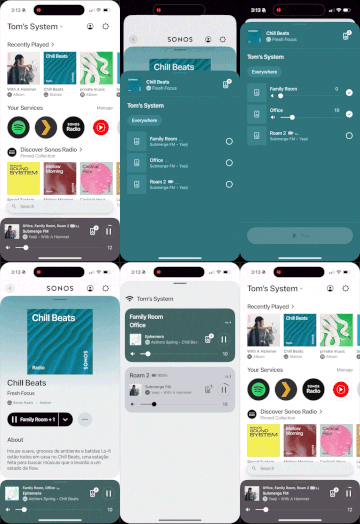
We’ve revamped the Play button on content screens to make it clearer where playback will start and to let you easily change the room or group without leaving the page.
 

Android versions 8 & 9 enter limited compatibility

Devices on Android 8 or 9 will soon be unsupported and will no longer receive updates—please upgrade to Android 10+ to keep enjoying the latest Sonos features. Devices not fully supported will be able to control playback but will not be able to configure the system.


Additional changes:

  • Minor UI improvements (Android and iOS)
  • Improvements to TalkBack UX on Home Edit screen
  • Fix-it flow for unbonded Subs

Once you have updated the app, you will be required to update the system (Players).


In the Player update:


Firmware - 91.0-68261


Sonos Voice Control x Philips Hue Support

We're excited to announce that you'll soon be able to use Sonos Voice Control to manage your Philips Hue smart lights and plugs directly from your Sonos speaker.

Simply use your voice to turn lights on/off, dim them, change colours, or activate scenes.

Requirements:

  • A Sonos voice-enabled speaker
  • A Philips Hue Bridge
  • Linked Sonos and Hue accounts

This feature will be available in US-English and French.

See the related Community post here for more information.

Note: After installing this update, Hue integration will not yet be available - the feature is yet to roll out over the coming weeks.


As always please do not hesitate to share your feedback, we genuinely appreciate it! 🙏🏽

Corry P


Edit: Emphasised that Hue feature is not immediately available after updating.

32 replies

Prodigy III
September 16, 2025

Hi, ​@Corry P - my iOS app has never received the facility to show the number next to the speaker to show how many it is grouped with. I’ve never been bothered by this as the number 1 against an ungrouped speaker feels unintuitive. 

However, upon seeing mention of the revamped Play button facility which seems pretty smart, and then updating the iOS app, I don’t have that either. When you mentioned phased roll-out, are you also referring to the new Play button - OR should this be there immediately upon updating the app? It’s not clear from the above.

The reason I ask is: given I’m still missing the grouping number after all this time, and not seeing the Play button after the update today, I’m starting to wonder if my specific Sonos app or iPhone 14+ are missing something. 

FYI, I am now on iOS 26 as of yesterday and both app and system are up to date...

Headliner I
September 16, 2025

​@Corry P does this include the display of the currently playing song in the queue for Android users?

Enthusiast II
September 16, 2025

Just updated but I am not seeing how to link hue to the app?

Mr. T
September 16, 2025

The Hue requirements now missing…

  • a Hue light or smart plug

In addition, who is responsible for updating the app and system update pages? Consistent formatting has gone right out of the window, plus this thread mentions further app updates that are not included on the app update page, namely:

Additional changes:

  • Minor UI improvements (Android and iOS)
  • Improvements to TalkBack UX on Home Edit screen
  • Fix-it flow for unbonded Subs

If there are quality controls in place before posts are published and webpages updated then they have failed in this instance.

Lyricist III
September 16, 2025

The Play button hasn’t changed after the update. Tried deleting and re-installing the app but no ”contextual” Play button for me :/ 

melvimbe
September 16, 2025

Just updated but I am not seeing how to link hue to the app?


My understanding of ‘phased rollout’ also means that just because you have all the software updated in your system, does not mean that all the features have been turned on in your system.  ​@Corry P didn’t specifically say that here, so I could be mistaken.


Danny
Corry P
Corry PAuthor
Sonos Staff
September 17, 2025

Hi ​@Rhonny 

Do you have anything on your network (like PiHole or a router feature) that might be filtering out connections to certain internet domains? If optimizely.com is being blocked, for example, it may well prevent features from showing in the app.

You can see a list of addresses to whitelist in my related article:

If this does not apply to you, I can only really recommend getting in touch with our technical support team for assistance.

I hope this helps.

"Common sense is the collection of prejudices acquired by age eighteen." - Albert Einstein
Corry P
Corry PAuthor
Sonos Staff
September 17, 2025

Hi ​@Gaham

​@Corry P does this include the display of the currently playing song in the queue for Android users?

I have not seen that mentioned - I can only presume it is still being worked-on.

I hope this helps.

"Common sense is the collection of prejudices acquired by age eighteen." - Albert Einstein
Corry P
Corry PAuthor
Sonos Staff
September 17, 2025

Hi ​@danielkea & ​@MmTt 

Getting the latest update does not mean that the feature will now be available - the software for integrating with Hue is included with this update, but the feature has not yet been rolled out.

Hue integration will be made available over the coming weeks.

Apologies - I shall add this information to the opening post.

"Common sense is the collection of prejudices acquired by age eighteen." - Albert Einstein
Prodigy III
September 17, 2025

Hi ​@Rhonny 

Do you have anything on your network (like PiHole or a router feature) that might be filtering out connections to certain internet domains? If optimizely.com is being blocked, for example, it may well prevent features from showing in the app.

You can see a list of addresses to whitelist in my related article:

If this does not apply to you, I can only really recommend getting in touch with our technical support team for assistance.

I hope this helps.

Possibly! I’ll whitelist those domains in NextDNS which I use for ad blocking etc… Thank you.