

Shaun O
Sonos Staff
July 14, 2026
News

14th July 2026 - New Sonos App & Player Updates Now Available!
Related content:Software
  • July 14, 2026
  • 78 replies
  • 2603 views
Stay cool!

Howdy y’all! We have a new Sonos App update releasing today and it’s a big one. This update brings the ability to try out Tab Navigation, introduces speaker/room sorting, and adds a Dynamic Volume Slider for iOS (coming soon to Android!). 
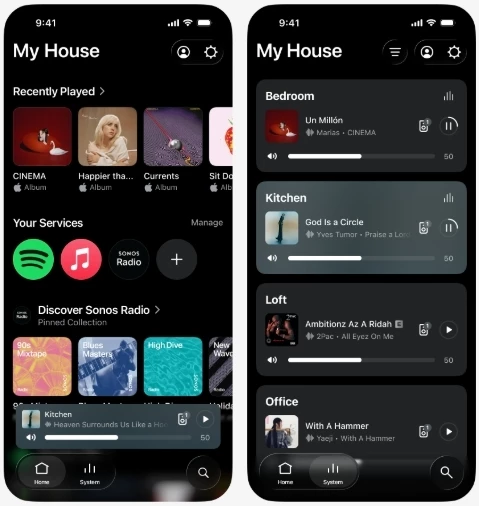
 

Tabs at the bottom leave so much room for activities

This update is rolling out in phases, so it may take up to two weeks to reach your device. No action is needed - it will install automatically once it's available to you and automatic updates are enabled.

iOS users: You can check availability early by opening the App Store, tapping your account icon, and pulling down to refresh. If it's not there yet, that means the update hasn't reached your device in the rollout. It's on the way.


Tab Navigation uses a layout familiar to many of us - the buttons across the bottom of the app are now clear buttons that show what’s selected. Home, System, and Search are now easy to find and easier to see what’s selected. To enable Tab Navigation, look for Enable Improved Navigation in the Sonos App Settings.
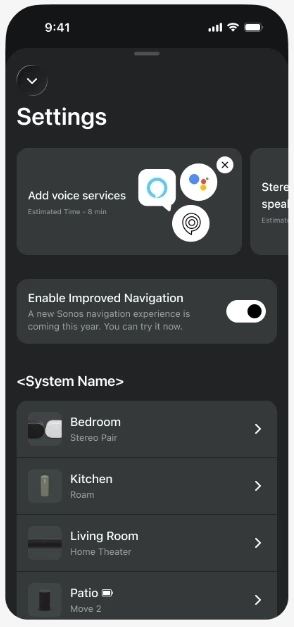
Toggle means you can try it out and if you don’t like it, go back

Sort Order is here! You can now choose how your speakers show up in the Sonos app on the System tab. You can also choose to pin specific speakers to the top, or pin all your speakers in a specific custom order. 
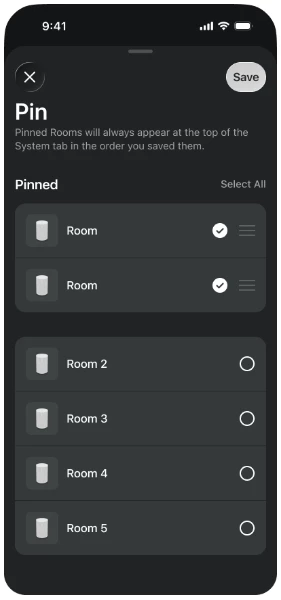
Want to pin your most used speakers in the app? Now you can.

We’ve got a lot of new things in this update that we’re excited to talk about. Please let us know with a reply below if you have any questions or feedback. And as usual, the technical details:

App Update details

iOS - 87.00.36

Android - 87.00.35

Player Update details

Modern Players - 96.0-78270

Legacy Players - 86.8.78270


New app features with the usual bug fixes and improved performance

  • Familiar tabbed navigation. 
  • New volume interface on iOS. 
  • Product sorting and orientation
  • Now Playing background colors update with album art
  • Swipe to delete from Sonos Favorites


Want to check out our previous or current App and Player Release Notes? We got you covered: here’s the App and Player release notes.


This topic has been closed for further comments. You can use the search bar to find a similar topic, or create a new one by clicking Create Topic at the top of the page.

78 replies

AjTrek1
July 14, 2026

Looking forward to trying out the new app features next week when I return home.

Together Everyone Achieves More = T.E.A.M.
Palco
Prominent Collaborator I
July 14, 2026

Ok.....good....same aesthetic adjustments....but Qobuz Connect is still nowhere....

Prodigy III
July 14, 2026

A good start! I’m liking the revised UI adjustments.

Airgetlam
July 14, 2026

Found the ‘Enable Improved Navigation’ per your post. Are you willing to share where I might find this ‘Pin’ page? I’ve scanned my system after updating both the iOS controller and the Player / firmware updates, but haven’t been able to find it. 

Bruce
bockersjv
Local Superstar
July 14, 2026

The Tabs are not appearing on the iPad app for me.  iPad M1 12.9. This means you can’t change the speaker selected.  Disabled the Improved navigation for the time being.


EDIT TO ADD…

Tabs ARE there in the iPad.  They are at the top rather than the bottom and appear in the middle.

bockersjv
Local Superstar
July 14, 2026

On the iPhone is a massive improvement.  The ability to get back to home in one click rather than backing out of countless screens.  Like the new playing now screen too.

The volume control improvements are especially good, much more intuitive and easy to select a very low volume.  the numbers and haptic feedback are welcome too.

Great stuff, keep em’ coming :D

Airgetlam
July 14, 2026

Yea, I’m not getting those bottom ‘tabs’ on my updated system, either, although my iPad is a bit older than yours! I’m assuming that’s part of the ‘rolled out’ aspect. I’ve got both the new iOS controller, and the associated firmware, and have enabled the improved navigation, but haven’t seen those bottom tabs yet. 

Bruce
Airgetlam
July 14, 2026

Ah, the ‘tabs’ are appearing on my (less used for control) iPhone. There must be some recognition of the device there. 

Bruce
Airgetlam
July 14, 2026

Found the ‘Pin’ menu. 

Select ‘System’ at the top (middle) of the screen, then the three lines on the right, which gets you to a place where you can choose ‘Pin’

Bruce
Stanley_4
Grand Maestro
July 14, 2026

Sigh, I hate being at the end of the update queue, you all have fun while I keep hitting the Check for Updates button.

As a reminder to folks that missed it above it can be two weeks before you see this update. Apple folks can try forcing it, Android types just have to wait.