Answered

Sonos Move will not power on after battery replacement

  • September 5, 2026
  • 3 replies
  • 73 views

Sonos Move does not power on after battery replacement.  Swapped batteries and charging base with known working Move, but no change.  When placing Move on charging base, the 4 small indicator lights at front bottom of Move go solid red for about 10 seconds, then go off.  Nothing after that - will not power on with either battery.

Best answer by Edude

Thanks for your responses, everyone.

Recap:  Move 1 does not power on.  No combination of buttons or placing on the charging base resolved it.  Swapped batteries with known working Move but the problem stayed with the failed Move.  Used 45w charger in USB-C port (bypassing charging base) to try charging but no change.  (Not that I expected that to work since the swapped battery didn’t work.). Worked with Sonos support and confirmed no other recovery steps were possible.  Move is bricked (out of warranty), and I’ll send it back to Sonos for a 30% discount on replacement.


3 replies

Airgetlam
  • September 5, 2026

I’d suggest you call Sonos Support to discuss it.


DIY242
Forum|alt.badge.img+3
  • Enthusiast I
  • September 5, 2026

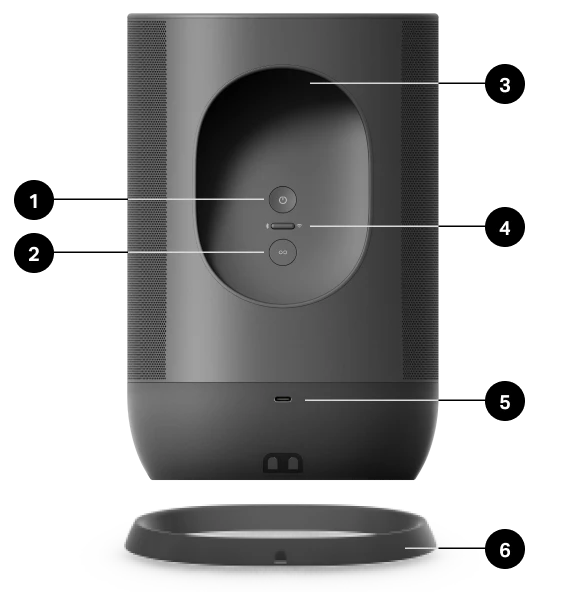
Good afternoon - I had a similar situation occur just recently - my GEN 1 Sonos Move went into some kind of hibernation after I stopped the music for a bit and would not turn on.  I checked online and the one solution that worked was to press the power button in (off the cradle/charger) for 30 seconds and the light came back on top and then reconnected to my network.  Please note that the same symptom of the red light coming on when placed in the cradle/charger was occurring.  (Button # 1)

I actually found the solution in the community here:  Cannot power off Sonos Move | Sonos Community


Thanks

Derek


  • Author
  • Contributor I
  • Answer
  • September 9, 2026

Thanks for your responses, everyone.

Recap:  Move 1 does not power on.  No combination of buttons or placing on the charging base resolved it.  Swapped batteries with known working Move but the problem stayed with the failed Move.  Used 45w charger in USB-C port (bypassing charging base) to try charging but no change.  (Not that I expected that to work since the swapped battery didn’t work.). Worked with Sonos support and confirmed no other recovery steps were possible.  Move is bricked (out of warranty), and I’ll send it back to Sonos for a 30% discount on replacement.