
Contributor II
June 22, 2025
Answered

Connecting Roam to holiday caravan WiFi

Trying to connect Roam to WiFi while we’re away. After going into the initial set up it says ‘No products found for (name of WiFi)’ which is fine, so I go into system settings but all I’m getting is this, (see picture)
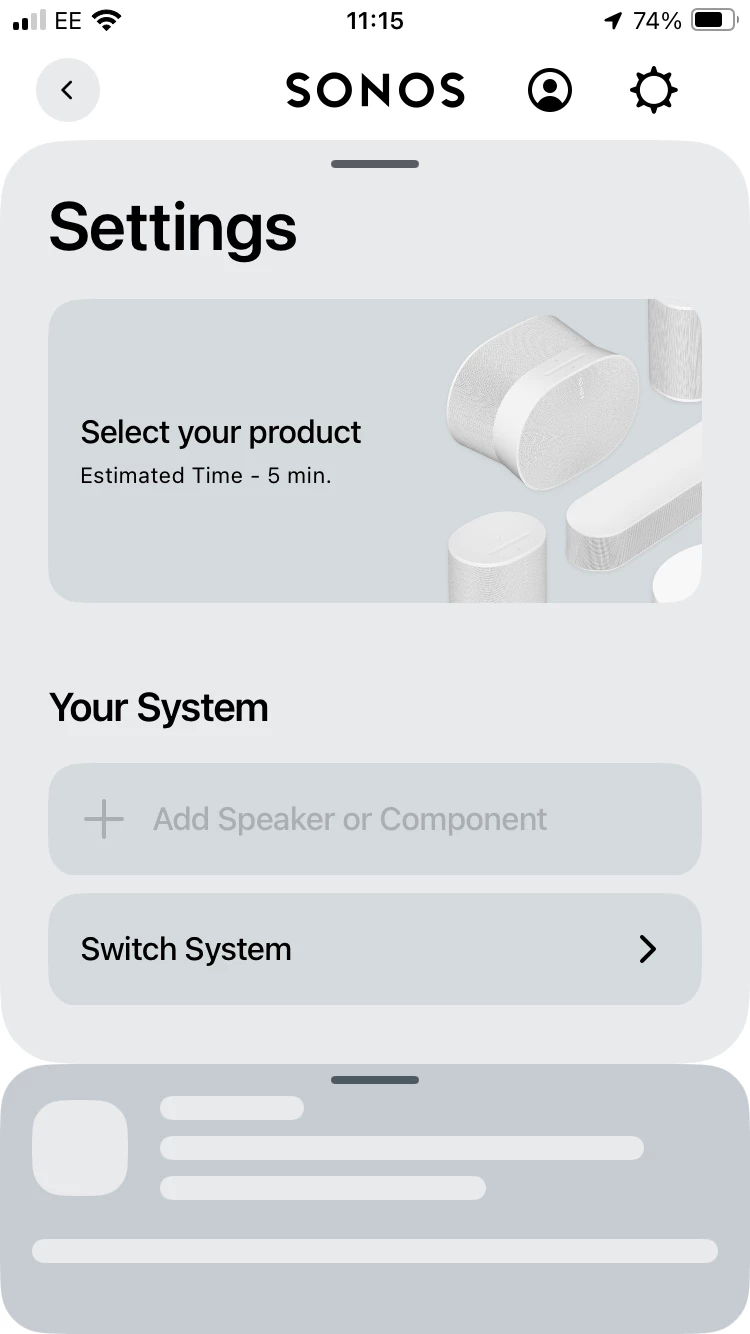
If I choose select your product I have to log in which I already am. If I go into switch system and then set up new system it searches constantly for the Roam but doesn’t find it. Currently using it as a Bluetooth speaker which isn’t ideal. 

This topic has been closed for further comments. You can use the search bar to find a similar topic, or create a new one by clicking Create Topic at the top of the page.
Corry P
Corry PAnswer
Sonos Staff
June 26, 2025

Hi ​@RandS 

Welcome to the Sonos Community!

Sorry to hear about this issue that you are having with getting your Roam online in your holiday caravan.

I think I may have found the issue - you mention that when you tap on “Select your Product” (which is the correct step to take) you get asked to sign in - if you are signing in with the email address that you are using to post here on the Community, that is the wrong email to use - there are no Sonos speakers registered on that account, and to connect your Roam to a new WiFi, you must use the account to which the Roam is registered. If you use the account with which the Roam is registered, you should be able to continue to the next step.

I hope this helps.


"Common sense is the collection of prejudices acquired by age eighteen." - Albert Einstein

14 replies

buzz
Grand Maestro
June 22, 2025

I assume that the caravan provides WiFi for all guests. In order to ensure security, WiFi users are not allowed to communicate with each other, only outbound Internet access is allowed. This means that your ROAM cannot communicate with your phone.

A travel router works around this by presenting a single WiFi client to the caravan WiFi that can be securely shared by your WiFi devices.

RandSAuthor
Contributor II
June 22, 2025

The WiFi is just for this caravan 

buzz
Grand Maestro
June 22, 2025

We need some details about your WiFi. 

RandSAuthor
Contributor II
June 22, 2025

We need some details about your WiFi. 

What do you need? I may not have the answers as this is a rental and not ours. I’m on the WiFi on my phone without any issues. 

buzz
Grand Maestro
June 22, 2025


buzz
Grand Maestro
June 22, 2025

Trying my reply again!


You will probably not have access to the router’s configuration. A travel router will simplify things for this and future rentals. One side of the travel router connects to the house WiFi as a single client. The other side gives you a private WiFi network that supports multiple clients. You could give your side the same SSID (WiFi name) and password as your home network. At this point your home WiFi clients are welcome at any rental after you give the router the local SSID and password.

RandSAuthor
Contributor II
June 23, 2025

Trying my reply again!


You will probably not have access to the router’s configuration. A travel router will simplify things for this and future rentals. One side of the travel router connects to the house WiFi as a single client. The other side gives you a private WiFi network that supports multiple clients. You could give your side the same SSID (WiFi name) and password as your home network. At this point your home WiFi clients are welcome at any rental after you give the router the local SSID and password.

Thanks. I suppose that makes sense. 

Corry P
Corry PAnswer
Sonos Staff
June 26, 2025

Hi ​@RandS 

Welcome to the Sonos Community!

Sorry to hear about this issue that you are having with getting your Roam online in your holiday caravan.

I think I may have found the issue - you mention that when you tap on “Select your Product” (which is the correct step to take) you get asked to sign in - if you are signing in with the email address that you are using to post here on the Community, that is the wrong email to use - there are no Sonos speakers registered on that account, and to connect your Roam to a new WiFi, you must use the account to which the Roam is registered. If you use the account with which the Roam is registered, you should be able to continue to the next step.

I hope this helps.


"Common sense is the collection of prejudices acquired by age eighteen." - Albert Einstein
RandSAuthor
Contributor II
June 30, 2025

Hi ​@RandS 

Welcome to the Sonos Community!

Sorry to hear about this issue that you are having with getting your Roam online in your holiday caravan.

I think I may have found the issue - you mention that when you tap on “Select your Product” (which is the correct step to take) you get asked to sign in - if you are signing in with the email address that you are using to post here on the Community, that is the wrong email to use - there are no Sonos speakers registered on that account, and to connect your Roam to a new WiFi, you must use the account to which the Roam is registered. If you use the account with which the Roam is registered, you should be able to continue to the next step.

I hope this helps.


But it wasn’t giving me the option to input any information. Not to worry, I just used it as a Bluetooth speaker. Not ideal but my phone was connected to the internet so we got there in the end. 

Corry P
Sonos Staff
June 30, 2025

Hi ​@RandS 

I am not sure if it is possible to log in to the app with another account when not currently connected to a system - it’s possible that you would need to ensure that you are signed in with the correct account before leaving your main Sonos system. I do not have a network that does not have a Sonos system on it with which to check, however.

But, if your app is signed into the correct account when you take a Portable to a new WiFi, you will see an option to join the new WiFi after tapping on “Select your product” (assuming the phone is already connected to WiFi), and the app, being logged into the same account, should then “find” the Roam.

As I understand it, there are plans to improve the in-app messaging for this situation.

I hope this helps.

"Common sense is the collection of prejudices acquired by age eighteen." - Albert Einstein