Sonos Home Theatre + Asus constant disconnects

  • December 9, 2025
  • 5 replies
  • 77 views

Hi all

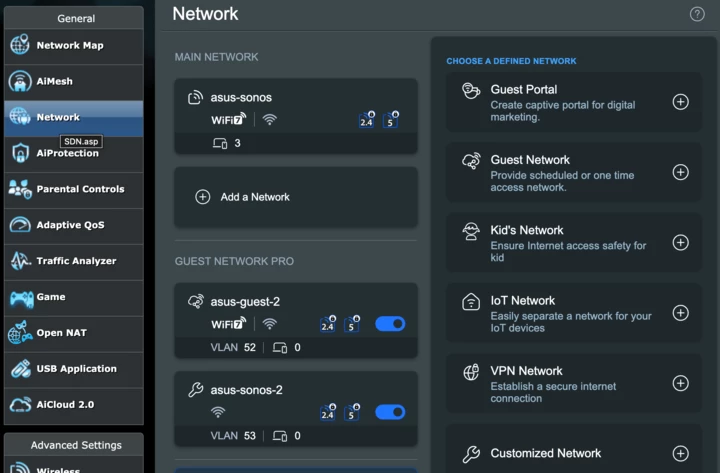
I thought I would start a thread about this since there are a lot of people with this issue looking for answers. There is currently an issue with the Asus firmware and Sonos devices set up in Home Theatre mode where Guest Network Pro has been activated on the router. 

For my setup it is the Arc paired with a Sub and Two ERA 300’s; however, many other setups also seem to be affected. Here is a long thread which I have been running where the process has been documented. 

Today Asus provided me with a Beta firmware which seems to have solved the issue. They are looking for users to test is, such if you would like to test it and provide me with feedback please reach out on the SNB forums. 

I submitted this to Sonos a number of times; however, they have not done anything about it. 

Thank you

Remi

5 replies

Corry P
Forum|alt.badge.img+19
  • Sonos Staff
  • December 10, 2025

Hi ​@remsta 

Welcome to the Sonos Community!

I am sorry to hear about the issues you’ve been having with your Sonos system and your Asus router.

Thanks for coming here and informing other users about this beta firmware that Asus have written to fix this issue - I hope it becomes mainstream soon if it does indeed solve this issue with the Guest WiFi interfering with Home Theatre setups, as you now seem to experience.

I submitted this to Sonos a number of times; however, they have not done anything about it. 

I am not sure what you want us, Sonos, to do about this - if the new firmware fixes the issue, then we will await general release of the firmware. There is not much we can do, if the issue is shown to be with the Asus firmware - as the new router firmware indeed demonstrates.

I’ll certainly encourage anyone who has been experiencing this issue to try the firmware out, especially if Asus are looking for people to do so - it will speed up the process of everyone else who needs the fix getting it.

I hope this helps.


  • Author
  • Contributor I
  • December 10, 2025

@Corry P Asus requested that I also contacted you because at one stage they were unable to diagnose the issue and it seemed that it is an issue that could be resolved from both sides as it happened as soon as the Arc went into Home Theatre mode and created its own 5GHz network. When it created this, it was trying to respond to Asus DHCP leases and rather than taking a lease and sticking with it, the Arc kept asking over and over again. In the end, it is likely that Sonos will also need to issue a fix so it does not happen again, if there are further changes to the Guest Network Pro feature. 

My point was more about my disappointment in your support structure. With Asus, I reached out and they got back to me within 24 hours, I was able to work directly with HQ in Taiwan and EMEA was also there to support. The responses were usually sub 24 hours. When I contacted your support department they told me “thanks for the feedback we will take it onboard”. Even after providing the support team with all the relevant logs and info over chat, I asked if I would get feedback on the issue so that we could continue to test it and ensure that we could get it resolved. The support agent told me that Sonos does not create support tickets, you don’t get a ticket number and there is no way to contact the technical support team. They told me they will submit it and there will be no further contact - this is pretty terrible support. So my feedback went somewhere into a black hole and probably still has not been looked at. 

For an issue that is affecting users worldwide, this is pretty poor behaviour. 


Corry P
Forum|alt.badge.img+19
  • Sonos Staff
  • December 10, 2025

Hi ​@remsta 

Thanks for getting back to me.

I’d like to point out a couple of things, if that’s OK:

In the end, it is likely that Sonos will also need to issue a fix so it does not happen again, if there are further changes to the Guest Network Pro feature. 

It is largely clear to me that due to the exact nature of this issue (pertaining to whether Guest WiFi is on or not), that this was an issue for Asus to address. That their attempts to do so have worked for you so far support this theory. 

When I contacted your support department they told me “thanks for the feedback we will take it onboard”. Even after providing the support team with all the relevant logs and info over chat, I asked if I would get feedback on the issue so that we could continue to test it and ensure that we could get it resolved. The support agent told me that Sonos does not create support tickets, you don’t get a ticket number and there is no way to contact the technical support team.

I have checked the transcript, and I don’t see them saying this at all. While we do create support tickets, they are private to the user who is asking for support, and not to be shared with others, in observance of GDPR (General Data Protection Regulation). I just looked at the transcript of your conversation with the agent you spoke to, and she gave you a ticket number there and then - straight after you asked for it:

“( 17m 57s ) [user’s name]: so do I get a ticket number?
( 18m 3s ) [user’s name]: Because Asus wanted to get info on a Ticket number
( 18m 12s ) Teodora C: Sure, here is a ticket number for this inquiry: [ticket number redacted].”

Please note, however, that Asus are not permitted access to your case - that would also be a breach of GDPR.

You contacted the technical support team in order to provide them with this information, so I do not understand why you are claiming that you cannot contact them.

They told me they will submit it and there will be no further contact - this is pretty terrible support. So my feedback went somewhere into a black hole and probably still has not been looked at.

Please allow me to quote what the agent you spoke to said:

“While we don't provide individual updates on feedback submissions, please rest assured that it has been shared with the appropriate team. If additional information is needed, we’ll be sure to reach out.”

It is, however, our policy not to update users with progress updates for known issues - doing so can often give rise to a customer having an unrealistic expectation in terms of the timescale that will be needed to resolve something. Additionally, it is often the case that we simply cannot address the issue at all - such as with cases where the router firmware is at fault, for example.

For an issue that is affecting users worldwide, this is pretty poor behaviour. 

It only affects users worldwide because Asus sell their router worldwide, and as Asus have managed to fix this issue, I am not sure what it is you expect to hear from us in regard to it.

I hope this helps.


Corry P
Forum|alt.badge.img+19
  • Sonos Staff
  • December 18, 2025

Hi ​@remsta 

An engineer colleague of mine has been attempting to recreate this issue you had on the router’s older firmware release but has so far been unable to do so. He wants to recreate the issue so that he can verify that the beta firmware resolves the reported issue without affected users needing to perform any extra steps in the router’s settings, or in Sonos’ settings.

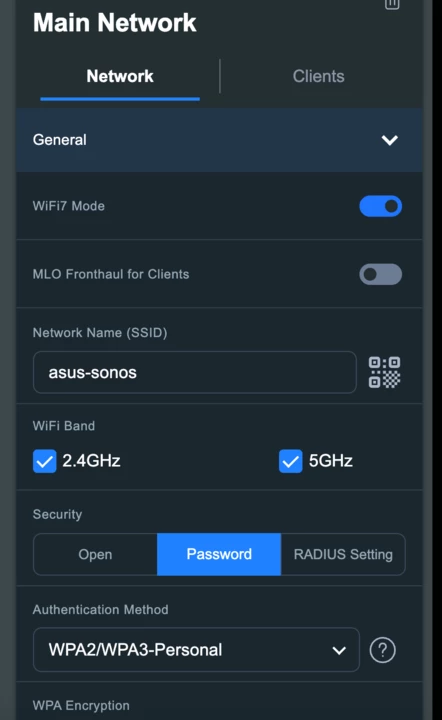
Could you please share some of the settings you have in the router that pertain to WiFi and Security (but not the network password, of course) so we can try again to recreate this issue? Thanks. Relevant settings may be those pertaining to WEP, WAP, split WiFi bands, which bands are in use, wireless isolation and possibly others.

Ideally, please provide screenshots of the following pages:

In addition, please let us know if you changed anything in the DHCP settings, firewall settings, or Wireless/Access Point Isolation setting.

My colleague has also been in touch with Asus directly (Mark Müller, mentioned in the other related thread).

We look forward to hearing back from you.


  • Author
  • Contributor I
  • December 20, 2025

Hi ​@Corry P 

Of course I can, would you be able to private message or email me so I can just forward you the whole thread with Asus, its been going for a number of months? I noticed the screenshots you uploaded is from the old firmware, not using Guest Network Pro, it has to be the 3006.102.X codebase.

Long story short, anything on the latest codebase 3006.102.X, the Guest Network feature was changed to Guest Network Pro - this introduced a new way in which Asus issued DHCP leases and broke the Sonos private network it creates when you put the speaker into Home Theatre mode. 

It seems to be related to the subnet and how it is handled, Long story short:

*Guest Network Pro abbreviated as GNP*

  1. If GNP is deactivated, everything works are expected 
  2. If GNP is activated and a guest network is created with standard 2.4GHz and 5GHz bands, the Sonos speakers disconnect from their host (the Arc) within seconds of the network being activated.
  3. If GNP is activated with just one of the bands, the same bahaviour happens
  4. If GNP is activated with no bands selected, the speakers also disconnect from the host
  5. If IoT network is selected and “Use Same Subnet” is selected, then everything works as expected and the speakers do not disconnect. 

So in the end, with the new firmware, users should not need to do anything but it might still be worth trying to align with Asus on what this means because they obviously released the 3006.102.X firmware with what they thought were standard settings, and this broke the Sonos private network. This might be something other providers do to in the future.  

In the end, the response from Asus was: 

Q1: Out of curiosity, could you please let me know what the issue with the firmware was?

ASUS made adjustments related to the UDP Checksum in the beta firmware, and we are pleased that this resolved the customer's issue.

Thanks