Answered

Product not connected after setting up as surround and adding sub to Arc

  • February 14, 2026
  • 27 replies
  • 180 views

Hi, hopefully you can help me out here.


I was able to connect my Arc, 2 Era 300s and the sub 3 in my network having 2.4ghz with WPA/WPA2 authentication as it is the bare minimum requirement. 

First step was connect my sub to a room, which is with my Arc. after connecting, it says that the Product is not connected. which is weird.

I tried to setup the surround with my 2 Era speakers and Arc, still ended up with the same error message on both Era speakers.


I have also added their IP & MAC adresses as dedicated devices under the DHCP list and still got the same error messages and result of not having all of them turned on.. except for the Arc itself. 


Basically I did the LAN cable thing and yes it worked but I cannot affort to have my cable running across the floor as it was only a test.


I rang up the support which they said its a DHCP issue, which I never had before after their upgrade of my sonos products recently.



Best answer by AjTrek1

@nahzd 

Glad you asked….

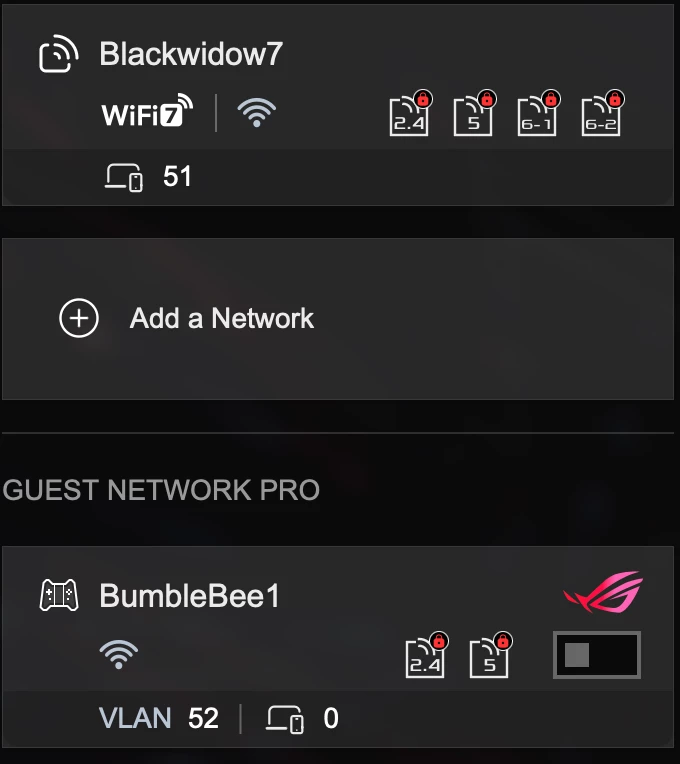
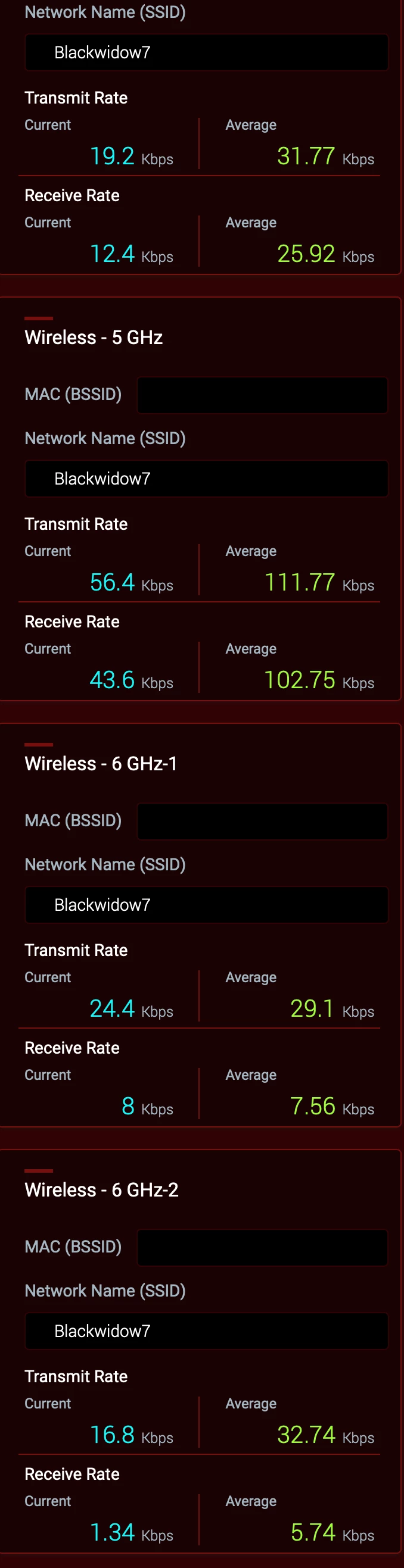
All bands have the same SSID as you can in the screen shot below and same password.


WiFi 7 is Active for all bands. However, the Guest network is turned off. *


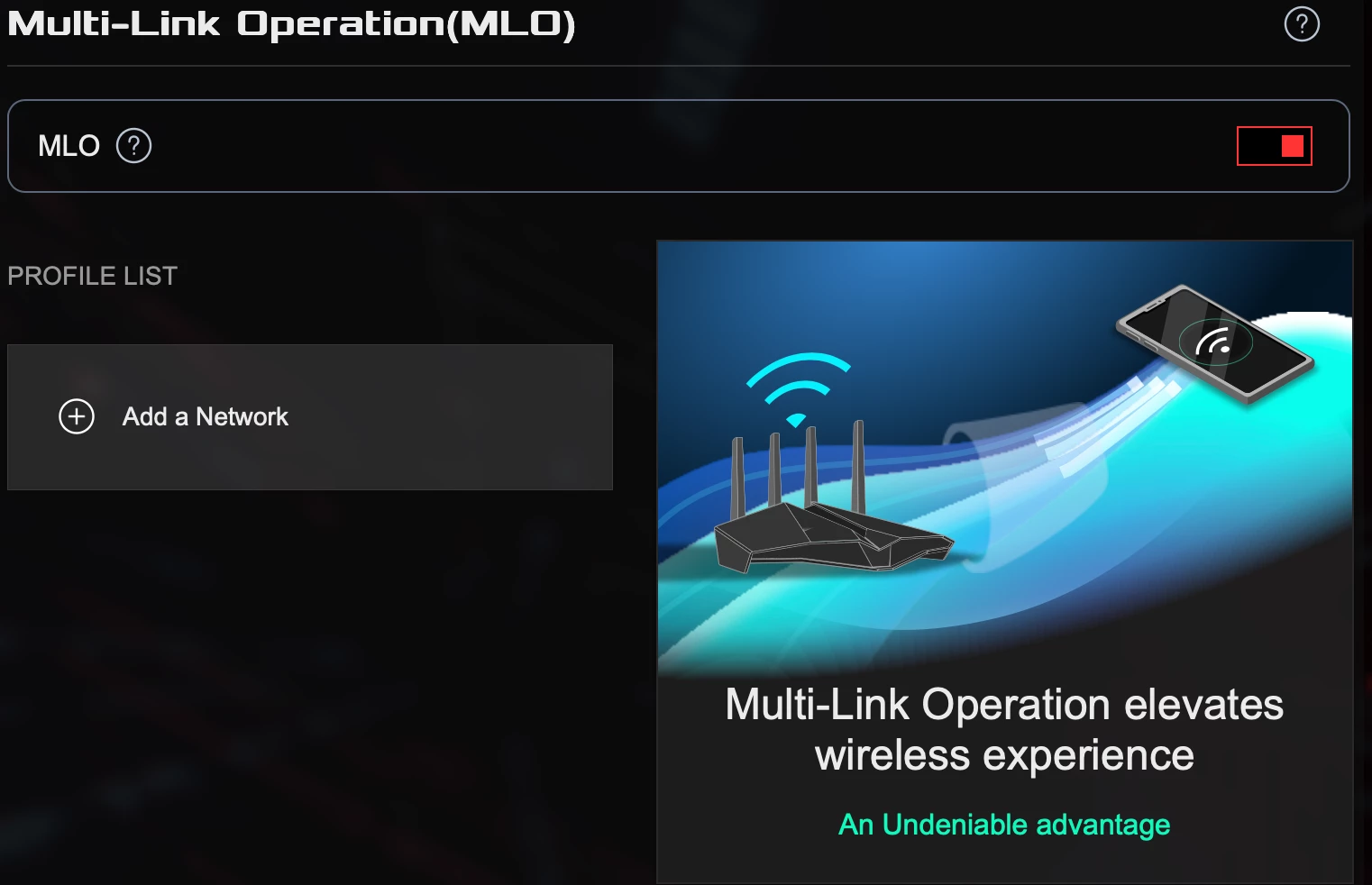
MLO is active but I haven’t set a parameter 


 * This may be the cause of your problems in a nutshell. It’s been verified by Asus that engaging the Guest Network will disrupt the hidden 5Ghz channel generated by Sonos to communicate with surrounds and subs.

As I don’t have people visiting needing to use my Wi-Fi; I haven’t pursued the issue to any great length with ASUS. A future firmware update is suppose to be pushed out based upon a beta.  However, I don’t have the time nor the inclination to test it as a Guest Network is very low on my list of priorities. Besides my Sonos and other devices are running rock solid.

27 replies

Airgetlam
  • February 14, 2026

First, I’d check to ensure that the radio was turned on, on all devices. The surrounds and Sub communicate with the Arc, and receive IP addresses from your router through that signal. The only time your surround speakers go directly to the router is when they’re initially set up as normal speaker. Once they get moved to surround mode, they change to connecting with the Arc. 


  • Author
  • Contributor I
  • February 14, 2026

First, I’d check to ensure that the radio was turned on, on all devices. The surrounds and Sub communicate with the Arc, and receive IP addresses from your router through that signal. The only time your surround speakers go directly to the router is when they’re initially set up as normal speaker. Once they get moved to surround mode, they change to connecting with the Arc. 

Thanks Bruce. Yes, As I have described, I was to get them linked to my 2.4ghz network without issues. Its only the time when I add the sub to the arc and/or to the Era 300, it gives that error message. I had to factory reset all over again to try another way, but still failed.


AjTrek1
  • February 14, 2026

A Few Suggestions

  1. You should not have to bother with manually adding IP and MAC addresses for a new and/or factory reset Sonos product during setup.
  2. You can setup “reserve” IP Addresses for your Sonos (or any Wi-Fi device) later; as a fun project 😊
  3. The best encryption is WPA2/WPA3 Personal. If you have devices that require WPA encryption you may want to consider upgrading them. 
  4. It’s best not to give each WiFi band a separate SSID. Use the same SSID for all bands and let your devices (including Sonos) choose the band they want to connect to. 
  5. Do not engage any type of “smart connect” or “band steering” in your router
  6. Turn off “AirTime Fairness” in you router 

Regarding your setup issues I suggest...

Factory reset the Era 300’s and Sub then follow the setup instructions below.

Era 300’s

  1. In the app select “Add speaker or component” for each Era 300 one at a time.
  2. Give each a different room name. I suggest “Era 300 One” and “Era 300 Two”. By doing so you don’t waste a legitimate room name that you may need in the future.
  3. Go to the room with the Arc and select “Add Surrounds” and follow the directions

Sub 3

  1. In the app select “Add speaker or component”.
  2. The app will detect the Sub 3.
  3. Once added the app may ask if you would like to add it to the room with the Arc or another room that is capable of using the sub. You would select the room with the Arc.
  4. If the app doesn’t prompt you...then go to the room with the Arc and select “Add a sub” and follow the directions

Forum|alt.badge.img+19
  • Senior Virtuoso
  • February 14, 2026

Do you currently have 1 room, which has the Arc, Sub and 2xEras associated to that room? 
 

Have you checked all devices - speakers and controllers - are up-to-date?


Have you tried refreshing your system by powering down all speakers and routers? If not, do so. Power up the router first and wait until it is fully restarted and the wifi signal is established. Then power the Arc, and when it’s fully running do the Sub and then the Eras. 


  • Author
  • Contributor I
  • February 14, 2026

A Few Suggestions

  1. You should not have to bother with manually adding IP and MAC addresses for a new and/or factory reset Sonos product during setup.- This was my alternative after downgrading the encryption based from the minimum specs.
  2. You can setup “reserve” IP Addresses for yo ur Sonos (or any Wi-Fi device) later; as a fun project 😊
  3. The best encryption is WPA2/WPA3 Personal. If you have devices that require WPA encryption you may want to consider upgrading them.  - This was my first struggle after a couple of attempts when my speakers got updated with the version 93.1-73190
  4. It’s best not to give each WiFi band a separate SSID. Use the same SSID for all bands and let your devices (including Sonos) choose the band they want to connect to. - Yes, I had only 2.4 & 5ghz only since I got my speakers.
  5. Do not engage any type of “smart connect” or “band steering” in your router - yup I did that too
  6. Turn off “AirTime Fairness” in you router 

Regarding your setup issues I suggest...

Factory reset the Era 300’s and Sub then follow the setup instructions below.

Era 300’s

  1. In the app select “Add speaker or component” for each Era 300 one at a time.
  2. Give each a different room name. I suggest “Era 300 One” and “Era 300 Two”. By doing so you don’t waste a legitimate room name that you may need in the future.
  3. Go to the room with the Arc and select “Add Surrounds” and follow the directions

 -  Yes I did these steps too, and ended up the same result.

Sub 3

  1. In the app select “Add speaker or component”.
  2. The app will detect the Sub 3.
  3. Once added the app may ask if you would like to add it to the room with the Arc or another room that is capable of using the sub. You would select the room with the Arc.
  4. If the app doesn’t prompt you...then go to the room with the Arc and select “Add a sub” and follow the directions

-  Yes I did these steps too, and ended up the same result.

I have replied above all the points you have mentioned.  I am point to find the Sonos Boost device that might help.


  • Author
  • Contributor I
  • February 14, 2026

Do you currently have 1 room, which has the Arc, Sub and 2xEras associated to that room? 
 

Have you checked all devices - speakers and controllers - are up-to-date?


Have you tried refreshing your system by powering down all speakers and routers? If not, do so. Power up the router first and wait until it is fully restarted and the wifi signal is established. Then power the Arc, and when it’s fully running do the Sub and then the Eras. 

Yes Nik9669a, did all of that too.


AjTrek1
  • February 14, 2026

The Boost should not be necessary. Are you using an ISP supplied router/modem combo box in addition to another single router or mesh setup? Also, what country are you in as network gear differs.


  • Author
  • Contributor I
  • February 14, 2026

The Boost should not be necessary. Are you using an ISP supplied router/modem combo box in addition to another single router or mesh setup? Also, what country are you in as network gear differs.

I am using a gaming router GT-Be98 Pro, which i have not had any issues after upgrade. I just suspect that it might be the new software upgrade is the culprit..


AjTrek1
  • February 14, 2026

So you’re using an Asus router. I use three Asus routers in an AiMesh setup Wi-Fi 7. I have 31 Sonos units with no issues and no Boost is needed. BTW … I’m running the latest Sonos updates for the App and hardware.

However, you didn’t answer my question completely. Who is your ISP and what equipment have they provided. We need precise information about your network to assist. If you are unwilling to provide that information then I suggest you call Sonos tech support.


AjTrek1
  • February 14, 2026

@nahzd 

Just to clarify….

The questions asked by me or other members are to gain information about your setup and network. If you’ve done everything that I and ​@Airgetlam and ​@nik9669a have suggested; and you say all Sonos is up-to-date, then there are clearly local network issues involved.

The information you provide (when asked) needs to be precise. You are not providing that type of information.

For example you stated that you have a GT-Be98 Pro router. I was only able to determine that you are using an ASUS router due to the fact that I use the same router. Do you think that everyone knows that the GT-Be98 Pro is an ASUS router? 

I asked about your ISP and what equipment they have provided. That’s critical information that you seem reluctant to provide.

I assure you that adding a Boost will not resolve your issues. You would essentially be creating the SonosNet which BTW the Era 300’s would ignore if being used as stand-alone speakers. 

So help us to help you by providing precise information when asked. We’re here to help.😊


  • Author
  • Contributor I
  • February 14, 2026

So you’re using an Asus router. I use three Asus routers in an AiMesh setup Wi-Fi 7. I have 31 Sonos units with no issues and no Boost is needed. BTW … I’m running the latest Sonos updates for the App and hardware.

However, you didn’t answer my question completely. Who is your ISP and what equipment have they provided. We need precise information about your network to assist. If you are unwilling to provide that information then I suggest you call Sonos tech support.

Oh sorry, I am with Aussiebroadband and they didnt supply me any modem.

I have FTTP connectivity atm, so it is directly plugged to the router on the WAN port.


Airgetlam
  • February 14, 2026

My suspicion is there is a network setting somewhere to disable proxy IP addresses, but not being familiar with either the ASUS, or the ISP equipment, that’s as far as any guesses would go. I’d certainly suggest another call Sonos Support to discuss it, with the hope that a more knowledgeable rep is reached, as both ​@nik9669a and ​@AjTrek1 have had excellent suggestions.


AjTrek1
  • February 14, 2026

Thanks for the reply. I see you are in Australia as evidenced by your use of Aussie Broadband. To be honest I’m in the US and not familiar with the Australian network. Hopefully, someone more knowledgeable than I can assist. However, you might call Sonos Tech support for assistance.

I have provided my Wireless General and Wireless Professional settings used for my GT-BE98 Pro router.  As I mentioned earlier all bands use the same SSID along with the other settings I suggested. Good luck to get your Sonos connected.


Forum|alt.badge.img+19
  • Senior Virtuoso
  • February 14, 2026

@nahzd: in your first post you said “Basically I did the LAN cable thing and yes it worked but I cannot affort to have my cable running across the floor as it was only a test”. You’ve also earlier said that you have wifi enabled on all of your speakers.
 

If the system works correctly when wired, but not when using WiFi, the issue must lie with your network settings. 


Stanley_4
  • Grand Maestro
  • February 14, 2026

I have replied above all the points you have mentioned.  I am point to find the Sonos Boost device that might help.

Going back a bit jjust in case others see this bit:

Hopefully the advice to get a Boost was from an AI program, not a human as it is so incredibly wrong.

1. The Boost creates Sonosnet, the 300s can't use Sonosnet.

2. The Boost is obsolete and provided a lower standard connection than current Wi-Fi. 

Many other lesser reasons too.


Forum|alt.badge.img+19
  • Senior Virtuoso
  • February 14, 2026

I have replied above all the points you have mentioned.  I am point to find the Sonos Boost device that might help.

Going back a bit jjust in case others see this bit:

Hopefully the advice to get a Boost was from an AI program, not a human as it is so incredibly wrong.

1. The Boost creates Sonosnet, the 300s can't use Sonosnet.

2. The Boost is obsolete and provided a lower standard connection than current Wi-Fi. 

Many other lesser reasons too.

As I understand it, when wireless, surrounds are connected via a dedicated WiFi link created by the soundbar. A Boost will do nothing to the setup. 


Stanley_4
  • Grand Maestro
  • February 14, 2026

I think it depends on the surrounds, older, Sonosnet capable ones will initially connect to the 2.4 gHz Sonosnet if present, then Wi-Fi if it isn't. They may also use that connection for updates as the soundbar and 5 gHz Sonosnet may be busy doing the update, that isn't documented that I can find.

Newer ones will likely do the same minus the 2.4 gHz Sonosnet option.


Airgetlam
  • February 14, 2026

I was unaware that surrounds ever fell back to SonosNet. I thought part of the ‘make this a surround speaker’ was to ‘bond’ it to the soundbar, and the only ‘fallback’ available was both the surrounds and the soundbar being wired directly to the router.

Part of the challenge may be what we call SonosNet may not be what Sonos engineers call it. To me, SonosNet is the WiFi equivalent that a Sonos device creates for other speakers to connect to it, and excludes the 5Ghz connection between the soundbar and surrounds/subs. From what I understand, engineers at Sonos call any Sonos generated connection, wired or not, SonosNet. Which confuses me. Wired to me isn’t SonosNet, nor is a signal that can’t be seen such as the bonding between surrounds or Subs and the soundbar.


Stanley_4
  • Grand Maestro
  • February 14, 2026

I'm going to try experimenting a bit and see if I can see anything.


AjTrek1
  • February 14, 2026

I was unaware that surrounds ever fell back to SonosNet. I thought part of the ‘make this a surround speaker’ was to ‘bond’ it to the soundbar, and the only ‘fallback’ available was both the surrounds and the soundbar being wired directly to the router.

Part of the challenge may be what we call SonosNet may not be what Sonos engineers call it. To me, SonosNet is the WiFi equivalent that a Sonos device creates for other speakers to connect to it, and excludes the 5Ghz connection between the soundbar and surrounds/subs. From what I understand, engineers at Sonos call any Sonos generated connection, wired or not, SonosNet. Which confuses me. Wired to me isn’t SonosNet, nor is a signal that can’t be seen such as the bonding between surrounds or Subs and the soundbar.

I agree with most of what you said except…

My understanding is that the SonosNet is only created when a Sonos component is Wired back to the router; excluding Subs and Surrounds, Move and Move2. Otherwise Sonos is Wireless using home Wi-Fi.

It was further to my understanding that after wiring one product all Sonos would ignore home Wi-Fi and use the SonosNet created by the wired product.

I could be wrong 🤔


Stanley_4
  • Grand Maestro
  • February 14, 2026

There are two Sonosnets, the 2,4 gHz we have known about for years, and the recently revealed tidbit that internal to Sonos the 5 gHz Sub/surround network is also called Sonosnet.

Only older Sonos establish the 2.4 gHz Sonosnet. If the 2.4 gHz Sonosnet is established speakers capabile (old ones) of using it will, if it has qn adequate signal in their location.


Stanley_4
  • Grand Maestro
  • February 14, 2026

AjTrek1
  • February 14, 2026

I think the bottom-line for this thread is that the Boost or wiring the Arc to create the SonosNet is not the answer. The OP’s router is more than adequate to handle the Wi-Fi unless a Mesh setup is called for. As I said...I have the same router which is the latest tech for Wi-Fi 7 and none of the products listed by the OP should have issues connecting

I honestly believe there are tweaks that need to be made with the router in order to accommodate the Aussie Broadband NBN infrastructure. A call to local customer support may help and/or to Sonos Tech Support. 

As I recall this is the second thread with issues involving Aussie Broadband.


  • Author
  • Contributor I
  • February 14, 2026

Thanks for the reply. I see you are in Australia as evidenced by your use of Aussie Broadband. To be honest I’m in the US and not familiar with the Australian network. Hopefully, someone more knowledgeable than I can assist. However, you might call Sonos Tech support for assistance.

I have provided my Wireless General and Wireless Professional settings used for my GT-BE98 Pro router.  As I mentioned earlier all bands use the same SSID along with the other settings I suggested. Good luck to get your Sonos connected.


Thanks for this. Initially these were my setup but having different SSID names. Are you saying that they should only have 1 SSID & password including the 2 6ghz? have you still created 1 guest network with a different name?  Did you also remove the Wifi7 Mode in this case and/or enable MLO?


  • Author
  • Contributor I
  • February 15, 2026

@AjTrek1 

I Did change the SSID to one name for all. To start off, I factorry reset the arc and sub. I was successfully able to add them but after trying to pair them, same results: