This topic has been closed for further comments. You can use the search bar to find a similar topic, or create a new one by clicking Create Topic at the top of the page.
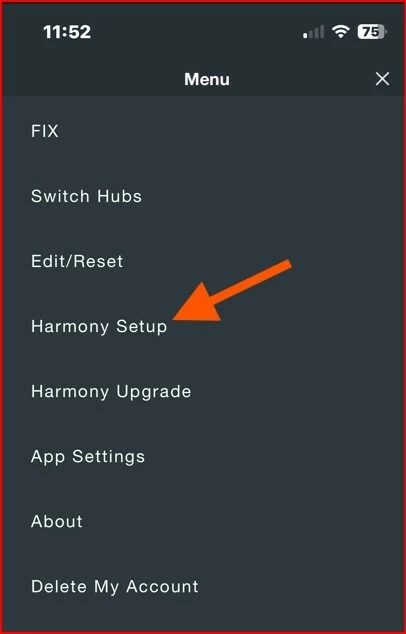
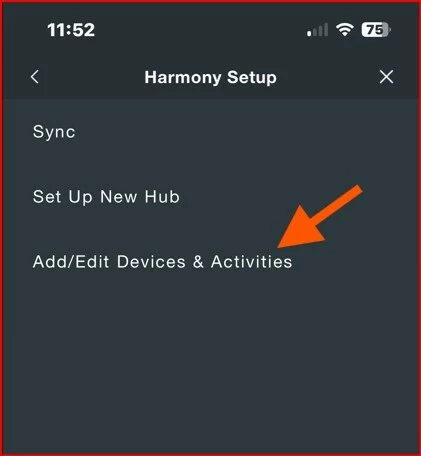
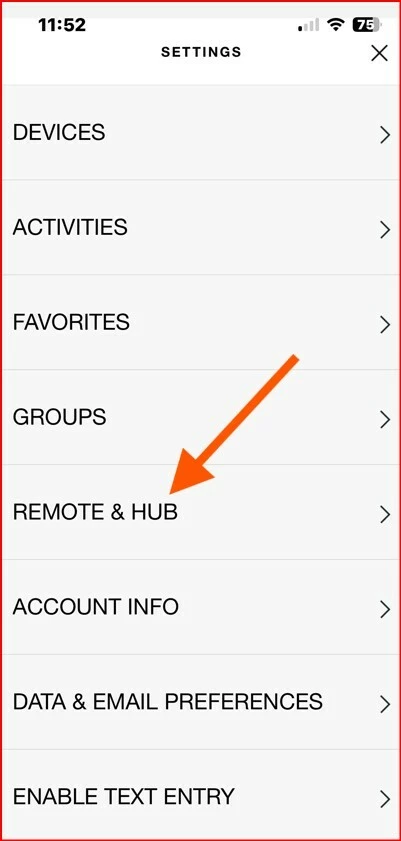
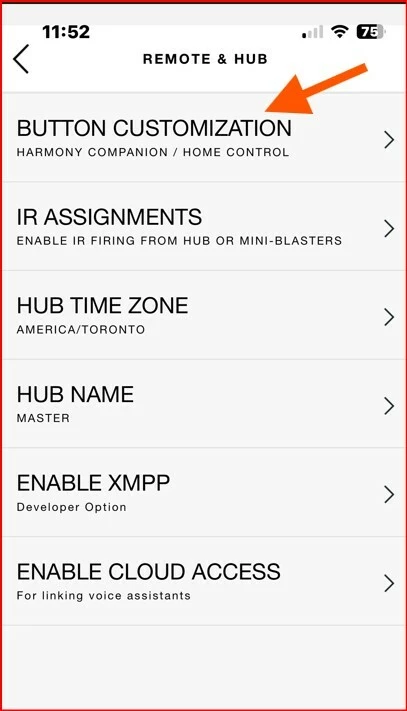
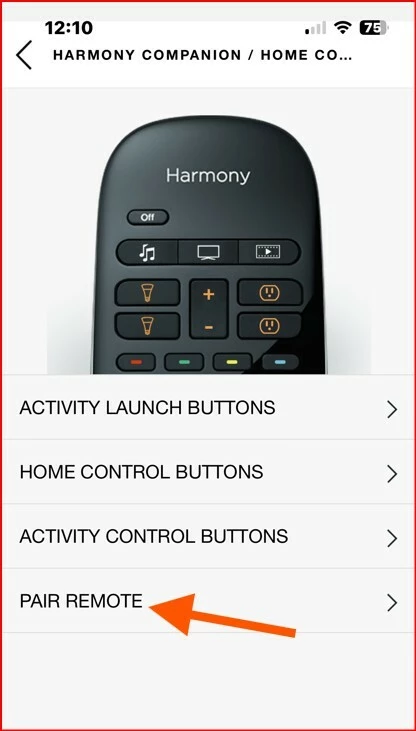
Good day folks - I also encountered the same issue with one of my Harmony Home Hub's yesterday. Volume stopped on controlling my Beam (GEN1). I also noticed this community post on it yesterday, however, unaware that I was impacted as well. Today, I tried powering on and off all equipment - no luck. I did not want to go to the extreme of deleting the HUB as I have such a hard time remembering how to set it all up. So, what I tried today was just re-pairing the remote. Once the remote finished pairing, then it does a final Sync - my first Sync failed and then I disconnected the HUB from it's power /reconnected and tried again. Sync successful - tested volume on remote control and back in business!! I have put the screenshots below on how to pair if anyone is interested. @Airgetlam - yes, I am curious as well as to what update caused this - looks like the last update I did for either the app or firmware was on April 16th, 2025. I am currently at:
Firmware 84.1-64070
iOS 80.19.21
So, not sure if maybe Logitech had some sort of blip or the issue is on Sonos's side.
Derek
Pairing Remote Instructions
Go to Settings in the Harmony Hub Application and on the Hub you want to work with
Harmony Setup
Add/Edit Devices & Activities
REMOTE & HUB
Button Customization
PAIR REMOTE
Harmony SetupAdd / EditRemote & HubButton CustomizationPair and follow the instructions and do final Sync - Good luck!!
Sorry, that’s one half of the questions. I’m actually asking those that the Hub reset didn’t fix it which Sonos update broke their systems, and which devices they’re controlling.
And to be honest, how they connected, either via IR from the Harmony remote (the way I used to, back when I had PLAYBARs and Harmony remotes), or via an ARC connection to the TV sets. Some Sonos devices require IR control, others offer different and more direct connection. I’m trying to help figure out where the misconnect occurred, as my Sonos devices and controller(s) have not changed this week at all. Which doesn’t make this sudden ‘it doesn’t work’ more confusing.
Good day folks - I also encountered the same issue with one of my Harmony Home Hub's yesterday. Volume stopped on controlling my Beam (GEN1). I also noticed this community post on it yesterday, however, unaware that I was impacted as well. Today, I tried powering on and off all equipment - no luck. I did not want to go to the extreme of deleting the HUB as I have such a hard time remembering how to set it all up. So, what I tried today was just re-pairing the remote. Once the remote finished pairing, then it does a final Sync - my first Sync failed and then I disconnected the HUB from it's power /reconnected and tried again. Sync successful - tested volume on remote control and back in business!! I have put the screenshots below on how to pair if anyone is interested. @Airgetlam - yes, I am curious as well as to what update caused this - looks like the last update I did for either the app or firmware was on April 16th, 2025. I am currently at:
Firmware 84.1-64070
iOS 80.19.21
So, not sure if maybe Logitech had some sort of blip or the issue is on Sonos's side.
Derek
Pairing Remote Instructions
Go to Settings in the Harmony Hub Application and on the Hub you want to work with
Harmony Setup
Add/Edit Devices & Activities
REMOTE & HUB
Button Customization
PAIR REMOTE
Harmony SetupAdd / EditRemote & HubButton CustomizationPair and follow the instructions and do final Sync - Good luck!!
Good day folks - I also encountered the same issue with one of my Harmony Home Hub's yesterday. Volume stopped on controlling my Beam (GEN1). I also noticed this community post on it yesterday, however, unaware that I was impacted as well. Today, I tried powering on and off all equipment - no luck. I did not want to go to the extreme of deleting the HUB as I have such a hard time remembering how to set it all up. So, what I tried today was just re-pairing the remote. Once the remote finished pairing, then it does a final Sync - my first Sync failed and then I disconnected the HUB from it's power /reconnected and tried again. Sync successful - tested volume on remote control and back in business!! I have put the screenshots below on how to pair if anyone is interested. @Airgetlam - yes, I am curious as well as to what update caused this - looks like the last update I did for either the app or firmware was on April 16th, 2025. I am currently at:
Firmware 84.1-64070
iOS 80.19.21
So, not sure if maybe Logitech had some sort of blip or the issue is on Sonos's side.
Derek
Pairing Remote Instructions
Go to Settings in the Harmony Hub Application and on the Hub you want to work with
Harmony Setup
Add/Edit Devices & Activities
REMOTE & HUB
Button Customization
PAIR REMOTE
Harmony SetupAdd / EditRemote & HubButton CustomizationPair and follow the instructions and do final Sync - Good luck!!
Thanks, DIY242! I also found that my Logitech Harmony Elite was suddenly unable to control the volume on my Sonos over wifi (not IR). I had tried various things to fix it, including completely removing my Sonos system from Harmony, but had hit a brick wall. After following your solution of re-pairing the remote, I’m now back in business! It did also take a few power cycles of the hub to get things to sync as you suggested.
I don’t understand why this works as my remote was otherwise functioning normally - it had just lost the ability to control my Sonos systems. I don’t think I’d have ever found the re-pair functionality without your post as it is strangely hidden under Button Customization, which makes no sense!
Thanks again!
Good day folks - I also encountered the same issue with one of my Harmony Home Hub's yesterday. Volume stopped on controlling my Beam (GEN1). I also noticed this community post on it yesterday, however, unaware that I was impacted as well. Today, I tried powering on and off all equipment - no luck. I did not want to go to the extreme of deleting the HUB as I have such a hard time remembering how to set it all up. So, what I tried today was just re-pairing the remote. Once the remote finished pairing, then it does a final Sync - my first Sync failed and then I disconnected the HUB from it's power /reconnected and tried again. Sync successful - tested volume on remote control and back in business!!