Contributor I
May 13, 2021
Answered

Creating a stereo pair - Sonos one and one SL

I have a sonos one and a new SL (I have just added)

Both are on the same wifi, both working fine and appear on the Sonos App (under different rooms on the app - though they are close by)

When I try and add a stereo pair to either the One or SL it just comes up as ‘Two Compatible Sonos Speakers are required….’

Can anyone help me please with how to fix this?

Many thanks
This topic has been closed for further comments. You can use the search bar to find a similar topic, or create a new one by clicking Create Topic at the top of the page.
caesar327Answer
Prodigy I
May 13, 2021

Hi, Thanks

yes done all that, rebooted the wifi box, turned off speakers off and on, app off and on etc….


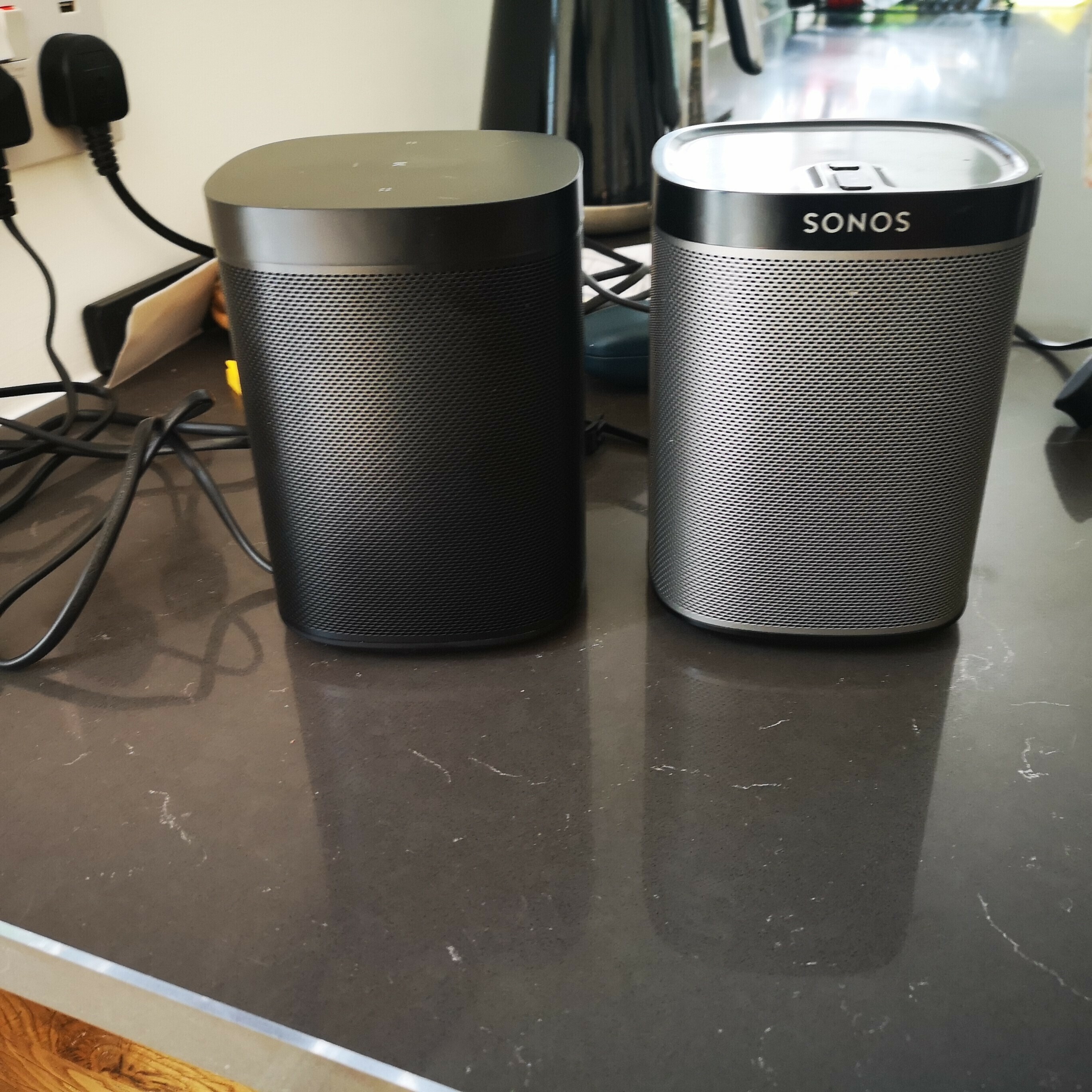
Looks like a Play 1 on the right as it has physical buttons.  You can’t stereo pair that with a One (SL or otherwise):


https://reverb.com/p/sonos-play-1-mini-wireless-speaker?hfid=40349184&utm_source=google&utm_medium=cpc&utm_campaign=12293041852&utm_content=campaignid=12293041852_adgroupid=116935846065_productpartitionid=1172618433337=merchantid=401052503_productid=40349184_keyword=_device=c_adposition=_matchtype=_creative=497322104776&gclid=EAIaIQobChMI0rytoenG8AIVlN7ICh0IgwCFEAQYBCABEgJJZ_D_BwE


If someone sold you that as a “One” 1st gen, you need to have a hard conversation with them.


8 replies

jgatie
May 13, 2021

Is it a One or a Play:1?  They are different.

Dee KayAuthor
Contributor I
May 13, 2021

Its a One - 1st Gen I believe - matched with a One SL

Thanks

Lead Maestro
May 13, 2021

You might try unplugging both speakers from power for about a minute and rebooting your phone.

Do you mind sending a photo of each speaker to confirm the models?

"Receive with simplicity everything that happens to you." - Rashi
Dee KayAuthor
Contributor I
May 13, 2021

Hi, Thanks

yes done all that, rebooted the wifi box, turned off speakers off and on, app off and on etc….


caesar327Answer
Prodigy I
May 13, 2021

Hi, Thanks

yes done all that, rebooted the wifi box, turned off speakers off and on, app off and on etc….


Looks like a Play 1 on the right as it has physical buttons.  You can’t stereo pair that with a One (SL or otherwise):


https://reverb.com/p/sonos-play-1-mini-wireless-speaker?hfid=40349184&utm_source=google&utm_medium=cpc&utm_campaign=12293041852&utm_content=campaignid=12293041852_adgroupid=116935846065_productpartitionid=1172618433337=merchantid=401052503_productid=40349184_keyword=_device=c_adposition=_matchtype=_creative=497322104776&gclid=EAIaIQobChMI0rytoenG8AIVlN7ICh0IgwCFEAQYBCABEgJJZ_D_BwE


If someone sold you that as a “One” 1st gen, you need to have a hard conversation with them.


Dee KayAuthor
Contributor I
May 13, 2021

Thanks for the feedback

pwt
Virtuoso
May 15, 2021

Note that it is possible to stereo-pair a Play:1 and a One, although it’s unsupported by Sonos. See:

https://github.com/avantrec/soco-cli#grouping-and-stereo-pairing

Needs a small amount of technical know-how to install Python and the SoCo-CLI utility, though both are free.

If you do try this, set the One as the left-hand speaker:

sonos <name of One> pair <name of Play:1>

4 x P:5 | Sub | 4 x P:1 | 3 x Connect | 2 x Boost | Connect:Amp | 2 x One | Amp | Move | Port | Era 300
Dee KayAuthor
Contributor I
May 15, 2021

Thanks 👍