Buying a projector to use with Beam (Gen1)

  • January 25, 2026
  • 10 replies
  • 66 views

Hi there,

I have a Sonos system with gen1 Beam and a Sub that I use for my TV.  I’d like to get rid of the TV and get a projector instead.  What do I need to know to ensure that the connection between my devices (the projector, the Beam, and--I assume--my Mocbook Pro, which will probably be the most used source of the audio/video).  Are there going to be lag issues?  Are there certain types of connectivity that I need to make sure the projector includes?


Thanks!
 

10 replies

Airgetlam
  • January 25, 2026

Sonos isn’t considered to be well designed for projector use, mostly because the sound is supposed to come from up front (where the screen is) and not in back where the projector is.

The Beam connects to the image generating device with an ARC connection, carried across HDMI, or in a pinch, an optical cable with the necessary adapter. Both of these methods require a cable run from the image generating device to the Sonos. 

Usually, the image generating device contains the ARC generating system. This means you can connect pretty much anything to the HDMI ports on it, and it sends out the ARC signal through the appropriate port, so all you need to do is connect the Sonos to the ARC port, and any other HDMI devices (including switches, if needed) connect to other HDMI ports. 

Because you’re using a Sonos Home theater device like the Beam, there is no appreciable delay in that ‘room’, which would include the Beam, any surrounds, and Subs…but you would get that 75 ms delay if you group any secondary rooms, between the Home theater room, and those secondary rooms. 

If you still are interested in going down this route, given the challenges, I’d be shopping for both a projector that does ARC, and a long HDMI cable to connect between the projector and the Beam. HDMI 2.1 is probably easiest to find, my understanding of the ARC signal (carried on separate pins than a standard HDMI audio signal) Carrie’s around 50 feet…but don’t trust my memory on that, do your own checking. 


  • Author
  • Contributor I
  • January 25, 2026

Thank you Bruce!  I appreciate you taking the time to respond so thoroughly.  I ask patience, as I am not a tech expert when it comes to HDMI, ARC, etc.  If I’m understanding you, the best option would be to have my A/V source (in this case my MacBook) output video to the projector and sound (via ARC signal using an HDMI cable) to the beam.  This should be totally doable, considering the size and setup of the room!


If my MacBook only has USB-c connectors, what is the best way of going about this?  Is there a device that will connect to my laptop and allow it to send out two HDMI signals: the video to the projector, and the ARC to the Beam?


  • Author
  • Contributor I
  • January 25, 2026

If my understanding is correct, and ARC signal is not the same as a regular HDMI signal?  Meaning, I can’t just get some kind of HDMI splitter that sends the same signal to the Beam and the projector?  I need something that will specifically provide an HDMI output and an ARC output? 


  • Author
  • Contributor I
  • January 25, 2026

Something like this?


https://a.co/d/crIPUZd

“8K@60Hz 4K@120Hz HDMI2.1 Switch 2 in 1 Out with Audio Extractor eARC,ARC,7.1Ch,SPDIF 5.1Ch,48Gbps,HDCP2.3 Bypass,VRR,IR,3D,HDR 10,Dolby Atmos,Compatible with QLED TV,PS5,Xbox,Sonos Soundbar,Apple TV”


buzz
  • January 25, 2026

Correct, there is a second set of audio pins in the HDMI plugs for the HDMI-ARC audio return and the player must be configured to use these pins.


  • Author
  • Contributor I
  • January 25, 2026

Brilliant, thank you!


Airgetlam
  • January 25, 2026

Nominally, the Projector takes any sound input via HDMI (for instance, from your Mac), and then sends the ARC signal back out through the HDMI port, via an HDMI appropriate cable, to the Sonos. Your Mac does not create an ARC signal, the projector (or TV) usually does. 

There are some relatively expensive devices that can create an ARC signal, which I can point to some, if you’re interested. They might make it easier…or not. The real problem, in my mind at least, is the distance between where the Sonos (Beam in your case) wants to be, at the front with the screen, and the source (HDMI ARC), which wants to be somewhere else, often behind the viewer. 

As I’ve said before, Sonos doesn’t really make a great solution for projectors. I have thoughts about why, but I’m not part of Sonos, so I don’t really know why. 


AjTrek1
  • January 26, 2026

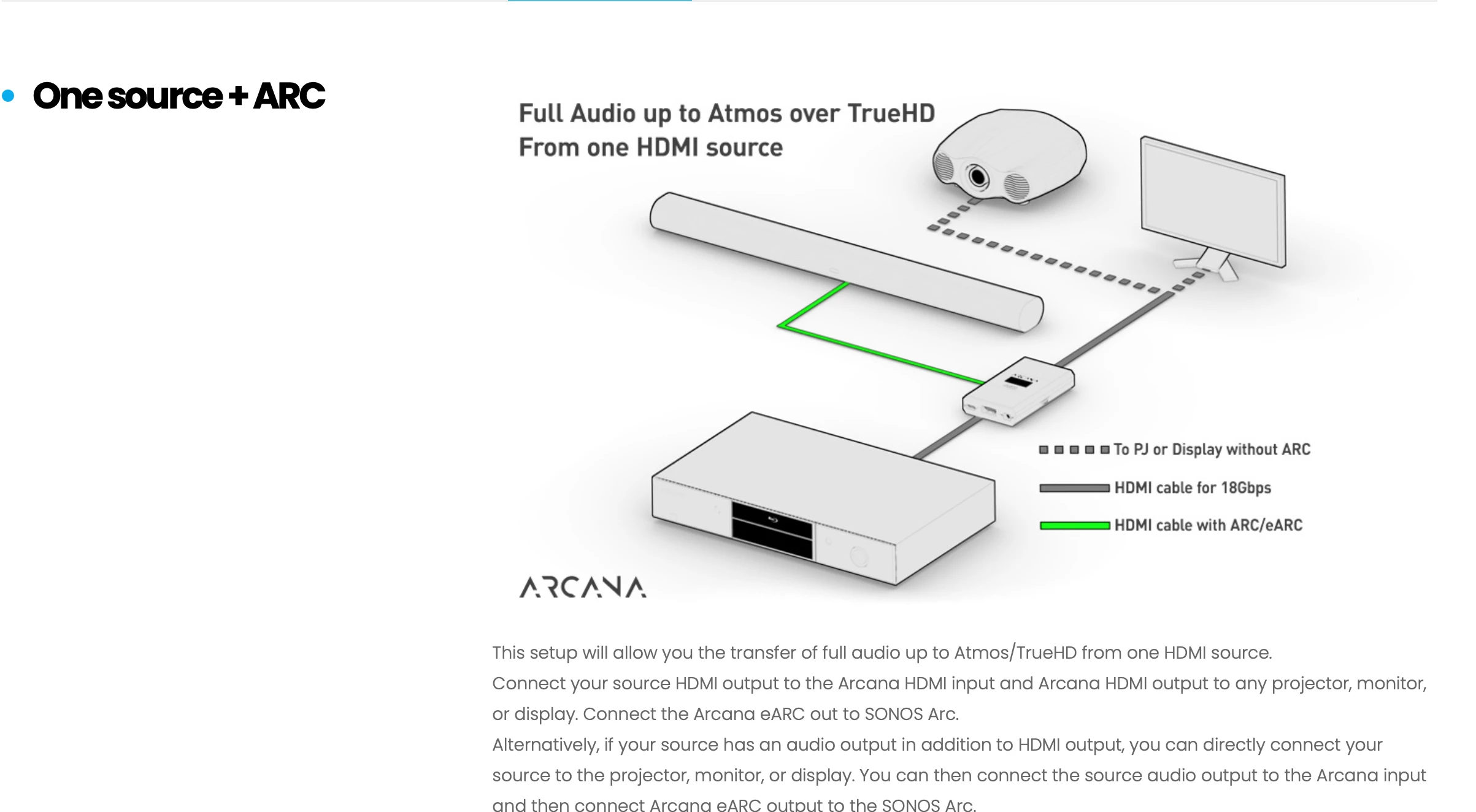
Below is a diagram of a device called the HDFury Arcana used to extract HDMI Atmos signals from HDMI sources without eARC. In diagram the device in the foreground would be your computer, the small device in the center is the HDFury Arcana and the long horizontal object is the Sonos Arc which would be your Beam. Where the tricky setup comes into play versus the diagram is this:

  • Projector in the Rear
  • Screen upfront
  • Beam upfront below screen (or behind if its acoustically transparent) 

However, as has been said Sonos is not designed for use with a projector. Here’s a link to the HDFury website. Good Luck!


  • Author
  • Contributor I
  • January 26, 2026

I’m considering getting a short throw projector, so it can just be very close to the sound bar!  Thanks!


  • Author
  • Contributor I
  • January 30, 2026

For anyone interested, I ended up going with a Yaber k300 short throw projector, which sits directly behind my beam, and connects with an HDMI cable. It works pretty seamlessly with my Sonos system (so far).