
Avid Contributor I
Aug 17, 2023 3:13 PM UTC
Answered

Audio dropouts with PLAYBAR

Hi, I am experiencing intermittent audio dropouts when streaming certain content.  Setup is FireTV stick connected to Sony TV via HDMI, then optical out from the TV to an optical splitter.  One of the outputs goes to the PLAYBAR, the other to a set of headphones.

I am noticing dropouts when streaming Netflix and Hulu primarily.  These dropouts last a fraction of a second but are very noticeable when the audio is loud.  Not sure if this will work, but here’s a recording - the dropout is right about in the middle of this car engine revving.
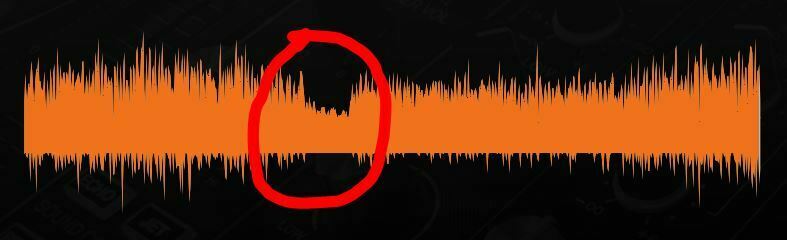
https://www.dropbox.com/scl/fi/1vxfg46pz722oygx7p7n6/sonosdropout.mp3?rlkey=zw0ons5hdpfkbc2hqys6gdh23&dl=0


I do not get these dropouts when listening to the same material on the headphones.  I have swapped the optical cables between headphones and PLAYBAR, and the problem follows the PLAYBAR regardless of which cable is used.  


I found a similar thread here from about 6 months ago but with no resolution.  


Any ideas?  Thanks!

This topic has been closed for further comments. You can use the search bar to find a similar topic, or create a new one by clicking Create Topic at the top of the page.
Corry P
Corry PAnswer
Sonos Staff
Aug 18, 2023 8:03 AM UTC

Hi @BRYAN_25 

I recommend testing with the optical splitter removed from the equation and the Playbar connected directly to the TV - if the Playbar then plays without issue, you’ve found the source of the problem.

It could be, however, that a reboot of the TV will help - unplugging it from power for at least a couple of minutes is recommended.

I hope this helps.

"Common sense is the collection of prejudices acquired by age eighteen." - Albert Einstein

4 replies

Corry P
Corry PAnswer
Sonos Staff
Aug 18, 2023 8:03 AM UTC

Hi @BRYAN_25 

I recommend testing with the optical splitter removed from the equation and the Playbar connected directly to the TV - if the Playbar then plays without issue, you’ve found the source of the problem.

It could be, however, that a reboot of the TV will help - unplugging it from power for at least a couple of minutes is recommended.

I hope this helps.

Translate
"Common sense is the collection of prejudices acquired by age eighteen." - Albert Einstein
Airgetlam
Aug 18, 2023 7:10 PM UTC

Might be also worth double checking for any software updates to the TV set, while you’re in there messing around. 

Translate
Bruce
BRYAN_25Author
Avid Contributor I
Aug 30, 2023 2:12 AM UTC

Hi @BRYAN_25 

I recommend testing with the optical splitter removed from the equation and the Playbar connected directly to the TV - if the Playbar then plays without issue, you’ve found the source of the problem.

It could be, however, that a reboot of the TV will help - unplugging it from power for at least a couple of minutes is recommended.

I hope this helps.

Hi - finally got around to trying this and it didn’t change anything.  Still having the dropouts even the optical is connected directly from the TV to the Playbar.  Same optical cable does not have dropouts if I use it my headphones.

Translate
Corry P
Sonos Staff
Aug 30, 2023 8:37 AM UTC

Hi @BRYAN_25 

If you also rebooted the TV, then I recommend you get in touch with our technical support team who have tools at their disposal that will allow them to give you advice specific to your Sonos system and what it reports.

Translate
"Common sense is the collection of prejudices acquired by age eighteen." - Albert Einstein