
Avid Contributor III
August 5, 2025
Answered

ARP attack between Sonos speakers ARC vs two Era-100, What’s happening Sonos?

  • August 5, 2025
  • 17 replies
  • 292 views

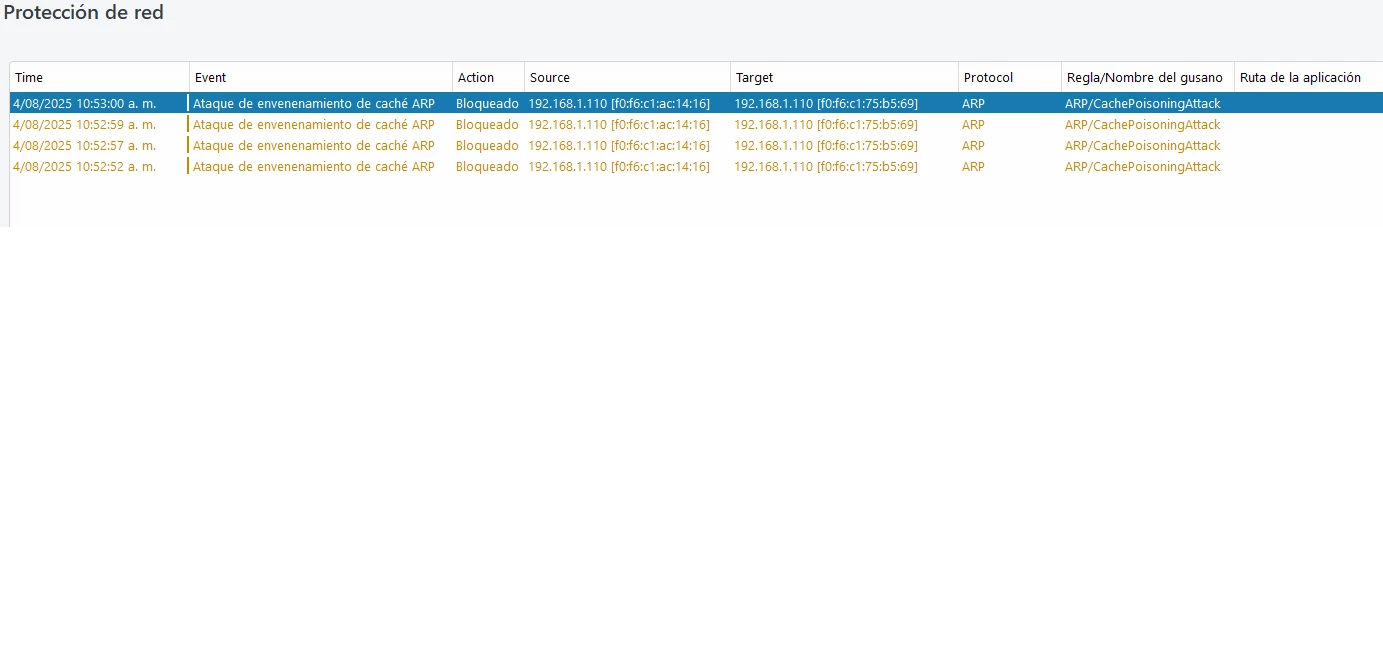
ARP attack between Sonos speakers. ARC attacks the Era-100 rear speakers, or vice versa. What's happening with Sonos? My Eset antivirus detected the ARP attack between these products, and this is causing my Wi-Fi network to crash. I also notice they're creating a hidden 2.4GHz network.
 

This topic has been closed for further comments. You can use the search bar to find a similar topic, or create a new one by clicking Create Topic at the top of the page.
Best answer by Angel24

Problem solved. After testing the Wi-Fi network, I discovered wireless interference due to other signals outside my home. The problem was resolved by changing the transmission channels from the 2.4 and 5GHz bands to unsaturated channels. My router was set to automatic channels; it's an Archer C9 router. The ARP attack message between speakers no longer appeared in the antivirus, and the hidden 2.4GHz band that was showing up before also disappeared. Thanks to everyone for their time and advice.

17 replies

Local Superstar
August 5, 2025

This is normal behavior for Sonos HT, don’t be concerned.

When the Era-100’s are powered on / restart they use their own MAC address and get an IP address from your router. They will then bond to the Arc, and use the Arc MAC address (proxy) and use same IP address. This is often detected as a MAC “Spoof” or “Poison”. You will see 2 MAC addresses in your screenshot with only a single IP address, one will be the Arc the other an Era-100.

One of the reasons why I don’t recommend reserving IP address for Sonos speakers.

Angel24Author
Avid Contributor III
August 5, 2025

This problem started about 5 days ago, I used the Eset antivirus years ago and this is the first time it sends an ARP attack message and the strangest thing is that it is caused by Sonos products, right now I have the speakers disconnected from the power grid, the router I use is about 5 years old and has never given me a problem so right now I am keeping the Sonos speakers offline, my woofo network uses DHCP to automatically assign IP, I will see what day it is when I have time I will try connecting my PC directly to the router of the internet company that I pay to check the internet speed and then compare it with that of my own router if the problem continues I will have to reset my router or buy another one to see if this strange issue is corrected. I will keep you informed.

MackDaddy1962
Lyricist II
August 6, 2025

Strange situation no doubt. It might be prudent to upgrade your WiFi router (I know, more $$$) to get around this mess. Just for reference, I’ve got ASUS RT-AX5400 routers in a 2 node mesh network with 26-28 connected devices that runs flawless. I’ve had these up and running since Oct 2023. I like the fact I can monitor and make adjustments from my primary workstation (Win 11,) iPhone & iPad without issues. I’ve got the ARC Ultra connected via Ethernet on the primary node, Sub 4 & ERA100’s are all in wireless connection mode. Just pure bliss for now, hands down.


My internet provider is Breezeline @ 500MB down / 50MB up. I can speed test from my Win 11 machine that’s connected (via Ethernet) on the secondary router node and get consistent advertised speeds. That’s impressive considering it rides the 5GHz pipe between router nodes to attain that.


Anyway, give some thought to a new router and get rid of this headache you’ve got. I don’t see any of that nonsense with my setup, so there’s that. Hope you get it worked out, please share your findings when you do get it sorted!

Moderator edit: Link removed.

AjTrek1
August 6, 2025

Just to be clear here’s an AI generated explanation of an ARP attack…


All said Sonos (IMO) is not at fault although it may be collateral damage due to a network security breach. The most common breaches occur because of poor network encryption and passwords:

Encryption

  • WPA (Wi-Fi Protected Access) version used should be WPA2, WPA3 or WPA2/WPA3. The latter is the most user friendly for all devices on a network. WPA3 used along may cause issues for some older devices. If you are using WEP or WPA1 the network is wide-open to attacks.

Password

  • Assuming you have the proper WPA version in place the next vulnerability is a weak or easily determined Wi-Fi password. * Click this link for tips on password security. 

Stopping or preventing the attacks can be as simple as correcting the points made or above. More difficult resolution may require one or more of the following:

  • Factory Reset of the network (requires use of proper encryption and strong password upon setup) 
  • Factory reset of Wi-Fi clients (will require use of the network SSID and Password to allow re-connection to network)
  • Erase and re-install of a computer OS assuming trojans may have been embedded in it

 * Password update of Wi-Fi clients required

Together Everyone Achieves More = T.E.A.M.
Angel24AuthorAnswer
Avid Contributor III
August 6, 2025

Problem solved. After testing the Wi-Fi network, I discovered wireless interference due to other signals outside my home. The problem was resolved by changing the transmission channels from the 2.4 and 5GHz bands to unsaturated channels. My router was set to automatic channels; it's an Archer C9 router. The ARP attack message between speakers no longer appeared in the antivirus, and the hidden 2.4GHz band that was showing up before also disappeared. Thanks to everyone for their time and advice.

MackDaddy1962
Lyricist II
August 6, 2025

Good call on the encryption and password use. I use WPA2/WPA3 with a 18 character PW. I’ve learned a lot about the AI explosion used by hackers on Hive Systems website. I’m a retired data center network guy, not specialized in security for routers but did the last stretch of my career doing Windows server farm admin.

Strong encryption and passwords are a must these days. 

Angel24Author
Avid Contributor III
August 6, 2025

My router uses WPA2 with AES, so I'll have to buy a newer one that's just as good as this one and has WPA3. I improved the Wi-Fi passwords just in case, but I've never had any problems with my Wi-Fi network.