
Avid Contributor III
August 5, 2025
Answered

ARP attack between Sonos speakers ARC vs two Era-100, What’s happening Sonos?

  • August 5, 2025
  • 17 replies
  • 292 views

ARP attack between Sonos speakers. ARC attacks the Era-100 rear speakers, or vice versa. What's happening with Sonos? My Eset antivirus detected the ARP attack between these products, and this is causing my Wi-Fi network to crash. I also notice they're creating a hidden 2.4GHz network.
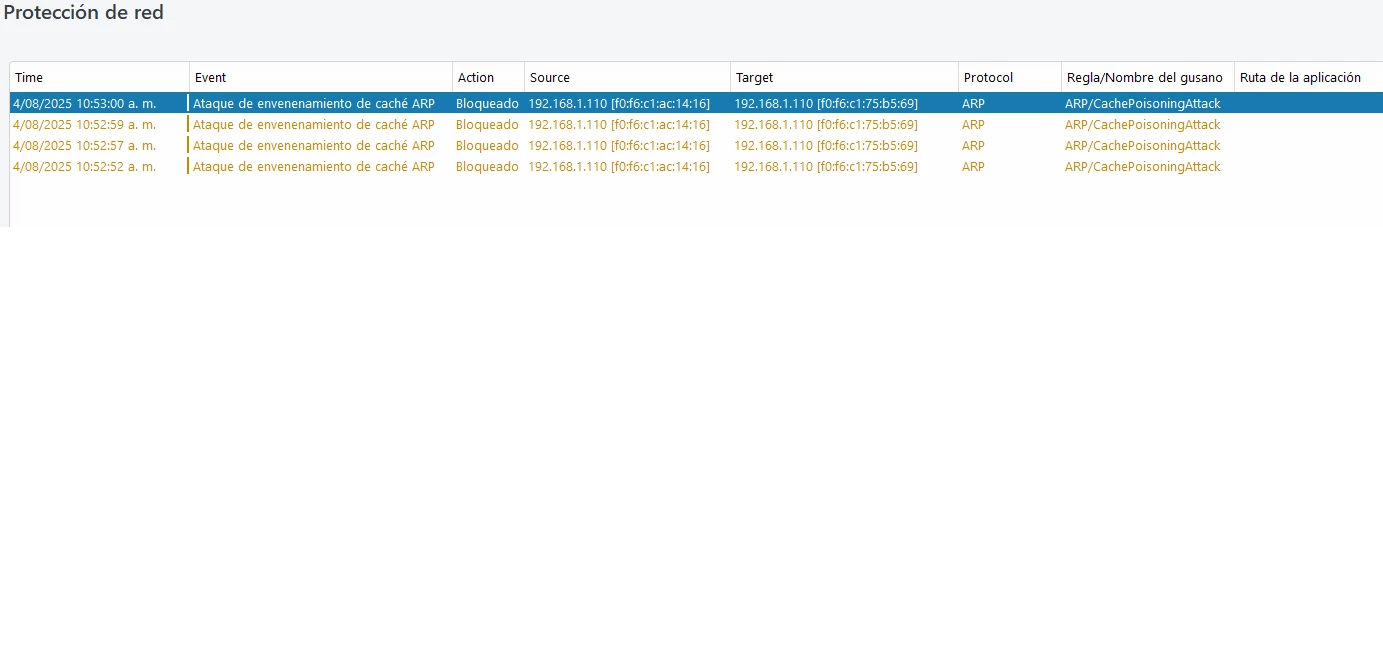
 

This topic has been closed for further comments. You can use the search bar to find a similar topic, or create a new one by clicking Create Topic at the top of the page.
Best answer by Angel24

Problem solved. After testing the Wi-Fi network, I discovered wireless interference due to other signals outside my home. The problem was resolved by changing the transmission channels from the 2.4 and 5GHz bands to unsaturated channels. My router was set to automatic channels; it's an Archer C9 router. The ARP attack message between speakers no longer appeared in the antivirus, and the hidden 2.4GHz band that was showing up before also disappeared. Thanks to everyone for their time and advice.

17 replies

Airgetlam
August 5, 2025

Are all of these devices wired to a managed switch? 

If the two Era 100s are surrounds, remove any Ethernet cables from them, they should latch on to the 5 GHz signal (hidden) generated by the Arc. It’s how the system is actually designed to work.

Edit: of course the radio/wifi needs to be turned on on all three devices.

Bruce
Angel24Author
Avid Contributor III
August 5, 2025

All the speakers are connected to a TP-Link Archer 9 router on the 2.4GHz band. About 4 days ago, I started having problems with my internet connection being slow. I noticed the first ARP attack between the Era-100s and the ARC bar. Now, today I'm getting another attack between the ARC and an Era-100. My Wi-Fi network hasn't been working properly since then.

Airgetlam
August 5, 2025

Then they’re not connected via an Ethernet cable. I’m not much help, other than to suggest you communicate directly with Sonos themselves, by submitting  a system diagnostic within 10 minutes of experiencing this problem, and calling Sonos Support to discuss it. Don’t post the resulting diagnostic number here, they get sensitive about GDPR.

There may be information included in the diagnostic that will help Sonos pinpoint the issue and help you find a solution.

When you speak directly to the Support staff, they have tools at their disposal that will allow them to give you advice specific to your network and Sonos system.

Bruce
Stanley_4
Grand Maestro
August 5, 2025

Are you sure that this isn't a false report from your tool and that the blocking it is doing is causing the problem?

Angel24Author
Avid Contributor III
August 5, 2025

The problem is real; there's nothing fake here; it's just something that's happening. I'm waiting for a Sonos engineer to resolve this speaker security issue for me, because that's what it really looks like. They'll know.

Airgetlam
August 5, 2025

You’re already in communication with Sonos engineers?

Bruce
Angel24Author
Avid Contributor III
August 5, 2025

I don't know if it will be possible to do it. I'm in Panama and I don't know if they can do anything for me or check the devices from there. Really, I would just have to reset the speakers and I don't know if that will solve the problem, because I need someone from them to see this post.

Airgetlam
August 5, 2025

The only Sonos employees that read this forum and reply are Sonos forum moderators.

If you want to get data to engineers, you’d need to submit that diagnostic I was speaking of, and call Sonos support. 

I’m certainly not having any issue with my Arc and Era 100s surrounds, and like ​@Stanley_4 , I’ve seen other cases of misreporting by various device/software combinations before, which ultimately end up not being issues with Sonos, but the way that these systems ‘look’ at things. Which isn’t to say there’s no chance, but suggests it’s extremely small. 

I recognize being in Panama is a challenge, as there is no Support location there, but Sonos Support exists in other countries in South America. Perhaps one of those might be able to assist you.


Bruce
Stanley_4
Grand Maestro
August 5, 2025

Resetting, aka factory reset, will usually do nothing and usually makes things worse.

I'd really lean to your tool getting confused by the way Sonos uses your network and the one(s) it creates.

Try removing the Ethernet connections and the private "SonosNet" 2.4 gHz network should go away.

Unbond any subs and surrounds and the private 5 gHz network should also go away.


If you can configure your tool to understand Sonos networking and how the Sonos devices use your network and the ones they create it might be able to coexist and not block essential Sonos to Sonos network, traffic, or essential traffic between Sonos and your router and/or Controller.

If you can't call support you could try the other contact options, maybe chat?

Enthusiast II
August 5, 2025

I think this is a false positive. When in surround mode the Arc will request the IP addresses for the rears via some kind of DHCP Proxy and it looks like your Eset Antivirus is seeing this as a problem which it is not in reality.

I’m not sure why this would bring your WiFi down. Where is Eset installed? It looks like it’s just a PC, so not sure why that could bring down your network.