
Ryan S
Retired Sonos Staff
June 18, 2020
Tips & Tricks

Understanding Dolby Atmos and Sonos Arc

  • June 18, 2020
  • 41 replies
  • 39823 views

One of the most exciting features of the new Sonos Arc is its ability to play Dolby Atmos sound. As with all relatively new technology, it’s understandable that you might feel a little confused when it comes to making sure you have a compatible setup for the feature. 

Head’s up—we’ll be talking about things like “codecs,” and “audio formats” below, but don’t panic. We’re here to make sure you understand why those things are important in setting up Arc to play Dolby Atmos. Rest assured that no matter what you’re listening to with Arc, it’s going to sound great. But to get the most out of Arc, it’s worth ensuring that your system is set up to deliver Dolby Atmos. And, as always, we’re here to help. If you have questions, feel free to ask.

Dolby Atmos (as in “atmosphere”) is a format that allows sound to be heard three-dimensionally —including from above! (Arc achieves this by bouncing sound off of the ceiling). To facilitate this experience, Atmos information is contained within an audio wrapper (known as a codec), which has metadata instructing the audio drivers how to direct the sound within your space. 

Arc-compatible codecs that contain Dolby Atmos include Dolby Digital Plus, Dolby TrueHD, and Dolby MAT. Most streaming services that have Atmos content use Dolby Digital Plus, while Blu-rays usually use Dolby TrueHD or Dolby MAT. 

To get Dolby Atmos sound from Sonos Arc, you need to address the following:

  1. Connections. Sonos Arc needs to be connected to your TV with an HDMI cord (one is provided with Arc) via an ARC or eARC port (eARC is required for Dolby TrueHD and Dolby MAT).

  2. Compatibility. Every device that ‘touches’ the audio (e.g. Blu-ray player, Apple TV, Fire TV) needs to be able to pass Atmos on to the next in line—from the source of the content to Sonos Arc. For Blu-ray, the individual discs need to have Atmos content and the player needs to be capable of sending Atmos as well.

  3. Apps. Your app (e.g. Netflix, Disney+) needs to be capable of playing Atmos content via your particular TV. 

  4. Content. Your content needs to have Atmos audio in an Arc-supported codec: Dolby Digital Plus, Dolby TrueHD, or Dolby MAT. 

Some things to note:

  • Not every episode of every show may have Atmos, even if the streaming service supports Atmos.

  • A device (such as your TV or a streaming box like the Apple TV) may support Atmos, but not for all apps running on it. 

  • Some devices may not pass Dolby Atmos by default without making some adjustments to audio settings.

We’re happy to help answer questions, but in some cases you may need to contact the manufacturer of certain devices to check compatibility.

When set up properly, your Now Playing screen in the Sonos app will display the Dolby Atmos logo.
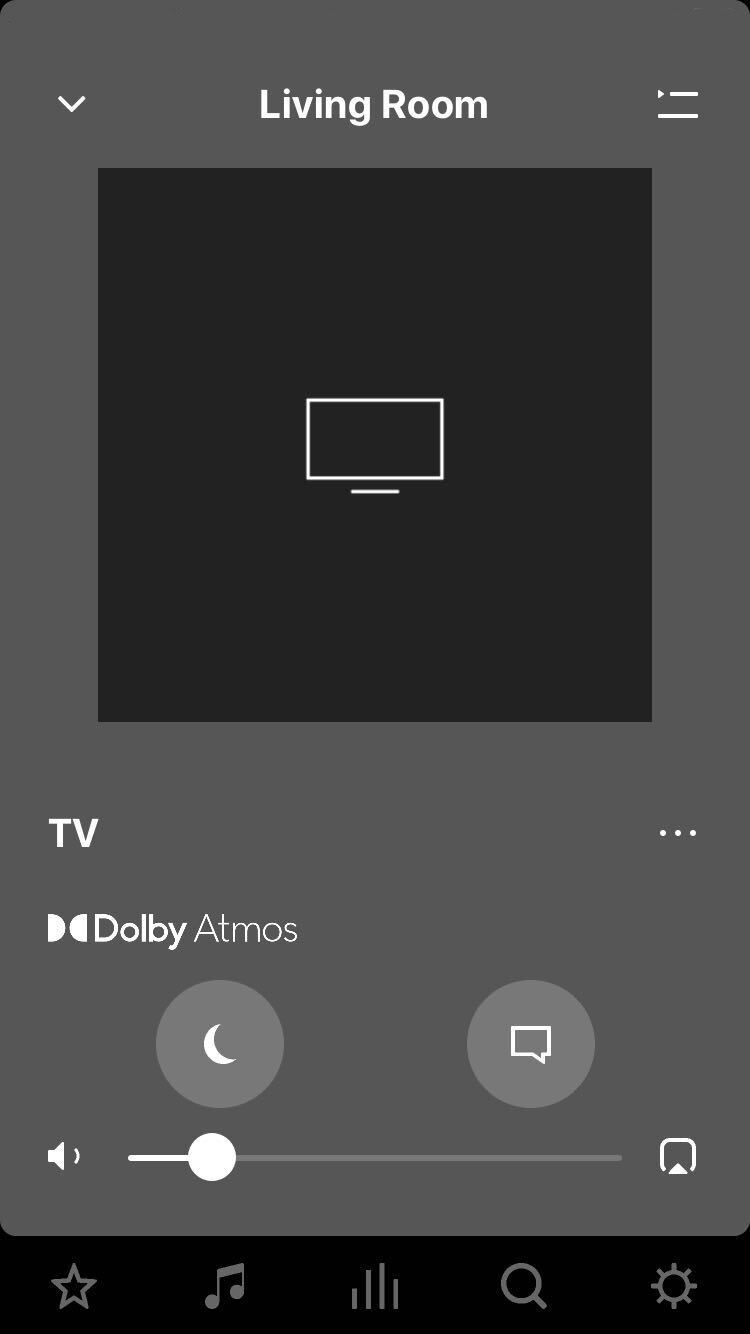


If you have all of the above set up, but are still not getting Dolby Atmos sound, let us know what you’re experiencing in a new thread or join an existing one and we’ll try to help you address the problem.

    This topic has been closed for further comments. You can use the search bar to find a similar topic, or create a new one by clicking Create Topic at the top of the page.

    41 replies

    Ken_Griffiths
    June 22, 2020

    I’m just slightly confused, as I (and a good many other users here in the community) have often classed (and referred to) a ’standalone’ Sonos Beam and PlayBar, which each do a similar thing with the two rear channels, as being a 3.0 system, when no surrounds/sub are bonded.
     

    I’m not seeing the case that a ‘standalone’ Arc would be referred to as a 5.0.2 setup? I would class it, in a similar vein, as a 3.0.2 system and perhaps state that it handles the two pseudo rear channels and that the ‘5 phased array channels’ referred to are the Arc’s FR, FL, Center and 2 height channels.


    Not hugely important, but It would be nice to get some clarification perhaps🤔? I also didn’t think it was just the two side-facing speakers (only) that just handled the rear (pseudo) channels, but that’s maybe my misunderstanding from some things that I’ve read and heard about the Arc.

    Local Superstar
    June 22, 2020

    https://professional.dolby.com/categories/soundbars/

    In numbers such as 5.1.2 and 7.1.2, the first digit represents the number of simulated traditional surround speakers; the second, a subwoofer; and the third, upward-firing speakers supporting Dolby Atmos.

    Prominent Collaborator I
    June 22, 2020

    I’m just slightly confused, as I (and a good many other users here in the community) have often classed (and referred to) a ’standalone’ Sonos Beam and PlayBar, which each do a similar thing with the two rear channels, as being a 3.0 system, when no surrounds/sub are bonded.
     

    I’m not seeing the case that a ‘standalone’ Arc would be referred to as a 5.0.2 setup? I would class it, in a similar vein, as a 3.0.2 system and perhaps state that it handles the two pseudo rear channels and that the ‘5 phased array channels’ referred to are the Arc’s FR, FL, Center and 2 height channels.


    Not hugely important, but It would be nice to get some clarification perhaps🤔? I also didn’t think it was just the two side-facing speakers (only) that just handled the rear (pseudo) channels, but that’s maybe my misunderstanding from some things that I’ve read and heard about the Arc.

    Haha, I think you are very confused. 😉  

    Some articles are wrong, for example, calling Arc+2 rears +Sub 7.1.2

    This article has the right info though:

    https://www.google.com.au/amp/s/arstechnica.com/gadgets/2020/05/the-sonos-arc-is-the-long-awaited-playbar-update-with-dolby-atmos-support/%3famp=1
    ”In general, Sonos refers to the Arc as a 5.0.2 arrangement—with five horizontal surround channels (left, center, right, left surround and right surround) and the two height channels for Atmos content—that converts to 5.0 sound when Atmos isn't in use. Prior Sonos soundbars are 3.0, but like those, you can pair the Arc with Sonos One or One SL speakers as dedicated surrounds and a Sonos Sub as a subwoofer. “


    melvimbe
    June 22, 2020


    I’m not seeing the case that a ‘standalone’ Arc would be referred to as a 5.0.2 setup? I would class it, in a similar vein, as a 3.0.2 system and perhaps state that it handles the two pseudo rear channels and that the ‘5 phased array channels’ referred to are the Arc’s FR, FL, Center and 2 height channels.


    the impression I got is that a standalone Arc will play rear channels, bouncing them off the side walls  to give somewhat of an appearance that audio is coming for the side/rear….in the same way the upfiring speakers give the appearance of audio coming from above.  I don’t think Sonos wants to advertise this as fully 5.0.2 so as not to mislead customers into thinking the Arc is just as good alone, isn’t compatible, or couldn’t benefit from bonding with rear surround speakers.   I don’t think there’s a good way to say that the rear channels are there, but not as good as real rear channels...if that makes sense.


    I think the point to consider is that the Arc is going to provide a better, fuller, more surround like experience by itself that a Beam/Playbar/Playbase does by itself.  Whether the Arc alone sounds better than those other options with rear sounds...don’t know.


    Danny
    Ken_Griffiths
    June 22, 2020


    I’m not seeing the case that a ‘standalone’ Arc would be referred to as a 5.0.2 setup? I would class it, in a similar vein, as a 3.0.2 system and perhaps state that it handles the two pseudo rear channels and that the ‘5 phased array channels’ referred to are the Arc’s FR, FL, Center and 2 height channels.


    the impression I got is that a standalone Arc will play rear channels, bouncing them off the side walls  to give somewhat of an appearance that audio is coming for the side/rear….in the same way the upfiring speakers give the appearance of audio coming from above.  I don’t think Sonos wants to advertise this as fully 5.0.2 so as not to mislead customers into thinking the Arc is just as good alone, isn’t compatible, or couldn’t benefit from bonding with rear surround speakers.   I don’t think there’s a good way to say that the rear channels are there, but not as good as real rear channels...if that makes sense.


    I think the point to consider is that the Arc is going to provide a better, fuller, more surround like experience by itself that a Beam/Playbar/Playbase does by itself.  Whether the Arc alone sounds better than those other options with rear sounds...don’t know.

    Okay, I will just go along with the majority then, that the standalone Arc is 5.0.2 and the old Playbar, Beam etc; are 3.0. Thanks Danny.👍

    melvimbe
    June 22, 2020

    Okay, I will just go along with the majority then, that the standalone Arc is 5.0.2 and the old Playbar, Beam etc; are 3.0. Thanks Danny.👍


    Not really what I was going for, but ok.  I guess I would say that it might be time to stop looking at the number designation.  The Arc is going to give you a better experience than the playbar.  And it’s get’s better when you add rears and sub.  What designation it is at what stage really does matter, just what the experience is.


    I think that expecially holds true as we are getting more Atmos contect, where it’s not so much about number of speakers as it the experience of getting the sound from the right place.

    Danny
    Ken_Griffiths
    June 22, 2020

    Okay, I will just go along with the majority then, that the standalone Arc is 5.0.2 and the old Playbar, Beam etc; are 3.0. Thanks Danny.👍

    Not really what I was going for, but ok.

    I just stated their formats as described in the arstechnica article... 

    www.google.com.au/amp/s/arstechnica.com/gadgets/2020/05/the-sonos-arc-is-the-long-awaited-playbar-update-with-dolby-atmos-support/%3Famp=1

    Trending Lyricist I
    June 22, 2020

    I have an LG Projector with ARC. If I connect a Fire TV Cube I get Atmos from Disney Plus, Prime, Tidal, Netflix and Movies anywhere. Not from Appletv app that is not compatible.

    If Instead of the FireTV I connect my 4K appletv, there is no immersive sound in options and I can’t get Atmos. I can in my LG TV but not in my projector. The AppleTV does not let me on settings tuen on Atmos.

    What could be the reason? If Fire can do it, this is obviously a problem of the AppleTV device or codecs…


    Thanks

    Trending Lyricist I
    June 22, 2020

    Yes, that’s pretty much what the whole thread about HDFury’s device here is all about. 

    Will I need a splitter like Vertex/Vertex2 in addition to the new product called “ARCANA” to achieve this?


    Ken_Griffiths
    June 22, 2020

    I have an LG Projector with ARC. If I connect a Fire TV Cube I get Atmos from Disney Plus, Prime, Tidal, Netflix and Movies anywhere. Not from Appletv app that is not compatible.

    If Instead of the FireTV I connect my 4K appletv, there is no immersive sound in options and I can’t get Atmos. I can in my LG TV but not in my projector. The AppleTV does not let me on settings tuen on Atmos.

    What could be the reason? If Fire can do it, this is obviously a problem of the AppleTV device or codecs…


    Thanks

    The reason is the ATV uses the multichannel LPCM codec and the Arc does not yet support that format, but sonos staff have said they may (will?)  release an update to support LPCM .. so it’s a case of changing the Apple TV sound-out format to Dolby Digital 5.1 until the Arc firmware is updated.