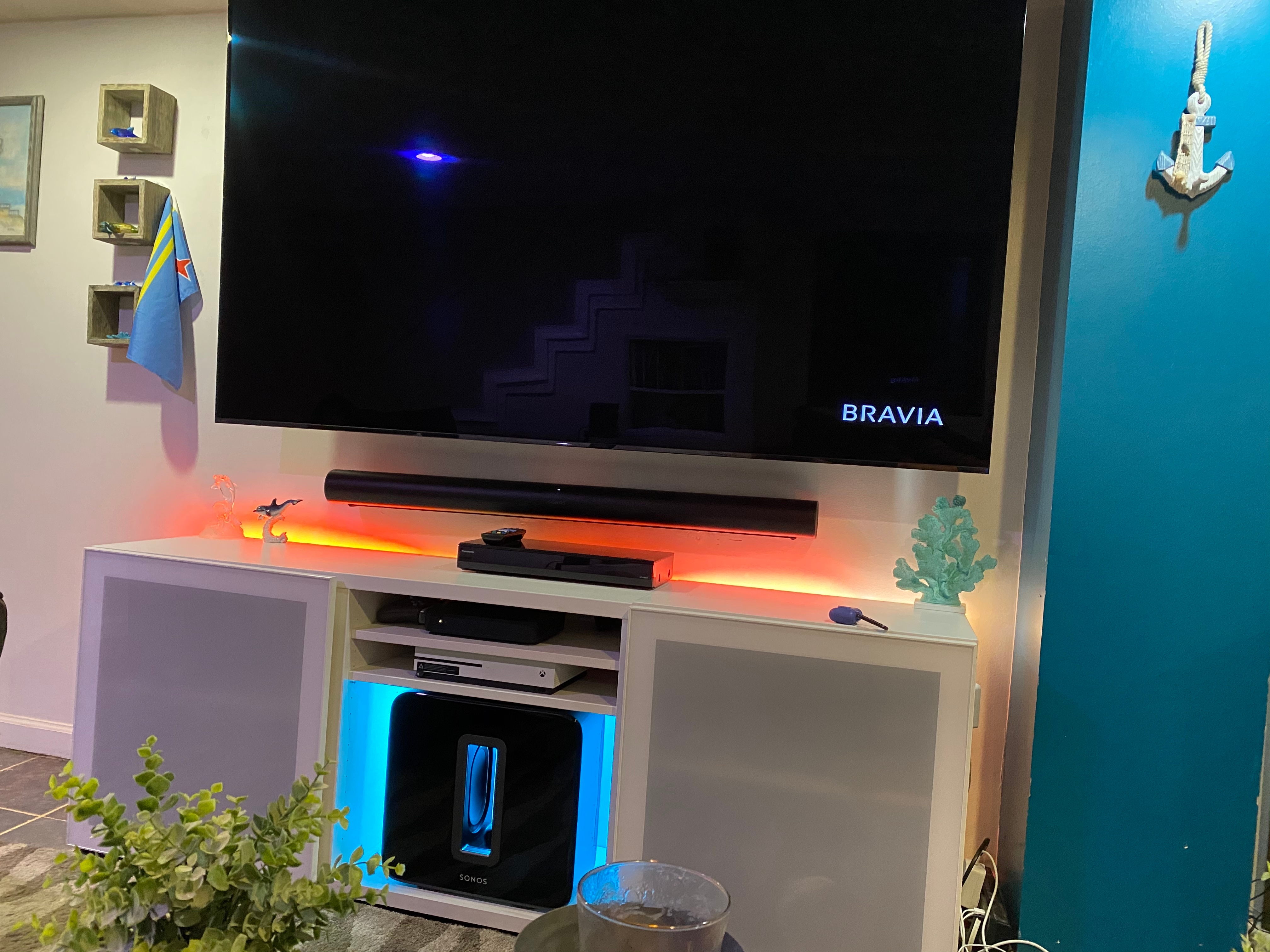
Just got a Sonos Beam. Connected it to a Sony Bravia TV using HDMI ARC and set up Bravia Sync. Audio is playing great. The TV remote, Apple TV remote, etc can control the Beam volume just fine.
However, I’ve noticed that lately the TV is doing what I might call a “hard power down” after sleeping, but only after having slept for some time. By hard power down I mean that next time I try to turn the TV on by waking a Bravia Sync device (like the Apple TV), the TV won’t turn on like it did before the Beam was added. And when the TV does turn on (which requires using the TV remote), it shows the Sony logo, the Android logo, the four rotating color block animations, etc and takes a minute or so to load.
My hunch is that the Beam is somehow sending a CEC power down signal to the TV, and the TV is interpreting it as a hard power down.
This only happens after the TV is off for an extended amount of time (an hour or two).
Any ideas?
Best answer by loodaddy
Ok so I switched to connecting the Beam to the TV with the optical adapter. The rebooting problem stopped (since Beam can’t access the TV using CEC). After playing with a few settings, it seems like this works just fine with only one major downside vs. using ARC/CEC.
For the settings changes:
For each input and the built-in Apps, turn off Clear Audio, set output to Dolby Digital, and set Speakers to Audio System
Make sure “Use IR” in on in the Sonos app
For me, the TV remote and Apple TV remote could control Sonos volume using IR (not sure if this will take extra steps for you), and the DVR remote controls Sonos volume using IR when you press the TV button first (assuming it’s already set up with the TV remote code as a universal remote).
Set up Sony’s Android TV skill in Alexa since Sonos can’t control the TV directly over optical (but since Sonos acts as an Echo it works just fine indirectly)
EDIT: See below for fix on this. The only weirdness seams to be that the on-screen volume meter doesn’t stay synced with the actual Sonos volume. So while up and down always effectively work to increase/decrease Sonos volume, and anything that moves the TV volume meter up/down will increase/decrease volume Sonos volume, you could get into situations where the TV says “0” and you aren’t at minimum Sonos volume (but you can keep pressing down to decrease volume), the TV says “100” and you aren’t at maximum Sonos volume, (but you can keep pressing up to increase volume), and things in between won’t consistently match to an actual Sonos volume (so “25” on the TV may be really quiet, or really loud).
This topic has been closed for further comments. You can use the search bar to find a similar topic, or create a new one by clicking Create Topic at the top of the page.
Yes, they stated that the Sony TV is “forgetting” the Sonos and thus thinks it’s a new device- hence initiating the restart. This explanation is problematic for a host of reasons. I felt like they were trying to get rid of me tbh.
Is it happening to any TVs other than Sony? If so, it could be a Sonos issue. If not, it’s liable to be a Sony HDMI-CEC issue. Might be worth double checking to see if there are firmware/software updates for the TV, just in case.
Is it happening to any TVs other than Sony? If so, it could be a Sonos issue. If not, it’s liable to be a Sony HDMI-CEC issue. Might be worth double checking to see if there are firmware/software updates for the TV, just in case.
Yes I just updated my firmware to their latest version via USB but I’m sorry to say it still has the issue.
I have an XF9005 (with Sonos beam) that was doing this exact same thing. I was also experiencing some wifi stability issues. In the end, i disabled the TV wifi (now use apple TV 4K) and this actually resolved my rebooting issue. Just thought id put this out there in case it can help anyone else.
The one problem i still have is when turning on the TV using alexa, the TV will turn on but then instantly turn off (only a soft turn off). If i use alexa to turn it on again it will stay on. The problem ususally happens when the tv has been off for a few hours.
How long has it been since it rebooted after turning off wifi? I’ve tried changing setting on the tv, sometimes can go 3 or 4 days, but reboot always came back.
Ive not had it reboot once in the last month. Its worth noting that im running the latest firmware and when i turned off wifi i also turned off “scanning for networks”
Turned off wifi and tv has not rebooted for a week. I use my Xbox for Netflix and stuff anyway. But i loose my built in chrome cast, tv will not auto update with wifi off and Alexa will not be able to turn on tv or anything. Solves one problem but creates a new one.
Turned off wifi and tv has not rebooted for a week. I use my Xbox for Netflix and stuff anyway. But i loose my built in chrome cast, tv will not auto update with wifi off and Alexa will not be able to turn on tv or anything. Solves one problem but creates a new one.
Yeh i know it’s frustrating. Personally I use an apple TV 4k for everything so it’s not really a problem. But if you rely on the TV smart platform it’s not really an option. Regarding updating the TV: it is possible to do that from USB (in fact it’s probably a bit more reliable). Just search for the relevant support page on the sony website. Updates are quite rare so its not really an issue just checking knce every couple of months to see if there’s an update.
Also the TV can still turn on/off with alexa even with wifi off. That uses cec commands over hdmi.
I’ve had this issue for over a year now. It’s so annoying. I did the workaround to optical, but I bought this TV specifically to upgrade to HDMI ARC. The powering off is only half of the issue for me. Every time it reboots, it also resets all of my sound settings, so in addition to doing a hard reboot on the TV, I also have to go to the Sound settings on my TV and change output from “TV speakers” to “external audio” -- EVERY TIME. I can’t believe this has not be fixed in over a year.
Since optical is a one way transmission, I.e. the Sony doesn’t receive any data from the Sonos, it certainly seems like this is an issue with the Sony. Have you tried contacting them?
I did find this on another thread, I wonder if it might help you?
Courtesy of method_ben and Smilja in this thread, try this:
Same here. I have a Beam connected to Sony Bravia KD-49X8000G via ARC. When the TV has been turned off and in stand by mode it will do a complete shut down after about 2 hours. The next time you restart the TV it will go into the full Android start up routine. If you disconnect ARC connection, TV stays in stand by mode. Also the TV mute button becomes unstable while the Beam is connected. Sony state that their TV software is not compatible with Sonos. Can you believe this? If you own a Beam and considering to upgrade your TV, then don’t buy a Sony. sony would have to be the the most difficult company I have ever experienced. Sonos on the other hand have been excellent in their support. Hoping they can get Sony to update their crappy software.
See grcrew post above yours. That fixed the problem. Sony Technical service were useless. They said that their new software was designed to shut down after being in standby for 2 hours. My experience since carrying out the setting ip Simple control that the TV remains in stand by mode as expected.
See grcrew post above yours. That fixed the problem. Sony Technical service were useless. They said that their new software was designed to shut down after being in standby for 2 hours. My experience since carrying out the setting ip Simple control that the TV remains in stand by mode as expected.
I’m also having an issue with my Sony A9G and the Sonos Arc. It idles out to a Bravia logo minutes into watching an HDMI connected Fios set up box. I don’t think this is Sonos issue but a Sony issue. I’ve tried every setting, contacted Sony and they tell me it’s just me and not a known issue. They are calling me tomorrow because they need to address this. Call Sony and let them know what’s happening.
I’m also having an issue with my Sony A9G and the Sonos Arc. It idles out to a Bravia logo minutes into watching an HDMI connected Fios set up box. I don’t think this is Sonos issue but a Sony issue. I’ve tried every setting, contacted Sony and they tell me it’s just me and not a known issue. They are calling me tomorrow because they need to address this. Call Sony and let them know what’s happening.
Have the same issue with the Arc and my Sony A8H. It would get to that black screen after maybe a minute or so. I’ll get the screen on again by hitting “back” or going into settings. But after about a minute it would go black again with the Bravia logo. Very frustrating. I would also lose sound sometimes with different apps.
Following worked for me. No more boot up when I switch on TV in the morning.
Turn on IP Simple Control
Open Settings
Go to Network
Go to Home network
Go to IP control
Go to Simple IP control
Toggle On
Had almost given up then I tried this as the tv hasn’t rebooted for 3 days and asking Google to turn the TV on and off now works consistently. This has been a life saver.
We have an XBR900E from late 2017 and are also having this problem with the Arc. We don’t want to use the optical because we’d lose Dolby+. Sidenote, why did Sony put one of the two available HDR ports as the ARC port?
Going to try the IP simple setting as well, we also don’t use any of the smart tv functionality so next step will be to turn off wifi.