
Contributor I
January 28, 2019
Answered

No sound from Sonos Beam even though connected and recognized by Samsung TV

TV (Model # QN75Q8FNBFXZA) recognizes Sonos Beam via HDMI ARC. However, there is no sound. Have tried numerous times, too many to count, to reset/unplug/replug, etc. Still nothing. Any ideas? Thank you in advance.

 

This topic has been closed for further comments. You can use the search bar to find a similar topic, or create a new one by clicking Create Topic at the top of the page.
AjTrek1
AjTrek1Answer
January 30, 2019
Hi Peter Ko

Th Beam should work with just your cable box connected to another HDMI port. Well...desperate times call for desperate measures. Here's my suggestion...

1. Factory Reset the Beam. You must see a Green flashing LED: (https://support.sonos.com/s/article/1096?language=en_US)
2. Factory Reset your Samsung (you may have to call Samsung to find out how)
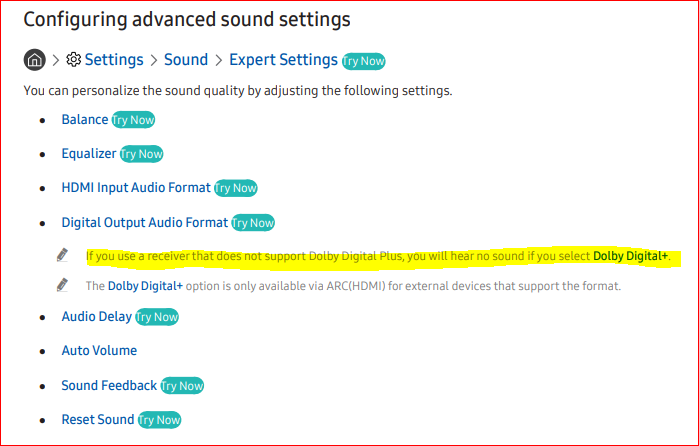
3. Make sure audio out is not set to DD+ or something other than DD5.1 or PCM (see insert)
3. Run setup again
4. Good Luck!

Together Everyone Achieves More = T.E.A.M.

9 replies

AjTrek1
January 28, 2019
Hi Peter Ko

I haven't looked at the manual for your set but there has to be an audio menu somewhere in settings. Make sure that audio for Digital Out is set to DD5.1 (preferred), PCM or Stereo. Also, did you follow the setup for the Beam step by step which setups up your audio as well? Lastly, make sure an audio source is connected and turned on (i.e. cable box etc.)?

Review the article at the link on setting up the Beam: https://support.sonos.com/s/article/2659?language=en_US

Cheers!
Together Everyone Achieves More = T.E.A.M.
Peter KoAuthor
Contributor I
January 29, 2019
TV recognizes Beam as one of the sources, "Receiver HDMI." Audio setting is set to "Receiver HDMI" and PCM.
ratty
January 29, 2019
Is there another HDMI device connected to the TV?
Peter KoAuthor
Contributor I
January 29, 2019
Yes, there are other HDMI connections. ChromeCast and HDMI Extender.
ratty
January 29, 2019
Remove the other HDMI devices. Power the TV and the Beam off. Power the TV and the Beam back on. This may resolve things, at least for a time, and you can reconnect the other HDMI devices.

There have been reports about issues with Samsung TVs when there are other HDMI-CEC devices. The TV seems to get confused. A workaround is to disable CEC in the other devices if you can. If that's not possible you can get 'CEC-less' adapters which basically break the CEC connection in the HDMI.
Peter KoAuthor
Contributor I
January 29, 2019
I removed all HDMI connections. Powered TV and Beam off by unplugging all. Then, powered TV back up. Beam is not connected. Reconnected just Beam. TV detected the Beam and set it as Receiver HDMI. Still no sound.
AjTrek1
AjTrek1Answer
January 30, 2019
Hi Peter Ko

Th Beam should work with just your cable box connected to another HDMI port. Well...desperate times call for desperate measures. Here's my suggestion...

1. Factory Reset the Beam. You must see a Green flashing LED: (https://support.sonos.com/s/article/1096?language=en_US)
2. Factory Reset your Samsung (you may have to call Samsung to find out how)
3. Make sure audio out is not set to DD+ or something other than DD5.1 or PCM (see insert)
3. Run setup again
4. Good Luck!

Together Everyone Achieves More = T.E.A.M.
Peter KoAuthor
Contributor I
February 2, 2019
AjTrek1, thank you. That fnally worked!
AjTrek1
February 2, 2019
That’s great, Peter Ko! Enjoy your Sonos!

Cheers!
Together Everyone Achieves More = T.E.A.M.