
Contributor I
November 23, 2021

Multiple TVs in one room - connected to a single sonos surround system - Need Help!
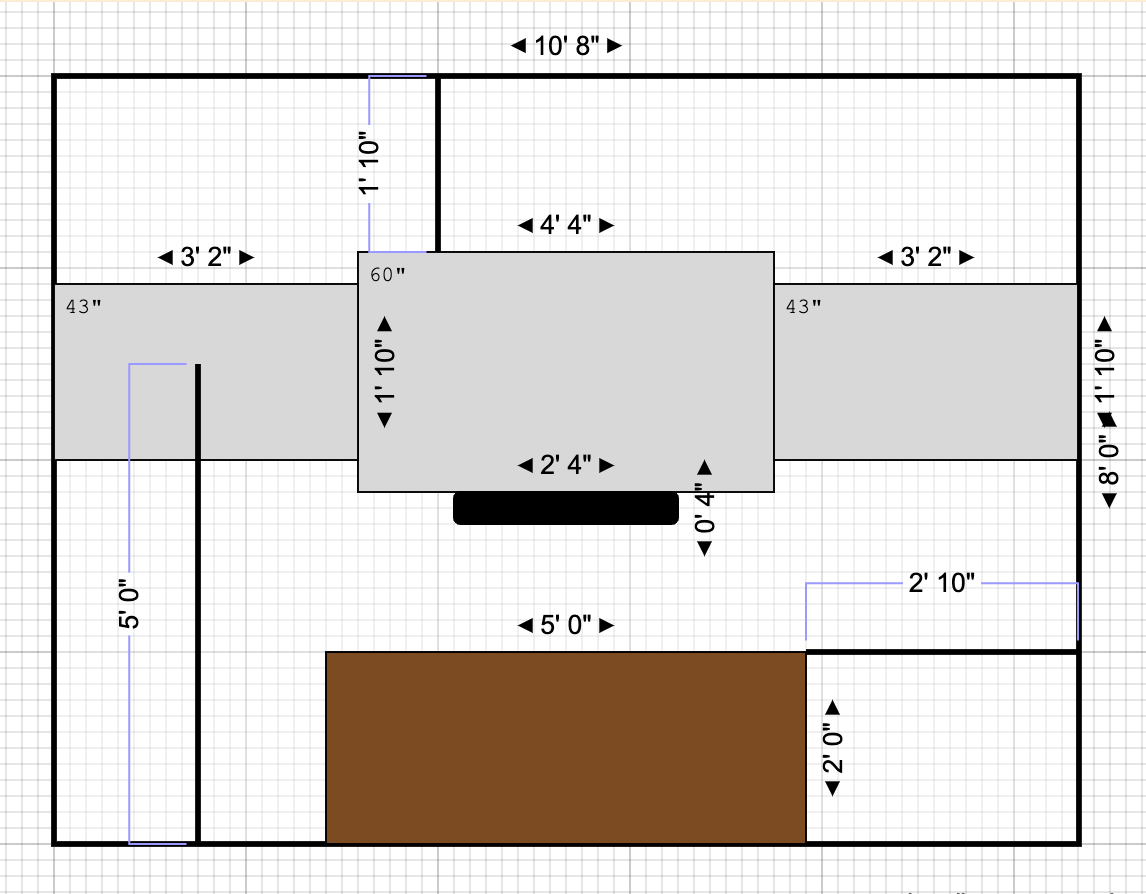
Need some help! Getting ready to move into a new home where I will have a “man-cave” with 3 TVs (all going to be Samsung - don’t yet have the model numbers) on one wall. TV left and right will utilize Apple TV to stream YouTubeTV while the center TV will use a Verizon box.


I’ve got a Beam (Gen 1), Sub, and (2) Play 1’s that I currently have set up in my home. I will be using the same system in the new home. 


My goal is to have the ability to choose what TV plays the audio… If we have three games on the TVs and TV 1 and 2 are on commercial i want to switch the audio to TV 3. If TV 2 is the only one that’s on i want to be able to tell the sonos that i want the audio to come from tv 2…  


I’ve been told that i should purchase this receiver (https://www.denon.com/en-us/product/av-receivers/avr-s650h) and have the three televisions connected to the audio inputs and have the sonos connected to the output port. I’d then be able to just use the remote to choose the audio output. Will this work? Any help would be greatly appreciated. 

This topic has been closed for further comments. You can use the search bar to find a similar topic, or create a new one by clicking Create Topic at the top of the page.

22 replies

melvimbe
November 24, 2021

I’ll take a contrarian position and recommend a TOSLINK switch connected to the TV’s. I have no experience with this unit, but it will probably work. This scheme will not, however, pass premium audio formats, such as Dolby Atmos.

I think this is the most likely to achieve the OP’s stated aim.  I can’t see how a standard HDMI switch could work, because that expects HDMI inputs not HDMI-ARC.  However, maybe HDFury do something suitable, and I wonder if the ‘HDMI Matrix’ referred to by Danny is something on those lines?

But a digital optical switch outputting to the converter supplied with the Arc would work, I think.


I would agree than optical switch is the most straight forward and least expensive way to resolve the issue as stated.  Honestly should have mentioned it myself, but opted to bring up a more comprehensive option….probably because I know what I would have done in the same situation.

Anyway, here is a link to a optical switch that does exactly what OP is asking for.  Nothing extra.  It’s not a bad solution at all.

However, if I were setting up this space, I would want the ability to display any of my sources (Apple TV, Verizon box, other sources I may want to add in the future) on any of the three TVs.  Additionally I would the audio from any of my sources to play on my Beam.  And I want it to be future proof so that I can upgrade my audio system without having to upgrade any other equipment.

An HDMI matrix, like this one, is the first step towards that goal.  You would connect up to 4 HDMI inputs (2 Apple TVs, Verizon box, one spare) to 4 HDMI outputs (3 TVS, one spare).  Want to use show an Apple TV source on the middle TV?  You can.  Want to show the verizon box on one of the outside TVs?  You can.  One to show the same thing on all 3 TVs?  You can.

But what about the audio?  Well you can still use an optical switch, connecting to the 3 TVs  as input, your Beam as output.  No problem, cheap and easy. The downside to this is you have more remotes to deal with and you are limited in audio quality (which is fine for the Beam). However, you have a spare HDMI output from your Matrix you could use.  And an  HD Fury Arcana will convert an normal HDMI signal into HDMI ARC/eARC for the Beam...Beam Gen 2, Arc, and Amp as well.  

So for example.  If your TVs  are outputs 1,2,3 on the matrix, and the Arcana/Beam are on output 4, to have the Beam play the audio for TV 1, set outputs 1 and 4 on the matrix to the same HDMI input.  If you want audio for the middle TV, 2 and 4 should be set to the same HDMI input on the matrix.  Get the idea?

Regarding the feintech product, I think it’s a good product, as it essentially combines an HDMI switch with an Arcana, which is great for a many source and 1 TV situation, but doesn’t work well with multiple displays.  An HDMI matrix + Arcana works better, I think


Danny
mdbryanAuthor
Contributor I
November 24, 2021

I’ll take a contrarian position and recommend a TOSLINK switch connected to the TV’s. I have no experience with this unit, but it will probably work. This scheme will not, however, pass premium audio formats, such as Dolby Atmos.

My current setup at the home isn’t passing Atmos anyways, correct? Gen 1 Beam doesn’t do that if i’m not mistaken?

buzz
Grand Maestro
November 24, 2021

Here are the supported formats.

Lyricist I
February 8, 2022

Late reply on this thread, but thought I would post info regardless.  I was searching for how to replace my existing setup that is very similar to what you want to do with SONOS (Beam preferably, ARC if need be).  It looks like it won’t be as simple as what I have now.

I currently have an older Polk 5000 soundbar / sub, connected to my 3 x 65” Costco special TV’s. The Polk has 2 optical inputs and 1 3.5mm input for audio.  I just run the audio outs from the TV’s (left and middle TV’s optical, right TV rca to 3.5mm) to the Polk.  The Polk remote has a source select button on it that makes changing audio between the TV’s quite easy.

It looks like for my set up I will probably have to continue using this and then just put a pair of Sonos One SL’s beside the soundbar for my audio needs.  I had originally planned on using a TOSLink optical changer (and had purchased one, dunno where it is now though dangit), so maybe this will be the thing to switch to if I go with an ARC there to replace the existing.


Hope this helps a bit.

melvimbe
February 8, 2022

Late reply on this thread, but thought I would post info regardless.  I was searching for how to replace my existing setup that is very similar to what you want to do with SONOS (Beam preferably, ARC if need be).  It looks like it won’t be as simple as what I have now.

I currently have an older Polk 5000 soundbar / sub, connected to my 3 x 65” Costco special TV’s. The Polk has 2 optical inputs and 1 3.5mm input for audio.  I just run the audio outs from the TV’s (left and middle TV’s optical, right TV rca to 3.5mm) to the Polk.  The Polk remote has a source select button on it that makes changing audio between the TV’s quite easy.

It looks like for my set up I will probably have to continue using this and then just put a pair of Sonos One SL’s beside the soundbar for my audio needs. 


using the Sonos One SLs for music only?  I assume that’s what you mean.


I had originally planned on using a TOSLink optical changer (and had purchased one, dunno where it is now though dangit), so maybe this will be the thing to switch to if I go with an ARC there to replace the existing.


Hope this helps a bit.


Using optical with an Arc would be limit you to 5.1 audio only, no atmos.  Using an HDMI switch + Arcana, as I recommended above, would allow you to play up to TrueHD atmos, depending on source. 

Danny
Lyricist I
July 25, 2022

I’ll take a contrarian position and recommend a TOSLINK switch connected to the TV’s. I have no experience with this unit, but it will probably work. This scheme will not, however, pass premium audio formats, such as Dolby Atmos.

I think this is the most likely to achieve the OP’s stated aim.  I can’t see how a standard HDMI switch could work, because that expects HDMI inputs not HDMI-ARC.  However, maybe HDFury do something suitable, and I wonder if the ‘HDMI Matrix’ referred to by Danny is something on those lines?

But a digital optical switch outputting to the converter supplied with the Arc would work, I think.


I would agree than optical switch is the most straight forward and least expensive way to resolve the issue as stated.  Honestly should have mentioned it myself, but opted to bring up a more comprehensive option….probably because I know what I would have done in the same situation.

Anyway, here is a link to a optical switch that does exactly what OP is asking for.  Nothing extra.  It’s not a bad solution at all.

However, if I were setting up this space, I would want the ability to display any of my sources (Apple TV, Verizon box, other sources I may want to add in the future) on any of the three TVs.  Additionally I would the audio from any of my sources to play on my Beam.  And I want it to be future proof so that I can upgrade my audio system without having to upgrade any other equipment.

An HDMI matrix, like this one, is the first step towards that goal.  You would connect up to 4 HDMI inputs (2 Apple TVs, Verizon box, one spare) to 4 HDMI outputs (3 TVS, one spare).  Want to use show an Apple TV source on the middle TV?  You can.  Want to show the verizon box on one of the outside TVs?  You can.  One to show the same thing on all 3 TVs?  You can.

But what about the audio?  Well you can still use an optical switch, connecting to the 3 TVs  as input, your Beam as output.  No problem, cheap and easy. The downside to this is you have more remotes to deal with and you are limited in audio quality (which is fine for the Beam). However, you have a spare HDMI output from your Matrix you could use.  And an  HD Fury Arcana will convert an normal HDMI signal into HDMI ARC/eARC for the Beam...Beam Gen 2, Arc, and Amp as well.  

So for example.  If your TVs  are outputs 1,2,3 on the matrix, and the Arcana/Beam are on output 4, to have the Beam play the audio for TV 1, set outputs 1 and 4 on the matrix to the same HDMI input.  If you want audio for the middle TV, 2 and 4 should be set to the same HDMI input on the matrix.  Get the idea?

Regarding the feintech product, I think it’s a good product, as it essentially combines an HDMI switch with an Arcana, which is great for a many source and 1 TV situation, but doesn’t work well with multiple displays.  An HDMI matrix + Arcana works better, I think


Is there a way this can be extended to split the audio and send it to 2 different Sonos 5.1 setups / rooms? I am planning to have 1 TV and 1 projector in the basement (on extreme ends) with each having it’s own Sonos 5.1 setup. The plan is to play video/audio independently most of the time but when needed I would like to show same video and same audio on both TVs and both Sonos 5.1 setups! Is that possible with this?

buzz
Grand Maestro
July 25, 2022

No simple schemes will yield satisfactory results. Even if you use commercial grade switchers that can keep things synchronized and rapidly switch between sources, the raw physics of attempting to have two 5.1 systems operating simultaneously in the same room is stacked against you.

Lyricist I
July 25, 2022

How about just grouping an additional Sonos ARC (from projector area) to the Sonos 5.1 setup (in bar area). I understand there will be a little lag, right?

buzz
Grand Maestro
July 25, 2022

Lip sync with the first TV will be OK, Grouped TV’s will be delayed by about 30ms from the first. You can fuss with this alignment by adjusting lip sync on the first TV.

Individual sensitivity to lip sync issues varies.

As a practical consideration, watching sports play does not involve lip sync because the commentator is talking off screen. If you are watching an on screen commentator, lip sync is more important.

Airgetlam
July 25, 2022

And, I don’t think the second Arc will have any 5.1, it will be stereo only. 

Bruce