
Contributor I
November 23, 2021

Multiple TVs in one room - connected to a single sonos surround system - Need Help!
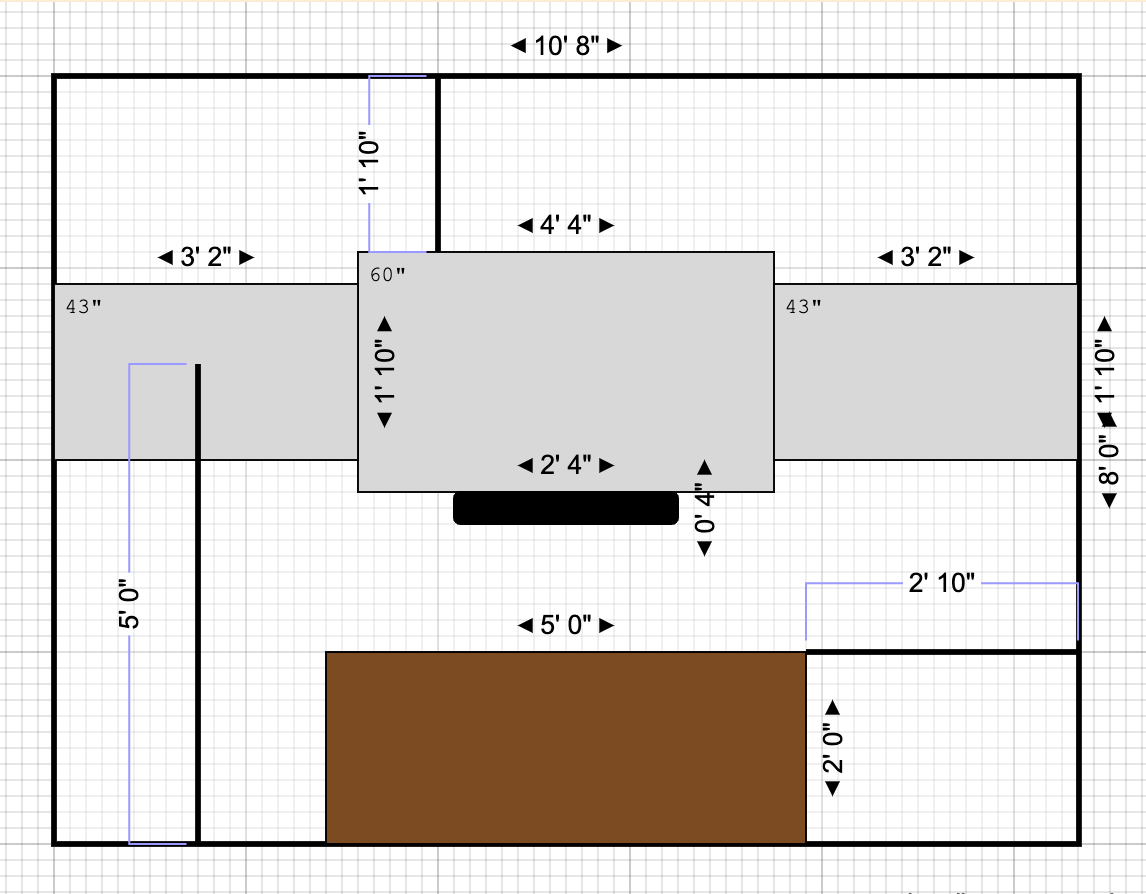
Need some help! Getting ready to move into a new home where I will have a “man-cave” with 3 TVs (all going to be Samsung - don’t yet have the model numbers) on one wall. TV left and right will utilize Apple TV to stream YouTubeTV while the center TV will use a Verizon box.


I’ve got a Beam (Gen 1), Sub, and (2) Play 1’s that I currently have set up in my home. I will be using the same system in the new home. 


My goal is to have the ability to choose what TV plays the audio… If we have three games on the TVs and TV 1 and 2 are on commercial i want to switch the audio to TV 3. If TV 2 is the only one that’s on i want to be able to tell the sonos that i want the audio to come from tv 2…  


I’ve been told that i should purchase this receiver (https://www.denon.com/en-us/product/av-receivers/avr-s650h) and have the three televisions connected to the audio inputs and have the sonos connected to the output port. I’d then be able to just use the remote to choose the audio output. Will this work? Any help would be greatly appreciated. 

This topic has been closed for further comments. You can use the search bar to find a similar topic, or create a new one by clicking Create Topic at the top of the page.

22 replies

106rallye
November 23, 2021

You are going to use an AV receiver as a switch. That’s quite a waste of a good receiver. And it might not work if there’s no connection that passes ARC to the Beam.

mdbryanAuthor
Contributor I
November 23, 2021

is there a better option? Is it a waste if it achieves what i need done? The receiver has an eARC port. 

106rallye
November 23, 2021

You’ll need a switch that can pass the HDMI-ARC signal from three TV’s to the Beam. No need for all the amps and signal processing the AV receiver also provides.

Not sure if such a switch exists……

melvimbe
November 23, 2021

is there a better option? Is it a waste if it achieves what i need done? The receiver has an eARC port. 


The eARC port on the receiver surely does not generate an eARC signal for other audio equipment to receive.  It’s their to receive eARC from your TV.  I don’t see how this would help you.


Personally, I would approach this differently.  I would get a 4x4 HDMI matrix that allows you to switch up to 4 sources to 4 different displays...even though you have 3 TVs.  You could then send the output from your AppleTV(s) or Verizon to any of the 3 TVs and whatever combination you want.

For the audio, you have two options.  You could connect your Beam to the main TVs ARC/eARC channel so that it always plays what’s on the main TV.  Instead of changing which TV has audio, change what’s displayed on the main TV.  Or you can use that 4th HDMI output to connect to a HD Fury Arcana, which can covert normal HDMI to HDMI eARC for the Beam to use.  So your Beam would play the audio from any of the 3 TVs or a difference source entirely.

A couple words of advice, whatever method you go about it.  It will be better to get three TVs with the same stats, preferably same brand.  An HDMI switch will usually send audio at the lowest common denominator.  So if one of your TVs is 1080p, and the others are 4K, you could get everything at 1080p.  Some HDMI switches handle this better, but getting 4 equal quality TVs (not necessarily same size) makes this easier.

And get a high quality switch.  A cheap one may do the job fine, and have a decent remote, but since control is going to be important for this setup, I would spend a bit more for that.


Danny
melvimbe
November 23, 2021

One additional thought...consider putting the left and right TVs on carts  rather than mounting to the wall.  This way you can roll them out of the way when you aren’t wanting to be distracted by extra TVs, possibly to another location in the room or something of that nature.  

Danny
buzz
Grand Maestro
November 23, 2021

I’ll take a contrarian position and recommend a TOSLINK switch connected to the TV’s. I have no experience with this unit, but it will probably work. This scheme will not, however, pass premium audio formats, such as Dolby Atmos.

Ken_Griffiths
November 24, 2021

This post deleted - I misread the opening post

November 24, 2021

I’ll take a contrarian position and recommend a TOSLINK switch connected to the TV’s. I have no experience with this unit, but it will probably work. This scheme will not, however, pass premium audio formats, such as Dolby Atmos.

I think this is the most likely to achieve the OP’s stated aim.  I can’t see how a standard HDMI switch could work, because that expects HDMI inputs not HDMI-ARC.  However, maybe HDFury do something suitable, and I wonder if the ‘HDMI Matrix’ referred to by Danny is something on those lines?

But a digital optical switch outputting to the converter supplied with the Arc would work, I think.

Ken_Griffiths
November 24, 2021

This is the closest thing that I could come up with, as an HDMI eARC switch/extractor - which has eARC pass through. It’s really like an Arcana audio extractor with a built in (pass-through) switch, with one eARC audio output to the Sonos HT device - but I’m not sure if it would work.

I have this switch/audio extractor myself, but I have never tried adding a 2nd TV input to it as an A/V source and it’s not something I could easily setup/test here either - but it might be worth asking Feintech the question, perhaps?

What I can say, is it does work very well with one TV and it provides Atmos audio, but I’m not sure if inputs 2 and 3 would work with other TV’s. Currently HDMI input 1 is used for TV and HDMI input 5 is used for the pass-through eARC connection to the Sonos Arc/Beam (gen2) etc.

Anyhow see this link:

https://feintech.eu/en/products/feintech-vax04101-hdmi-earc-pass-switch-4x1

buzz
Grand Maestro
November 24, 2021

A major consideration in this sort of scheme is the switching time between sources. There are a lot of negotiations that need to take place when establishing a connection between a source and “sink” (display). We have all experienced this negotiation time as we switch to an input device. In a sports environment the play will be over before negotiations are complete. Commercial installations, such as sports bars, use specialized switches that fool all sources and sinks into believing that their connection is forever, The result is that the switching time is a video frame or two (essentially zero in human terms). These switches are very expensive -- thousands of dollars, not dozens or hundreds of dollars.

A very interesting setup would operate similar to a studio control room where a series of smaller displays flank a large display and any of the small displays can be instantly pulled up on the large display. Another design decision is which display or displays deliver audio into the room.