Answered

Multichannel PCM on Arc

  • May 6, 2020
  • 328 replies
  • 53005 views

Show first post
This topic has been closed for further comments. You can use the search bar to find a similar topic, or create a new one by clicking Create Topic at the top of the page.

328 replies

Forum|alt.badge.img+1
  • Trending Lyricist III
  • November 10, 2020

It works! It works! thank you, Sonos :)


Forum|alt.badge.img+3
  • Collaborator I
  • November 10, 2020

Wait… so I have a blu ray disc in the PS4 and it’s a 5.1 enabled movie. But with the update and changed tv settings, it’s still 2.0? Am I confusing myself? 


  • November 10, 2020

Nice.  What does this mean for Apple TV users wanting Atmos?

Party pooper 


Forum|alt.badge.img+1
  • Lyricist III
  • November 10, 2020

Wait… so I have a blu ray disc in the PS4 and it’s a 5.1 enabled movie. But with the update and changed tv settings, it’s still 2.0? Am I confusing myself? 

Sounds like your settings are wrong and you probably do not have an earc tv?


Bumper
  • November 10, 2020

Hi all,

We hear you. With a software update today, Arc now supports multi-channel LPCM, bringing new immersive sound experiences for gaming, Blu-ray discs, and more. To get support for multi-channel LPCM on Arc, download the latest Sonos S2 update from the app store and then update your system in the Sonos S2 app. After updating the app, go to Settings > System > System Updates > Check for Updates.

All the best,

Ditte

NO LPCM for any of the other HDMI Sonos devices? 


Forum|alt.badge.img+3
  • Collaborator I
  • November 10, 2020

Wait… so I have a blu ray disc in the PS4 and it’s a 5.1 enabled movie. But with the update and changed tv settings, it’s still 2.0? Am I confusing myself? 

Sounds like your settings are wrong and you probably do not have an earc tv?

I absolutely do have an eARC TV… so I’m unsure what I am doing wrong in the settings. I have it set to “auto” instead of PCM or passthrough and the PS4 is set to Bitstream Dolby.


Forum|alt.badge.img+1
  • Lyricist III
  • November 10, 2020

Nice.  What does this mean for Apple TV users wanting Atmos?

Party pooper 

Not at all, it should work now. If it doesn’t, it’s a tv issue.


  • November 10, 2020

Nice.  What does this mean for Apple TV users wanting Atmos?

Party pooper 

Not at all, it should work now. If it doesn’t, it’s a tv issue.

But off topic.


Forum|alt.badge.img+1
  • Trending Lyricist III
  • November 10, 2020

Wait… so I have a blu ray disc in the PS4 and it’s a 5.1 enabled movie. But with the update and changed tv settings, it’s still 2.0? Am I confusing myself? 

Sounds like your settings are wrong and you probably do not have an earc tv?

I absolutely do have an eARC TV… so I’m unsure what I am doing wrong in the settings. I have it set to “auto” instead of PCM or passthrough and the PS4 is set to Bitstream Dolby.

You should set to passthrough. 


Forum|alt.badge.img+1
  • Lyricist III
  • November 10, 2020

Wait… so I have a blu ray disc in the PS4 and it’s a 5.1 enabled movie. But with the update and changed tv settings, it’s still 2.0? Am I confusing myself? 

Sounds like your settings are wrong and you probably do not have an earc tv?

I absolutely do have an eARC TV… so I’m unsure what I am doing wrong in the settings. I have it set to “auto” instead of PCM or passthrough and the PS4 is set to Bitstream Dolby.

If that’s an lg, at least your tv setting is wrong. You might have to also force the tv to look at the Arc edid again… so unplug both for 15 mins and try again or something.


Forum|alt.badge.img+1
  • Trending Lyricist III
  • November 10, 2020

Hi all,

We hear you. With a software update today, Arc now supports multi-channel LPCM, bringing new immersive sound experiences for gaming, Blu-ray discs, and more. To get support for multi-channel LPCM on Arc, download the latest Sonos S2 update from the app store and then update your system in the Sonos S2 app. After updating the app, go to Settings > System > System Updates > Check for Updates.

All the best,

Ditte

NO LPCM for any of the other HDMI Sonos devices? 

Multichannel LPCM requires high bandwidth (eARC). So ARC-only speakers can’t do LPCM.


Forum|alt.badge.img+1
  • Lyricist III
  • November 10, 2020

Nice.  What does this mean for Apple TV users wanting Atmos?

Party pooper 

Not at all, it should work now. If it doesn’t, it’s a tv issue.

But off topic.

The fact that it now works due to this very patch is off topic?


Forum|alt.badge.img+3
  • Collaborator I
  • November 10, 2020

Wait… so I have a blu ray disc in the PS4 and it’s a 5.1 enabled movie. But with the update and changed tv settings, it’s still 2.0? Am I confusing myself? 

Sounds like your settings are wrong and you probably do not have an earc tv?

I absolutely do have an eARC TV… so I’m unsure what I am doing wrong in the settings. I have it set to “auto” instead of PCM or passthrough and the PS4 is set to Bitstream Dolby.

You should set to passthrough. 

I have a Samsung QLED. So the PS4 should be Dolby Bitstream and the TV passthrough?


Forum|alt.badge.img+1
  • Trending Lyricist III
  • November 10, 2020

Wait… so I have a blu ray disc in the PS4 and it’s a 5.1 enabled movie. But with the update and changed tv settings, it’s still 2.0? Am I confusing myself? 

Sounds like your settings are wrong and you probably do not have an earc tv?

I absolutely do have an eARC TV… so I’m unsure what I am doing wrong in the settings. I have it set to “auto” instead of PCM or passthrough and the PS4 is set to Bitstream Dolby.

You should set to passthrough. 

I have a Samsung QLED. So the PS4 should be Dolby Bitstream and the TV passthrough?

Yes, assuming your TV supports Multichannel LPCM passthrough (should). Basically that way TV sends whatever it gets from PS4 directly to Arc. Arc should be able to deal with the audio now. Make sure your eARC is enabled. 


Forum|alt.badge.img+3
  • Collaborator I
  • November 10, 2020

Wait… so I have a blu ray disc in the PS4 and it’s a 5.1 enabled movie. But with the update and changed tv settings, it’s still 2.0? Am I confusing myself? 

Sounds like your settings are wrong and you probably do not have an earc tv?

I absolutely do have an eARC TV… so I’m unsure what I am doing wrong in the settings. I have it set to “auto” instead of PCM or passthrough and the PS4 is set to Bitstream Dolby.

You should set to passthrough. 

I have a Samsung QLED. So the PS4 should be Dolby Bitstream and the TV passthrough?

Yes, assuming your TV supports Multichannel LPCM passthrough (should). Basically that way TV sends whatever it gets from PS4 directly to Arc. Arc should be able to deal with the audio now. Make sure your eARC is enabled. 

Strange. I have a blu-ray in and it has a 5.1 DTS HD option and it’s still outputting Stereo PCM 2.0. eARC is enabled. On chat to Sonos now… 


Forum|alt.badge.img+1
  • Trending Lyricist III
  • November 10, 2020

Wait… so I have a blu ray disc in the PS4 and it’s a 5.1 enabled movie. But with the update and changed tv settings, it’s still 2.0? Am I confusing myself? 

Sounds like your settings are wrong and you probably do not have an earc tv?

I absolutely do have an eARC TV… so I’m unsure what I am doing wrong in the settings. I have it set to “auto” instead of PCM or passthrough and the PS4 is set to Bitstream Dolby.

You should set to passthrough. 

I have a Samsung QLED. So the PS4 should be Dolby Bitstream and the TV passthrough?

Yes, assuming your TV supports Multichannel LPCM passthrough (should). Basically that way TV sends whatever it gets from PS4 directly to Arc. Arc should be able to deal with the audio now. Make sure your eARC is enabled. 

Strange. I have a blu-ray in and it has a 5.1 DTS HD option and it’s still outputting Stereo PCM 2.0. eARC is enabled. On chat to Sonos now… 

Sonos doesn’t support DTS. You want Multichannel LPCM or Dolby Digital 5.1 or anything like that. 


  • November 10, 2020

Wait… so I have a blu ray disc in the PS4 and it’s a 5.1 enabled movie. But with the update and changed tv settings, it’s still 2.0? Am I confusing myself? 

Sounds like your settings are wrong and you probably do not have an earc tv?

I absolutely do have an eARC TV… so I’m unsure what I am doing wrong in the settings. I have it set to “auto” instead of PCM or passthrough and the PS4 is set to Bitstream Dolby.

You should set to passthrough. 

I have a Samsung QLED. So the PS4 should be Dolby Bitstream and the TV passthrough?

Yes, assuming your TV supports Multichannel LPCM passthrough (should). Basically that way TV sends whatever it gets from PS4 directly to Arc. Arc should be able to deal with the audio now. Make sure your eARC is enabled. 

Strange. I have a blu-ray in and it has a 5.1 DTS HD option and it’s still outputting Stereo PCM 2.0. eARC is enabled. On chat to Sonos now… 

The Arc still doesn't support DTS as far as I know.


Forum|alt.badge.img+3
  • Collaborator I
  • November 10, 2020

Wait… so I have a blu ray disc in the PS4 and it’s a 5.1 enabled movie. But with the update and changed tv settings, it’s still 2.0? Am I confusing myself? 

Sounds like your settings are wrong and you probably do not have an earc tv?

I absolutely do have an eARC TV… so I’m unsure what I am doing wrong in the settings. I have it set to “auto” instead of PCM or passthrough and the PS4 is set to Bitstream Dolby.

You should set to passthrough. 

I have a Samsung QLED. So the PS4 should be Dolby Bitstream and the TV passthrough?

Yes, assuming your TV supports Multichannel LPCM passthrough (should). Basically that way TV sends whatever it gets from PS4 directly to Arc. Arc should be able to deal with the audio now. Make sure your eARC is enabled. 

Strange. I have a blu-ray in and it has a 5.1 DTS HD option and it’s still outputting Stereo PCM 2.0. eARC is enabled. On chat to Sonos now… 

Sonos doesn’t support DTS. You want Multichannel LPCM or Dolby Digital 5.1 or anything like that. 

Ahh. I’ll try a blu-ray with DD5.1… additionally, I’ve just put a game on and it’s just “dolby digital 5.1” and not LPCM unless I change the TV to “auto” instead of passthrough… sorry for the questions, I’m a noob!


Forum|alt.badge.img+1
  • Trending Lyricist III
  • November 10, 2020

Wait… so I have a blu ray disc in the PS4 and it’s a 5.1 enabled movie. But with the update and changed tv settings, it’s still 2.0? Am I confusing myself? 

Sounds like your settings are wrong and you probably do not have an earc tv?

I absolutely do have an eARC TV… so I’m unsure what I am doing wrong in the settings. I have it set to “auto” instead of PCM or passthrough and the PS4 is set to Bitstream Dolby.

You should set to passthrough. 

I have a Samsung QLED. So the PS4 should be Dolby Bitstream and the TV passthrough?

Yes, assuming your TV supports Multichannel LPCM passthrough (should). Basically that way TV sends whatever it gets from PS4 directly to Arc. Arc should be able to deal with the audio now. Make sure your eARC is enabled. 

Strange. I have a blu-ray in and it has a 5.1 DTS HD option and it’s still outputting Stereo PCM 2.0. eARC is enabled. On chat to Sonos now… 

Sonos doesn’t support DTS. You want Multichannel LPCM or Dolby Digital 5.1 or anything like that. 

Ahh. I’ll try a blu-ray with DD5.1… additionally, I’ve just put a game on and it’s just “dolby digital 5.1” and not LPCM unless I change the TV to “auto” instead of passthrough… sorry for the questions, I’m a noob!

No worries, yes, TV will probably flatten most signals into Stereo, hence it’s better as much as possible for signal to just pass through (ha!) directly to audio receiver.


Forum|alt.badge.img+1
  • Lyricist III
  • November 10, 2020

Wait… so I have a blu ray disc in the PS4 and it’s a 5.1 enabled movie. But with the update and changed tv settings, it’s still 2.0? Am I confusing myself? 

Sounds like your settings are wrong and you probably do not have an earc tv?

I absolutely do have an eARC TV… so I’m unsure what I am doing wrong in the settings. I have it set to “auto” instead of PCM or passthrough and the PS4 is set to Bitstream Dolby.

You should set to passthrough. 

I have a Samsung QLED. So the PS4 should be Dolby Bitstream and the TV passthrough?

Yes, assuming your TV supports Multichannel LPCM passthrough (should). Basically that way TV sends whatever it gets from PS4 directly to Arc. Arc should be able to deal with the audio now. Make sure your eARC is enabled. 

Strange. I have a blu-ray in and it has a 5.1 DTS HD option and it’s still outputting Stereo PCM 2.0. eARC is enabled. On chat to Sonos now… 

Sonos doesn’t support DTS. You want Multichannel LPCM or Dolby Digital 5.1 or anything like that. 

Ahh. I’ll try a blu-ray with DD5.1… additionally, I’ve just put a game on and it’s just “dolby digital 5.1” and not LPCM unless I change the TV to “auto” instead of passthrough… sorry for the questions, I’m a noob!

You want the multichannel pcm output (can’t remember what it is) on the ps4, it doesn’t compress the audio and works now.


Forum|alt.badge.img+3
  • Collaborator I
  • November 10, 2020

Wait… so I have a blu ray disc in the PS4 and it’s a 5.1 enabled movie. But with the update and changed tv settings, it’s still 2.0? Am I confusing myself? 

Sounds like your settings are wrong and you probably do not have an earc tv?

I absolutely do have an eARC TV… so I’m unsure what I am doing wrong in the settings. I have it set to “auto” instead of PCM or passthrough and the PS4 is set to Bitstream Dolby.

You should set to passthrough. 

I have a Samsung QLED. So the PS4 should be Dolby Bitstream and the TV passthrough?

Yes, assuming your TV supports Multichannel LPCM passthrough (should). Basically that way TV sends whatever it gets from PS4 directly to Arc. Arc should be able to deal with the audio now. Make sure your eARC is enabled. 

Strange. I have a blu-ray in and it has a 5.1 DTS HD option and it’s still outputting Stereo PCM 2.0. eARC is enabled. On chat to Sonos now… 

Sonos doesn’t support DTS. You want Multichannel LPCM or Dolby Digital 5.1 or anything like that. 

Ahh. I’ll try a blu-ray with DD5.1… additionally, I’ve just put a game on and it’s just “dolby digital 5.1” and not LPCM unless I change the TV to “auto” instead of passthrough… sorry for the questions, I’m a noob!

You want the multichannel pcm output (can’t remember what it is) on the ps4, it doesn’t compress the audio and works now.

I’m having a nightmare here haha. I put in a new blu-ray that is DD5.1 and using passthrough or auto on my TV doesn’t work. I’ve also changed the ps4 to Linear PCM instead of dolby and nope… ahh!!


Forum|alt.badge.img+3

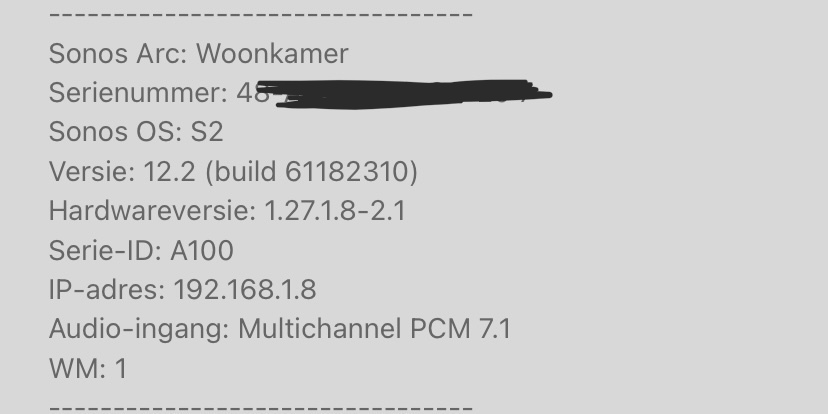
Yes!!!! Thanks Sonos! My Nintendo Switch does Multichannel PCM 7.1 now instead of stereo 2.0 :D


Ken_Griffiths

I’m having a nightmare here haha. I put in a new blu-ray that is DD5.1 and using passthrough or auto on my TV doesn’t work. I’ve also changed the ps4 to Linear PCM instead of dolby and nope… ahh!!

With these settings in place snd the firmware update, I would power off (completely- not just standby) the PS4, TV & Arc for 30 seconds then bring them back online (TV first) and let the devices do their ‘handshake’ again and see if that solves the issue.


Forum|alt.badge.img+3
  • Collaborator I
  • November 10, 2020

I’m having a nightmare here haha. I put in a new blu-ray that is DD5.1 and using passthrough or auto on my TV doesn’t work. I’ve also changed the ps4 to Linear PCM instead of dolby and nope… ahh!!

With these settings in place snd the firmware update, I would power off (completely- not just standby) the PS4, TV & Arc for 30 seconds then bring them back online (TV first) and let the devices do their ‘handshake’ again and see if that solves the issue.

Thanks for the reply. So, TV to passthrough and PS4 to dolby bitstream? Or PS4 to linear PCM?


Forum|alt.badge.img+3
  • Collaborator I
  • November 10, 2020

I started a new question about my issue as to not clog up this answered thread… no idea why it won't output for me via PS4.