Contributor I
July 18, 2019
Answered

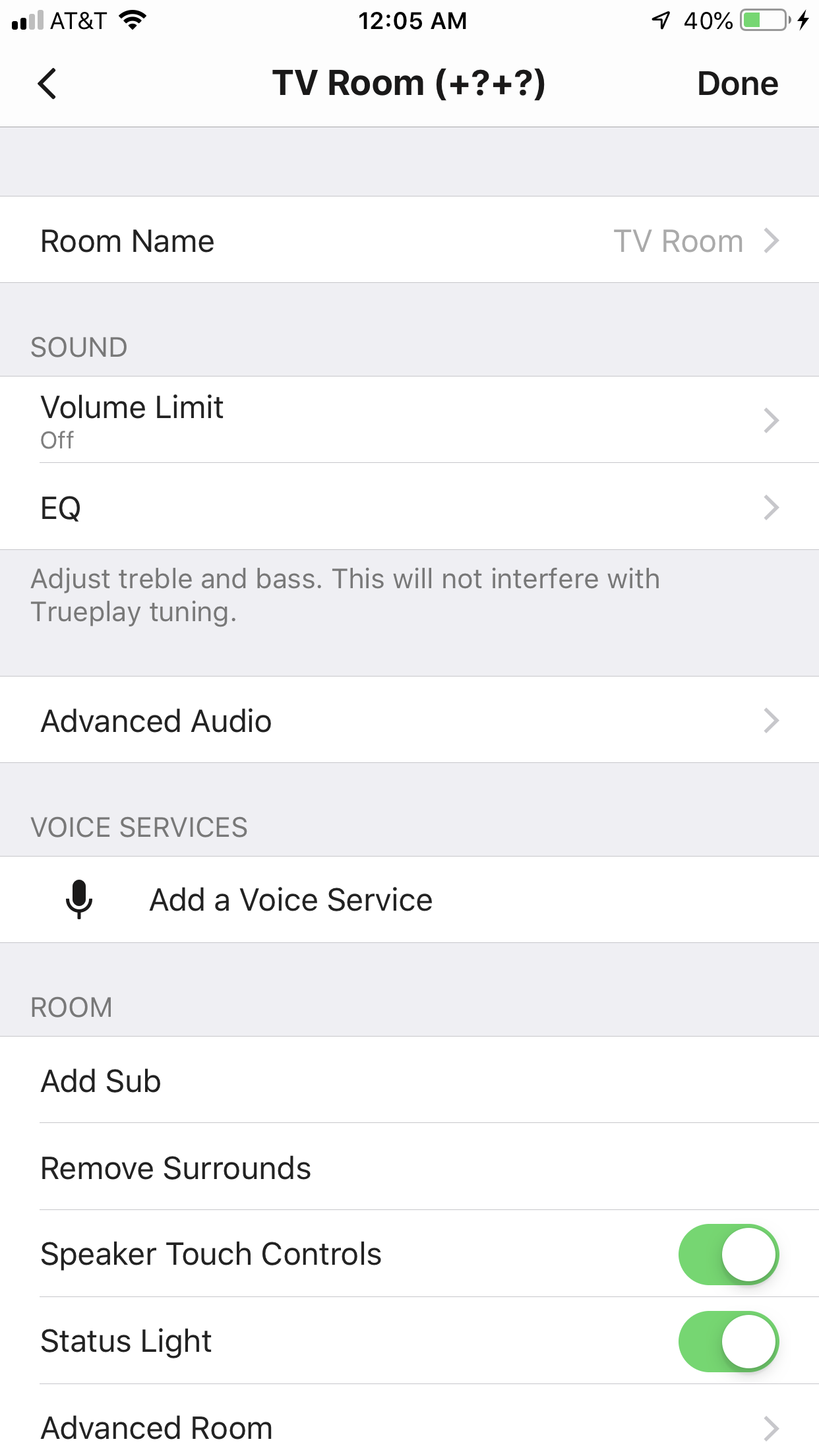
2 sonos one + 1 bean setup showing question marks ??

I have 2 sonos one and 1 beam.. I want to set them together with surround sound setting. I see TV Room (+?+?) and do not see True Play tuning. And only beam is working. Other 2 sonos one are not working in surround setup. Attaching snapshot of TV room setting.
Please help.

    This topic has been closed for further comments. You can use the search bar to find a similar topic, or create a new one by clicking Create Topic at the top of the page.
    vish_jaanAnswer
    Contributor I
    July 24, 2019
    Sonos technician Joseph helped. Things are working now. Looks like my home router was not capable with Sonos. Switched to generic one and configured.. All good now. Thanks all of you who helped. Appreciate it.

    7 replies

    Airgetlam
    July 18, 2019
    That indicates that they haven’t received IP addresses from your router, most likely. Reboot your router first, then reboot the speakers, and see if that resolves it.
    Bruce
    vish_jaanAuthor
    Contributor I
    July 23, 2019
    That indicates that they haven’t received IP addresses from your router, most likely. Reboot your router first, then reboot the speakers, and see if that resolves it.
    Do you want me to 'factory reset' all speakers (beam & ones)? And then configure them as home theatre one more time?
    I am facing this while setting up 2+1 sonos. I did below things at first.

    1. I did setup beam
    2. Named it TV room
    3. Then went inside TV room settings --> add surround speakers
    4. Added left successfully
    5. Failed to add right into this configuration. Setup was unsucceful. But light for both sone ones went to white.
    6. I see TV Room (+?+?) and no true play tuning, which was there when only Beam was configured.
    Thanks for all help!! But I am still struggling.. Thanks for any help in advance.
    jgatie
    July 23, 2019

    That indicates that they haven’t received IP addresses from your router, most likely. Reboot your router first, then reboot the speakers, and see if that resolves it.Do you want me to 'factory reset' all speakers (beam & ones)? And then configure them as home theatre one more time?
    I am facing this while setting up 2+1 sonos. I did below things at first.

    1. I did setup beam
    2. Named it TV room
    3. Then went inside TV room settings --> add surround speakers
    4. Added left successfully
    5. Failed to add right into this configuration. Setup was unsucceful. But light for both sone ones went to white.
    6. I see TV Room (+?+?) and no true play tuning, which was there when only Beam was configured.
    Thanks for all help!! But I am still struggling.. Thanks for any help in advance.


    No. Factory resetting is almost never needed, and erases all data from your units. Rebooting them simply means removing power, waiting a few seconds, then plug them back in.
    vish_jaanAuthor
    Contributor I
    July 24, 2019
    I tried this but still facing same issue.
    Senior Virtuoso
    July 24, 2019
    Make sure all speakers incl Beam and router are powered off.

    Reboot the router. Wait till it has fully booted. Then power up first speaker - the Beam. Wait till it's fully booted. Then power up first One. Wait till it's fully started. Then power up second One.
    vish_jaanAuthorAnswer
    Contributor I
    July 24, 2019
    Sonos technician Joseph helped. Things are working now. Looks like my home router was not capable with Sonos. Switched to generic one and configured.. All good now. Thanks all of you who helped. Appreciate it.
    Ryan S
    Retired Sonos Staff
    July 24, 2019
    Thanks fore the update! There are a few routers that have trouble with assigning IPs tot devices through multicast, which can prevent all but the first/main player from getting an IP on the network. Glad you're all set now!
    Mark good posts by pressing the like button, and select the best answer on questions you've asked to help others find solutions.