
Avid Contributor I
February 2, 2024

Sonos/Spotify Family sharing and Recently Played Playlist issue

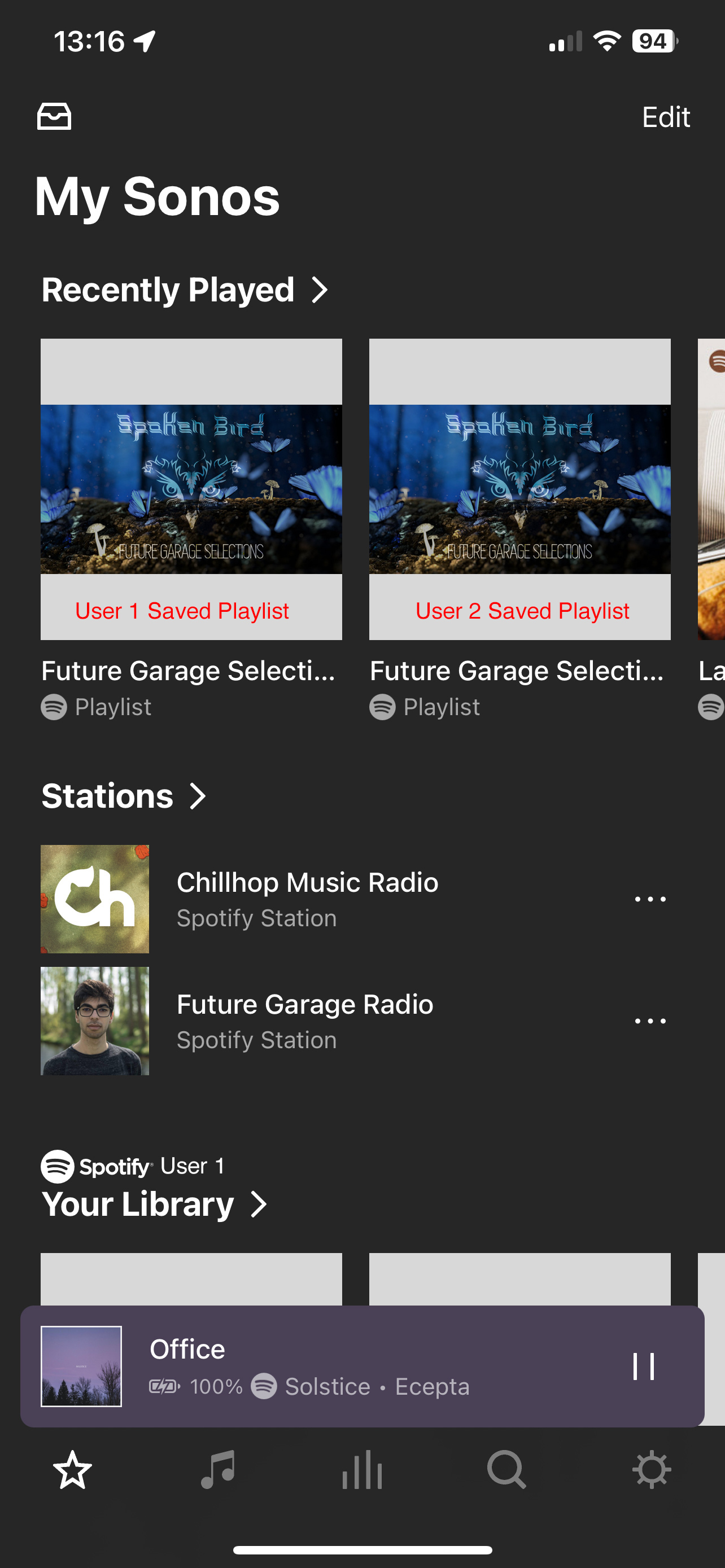
When using the Sonos app with more than one user account in Spotify (Family Plan), there’s no way to tell what recently played playlist is part of which member’s account.

The biggest issue we’ve been experiencing is the classic, one person is playing their music outside the home, but then someone at home plays a playlist from the recently played, and it cuts the other person off. Then a bit of back and forth stealing playing rights before figuring out what is going on. 

It would be great to add the Spotify user avatar or initials in a small bubble over the album/playlist art in any area of the UI where music sources from multiple accounts are displayed (ie - Recently Played, Albums, or Playlists). 
 

This topic has been closed for further comments. You can use the search bar to find a similar topic, or create a new one by clicking Create Topic at the top of the page.

24 replies

Sotiris C.
Sonos Staff
February 6, 2024

Hello @sixoversix, welcome back!

As a Spotify Family member I totally agree with this feature.

I would suggest you reach out to Spotify though, as they are responsible for the implementation of Spotify within the Sonos App.

One quick tip would be to save a Spotify curated playlist as your own Sonos playlist and rename it, to avoid having other members playing the same one by accident.

I hope this helps.

Leaving a like and marking Best Answer might make someone's day. Who knows, that someone might be you.
Bumper
February 6, 2024


I would suggest you reach out to Spotify though, as they are responsible for the implementation of Spotify within the Sonos App.


This answer for every issue with the music service by Sonos and their surrogates is so tired. 
 

106rallye
February 6, 2024

This is how it works though……

Bumper
February 6, 2024

As I said it’s a tired response.


But I get it, they are powerless. They have zero control to ensure that the music services they allow to integrate on their platform work well. Sonos can’t do anything about, it they just host and own the integration, have zero say. It’s up to the users to make this happen by begging, pleading.  /s


But in seriousness, over ten years ago when streaming was new this may have made sense, but now IMO not at all.


Avid Contributor I
February 6, 2024

Hello @sixoversix, welcome back!

As a Spotify Family member I totally agree with this feature.

I would suggest you reach out to Spotify though, as they are responsible for the implementation of Spotify within the Sonos App.

One quick tip would be to save a Spotify curated playlist as your own Sonos playlist and rename it, to avoid having other members playing the same one by accident.

I hope this helps.

@Sotiris C. Thank you for your response, however I must respectfully disagree that this is a Spotify issue.
 

In the Sonos app, my Spotify username is displayed in some areas (meaning Spotify has provided the necessary data to the Sonos App, for Sonos to manage and display in Spotify’s “Your Library” and Spotify’s “Playlists” shortcuts on the My Sonos page, as well as they “Browse” connections of the app.

This tiny piece of meta data is available and can be implemented by the Sonos team. In the screenshot above, you can already see there is a Spotify logo under the playlist album art cover. Just pass the username as part of the source object to the UI. 
 

I do this for a living and know this is most certainly a “low hanging fruit” for any developer who already has the connection saved for each user’s third party music app integration. You have to keep it saved in the app for it to keep the authentication live. 

Edit: regarding renaming the playlist. We like to subscribe to other’s playlists and not save a copy sometimes, so we cannot always rename the playlist. Also this problem would exist for any single track or artist album that is shown in the Recently Played list. 

jgatie
February 6, 2024

@Sotiris C. Thank you for your response, however I must respectfully disagree that this is a Spotify issue.
 

In the Sonos app, my Spotify username is displayed in some areas (meaning Spotify has provided the necessary data to the Sonos App, for Sonos to manage and display in Spotify’s “Your Library” and Spotify’s “Playlists” shortcuts on the My Sonos page, as well as they “Browse” connections of the app.

This tiny piece of meta data is available and can be implemented by the Sonos team. In the screenshot above, you can already see there is a Spotify logo under the playlist album art cover. Just pass the username as part of the source object to the UI. 
 

I do this for a living and know this is most certainly a “low hanging fruit” for any developer who already has the connection saved for each user’s third party music app integration. You have to keep it saved in the app for it to keep the authentication live. 

Edit: regarding renaming the playlist. We like to subscribe to other’s playlists and not save a copy sometimes, so we cannot always rename the playlist. Also this problem would exist for any single track or artist album that is shown in the Recently Played list. 


I suggest you look here and learn the relationship between Sonos, music services, and the Sonos Music API.  In short, Sonos doesn’t change anything about the displayed data as it comes to them from SMAPI.  They allow the music service full autonomy over how their data is displayed:

https://docs.sonos.com/docs/content-service-get-started

jgatie
February 6, 2024

As I said it’s a tired response.


But I get it, they are powerless. They have zero control to ensure that the music services they allow to integrate on their platform work well. Sonos can’t do anything about, it they just host and own the integration, have zero say. It’s up to the users to make this happen by begging, pleading.  /s


But in seriousness, over ten years ago when streaming was new this may have made sense, but now IMO not at all.


Simply declaring something “tired” doesn’t change the accuracy of the statement.  Sonos has pledged that the music service has the right to display data any way they choose and Sonos will not interfere.  Does Sonos perhaps work behind the scenes to suggest changes or additions?  We know that for a fact, because they have said so.  Do we know when a music service has told them that they aren’t going to make those changes, and for what reason?  No we don’t, because Sonos isn’t going to throw a partner under the bus.  So we are back to the most logical route to request a change - Ask the music services directly, for it is the user who has a financial relationship with any given service.

Bumper
February 6, 2024

Like clockwork.

I get it Sonos can’t do anything, music services have rights, very logical, buses, money etc. Same crap for like 10 years, same crappy sonos app.


Sonos has pledged that the music service has the right to display data any way they choose and Sonos will not interfere.


Oh really


i. We have guidelines on building a good app/product that you agree to work towards.
j. If you are a content service, you additionally agree to comply with the Sonos Music API terms and conditions. As a content service, you can sign in to your existing account or create a new account here.


Avid Contributor I
February 6, 2024

In short, Sonos doesn’t change anything about the displayed data as it comes to them from SMAPI.  They allow the music service full autonomy over how their data is displayed:

https://docs.sonos.com/docs/content-service-get-started

Thanks for supplying the link. Checking into what data is available in the SMAPI object, there is:

<userInfo>
<userIDHashCode>string</userIDHashCode>
<nickname>string(32)</nickname>
</userInfo>

https://docs.sonos.com/docs/smapi-object-types#userinfo

There is also the refreshAuthToken which renews the connection to your third-party services. In this response is userInfo. This object will return the user's nickname on your service. The Sonos app will pre-populate this nickname for the account holder when they add your service to their Sonos household. This element contains the information needed for your service to continue to authenticate the user for all Sonos API calls.

https://docs.sonos.com/docs/refreshauthtoken

The SMAPI does capture the third-party API information to display the username (the “nickname”). Sonos’ app uses this show this information on it’s UI today - just not everywhere it could/should.

If a component does not directly contain part of the object data, but it exist through the AuthToken or UserInfo elsewhere, it’s not hard to can create a new object that passes the additional info along to the UI. 

Edit: I’m willing to admit I am wrong about something. But I believe the data exists, it is already part of the UI, just need to update the UI or component to accept an additional piece of metadata to enable this VERY SIMPLE feature.

Bumper
February 6, 2024

@sixoversix Sonos app displays this correctly with Apple Music afaik