Renowned Enthusiast I
December 5, 2023

Some music drops after Starlink install? Connected by ethernet but interference?

Hello.  thanks for reading.  Two topics that may be related.

  1.  I’ve had my Sonos system set up for about 5 years with help from this community.  Pretty much no problems after the initial kinks were worked out.  I’m in a rural area and had been using Verizon wireless, a grandfathered plan for the house.  A few weeks back, we got Starlink and I have that installed with no obstructions. 

I have the Starlink installed with their router, turned off in bridge mode, with an ethernet adapter, going to a Unifi Router.  The router feeds a Unifi switch with various rooms connected by ethernet (even though it obviously goes back to Starlink).   

Ever since the install, one room in particular (the kitchen) will have music drop out from playing but you can still hear audio from the paired sub.  Then the music will return for a while, then drop out again for about 30 seconds.  Random.    I have unplugged all devices, re-booted the router, plugged them one by one, assigned fixed IP addresses.   Worked for a few days, then started again.  Tried chatting with Sonos and the 1st attempt was slow and unimpressive.  Being honest, I ended the chat out of frustration.   I don’t know what else to try. 


  1.  Before Starlink, I had a closet full of Sonos equipment that also had a Unifi access point in the same closet.  All of the sonos equipment in that closet is connected by ethernet to the switch.  At the same time I installed Starlink, I moved the access point out of the closet and hung it on the ceiling above the closet.   I generally saw some of our speeds around the house improve.  

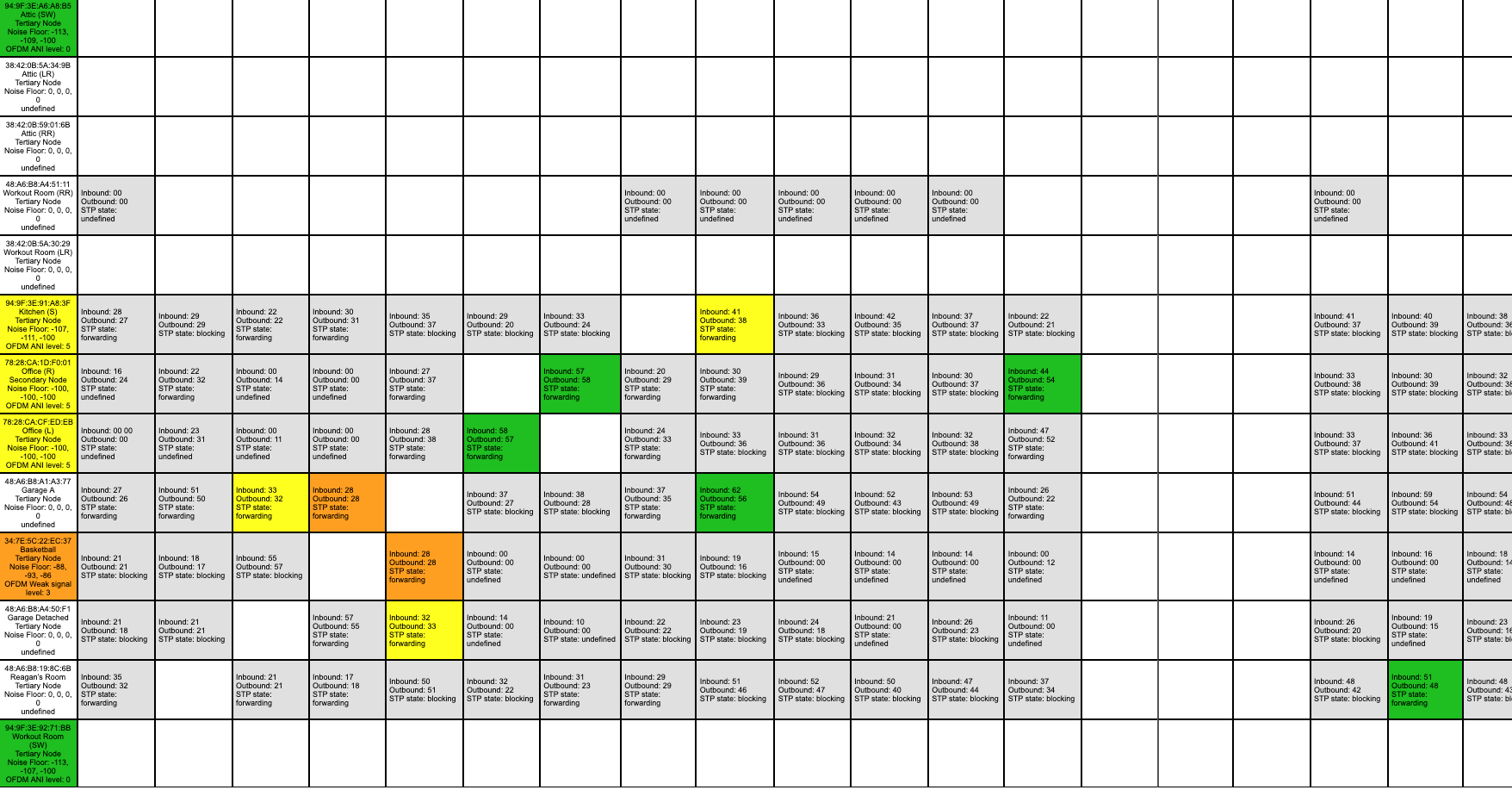
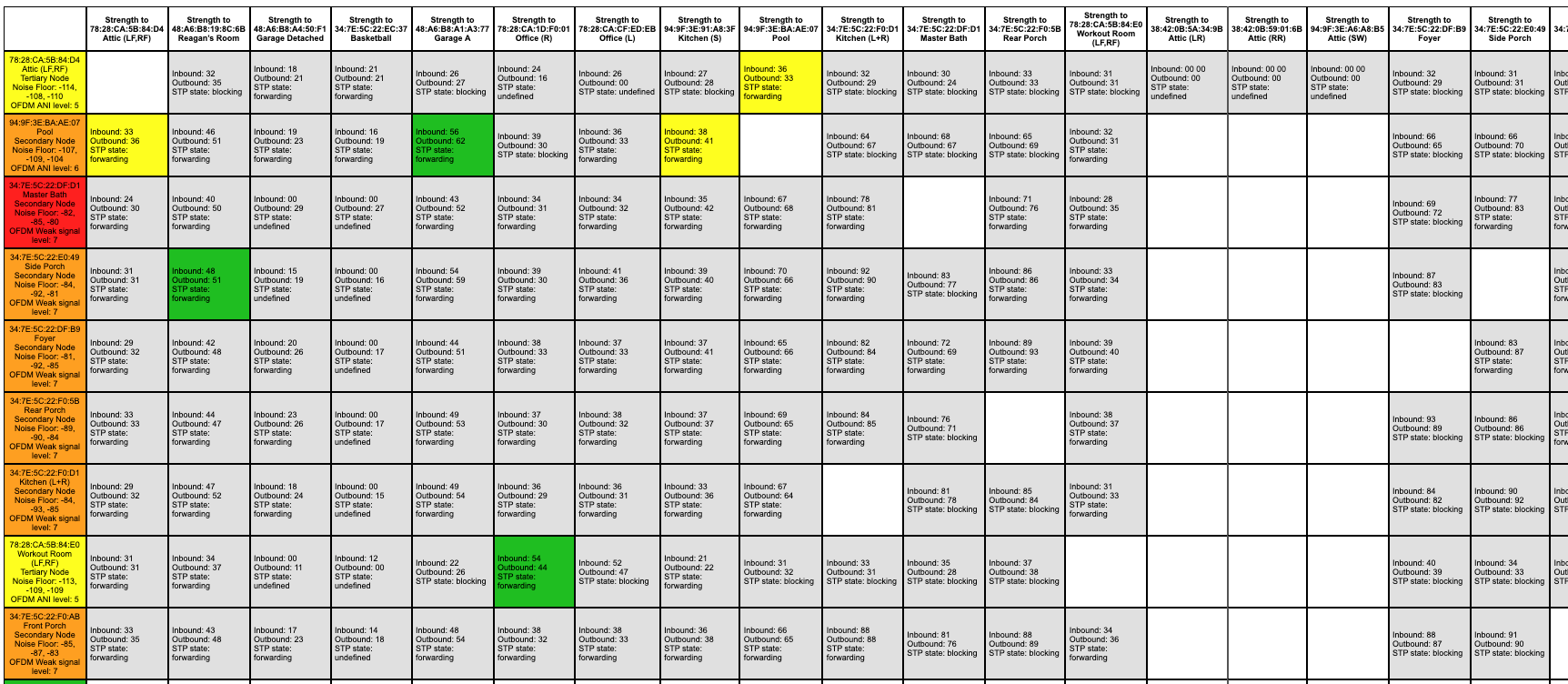
When I run the Sonos Matrix, I used to have a lot of green.  Now, I have some oranges and a red, even though some of this equipment is in the same closet next to each other.  Could this be part of the problem?  Anything I should consider doing here?

I have a few APs and I’ve made sure the channels are spaced out appropriately.   Our house is about 5,500 square feet.  I live almost smack dab in the middle of 150 acres so there is no neighbor interference being caused. 

I have a case number for a diagnostic.  I tried in a previous chat to get them to check to see if they saw anything and they simply would not do it, another reason I gave up on the chat.  

Anything else I should try to reduce the drops?  Thank you.

Editing to include some screen shots of the matrix. 


This topic has been closed for further comments. You can use the search bar to find a similar topic, or create a new one by clicking Create Topic at the top of the page.

20 replies

Renowned Enthusiast I
December 11, 2023

@TheRamblinMan,

If not seen already, maybe see if this link will assist you with your Unifi setup and Sonos devices…

https://github.com/IngmarStein/unifi-sonos-doc


Thank you.  Yes, I’ve seen this some time ago and already did this.  My Unifi setup has been up and running for about 4 or 5 years with no issues (after initial tweaks) until I installed Starlink recently.   I’ve done most (possibly all) in this article.  But, I think I’m going to go back through all these settings in that article to make sure nothing triggered in the opposite direction unintentionally with an update or something to be sure.  Thanks again. 

Stanley_4
Grand Maestro
December 11, 2023

Worst case wait for the glitch and send Sonos a diagnostic and call Support.

Been a long time since I used satellite but it gave me fits.

Renowned Enthusiast I
December 12, 2023

Worst case wait for the glitch and send Sonos a diagnostic and call Support.

Been a long time since I used satellite but it gave me fits.


I went 100% wifi.  Played for about 2 hours with no problem then it happened again.  Also, in another room with a paired stereo pair, the right one keeps dropping. 


Chatting with Sonos after I ran a diagnostic.  They are telling me I need to put all the access points on the same channel.  Of course, I do not believe that is what Ubiquiti or networking in general calls for.  They told me I had 1, 6, 11 in use and they want me to just pick 1 for all of my access points.  Sort of stuck now.

Before, I had put Sonosnet on Channel 1 and used only 6 and 11 on my access points to see if that would work.  It didn’t resolve the issue.  Still chatting with Sonos but they are basically telling me to use only a single channel. 

Stanley_4
Grand Maestro
December 12, 2023

Sonos doesn’t seem happy with multiple AP channels when using WiFi but as you point out that isn’t great for your WiFi setup with multiple APs.

I’m resisting buying any of the new Sonos WiFi / wired Ethernet only speakers to avoid opening that can of worms. I have wired and SonosNet connected older gear on a single channel and my APs are on the other two and it is going to take a lot to get me to change.

Be a pain but you could put several APs, near your Sonos gear on a single channel with a different SSID than the rest of the APs you could spread across the other two channels just to see if it worked.

If it does you could wire Sonos Beams co-located (but a meter away) with your APs for your Sonos and put the APs on the other two channels. The store still has some and used ones are getting pretty cheap. Do avoid the Bridges though, they are problems waiting to happen.

Renowned Enthusiast I
December 12, 2023

Worst case wait for the glitch and send Sonos a diagnostic and call Support.

Been a long time since I used satellite but it gave me fits.

Just a further update.  Did a long chat with Sonos.  Disconnected two of my access points as they wanted to see the impact on interference/congestion.  I did that.  System stopped playing after about 5 minutes and then resumed.   Now they want me to talk by phone.  I plan to do that later.  

Now I read online that the UDM router I bought (based on recommendations on the Ubiquiti boards about Sonos) doesn’t support STP that I’m told I need for Sonos.  Some saying they could not get UDM to play nicely with Sonos...spent a nice sum buying that router after posing questions.  That stinks.  

I’m currently 100% wireless. 

Stanley_4
Grand Maestro
December 12, 2023

I’ve wanted a Ubiquity router for years, even bought an X to play with but it was just too much frustration.

Just re-looked them a few months ago when my Gen 1 CloudKey packed it in but again just couldn't see getting one working as I wanted here. Ended up with a Gen 2 CloudKey Plus and a new AP, but stuck with my trusty pfSense router that is much less frustrating for me to use.

Good luck.

Renowned Enthusiast I
December 12, 2023

I’ve wanted a Ubiquity router for years, even bought an X to play with but it was just too much frustration.

Just re-looked them a few months ago when my Gen 1 CloudKey packed it in but again just couldn't see getting one working as I wanted here. Ended up with a Gen 2 CloudKey Plus and a new AP, but stuck with my trusty pfSense router that is much less frustrating for me to use.

Good luck.


When we built this new place a few years ago I relied on the networking guy to pick this equipment.  He recommended Sonos and Unifi stuff.  He then ran for the hills apparently and went out of business so I’ve had to do a deep dive on all this stuff.  A novice but I’m trying. 

I just decided to go back to SonosNet again to see if that helps.  I don’t understand what happens if I don’t set STP on the Unifi switch.  I had it set but then read the UDM router doesn’t support it.  I may just have to live with occasional drops as I can’t get rid of Starlink for now.  Thanks again. 

Stanley_4
Grand Maestro
December 12, 2023

I think just setting it on the switch ports your Sonos connect through might be enough but I’ve avoided the subject.

I’ve seen suggestions to just hook a dumb switch to the Ubiquity gear and then the Sonos to it.

As a past IT contractor I can confirm cashing a check while at a dead run for the horizon is a key skill.

buzz
Grand Maestro
December 12, 2023


 I don’t understand what happens if I don’t set STP on the Unifi switch.  I had it set but then read the UDM router doesn’t support it.  

If you are experiencing a storm there is a buildup of packets. The network speed will slowly decrease. In one network I was seeing the expected near gigabit speeds immediately after startup. After twenty minutes or so I was seeing 9K speeds and complaints of dropped packets. Enabling STP in a managed switch will mitigate this storm.

SONOS supports STP, not RSTP. RSTP is the default for Ubiquiti switches. UDM does not support STP. You must wire SONOS units to a switch that supports STP.

Renowned Enthusiast I
December 12, 2023


 I don’t understand what happens if I don’t set STP on the Unifi switch.  I had it set but then read the UDM router doesn’t support it.  

If you are experiencing a storm there is a buildup of packets. The network speed will slowly decrease. In one network I was seeing the expected near gigabit speeds immediately after startup. After twenty minutes or so I was seeing 9K speeds and complaints of dropped packets. Enabling STP in a managed switch will mitigate this storm.

SONOS supports STP, not RSTP. RSTP is the default for Ubiquiti switches. UDM does not support STP. You must wire SONOS units to a switch that supports STP.


Thanks for the note, Buzz.  Admittedly, I’m a bit bummed at where I find myself because the folks on the Ubiquiti page (on a Sonos related post) told me to get the UDM based on my situation.   My Sonos units are wired to a switch that supports STP.  UDM is a router that I’m told doesn’t support STP.  Not sure if that makes a different.  Probably not.  I’m a novice and on a learning curve.  

I have this Unifi switch and the UDM.  Not sure which Unifi router I can buy to support STP.