Renowned Enthusiast I
December 5, 2023

Some music drops after Starlink install? Connected by ethernet but interference?

Hello.  thanks for reading.  Two topics that may be related.

  1.  I’ve had my Sonos system set up for about 5 years with help from this community.  Pretty much no problems after the initial kinks were worked out.  I’m in a rural area and had been using Verizon wireless, a grandfathered plan for the house.  A few weeks back, we got Starlink and I have that installed with no obstructions. 

I have the Starlink installed with their router, turned off in bridge mode, with an ethernet adapter, going to a Unifi Router.  The router feeds a Unifi switch with various rooms connected by ethernet (even though it obviously goes back to Starlink).   

Ever since the install, one room in particular (the kitchen) will have music drop out from playing but you can still hear audio from the paired sub.  Then the music will return for a while, then drop out again for about 30 seconds.  Random.    I have unplugged all devices, re-booted the router, plugged them one by one, assigned fixed IP addresses.   Worked for a few days, then started again.  Tried chatting with Sonos and the 1st attempt was slow and unimpressive.  Being honest, I ended the chat out of frustration.   I don’t know what else to try. 


  1.  Before Starlink, I had a closet full of Sonos equipment that also had a Unifi access point in the same closet.  All of the sonos equipment in that closet is connected by ethernet to the switch.  At the same time I installed Starlink, I moved the access point out of the closet and hung it on the ceiling above the closet.   I generally saw some of our speeds around the house improve.  

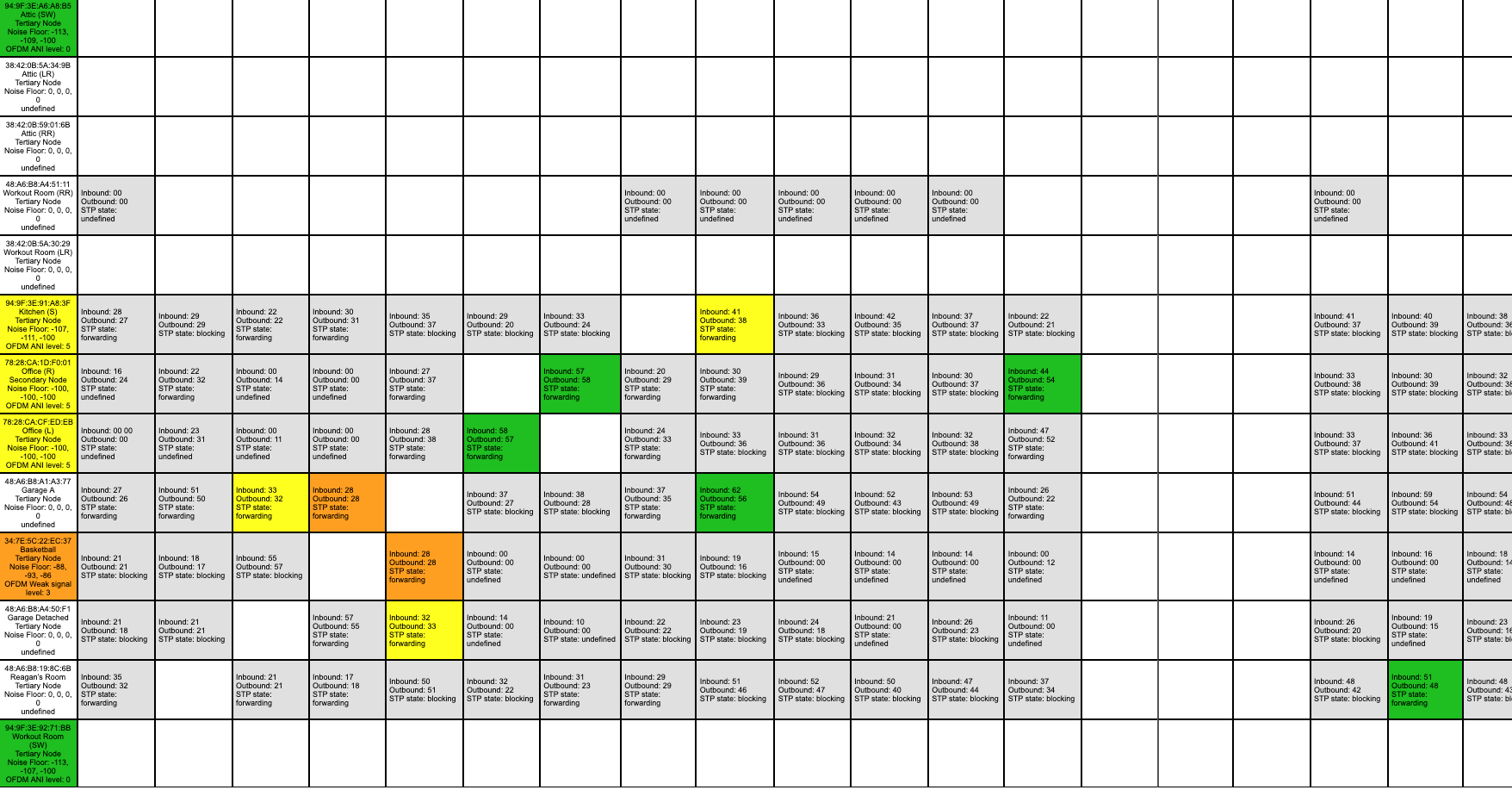
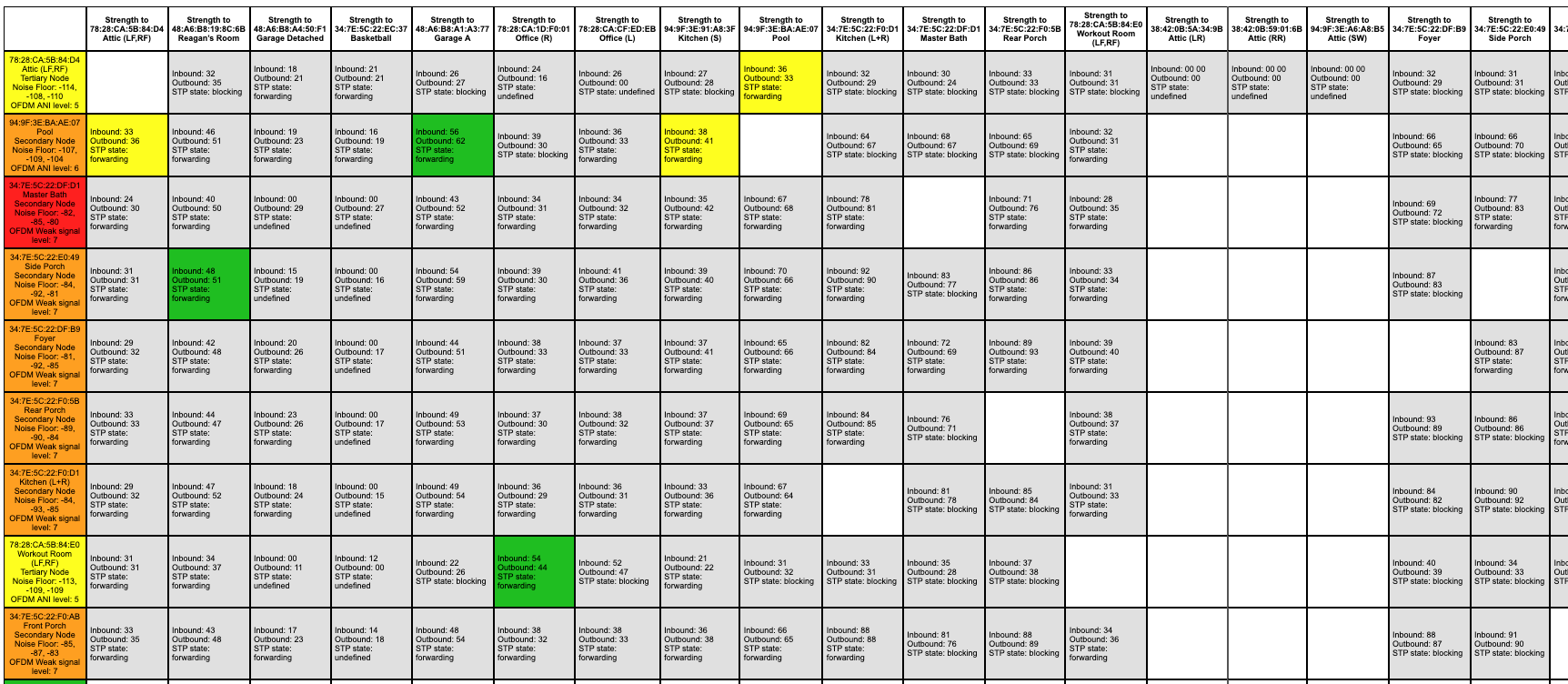
When I run the Sonos Matrix, I used to have a lot of green.  Now, I have some oranges and a red, even though some of this equipment is in the same closet next to each other.  Could this be part of the problem?  Anything I should consider doing here?

I have a few APs and I’ve made sure the channels are spaced out appropriately.   Our house is about 5,500 square feet.  I live almost smack dab in the middle of 150 acres so there is no neighbor interference being caused. 

I have a case number for a diagnostic.  I tried in a previous chat to get them to check to see if they saw anything and they simply would not do it, another reason I gave up on the chat.  

Anything else I should try to reduce the drops?  Thank you.

Editing to include some screen shots of the matrix. 


This topic has been closed for further comments. You can use the search bar to find a similar topic, or create a new one by clicking Create Topic at the top of the page.

20 replies

Stanley_4
Grand Maestro
December 6, 2023

Keeping WiFi devices three feet apart is a good idea. Sonos does offer the option to turn off the internal radio (labeled disable WiFi) that you could use on all but one of the too-close to each other Sonos devices. Getting some distance from non-Sonos devices would be good too.

You do have your Sonos mesh and WiFi on different channels?


Renowned Enthusiast I
December 6, 2023

Keeping WiFi devices three feet apart is a good idea. Sonos does offer the option to turn off the internal radio (labeled disable WiFi) that you could use on all but one of the too-close to each other Sonos devices. Getting some distance from non-Sonos devices would be good too.

You do have your Sonos mesh and WiFi on different channels?


Thanks for the response. When I introduce Starlink as the new incoming network I did tweak some of the wireless access points.  Tonight I did have to change back my Sonos network back to a channel that was not on my wifi channel.  I have a unifi setup with two wifi bands, a separate 2.5 and 5.  The 2.5 band has the 1, 6, 11 and the “best practice” is to not repeat those channels nearby.  I have 6 APs with two of them outside.  I used to have only 4 and was recently advised I needed to add at least 2 more given the size of the area we’re covering.  What I did tonight was not use Channel 1 at all on that wifi network and changed sonosnet to channel 1.  Trying this now to see how it goes. 

By wifi devices, would that include all of the Sonos Connect amps?  That may be hard for me to do as many of them are in the same media closet. I’m thinking you probably mean the “other” wifi devices.  There is an apple mini in there that serves as one of the music libraries and it does have wifi turned on. As this worked for 5 years until just recently, I’m hoping the above change with that network may help.  To undo my media closet would be a pain.  

I’ve read different things about disabling the wifi and taken different approaches through the past 5 years.  Currently, I have the wifi on on all of the devices even if connected by ethernet.   To take things in steps, I’ll try that next if the problem continues.  Thanks for bringing that up as an idea as I was waffling on whether I should do that.

Stanley_4
Grand Maestro
December 7, 2023

With multiple access points and other WiFi devices picking channels is difficult.

The key point to remember is there are only three good options in the US, 2.4 GHz channels 1, 6 and 11, as all the others interfere with one or more of the three good channels.

I’d give Sonos one channel, with no AP or other device on that channel.

Lay out a map of your AP locations and try to get them arranged (using the other two clear channels) so that same-channel distances are maximized.

How big an area are you trying to cover, my Ubiquity APs cover out several hundred feet on 2.4 and at least 100 on 5 GHz.

Connect Amps count. A wired Sonos does not need the radio (aka WiFi) enabled unless it is bonded to Surrounds or a Sub so shutting the radios off in your closet would be a good thing, and only a couple clicks for each device.


If you want to put your Sonos on your WiFi you could do that by removing all Sonos Ethernet connections, otherwise any connected Sonos, with the radio enabled, will create the SonosNet and other Sonos that can use that may prefer it to your WiFi.

Renowned Enthusiast I
December 8, 2023

With multiple access points and other WiFi devices picking channels is difficult.

The key point to remember is there are only three good options in the US, 2.4 GHz channels 1, 6 and 11, as all the others interfere with one or more of the three good channels.

I’d give Sonos one channel, with no AP or other device on that channel.

Lay out a map of your AP locations and try to get them arranged (using the other two clear channels) so that same-channel distances are maximized.

How big an area are you trying to cover, my Ubiquity APs cover out several hundred feet on 2.4 and at least 100 on 5 GHz.

Connect Amps count. A wired Sonos does not need the radio (aka WiFi) enabled unless it is bonded to Surrounds or a Sub so shutting the radios off in your closet would be a good thing, and only a couple clicks for each device.


If you want to put your Sonos on your WiFi you could do that by removing all Sonos Ethernet connections, otherwise any connected Sonos, with the radio enabled, will create the SonosNet and other Sonos that can use that may prefer it to your WiFi.

Stanley:  Thanks so much for your responses.  It’s funny when I google my Sonos issues and find my posts from a few years ago and you were helping me then too!  Ha!   Seriously, I really appreciate it. 

Taking things in baby steps to see what improved what, I turned off the wifi on the wired devices.  There seems to be conflicting stances on this on the posts I’ve read through the years, but I guess it’s best to turn it off if one has a problem.  Just wanted to report back that I think this baby step helped improve some of the connectivity.  No red.  I see a lot of boxes are just “white” now and I think that means those are the newer devices that don’t show noise.  I could be wrong as I thought they were showing noise when I had wifi turned on.

I’ve been playing music off and on all day and yesterday and so far no issues.  Will keep experimenting.   I may go the 100% wireless route if I have more issues, but I think I’m good for now.  (For others reading this, to recap, the main change was introduce Starlink into the mix.  I had a Unifi environment all along and the only change was adding Starlink and a couple of additional access points. )

I’m not sure how to describe the area I’m trying to cover.  We have a 3 story house (finished attic on top) with a house that’s about 5,500 to 6,000 square feet.  We have a pool, an attached and detached garage, and a basketball court where we’re also trying to get wifi coverage to.  The detached garage has some Sonos speakers and houses the Sonos Connect with some wired speakers going to the court.  

I was on the Ubiquiti boards asking about our layout and those folks pretty consistently told me I didn’t have enough access points so I added one on the top floor and one outside.  Grand total of 2 on the 1st and 2nd floor (at each end basically) and one on the third floor, with two outside pointing in different directions.  Hope that makes sense.   Thank you.


Edit:  Forgot to include updated matrix.


buzz
Grand Maestro
December 8, 2023

For the stack of SONOS units in the closet I recommend wiring all of them to a switch and disabling the radio on all but one SONOS unit. With Ubiquiti switches, set them for STP, not RSTP.

Renowned Enthusiast I
December 8, 2023

For the stack of SONOS units in the closet I recommend wiring all of them to a switch and disabling the radio on all but one SONOS unit. With Ubiquiti switches, set them for STP, not RSTP.

Thanks for the note.  Unless I’ve overlooked something, every Sonos unit in the closet has been connected by ethernet to the switch (also in the closet) from the very beginning 5 years ago.  What has changed off/on is whether I left wifi on.  I turned them all back to “off” except one of them.  The one I left on is paired to a subwoofer that is not connected by ethernet, so I thought the radio was supposed to stay on.

I'm glad you brought STP up.  I had changed that to STP in the past based on some advice here, but with my recent changes it seems to have reverted back to RSTP.  I’m changing it back to STP.  Thank you!

buzz
Grand Maestro
December 8, 2023

Yes, the SUB needs a 5G connection.

Stanley_4
Grand Maestro
December 8, 2023

Colored to white in the matrix is probably because the Sonos Disable WiFi switch turns off the whole radio and with it off it can’t report any data.

Trying to get as much isolation between same-channel APs and SonosNet is going to be your best option. You could get things as good as possible and then consult directly with Sonos support to decide which radios to disable to reduce self-inflicted interference.

And yes, the usual suggestion is to leave all Sonos radios enabled as that makes for the most robust SonosNet mesh and enables surround connections. BUT in limited situations, with too close together Sons the radio off option can solve otherwise unfixable issues.

I think sometimes the folks at the Ubiquity forums suggest more APs than are really needed. Unless you are seeing connection issues with fewer going that route will reduce your same-channel fratricide. :-)

Renowned Enthusiast I
December 10, 2023

Colored to white in the matrix is probably because the Sonos Disable WiFi switch turns off the whole radio and with it off it can’t report any data.

Trying to get as much isolation between same-channel APs and SonosNet is going to be your best option. You could get things as good as possible and then consult directly with Sonos support to decide which radios to disable to reduce self-inflicted interference.

And yes, the usual suggestion is to leave all Sonos radios enabled as that makes for the most robust SonosNet mesh and enables surround connections. BUT in limited situations, with too close together Sons the radio off option can solve otherwise unfixable issues.

I think sometimes the folks at the Ubiquity forums suggest more APs than are really needed. Unless you are seeing connection issues with fewer going that route will reduce your same-channel fratricide. :-)


Hello, I’m back.  

I had changed my Sonosnet channel to 1.  Removed channel 1 from my access points and used only 6 and 11.  I also disabled wifi on all of the wired devices except those that were paired with another speaker.  Then the trouble started again.  I tend to listen mostly in the kitchen. Audio started dropping out for 30 seconds (but kept playing on the subwoofer).

So I decided to unplug a few of the ethernet devices as I saw a thread where a guy said Sonos Support told him he had too many wired devices.  So I turned wifi back on for those devices and then removed ethernet.  Didn’t take long for audio to drop again.  So I decided to go 100% wifi and entered my wifi networked, turned wifi back on for all devices, etc.   I played music for about 45 minutes in the kitchen with no problem.  Then, just like that, the audio started dropping out again.  Did it twice in 15 minutes.


I’m stumped.  Had this system fine-tuned for about 4 years with no major issues.  The change was introducing Starlink, adding the UDM in the process.  


Would seem to be odd that the kitchen Connect just happened to go bad during all of this.  Having trouble further diagnosing what to try from here.   Thanks for reading. 

Adding the latest matrix in case that helps.  


Ken_Griffiths
December 11, 2023

@TheRamblinMan,

If not seen already, maybe see if this link will assist you with your Unifi setup and Sonos devices…

https://github.com/IngmarStein/unifi-sonos-doc