NAS path rejected after update of Windows 10 Sonos app

  • December 6, 2025
  • 10 replies
  • 83 views

MoPac
Forum|alt.badge.img+18

 After I updated the Windows 10 Sonos app the library would not reindex.  Error stated path no longer correct or something like that.

 On the iPhone the reindex worked OK.

10 replies

Airgetlam
  • December 6, 2025

Huh, that’s odd, and specific to the controller, which, as far as I’m aware, shouldn’t be. Did you submit diagnostics from both machines?


MoPac
Forum|alt.badge.img+18
  • Author
  • Headliner II
  • December 6, 2025

 I did not.

 I don’t mind using the phone app for reindexing.  Just thought it odd that the Windows Sonos Controller app, which always worked in the past, now doesn’t like the path statement.


MoPac
Forum|alt.badge.img+18
  • Author
  • Headliner II
  • December 7, 2025

Update:

 Added more music to my NAS library.  When I tried to use the iPhone app to “Scan for New Content” the NAS path was rejected ( Same thing that happened on the Windows Sonos app the last time I added music ).  After the failed scan I removed and re-entered the path.  After re-entering the path, again the scan failed.  To get the scan to finally work I had to swipe out the iPhone app.  After opening the app and putting in the path for a third time the scan worked.

 I apologize for not sending a diagnostics when the scan failed.  If it happens next time I will do so.  I’ll also send screenshots of the message.


Airgetlam
  • December 7, 2025

It does sound (forgive me) that there is something going on, just not something I can make heads or tails of. I’m hoping the data in a diagnostic might help figure it out. 
 

It almost seems like an IP address issue…with the IP address of your NAS changing, and not being found when re-indexing. But that makes no sense if it connects during regular playback of stored music, and only fails on re-indexing…but I don’t ‘know’ the way the code Sonos wrote works. 


Stanley_4
  • Lead Maestro
  • December 7, 2025

I moved some reserved IP addresses around earlier and things got frustrating, some of it appears to have been cached IP addresses and DNS lookups.

Much fussing until I powered down the confused devices, rebooted the router and powered them back up.


Forum|alt.badge.img+4
  • Collaborator II
  • December 7, 2025

What format does your path naming take?

If you are using a name, i.e. //NAS/Music Library, this stopped working for me (after several trouble free years) a few months ago. Changing the path to use the IP,  i.e. //123.456.789.001/Music Library, instead of the name rectified the issue.

(IP is fixed btw 👍)


MoPac
Forum|alt.badge.img+18
  • Author
  • Headliner II
  • December 8, 2025

User117655:

 I’ll try the IP idea.  The only thing that’s confusing is the fact that after swiping out the iPhone Sonos app and then attempting a rescan it works.  The path statement never changed.

 I’ll try the IP Address.  Hopefully the issue will stabilize.  My IP Addresses are all reserved.


Kenv
  • December 8, 2025

I had a similar issues with a Windows 11 PC where my music library is kept. 

After 9 months of doing only the most basic necessary software updates I let Microsoft loose and fully updated. Following which the network path was not recognised by SONOS. So I went through the tedious process of updating the information using the instructios that SONOS links to from Microsoft. This took a few attempts and I was then able to delete the SONOS indexing and reindex my entire music library. 

All seemed to be well initially but coming back to it a few hours later, after initially successfully playing music from my library, SONOS did not recognise the network path. I found that despite the PC not sleeping (as deliberately set by me) it was necessary to dig into the settings relating to the sleeping of Network drives and paths and stop those elements from sleeping, plus anything else which it seemed to me might affect access. Subsequently, so far, all seems to be working correctly.


controlav
Forum|alt.badge.img+24
  • Lead Maestro
  • December 8, 2025

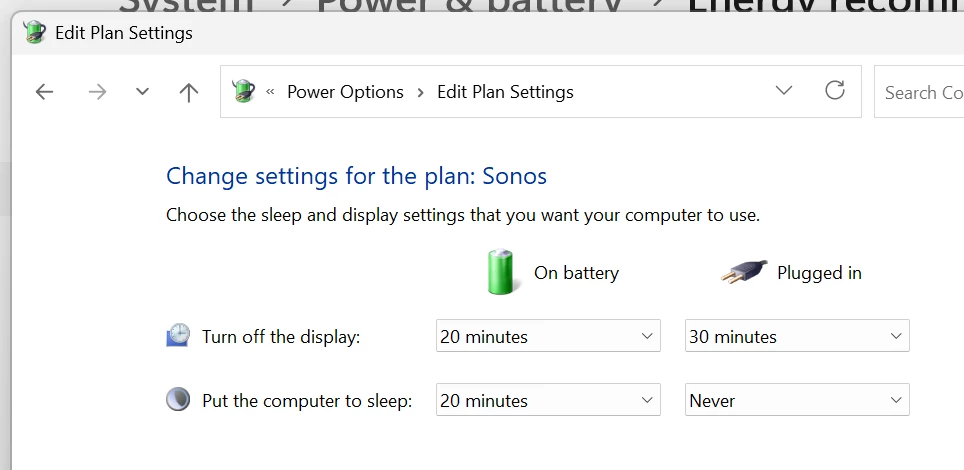
The PC Sonos app should install a Power Plan called Sonos, which should set things up correctly, power-wise. You can see it in the old Control Panel, here’s what mine is:

Windows 11 Power Plan for Sonos


Kenv
  • December 9, 2025

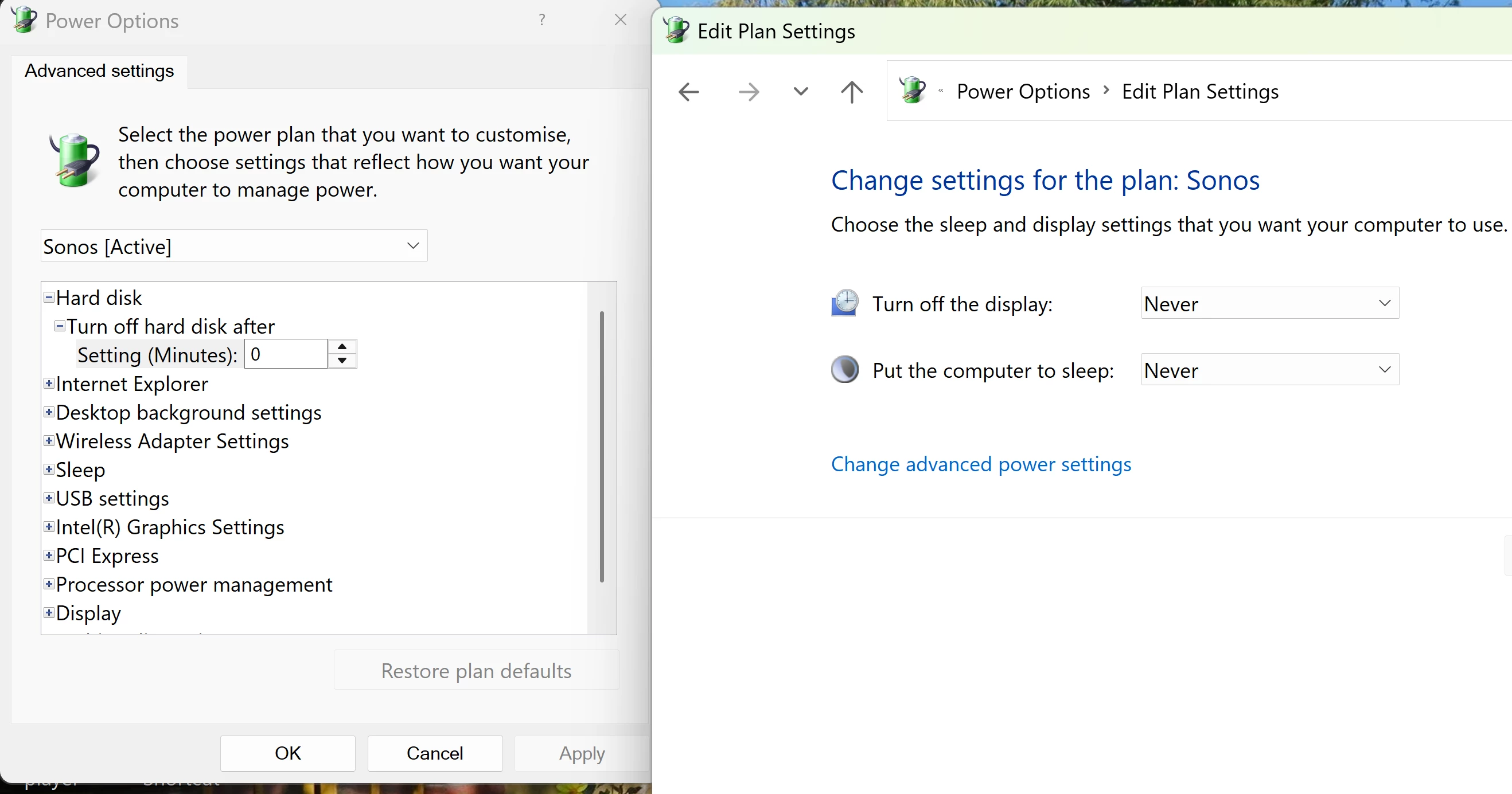
In my Power Plan there was an advanced setting “Multi Media: Sharing media” which defaulted to sleeping. I changed that to not sleep. I’ve included a screen capture but managed not to get the Multi Media option on screen.