Sticky

Help us make Sonos easier to learn and use?

  • February 26, 2026
  • 68 replies
  • 1080 views

Show first post

68 replies

  • Lyricist I
  • March 2, 2026

Thank you, MoPac … I do see that list and use it.  My point was more that I should have the option to set that be my homepage for ease of use, as it’s the only thing I care about.  I shouldn’t have to swipe up or click on the bottom menu and then click on the speaker icon to get to that screen.  In fact, if I just had a toggle button at the top of my home screen to turn my speaker group on or off, that would be amazing. 

It’s just not very easy for a novice to look at the current home screen and know what to click or how to navigate … and my “Line In” input is not always at the top of that list (where you have “Main Bedroom” in your first screenshot), so I often have to click or swipe up just to get to see the list where my “Line In” shows so that I can click on the speaker button and see my list.  I know it’s all there … it’s just not very clear or optimally positioned, in my opinion.


Forum|alt.badge.img+17
  • Local Superstar
  • March 2, 2026

If there are no favourites, then what ever is used is added to a the favourites on home page, including items that can not be currently added, such as Line-In sources and settings, such as Alarms.

A dynamic favourites page, that adjusts to what is used regularly, aka Google home page with frequently visited web pages?

Make the bars at top of pages more prominent to make it obvious page can we swiped, eg black on grey is prominent for some pages, but the colours on the now playing at bottom are almost invisible, not obvious for new user it can be swiped.

If the user has a page open in App for an extended period of time (whilst they are confused and wondering what to do), highlight/flash the bar that needs to be touched and swiped to continue the App flow.

A shake feature to return to home page.


Would be amazing if you could just let non-system owners put their own spotify accounts onto the systems.  Or...even better, let switch ownership...actually, ya know...switch ownership. I just spent 45 minutes loggin in, loggin out, etc..etc..etc..with it never actually let me remove my spotify account, and add my wifes spotify account, even though it supposedly switched account ownership, (Spoiler: It didnt)

At this point, I’m sorry I ever even bought a pair of them.


  • Prodigy III
  • March 3, 2026

@Tom Conrad It’s good you’ve finally realised that the mess of swiping, traditional X to clear etc. is confusing. My main gripe though is the tablet experience. It’s just the phone app in landscape, stretched with acres of empty space. It’s so frustrating I don’t use it. 

Can you also put some effort into the local music library indexing. It’s broken currently and support are fixated on it being about compilations when it isn’t. I know us old dinosaurs that still use our own libraries are in a minority, but conversely we have been using Sonos the longest and are starting to feel like disgraced family members. A bit of priority to fix this would be good. 

Also, please give us a way to remove a speaker from the system when we upgrade or just wish to sell. 

Finally, it would also be good to be able to disable the creation of Sonosnet without turning off WiFi. 


MoPac
Forum|alt.badge.img+19
  • Headliner III
  • March 3, 2026

 Maybe Sonos should make a dedicated Sonos NAS for your local library.  Then it could automatically index the library without the user having to deal with the difficulties of creating a share.

 Small Green Computer makes a NAS that is designed to give access to a music library.  You can use it as an indexable share, but it’s more focused on the server-client relationship.

 Lumin also sells a dedicated NAS that simplifies the local library issue.

 It’s possible there is no market for a Sonos NAS.  Sonos would know best.


melvimbe
  • March 3, 2026

 Maybe Sonos should make a dedicated Sonos NAS for your local library.  Then it could automatically index the library without the user having to deal with the difficulties of creating a share.

 Small Green Computer makes a NAS that is designed to give access to a music library.  You can use it as an indexable share, but it’s more focused on the server-client relationship.

 Lumin also sells a dedicated NAS that simplifies the local library issue.

 It’s possible there is no market for a Sonos NAS.  Sonos would know best.

I don’t see Sonos developing a device that’s only useful for those that want a NAS dedicated to local music library with their Sonos system.  I think the brentwood video streaming device would have possibly made sense to add storage (or a USB for storage) of local libraries.  This would essentially be what Nvidia Shield + Plex is doing right now, and Plex isnt’ selling any software to get this done.  And Plex serves to make (or tries to) your music library available outside the home on any device...something I don’t know that Sonos would want to replicate.

I wouldn’t say that I’m against the idea, or that a local library+Sonos integration couldn’t use some work, I just would want a NAS to do a lot more than just serve Sonos.


MoPac
Forum|alt.badge.img+19
  • Headliner III
  • March 3, 2026

I probably should have talked about how a Sonos NAS could also have the ability to use servers for those who prefer a server-client system.  It could be more versatile than being only used for Sonos.  Right now Sonos devices can be played using UPnP/DLNA control point apps if the local library is seen by a server.  It’s not gapless, but it works.


Stanley_4
  • Grand Maestro
  • March 3, 2026

Since I've been using a Raspberry Pi as a dedicated Sonos NAS for years I like the idea of a Sonos NAS but given the price point they would need to hit to have a competitive product I just can't see it happening.


MoPac
Forum|alt.badge.img+19
  • Headliner III
  • March 3, 2026

 You’re probably right.  After all your router can still screw things up enough to make a dedicated NAS fail to work as expected.


The most obvious things that are the reason you have a 3-5 app ecosystem entirely designed around fixing your UX:


  • people want to know what is playing now, and adjust the volume immediately, anywhere they are in the app. 
  • they want to know what is going to play next, and they want to play something NOW that they found while browsing and know that it will go to the right speaker and not destroy the existing queue.
  • I think the old Sonos app had a great volume interface, but a poor queuing interface, and the solution is to just ask people where to play things each time.
  • people want to browse their music by playlist, and recently played, and also search in a way that makes it very clear which service is being triggered. 
  • Basically nobody wants to toggle between services. Ever. In any view. 
  • people want to browse the queue, as well as recently played tracks, and save the queue to a playlist quickly and with no hassle.
  • People want the Sonos app to primarily show them things they want - not radio stations they do not use, not services they rarely open, not ads for Sonos products. There is no excuse for hostaging your users with meaningless ads for things that statistically 50% of your app users do not even make purchase decisions about. 
  • people want to be able to browse for music and not need to worry about whose account and service they are in. They do not want to see “authentication” errors. They do not want things to stop being findable simply because they’re somehow in the “wrong account”. This UX is trickier but it never used to be confusing before. 

jgatie
  • March 3, 2026

The most obvious things that are the reason you have a 3-5 app ecosystem entirely designed around fixing your UX:


  • people want to know what is playing now, and adjust the volume immediately, anywhere they are in the app. 

Not me.  


  • they want to know what is going to play next, and they want to play something NOW that they found while browsing and know that it will go to the right speaker and not destroy the existing queue.
  • I think the old Sonos app had a great volume interface, but a poor queuing interface, and the solution is to just ask people where to play things each time.


Ugh!  I’m fully aware of where I am in the app and would toss Sonos out the window if it continuously asked me where to play something.


  • people want to browse their music by playlist, and recently played, and also search in a way that makes it very clear which service is being triggered. 
  • Basically nobody wants to toggle between services. Ever. In any view. 


I toggle between playing services very often, and appreciate having multiple versions of a song listed after a search. 


  • people want to browse the queue, as well as recently played tracks, and save the queue to a playlist quickly and with no hassle.


I never, ever, ever use Sonos playlists.


  • People want the Sonos app to primarily show them things they want - not radio stations they do not use, not services they rarely open, not ads for Sonos products. There is no excuse for hostaging your users with meaningless ads for things that statistically 50% of your app users do not even make purchase decisions about. 
  • people want to be able to browse for music and not need to worry about whose account and service they are in. They do not want to see “authentication” errors. They do not want things to stop being findable simply because they’re somehow in the “wrong account”. This UX is trickier but it never used to be confusing before. 


Speaking for “people” in general is probably not in the true spirit of this thread.


MoPac
Forum|alt.badge.img+19
  • Headliner III
  • March 3, 2026

 I think it would be nice to have a small Play/Pause button on the queue screen.


Forum|alt.badge.img
  • Trending Lyricist I
  • March 4, 2026

Dg7559:

 Last gripe, I struggle with the app, my partner just hates this, and  can't cope with putting her music on, if I'm out, and her friends come round, she can't use the app at all, frustrating her further with the equipment. 

Please make this app intuitive to people who wishes their quality products to work without a degree in physics would be a great step forward.

Thanks


 I can’t get my wife to let me teach her how to use the app.  She just wants to push a button and music starts playing.  Maybe I need to make her some playlists she can call up using SVC.

This is it exactly, my partner finds it too much. I believe most non tech people, or maybet older folk are similar, like you said, they want to press play and that's it, together with granular intuitive volume control. 

When I'm around, she gives orders of volumes or music selection, when I'm out/away she doesn't use the system a shame; Plus  the volume sliders are too fiddly and not smooth, which I find this too, the Sonos app volume slider  reminds me of YouTube fast forward/reverse button, you never get it to the exact point. 


MoPac
Forum|alt.badge.img+19
  • Headliner III
  • March 4, 2026

 To make the volume sliders more accurate tap on either side of the round volume indicator to change the volume by one unit at a time.


Forum|alt.badge.img+17
  • Local Superstar
  • March 4, 2026

 To make the volume sliders more accurate tap on either side of the round volume indicator to change the volume by one unit at a time.

And hit the mute by mistake when trying to lower a already low volume. Better solution, be able to slide anywhere on the volume slider, not just the tiny dot, see Apple Music App for an example of how the volume slider should work with small phone screens and/or fat fingers and/or not wearing your reading glasses.


Stanley_4
  • Grand Maestro
  • March 4, 2026

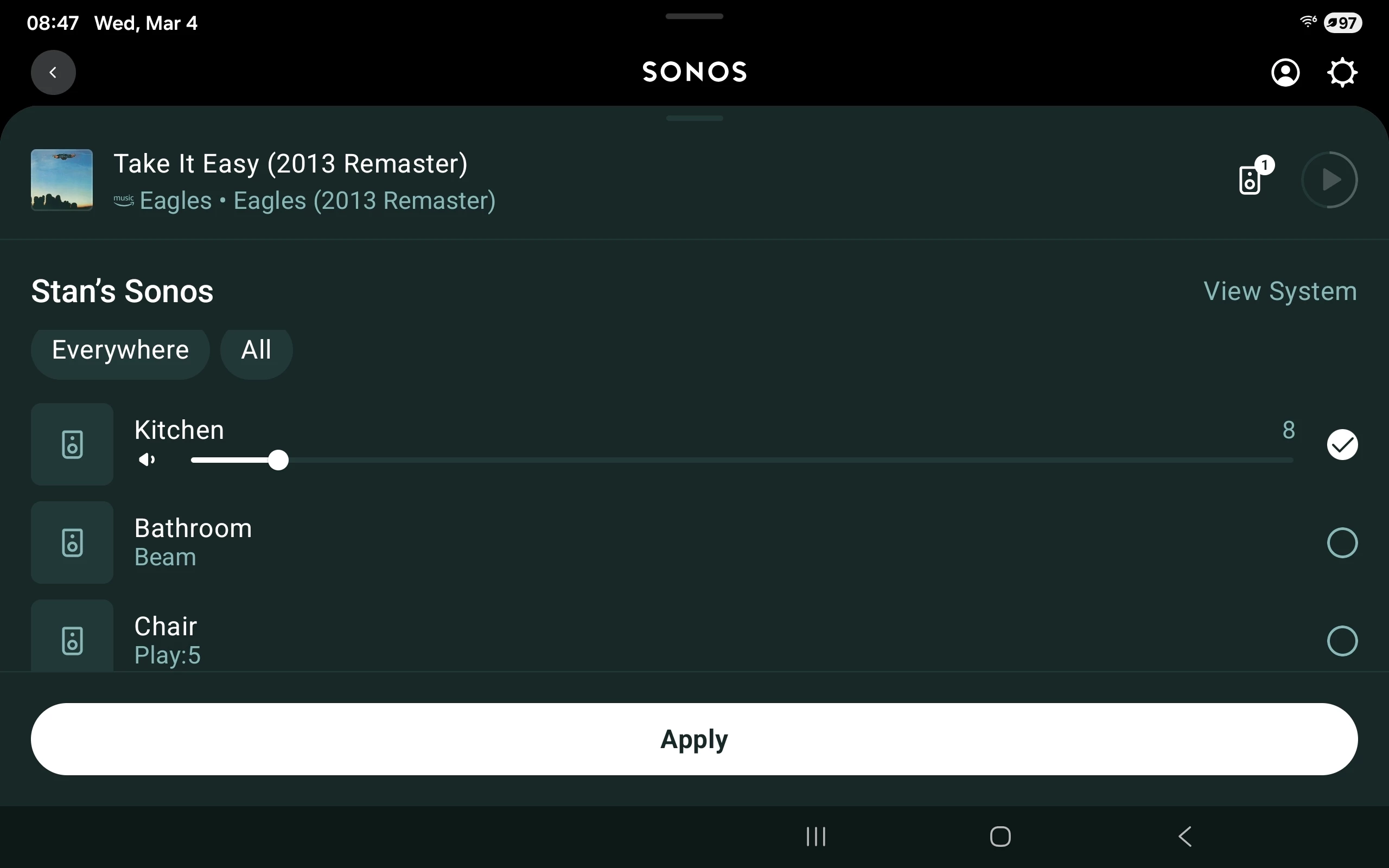
If you have more than one Room you get a Group icon, a tiny speaker with a number. If you tap it usable volume controls not only appear but they don't go away if you blink.

Making access to this screen more obvious to new users would really help usability, particularly for the physicality challenged.


106rallye
Forum|alt.badge.img+18
  • March 4, 2026

Triggered by a recent post: could Sonos please remove the two methods to ad a music library that do not work anymore from the PC and the Mac app? This confuses a lot of users.


Forum|alt.badge.img+6
  • Enthusiast II
  • March 6, 2026

My design requests would be:

  1. the app should open with the Sonos components in the system listed with small icons at the top of the screen ( like those used for services) with a horizontal scrolling list if needed for larger systems.  This is so I can easily select the Sonos device or room I want to control with one click. (Currently it is at least two actions)
  1. sources and services should be combined into one list. This is so I can easily identify where I want to play music from. it makes no difference to me as to whether a service like Spotify or my music library is the source. For the purposes of controlling the system this idealogical / artificial distinction between sources and services serves no purpose whatsoever and wastes screen real estate.
     
  2. you must eliminate this utter nonsense of fragmented albums in a music library. It makes no sense for a manufacturer like yourselves to insist that an end user has to edit tags on every album in their library and every new album they acquire that contains various artists or guest artists.  And they need to do this in perpetuity! Really??
     
  3. When you are editing queues or playlists in the android app and scroll through deleting entries the app deletes the wrong entry for the 2nd or subsequent delete requests not the entry the user intended.  This bug has been around for a year or more and is frankly embarrassing. I don’t know if the iOS app suffers the same fault but the pc version doesn’t and performs as expected.
     
  4. The ability to control music from your music library and control the system when there is no internet connection is essential. 
     
  5. in summary it it’s important to me that I can open the app, select which room / component I want to control then select where I want the music to come from ( a library or service) and then select the artist, album or track with as few clicks as possible.