
Contributor I
January 3, 2023
Answered

YouTube music search
  • January 3, 2023
  • 19 replies
  • 1060 views

Hi there,


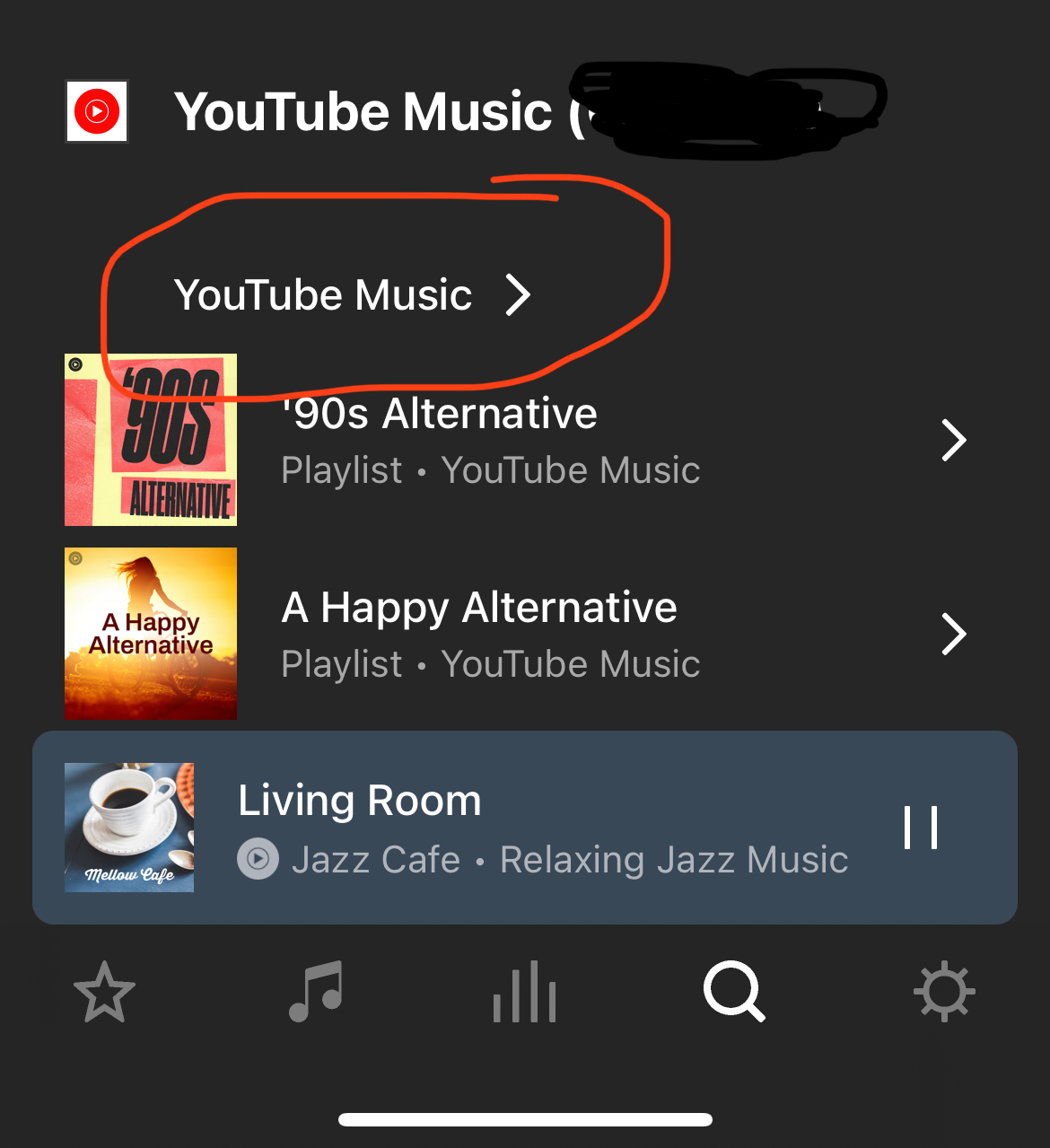
When searching on Sonos app for YouTube music playlist/artist or songs then selecting YouTube Music to view more search results, the app crashes. 
 

This happens on iOS 16.1.1. and iPadOS 15.6.1. I have tried another iOS device running same versions as above with same results.  I’m using Sonos 14.20


anyone else experiencing the same?

This topic has been closed for further comments. You can use the search bar to find a similar topic, or create a new one by clicking Create Topic at the top of the page.
Best answer by Corry P

Hi @GBTC et al

We are aware of this issue and are looking into a resolution. There is currently no ETA on resolution.

In the meantime, please use a non-iOS controller, if you can.

Or, use AirPlay or Bluetooth to get your YouTube Music to play through Sonos.

I hope this helps.
 

19 replies

Corry P
Corry PAnswer
Sonos Staff
January 27, 2023

Hi @GBTC et al

We are aware of this issue and are looking into a resolution. There is currently no ETA on resolution.

In the meantime, please use a non-iOS controller, if you can.

Or, use AirPlay or Bluetooth to get your YouTube Music to play through Sonos.

I hope this helps.
 

"Common sense is the collection of prejudices acquired by age eighteen." - Albert Einstein
Trending Lyricist I
January 27, 2023


Hi @GBTC et al

We are aware of this issue and are looking into a resolution. There is currently no ETA on resolution.

In the meantime, please use a non-iOS controller, if you can.

Or, use AirPlay or Bluetooth to get your YouTube Music to play through Sonos.

I hope this helps.
 

That was the idea except that I have to reset twice in a month my Play 5 because “Unable to connect”. Problems are just piling up. 


controlav
Lead Maestro
January 27, 2023


Hi @GBTC et al

We are aware of this issue and are looking into a resolution. There is currently no ETA on resolution.

In the meantime, please use a non-iOS controller, if you can.

Or, use AirPlay or Bluetooth to get your YouTube Music to play through Sonos.

I hope this helps.
 

That was the idea except that I have to reset twice in a month my Play 5 because “Unable to connect”. Problems are just piling up.


That’s your router though, unrelated to the iOS crash this thread describes. Don’t cross the streams.

Author of the leading independent Sonos apps for Android, MacOS, iOS, Windows and Xbox.
Trending Lyricist I
January 27, 2023


Hi @GBTC et al

We are aware of this issue and are looking into a resolution. There is currently no ETA on resolution.

In the meantime, please use a non-iOS controller, if you can.

Or, use AirPlay or Bluetooth to get your YouTube Music to play through Sonos.

I hope this helps.
 

That was the idea except that I have to reset twice in a month my Play 5 because “Unable to connect”. Problems are just piling up.


That’s your router though, unrelated to the iOS crash this thread describes. Don’t cross the streams.

Nice try... Airplay works on all my devices with any applications except Sonos but it is my router...seriously? Oh I forgot to mention Airplay works on my Play One. 

So now who is responsible?


Corry P
Sonos Staff
January 27, 2023

Hi @Bruno92 

Being unable to AirPlay to a particular Sonos device could be an issue with the network, as @controlav suggests, the speaker, the phone/tablet or with Apple HomeKit (they recently pulled a version from their download page because it was causing AirPlay issues). I recommend you get in touch with our technical support team, who have tools at their disposal that will allow them to give you advice specific to your Sonos system and what it reports.

Please also have a read of 

I hope this helps.

"Common sense is the collection of prejudices acquired by age eighteen." - Albert Einstein
Trending Lyricist I
January 27, 2023


Hi @Bruno92 

Being unable to AirPlay to a particular Sonos device could be an issue with the network, as @controlav suggests, the speaker, the phone/tablet or with Apple HomeKit (they recently pulled a version from their download page because it was causing AirPlay issues). I recommend you get in touch with our technical support team, who have tools at their disposal that will allow them to give you advice specific to your Sonos system and what it reports.

Please also have a read of 

I hope this helps.

Thanks I was aware of that. But I don't use Homekit, Sonos support in Europe is helpless with no technical knowledge, just reading their scripts. Also, their miracle response, interferences in your networks. I not sure they have any network or sound knowledge. This is what you get when you outsource your support to certain countries. 

I already tried everything and the only solution, that at leastworks for me, is to reset the speaker. I found the same feedback from another user on Reddit. 

Anyway thanks for the thought. 


Contributor I
October 17, 2024

Youtube Music searching broken… I’m unable to search my Uploads in Youtube music in the new app (works fine in the old app for my older Sonos devices Play 3 and Play 5 that use the old app) 

Also if I browse my Uploads library instead i can only scroll so far then it just loops back over what i’ve already browsed. Making finding or searching for that music in mu Youtube Music Uploads library useless. 

Corry P
Sonos Staff
October 17, 2024

Hi @supajonesy 

Thanks for reporting this behaviour. I see it too, so I did some digging - it seems that YouTube Music will not return results for uploaded content to our new search method. Therefore, it is currently expected behaviour that you cannot get search results for content uploaded to YouTube Music.

The S1 app uses the older search method, so it still gets results from the servers.

As far as I understand it, it would be on YouTube to adjust things at their end so that the new search method works for uploaded content.

As for the issue with the looping when scrolling, we are aware and are investigating, but have no estimate for when a fix might be put in place.

It is unfortunate that the combination of these two issues mean that you are unable to pick an artist beyond the 100th item in your Artists list - I can only recommend perhaps browsing by album name or instead uploading your content to an alternative service, like ibroadcast.com (available for free, and can be added to Sonos as a service), or linking to it locally on a computer or NAS (Network Attached Storage) device.

If you have a Samsung phone, I happen to know that you can play to Sonos from the Samsung Music app if you use SmartThings to link them, or, if you have an iPhone, you could use AirPlay. Both methods would require you to have your collection stored on your phone. Bluetooth and Line-In may also be options for you.

I hope this helps.

"Common sense is the collection of prejudices acquired by age eighteen." - Albert Einstein
Contributor I
November 16, 2024

Why move to a new search method that is more limited in what it can return results for?

I have also noticed there is an issue with browsing my Amazon music library, that I can only browse so far through the list then it doesn’t attempt to display any more results/entries there either. The search and viewing library function is so much better in the old app. 
 

The new search seems so restrictive and backwards to what we used to be able to do. Which is frustrating as a long time customer. 
 

please bring this back to the new app if feels like it’s been long enough since the new app was released that we should have these functions by now