Contributor I
December 1, 2024
Answered

youtube music

  • December 1, 2024
  • 3 replies
  • 267 views

Hello everyone. I can't find any YouTube playlists on my sono move 2. Please help. The link to YouTube music is there. Thx Andreas

This topic has been closed for further comments. You can use the search bar to find a similar topic, or create a new one by clicking Create Topic at the top of the page.
Best answer by Corry P

Hi ​@andiknobi 

Understood. I just created a playlist called “test” in the YouTube Music app, and it showed up in the YTM container of the Sonos app within 1 minute (though I have heard that it can take up to one hour).
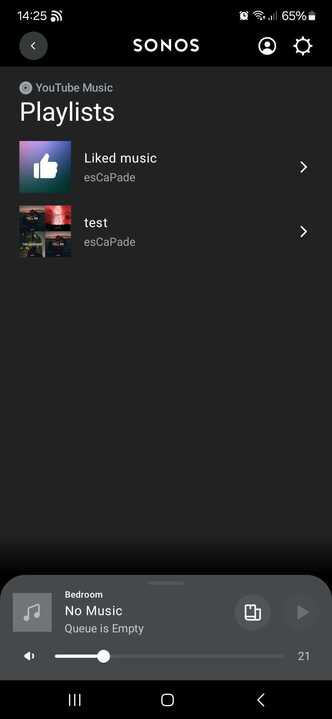
As a result, I can only suggest that you try removing your YouTube Music account from your Sonos system, then add it back on again:

Remove a music service account from Sonos

Add a music service to Sonos

Please note that to find it, I went to YouTube Music » Library » Playlists.

I hope this helps.

3 replies

Corry P
Sonos Staff
December 2, 2024

Hi ​@andiknobi 

Welcome to the Sonos Community!

Sorry to hear of this issue you are having with YouTube Music on your Sonos system.

Are you referring to custom-made playlists curated by you, or dynamic playlists suggested by YouTube Music?

Please also confirm the route you are taking within the Sonos app to look for them. Thanks.

"Common sense is the collection of prejudices acquired by age eighteen." - Albert Einstein
andiknobiAuthor
Contributor I
December 2, 2024

Hello Corry P.

I have added YouTube Music as a service in my Sonos app. At the same time, I am logged into the free version of YouTube Music. I create a playlist in YouTube Music. I cannot find this in the Sonos app under YouTube Music.

Best regards 

Andreas 

Corry P
Corry PAnswer
Sonos Staff
December 2, 2024

Hi ​@andiknobi 

Understood. I just created a playlist called “test” in the YouTube Music app, and it showed up in the YTM container of the Sonos app within 1 minute (though I have heard that it can take up to one hour).

As a result, I can only suggest that you try removing your YouTube Music account from your Sonos system, then add it back on again:

Remove a music service account from Sonos

Add a music service to Sonos

Please note that to find it, I went to YouTube Music » Library » Playlists.

I hope this helps.

"Common sense is the collection of prejudices acquired by age eighteen." - Albert Einstein