
Trending Lyricist I
February 1, 2023
Answered

Wifi range expander message (but I have none)

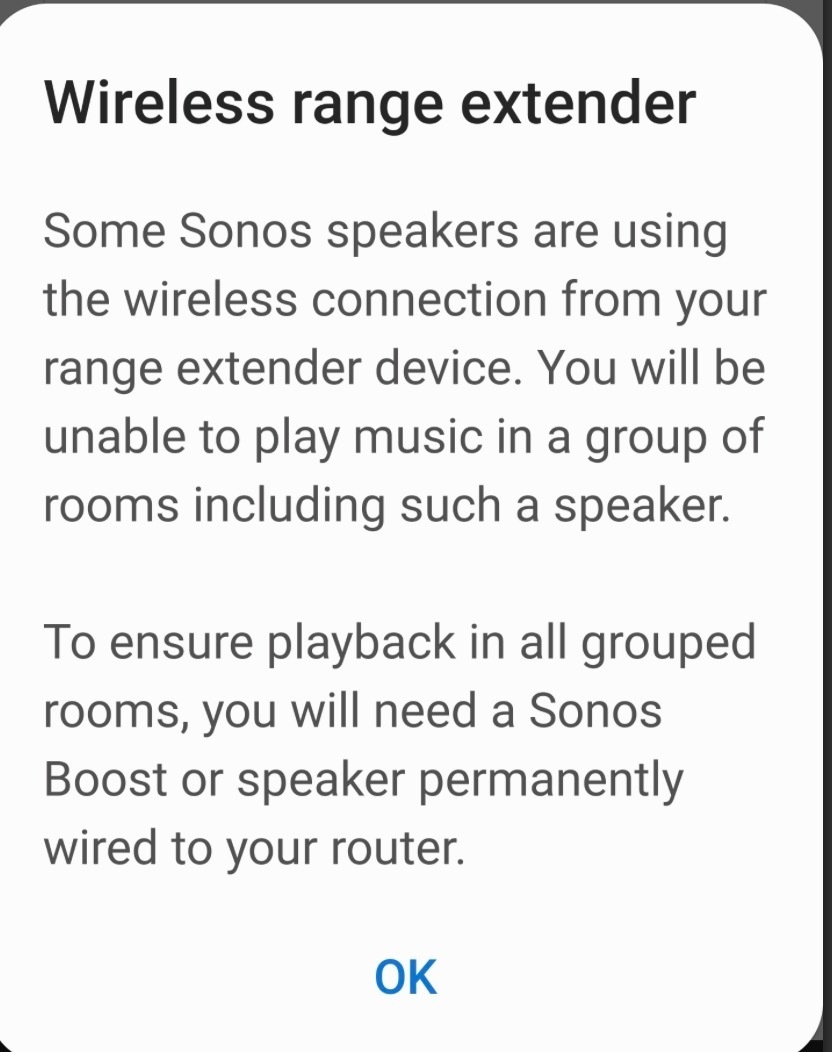
Hi.  When I select several rooms I always get a message telling me Sonos does not work with wifi range expanders,  but I do not have a wifi range expander.  Just one single router . And in fact I can perfectly successfully connect to all the rooms in all combinations.  I just have to dismiss this incomprehensible unnecessary warning  message each time.  What is this happening? Thanks in advance for your help!
 

This topic has been closed for further comments. You can use the search bar to find a similar topic, or create a new one by clicking Create Topic at the top of the page.
Airgetlam
AirgetlamAnswer
February 1, 2023

Might be worth it if you were to submit a system diagnostic within 10 minutes of experiencing this problem, and call Sonos Support to discuss it. I’d think Sonos could possibly ‘see’ the reason why this pop up is occurring, and give you better hard suggestions than those made by us here in the forums.

When you speak directly to the phone folks, they have tools at their disposal that will allow them to give you advice specific to your Sonos system and network.


Bruce

14 replies

Airgetlam
AirgetlamAnswer
February 1, 2023

Might be worth it if you were to submit a system diagnostic within 10 minutes of experiencing this problem, and call Sonos Support to discuss it. I’d think Sonos could possibly ‘see’ the reason why this pop up is occurring, and give you better hard suggestions than those made by us here in the forums.

When you speak directly to the phone folks, they have tools at their disposal that will allow them to give you advice specific to your Sonos system and network.


Bruce
fnegrinAuthor
Trending Lyricist I
February 1, 2023

thanks so much for that advice.  Will do!


fnegrinAuthor
Trending Lyricist I
February 1, 2023

so after submitting a diagnostic it appears my wifi router is generating two hidden networks other than my normal 2.4 and 5 GHz ones and Sonos is thinking they are range extenders.  Makes no difference…  all works  fine.. just annoying the message pops up to warn me.  Will have to figure out why my router is doing that! 

thanks again for the advice

Airgetlam
February 1, 2023

Glad they were able to see something that none of us would have ever guessed. 

I think my next step would be to contact the CS of your router, and ask them what is going on :)

Bruce
buzz
Grand Maestro
February 2, 2023

Are you using the default SSID (user name) and password from your ISP’s Gateway? If so, it’s possible that they all use the same SSID and password by default. This would be silly and awkward, but possible. You could try changing the 2.4GHz and 5GHz bands SSID -- and you’d also need to change these in all of your devices.

A better plan would be do disable the extra connections -- if you can figure out how to do this.

fnegrinAuthor
Trending Lyricist I
February 2, 2023


A better plan would be do disable the extra connections -- if you can figure out how to do this.


yes, that is the plan! thank you. lets see if i find a way ..


February 2, 2023

@fnegrin One other thing you might try, even if just experimentally, would be to connect one of your devices by Ethernrt to your router, so as to trigger SonosNet. Then remove your WiFi details from Sonos in Settings, System, Network, Manage Networks. This might stop the Sonos system from looking for any WiFi network and hence throwing the error. 

That's a bit speculative though!

fnegrinAuthor
Trending Lyricist I
February 2, 2023

@fnegrin One other thing you might try, even if just experimentally, would be to connect one of your devices by Ethernrt to your router, so as to trigger SonosNet. Then remove your WiFi details from Sonos in Settings, System, Network, Manage Networks. This might stop the Sonos system from looking for any WiFi network and hence throwing the error. 

That's a bit speculative though!

Yes, thank you!  indeed I thought of trying that …..  But I would need to go buy a veeeery long ethernet cable or temporarily place one of my speakers near the router in a place I could never actually keep it , just for the test.   Would be interesting  but maybe not worth it and easier to click on “ok” when the little message appears! 

February 2, 2023

Fair enough. I think it would eventually really irritate me. But then I am very easily irritated!

I like the suggestion from @buzz to change the SSID on your router if it is still the original at the moment.  But that may not be worth the effort either.

fnegrinAuthor
Trending Lyricist I
February 2, 2023

Update:    my wifi router, like most do, emits a 5GHz network and a 2.4 GHz one.  I use the 2.4  because it goes through walls better than the 5Ghz one and gives me the full 600Mbps down/up that I pay for anyway.    All my devices including all the Sonos ones are connected to the 2.4 one.  So just now I turned off the 5GHz one . Result:  the offending Sonos message  about the wifi range extenders no longer appears.  So it looks like Sonos thought the faster network was a repeater and was warning me not to connect my devices to it even though none were and all was working fine?    I am going to update the  Sonos tech assistance guy who attended me  to se what he says.