
Enthusiast II
August 2, 2024
Answered

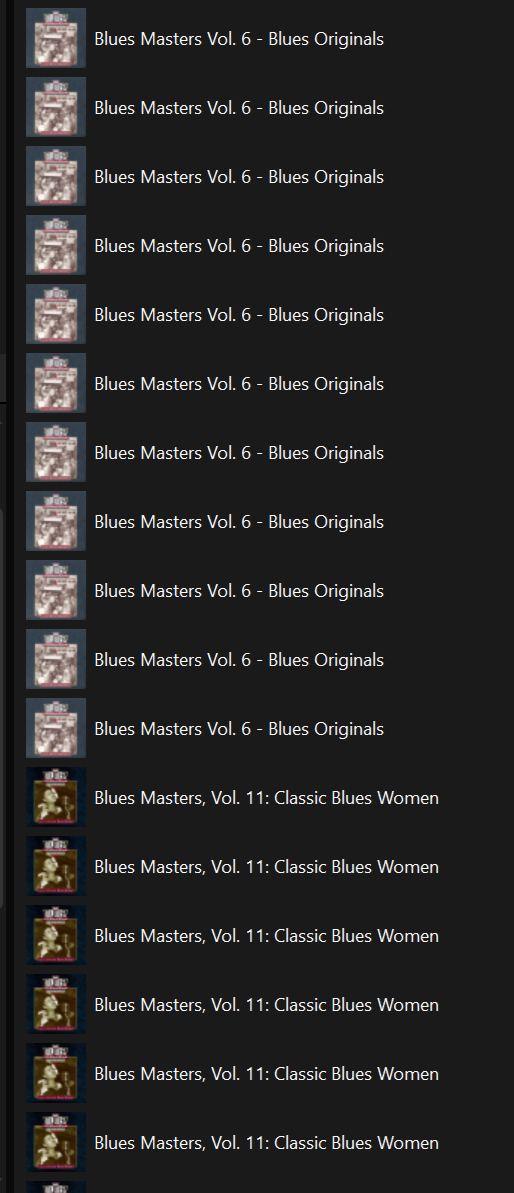
why is the library suddenly giving me many copies of the same record?

  • August 2, 2024
  • 33 replies
  • 1216 views

a few weeks ago my sonos library started giving me multiples copies of some albums. I think even though all my albums are in different folders and have consistent “album artist” is it now giving me an entire different albume for each song artist! This makes compilation albums completely unusable. It’s not the controller, as this is consistent with ios, win11 and Sonopad controllers. Check out this image!


This topic has been closed for further comments. You can use the search bar to find a similar topic, or create a new one by clicking Create Topic at the top of the page.
Best answer by Belly M

It’s been reported and acknowledged by Sonos, it’s a firmware issue but no ETA of a fix

33 replies

rosswells127
Prodigy I
October 15, 2024

The Music Library Compilations issue appears to have been resolved with Firmware Update 16.4.2.
Ross.

Exterminating Angel
Avid Contributor I
October 18, 2024

I  agree that the latest firmware update 16.4.2 appears to have fixed the compilation album problems. My Music Library albums list in the Sonos app has now shrunk to a more manageable size.

Abuse of power comes as no surprise
Enthusiast II
November 6, 2024

16.4.2 and later versions haven’t fixed it for me ,  its still an issue making the Album view a pain to navigate.    

Its very odd that they know when it happened, so they must know what triggered this behaviour but they haven’t yet put it back the way it was,   A seemingly obvious change you would think (ie “oops we’ve broken it, lets put it back the way it was until we have found a solution” )     


There is no way I want to spend hours playing around to fix tags - where does this stand with the CEO’s latest pronouncement on values and priorities?????  

bockersjv
Local Superstar
November 6, 2024

16.4.2 and later versions haven’t fixed it for me ,  its still an issue making the Album view a pain to navigate.    

Its very odd that they know when it happened, so they must know what triggered this behaviour but they haven’t yet put it back the way it was,   A seemingly obvious change you would think (ie “oops we’ve broken it, lets put it back the way it was until we have found a solution” )     


There is no way I want to spend hours playing around to fix tags - where does this stand with the CEO’s latest pronouncement on values and priorities?????  

I had similar issues.  I ended up changing the library in Sonos to an empty location followed by a libarary scan.  Then once complete I re-entered the correct library location and did a new scan.  The new scan takes a while but it should work.  Also check that Album viw is by Artist and Not Album Artist.

Enthusiast II
November 9, 2024

16.4.2 and later versions haven’t fixed it for me ,  its still an issue making the Album view a pain to navigate.    

Its very odd that they know when it happened, so they must know what triggered this behaviour but they haven’t yet put it back the way it was,   A seemingly obvious change you would think (ie “oops we’ve broken it, lets put it back the way it was until we have found a solution” )     


There is no way I want to spend hours playing around to fix tags - where does this stand with the CEO’s latest pronouncement on values and priorities?????  

I had similar issues.  I ended up changing the library in Sonos to an empty location followed by a libarary scan.  Then once complete I re-entered the correct library location and did a new scan.  The new scan takes a while but it should work.  Also check that Album viw is by Artist and Not Album Artist.

Thanks for the Tip,   I tried deleting the library scanning a different location then re-establishing the original library and re-scanning but sadly the compilation albums are still fragmented. 

Trending Lyricist I
November 10, 2024

same here, I removed and added the library again, same issue. useless system

Trending Lyricist I
November 30, 2024

Some folk have suggested that the problem with compilation albums displaying as individual songs may be caused by the Sonos firmware rather than the app.

However, although I experience this same problem when using the Sonos app (app version is 80.12.03, and firmware version is 16.4.4), the problem does not occur if I view my library using Synology’s ‘DS Audio’ app on my iPhone (my library is stored on a Synology NAS).

Not only does the Synology audio controller display all my compilation albums correctly, it also allows me to select my Sonos system as a player, so I can use the Synology app to stream anything in my music library directly to my Sonos speakers.

So if Synology’s audio controller app is able to display compilation albums properly while the Sonos controller app is not able to do so, all while using the same Sonos firmware, doesn’t this suggest that the issue is more likely with the Sonos app rather than the firmware?

MoPac
Headliner III
November 30, 2024

 It was corrected with a firmware update.  To make it work, though, your Album Artist tag needs to be populated.  In the case of compilations that Album Artist tag for the entire album is usually something like Various Artists.

Trending Lyricist I
November 30, 2024

Thanks MoPac, that has indeed fixed the issue for me when using the Sonos app. Everything is perfect now.

Thanks again

Trending Lyricist I
December 1, 2024

Why you should start editing tags when it worked before? And it works in heos and itunes. I import all cd's using itunes, I'm not going to start editing everything manually. 

The new app/system is a downgrade. I can't understand how this is handled by the Sonos team. 

I was in contact with the support team and they promised that next update should fix some stuff. But no clue what :)