
Enthusiast II
August 2, 2024
Answered

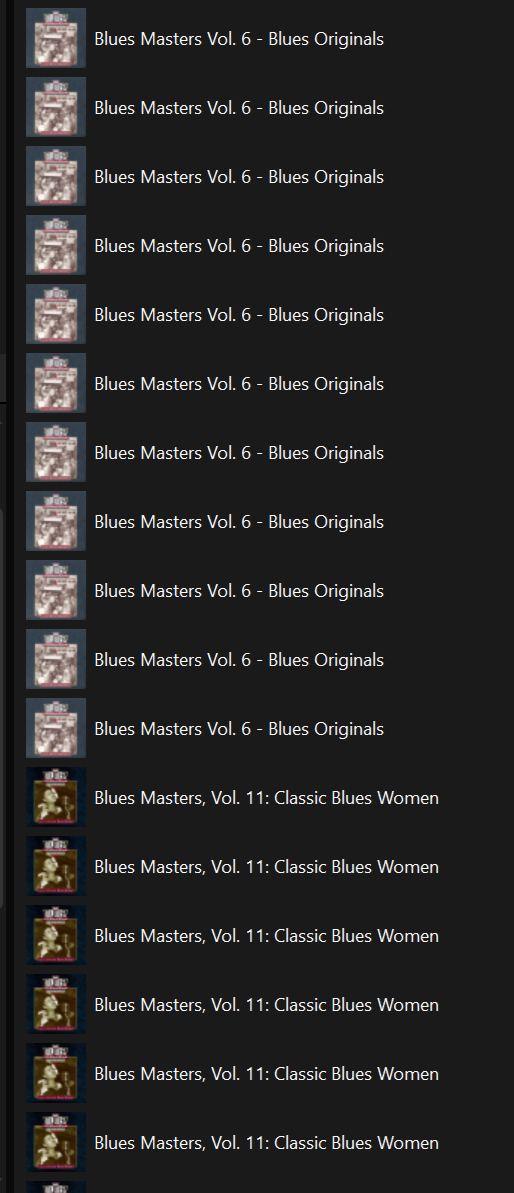
why is the library suddenly giving me many copies of the same record?

  • August 2, 2024
  • 33 replies
  • 1216 views

a few weeks ago my sonos library started giving me multiples copies of some albums. I think even though all my albums are in different folders and have consistent “album artist” is it now giving me an entire different albume for each song artist! This makes compilation albums completely unusable. It’s not the controller, as this is consistent with ios, win11 and Sonopad controllers. Check out this image!


This topic has been closed for further comments. You can use the search bar to find a similar topic, or create a new one by clicking Create Topic at the top of the page.
Best answer by Belly M

It’s been reported and acknowledged by Sonos, it’s a firmware issue but no ETA of a fix

33 replies

robokittyAuthor
Enthusiast II
August 3, 2024

On the app go to music library and then at the bottom is folders. That seems to be working okay.

oh, good tip. Still awful for me, since I have a lot of compilations, and some are in a folder called “compilations” and some are in “Various Artists”. But not bad…


antarcticaman
Contributor I
September 12, 2024

I’ve had sonos for ten years, 9 great years and in the last one problem after another.  So no Beta testing anymore…. Just get it out right or wrong?

robokittyAuthor
Enthusiast II
September 12, 2024

I saw on another post that the new software update doesn’t fix this. I have 16.3.3. I’ll try re-indexing and see what happens….
… nope, still totally busted. anthology box sets come out as 40 different albums!

Ken_Griffiths
September 12, 2024

I saw on another post that the new software update doesn’t fix this. I have 16.3.3. I’ll try re-indexing and see what happens….
… nope, still totally busted. anthology box sets come out as 40 different albums!

It seems the fix is not in the recent update. As the answer to this thread indicates however, Sonos are aware of the issue. Fingers-x’d it will be in one of the next couple of updates.🤞

DGR1
Chromatic Producer I
September 12, 2024

Considering this wasn’t initially an issue when the music library became available with the new app, it seems a bit strange that it wasn’t a quick fix. I fear it’s somewhat low in the priority list. 

Exterminating Angel
Avid Contributor I
September 24, 2024

What this, apparently, minor problem - which has not been repaired - suggests is that there is a lot of turmoil in the development of this release - which can hardly be called a “release” any more as it now in its 5th month and issues are still not fixed nor is there a clear “road map” of what will be fixed and when.

It would appear that Sonos development is about as well organised as Putin’s Russia is in trying to attack Ukraine.

Perhaps we should refer to this as Usability-Release-Zero in future correspondence.

Abuse of power comes as no surprise
Prodigy III
September 24, 2024

What this, apparently, minor problem - which has not been repaired - suggests is that there is a lot of turmoil in the development of this release - which can hardly be called a “release” any more as it now in its 5th month and issues are still not fixed nor is there a clear “road map” of what will be fixed and when.

It would appear that Sonos development is about as well organised as Putin’s Russia is in trying to attack Ukraine.

Perhaps we should refer to this as Usability-Release-Zero in future correspondence.

Or ‘Application Ruins Sonos Experience’ ? 

Lyricist III
October 10, 2024

You can fix this providing you are prepared to forgo searches by Artist  and composer.


Download Mp3tag, go to the album causing the issue, select all tracks, copy the Album Artist into the Artist and Composer fields, save.  Then re-index your music library in Sonos.  Don’t make the Artist and composer fields blank,which I also tried,  for some reason Sonos doesn’t like this and won’t play the album.

Ken_Griffiths
October 10, 2024

You can fix this providing you are prepared to forgo searches by Artist  and composer.


Download Mp3tag, go to the album causing the issue, select all tracks, copy the Album Artist into the Artist and Composer fields, save.  Then re-index your music library in Sonos.  Don’t make the Artist and composer fields blank,which I also tried,  for some reason Sonos doesn’t like this and won’t play the album.

This would not work for me - my compilation Albums have the ‘Album Artist’ set to ‘Various Artists’

The ‘Artists’ tag has the name of the singer, or band …and in my case I don’t bother with the ‘composer’ tag.

I haven’t reindexed since before the 16.3 update that caused the ‘compilation albums’ issue and my library displays fine with no duplicates in the new Sonos App.

Plus …Sonos have acknowledged this ‘compilation albums’ only issue and have said they plan to fix it. So I think it’s best to wait for that fix. Otherwise I can see users having ‘duplicates’ to contend with in their library search results.

rosswells127
Prodigy I
October 11, 2024

You can fix this providing you are prepared to forgo searches by Artist  and composer.


Download Mp3tag, go to the album causing the issue, select all tracks, copy the Album Artist into the Artist and Composer fields, save.  Then re-index your music library in Sonos.  Don’t make the Artist and composer fields blank,which I also tried,  for some reason Sonos doesn’t like this and won’t play the album.

This would not work for me - my compilation Albums have the ‘Album Artist’ set to ‘Various Artists’

The ‘Artists’ tag has the name of the singer, or band …and in my case I don’t bother with the ‘composer’ tag.

I haven’t reindexed since before the 16.3 update that caused the ‘compilation albums’ issue and my library displays fine with no duplicates in the new Sonos App.

Plus …Sonos have acknowledged this ‘compilation albums’ only issue and have said they plan to fix it. So I think it’s best to wait for that fix. Otherwise I can see users having ‘duplicates’ to contend with in their library search results.

Thanks for the suggested workaround @KiwiTony but I am with you on this one Ken.
Waiting “somewhat” patiently for Sonos to sort this out. Frustrated at the time it is taking being that we reported it back in July.
Ross.